LMS Evaluation Guide
Many districts are consolidating digital tools to streamline operations, often aiming for a single platform that can serve all grade levels. While consolidation can support efficiency, it’s important to ensure that selected tools truly reflect the needs of each level.
The elementary experience—how young students learn, how teachers teach, and how families stay connected—is fundamentally different from what’s required in middle and high school. Just as you wouldn’t hand a kindergartener a high school textbook, the technology you place in an elementary classroom shouldn’t be built for older learners or their workflows. This guide is designed to help you evaluate Seesaw (or any LMS) through the lens of what truly matters for K–5 learners.
Each section includes guiding questions rooted in educational research and best practices, empowering your team to assess alignment across instruction, engagement, data, and implementation. Use this as a framework for reflection, collaboration, and confident decision-making as you identify the best fit for the needs of your elementary classrooms.
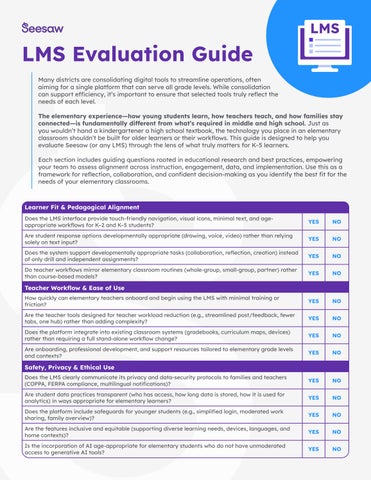
Learner Fit & Pedagogical Alignment
Does the LMS interface provide touch-friendly navigation, visual icons, minimal text, and ageappropriate workflows for K–2 and K–5 students?
Are student response options developmentally appropriate (drawing, voice, video) rather than relying solely on text input?
Does the system support developmentally appropriate tasks (collaboration, reflection, creation) instead of only drill and independent assignments?
Do teacher workflows mirror elementary classroom routines (whole-group, small-group, partner) rather than course-based models?
Teacher Workflow & Ease of Use
How quickly can elementary teachers onboard and begin using the LMS with minimal training or friction?
Are the teacher tools designed for teacher workload reduction (e.g., streamlined post/feedback, fewer tabs, one hub) rather than adding complexity?
Does the platform integrate into existing classroom systems (gradebooks, curriculum maps, devices) rather than requiring a full stand-alone workflow change?
Are onboarding, professional development, and support resources tailored to elementary grade levels and contexts?
Safety, Privacy & Ethical Use
Does the LMS clearly communicate its privacy and data-security protocols to families and teachers (COPPA, FERPA compliance, multilingual notifications)?
Are student data practices transparent (who has access, how long data is stored, how it is used for analytics) in ways appropriate for elementary learners?
Does the platform include safeguards for younger students (e.g., simplified login, moderated work sharing, family overview)?
Are the features inclusive and equitable (supporting diverse learning needs, devices, languages, and home contexts)?
Is the incorporation of AI age-appropriate for elementary students who do not have unmoderated access to generative AI tools?
NO
Family & Home Engagement
Does the LMS provide families with easy access to student work, updates, and communications (mobile friendly, low-barrier login)?
Are family engagement features built in (messaging, portfolios, viewing student responses) rather than requiring additional tools?
Does the platform support home-school learning continuity (e.g., parent review, student reflection, sharing) beyond dismissal?
Are there features to support multilingual families, device-diverse homes, and equity of access?
Can families celebrate learning within the platform (leave comments, like work)?
Data Collection & Feedback
Do dashboards and reports focus on growth and progress (especially for younger learners) rather than just grades or completion counts?
Can teachers capture learning beyond text (e.g. voice recordings, video, student writing samples)?
Are performance metrics meaningful for K–5 contexts (e.g., literacy fluency, multimodal expression, foundational skills)?
Can teachers and administrators easily act on the data (interventions, grouping, parent outreach) rather than generating reports that sit unused?
Does the LMS support longitudinal tracking across K–5 (so you can follow growth year-over-year) and align with district priorities?
Does the platform allow teachers to easily capture and store evidence of offline learning alongside online learning to monitor progress over time?
Does the platform support standards and assignment based grading?
Implementation, Scalability & Value
Do Administrators have access to the right data to assess success of the LMS implementation (engagement and growth)?
Does the platform include teacher-facing AI tools built in to streamline core workflows (content creation, grading & assessment)?
Can the system scale across all elementary grades (K–5) without requiring significant redesign or separate systems for each grade band?
Are the cost, training time, and change management effort reasonable for the elementary context, and is there a clear value proposition (teacher time saved, improved engagement, outcome gains)?
Does the vendor offer ongoing support, updates with elementary focus, and an implementation plan tailored for primary grades?
Assignments & Assessment
Does the LMS include the ability to create, assign, and collect work?
Do students complete work and receive feedback within the same platform?
Do teachers have time-saving AI tools built into the LMS (lesson & assessment creation, auto-grading, etc)?