
Industrial Accident Notification System Manual
Background information
The Convention on the Transboundary Effects of Industrial Accidents (Industrial Accidents Convention) aims to protect human beings and the environment by preventing industrial accidents as far as possible, reducing their frequency and severity and mitigating their effects.
Timely notification and assistance are vital for activating adequate response measures to mitigate the effects of accidents. The Convention ensures this mainly through Articles 10 and 12 below.
Article 10 specifically addresses industrial accident notification systems:
1. Parties shall establish and operate compatible and efficient industrial accident notification systems at appropriate levels to obtain and transmit notifications containing information needed to counter transboundary effects.
2. In the event of an industrial accident, or imminent threat thereof, capable of causing transboundary effects, the Party of origin shall ensure that affected Parties are notified without delay through these systems, including with the elements listed in Annex IX.
3. Parties concerned shall activate contingency plans prepared under Article 8 as soon as possible and to the extent appropriate to the circumstances.
Article 12 provides for mutual assistance. A Party requiring assistance during an industrial accident may request help from other Parties, specifying the scope and type of assistance needed. The requested Party shall promptly decide and inform the requesting Party whether it can render assistance and indicate the scope and terms of the assistance. The Parties concerned shall then cooperate to ensure timely provision of agreed assistance, including measures to minimize consequences. Where bilateral or multilateral agreements do not exist, assistance shall follow Annex X unless agreed otherwise.
To support the implementation of Articles 10 and 12, the Conference of the Parties adopted the UNECE Industrial Accident Notification System (IAN System) at its first meeting in 2000 (Decision 2000/1, ECE/CP.TEIA/2, annex II). The IAN System has undergone upgrades in 2013-2014 and 2025.
The Convention secretariat administers the IAN System. Participating member States must each designate a Point of Contact (PoC) – an institution available 24/7 in case of emergencies – to the secretariat of the Industrial Accidents Convention. PoCs centrally coordinate sending and receiving of notifications and mutual assistance requests for their country. They also participate in regular testing exercises and consultations on the System. In practice, the same institution usually serves as PoC for both notifications and assistance requests.
This manual has been prepared by the UNECE secretariat to facilitate use of the IAN System online platform. For further inquiries, please contact the Convention secretariat: ece-teia.conv@un.org
Contents — Using the IAN System
Logging in to the IAN System
Language preferences
Navigating the IAN System
Preparing reports
Completing an Early-Warning report
Completing an Assistance Request
Provision of subsequent information/reports
Receiving an Early-Warning, Assistance Request or Information Report
Using the IAN system
The Industrial Accidents Notification (IAN) System is a secure web-based platform that enables UNECE member States to send early warnings, share critical information and request mutual assistance in the event of an industrial accident or imminent threat of one. It ensures rapid communication and coordinated response across borders.
Logging in to the IAN System
Register as a New User
1. Upon opening the IAN System web application, click Register to go to the registration page
2. Submit the registration request.
3. The Convention secretariat will review your request. If approved, you will receive an email confirmation.
Login for Existing Users
1. Upon opening the IAN System web application, enter your email address (registered with the secretariat) and password.
2. Click Login to access the system.
3. If you have forgotten your password, click Forgot Password and follow the instructions to reset it.
Change Your Password
1. After logging in, click your username in the top-right corner.
2. Select Account Settings
3. Choose Change Password, enter your current password, and set a new secure password.
4. Save changes.
Tip: Use a strong password and keep it confidential. Update it regularly for security.
Please note that PoCs are responsible to keep their contact details in the IAN System up to date and to ensure that they know their access information (login name and password) and how to use the IAN System (using the instructions) to be able to react to an accident or request for mutual assistance without delay.
Language preferences
The system’s default language is English
The other languages available are French and Russian
Click the globe icon (top right) to change language preferences.
Please note that the IAN System only has translations in the above mentioned languages for the standard text and report templates on the web application. Any text inputs made by PoCs, e.g. when completing reports, will not be translated.
Navigating the IAN System
After logging in, you can manage your account settings by selecting your username and clicking My Account. Here you can update contact details, choose which reports to receive, choose your language, set measurement units and change your password.
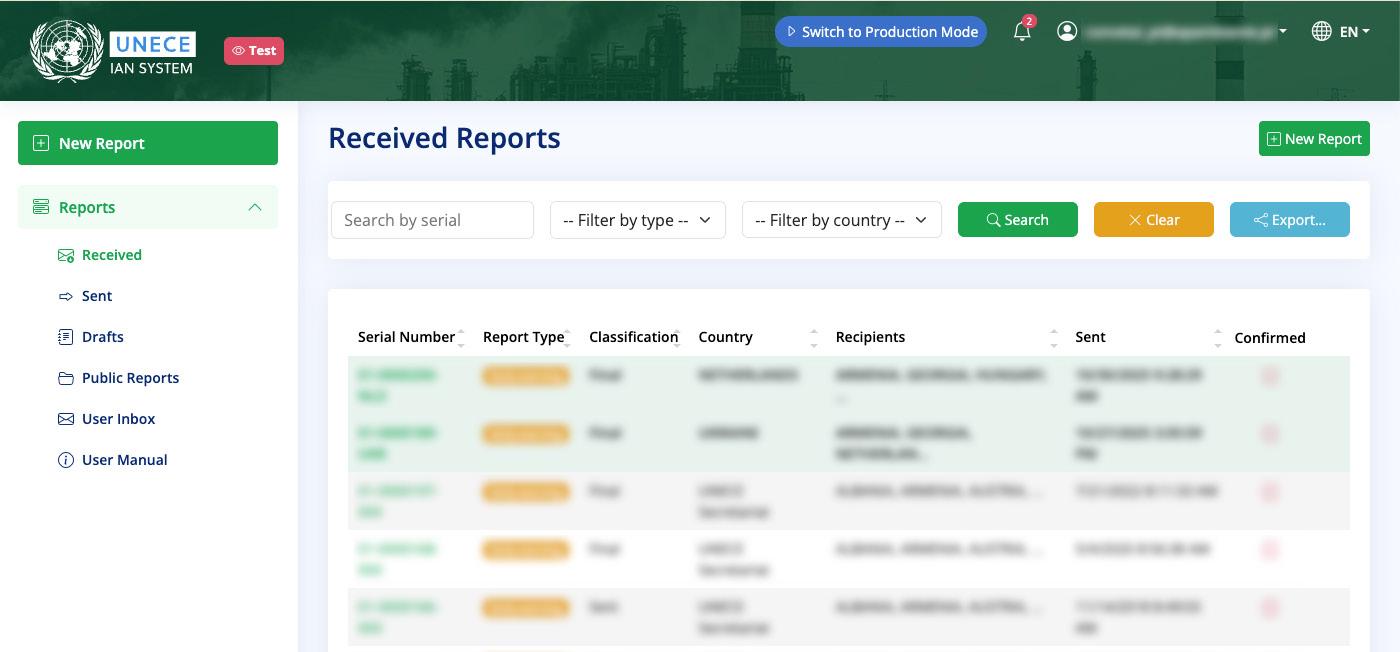
At the top of the screen, you can toggle between:
Production Mode for real accidents and notifications. This is the default mode and it has a blue color scheme.
Test Mode for testing and simulations. This mode provides the same functions as the Production Mode, but PoCs can practice sending reports and requests and responding. It has a green color scheme.
Ensure the email address listed is monitored 24/7 within your authority/ institution for emergency notifications.
For both Production Mode and Test Mode, use the left-hand menu to navigate the web application. The options include:
New report (to prepare new reports; see below)
Received (reports sent directly to you)
Sent (your sent reports)
Drafts (your draft reports)
Public reports (reports sent to all PoCs)
User inbox (reports sent to you specifically)
User manual (inclusive of the present manual)
To create a new report, click New Report (top left). You have the option to create reports for either:
Early-Warning: This is used to give information or warning in the event of an industrial accident or imminent threat thereof. Please submit only one Early-Warning report per incident. Every initial report should be followed by either additional Information Reports or be cancelled.
Assistance Request: This is used for matters related to the provision of assistance in order to mitigate consequences including transboundary effects.
In addition, once you have sent an Early-Warning or Assistance Request, it will appear in your Sent box. In the Sent box, the sent report will have the option to add an Information Report; this type of report enables you to follow up on a previously sent early warning or assistance report.
To logout, click your username and select Logout
Preparing reports (same procedure for both Production Mode and Test Mode)
In order to create an accident report, the PoC should click the New Report button in the upper left side of the screen. Note: this only concerns the initiation of new cases of Early Warning and Assistance Requests
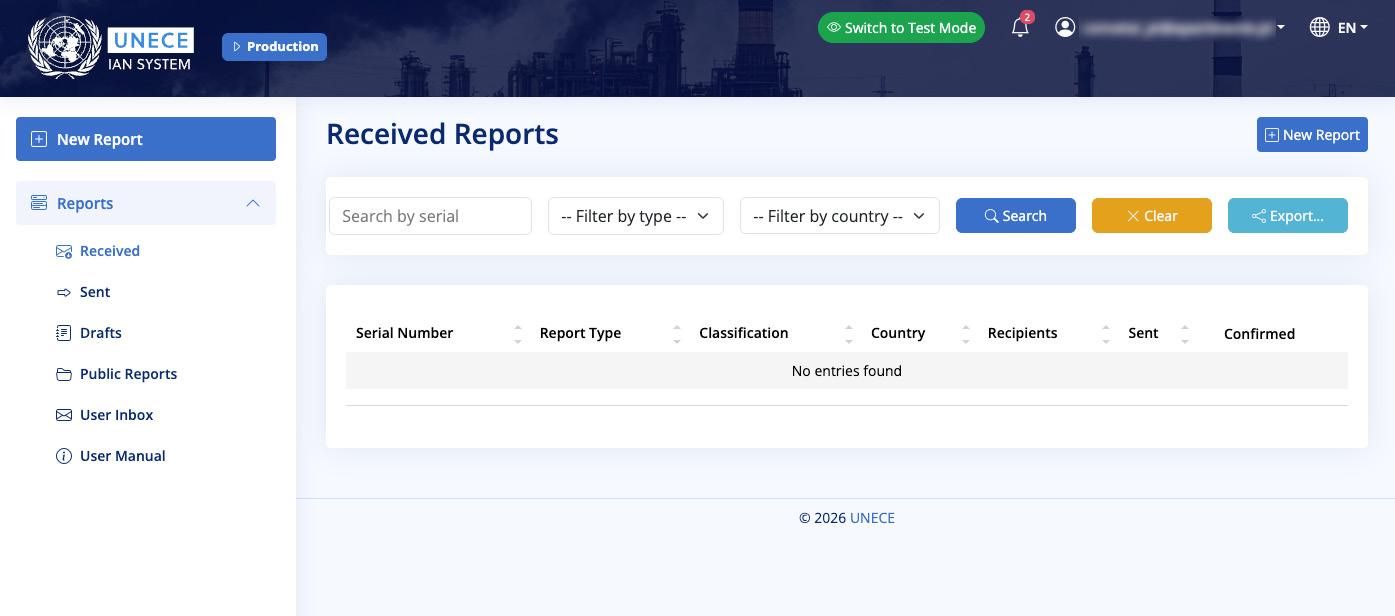
The PoC will then have two options: Early-Warning or Assistance Request
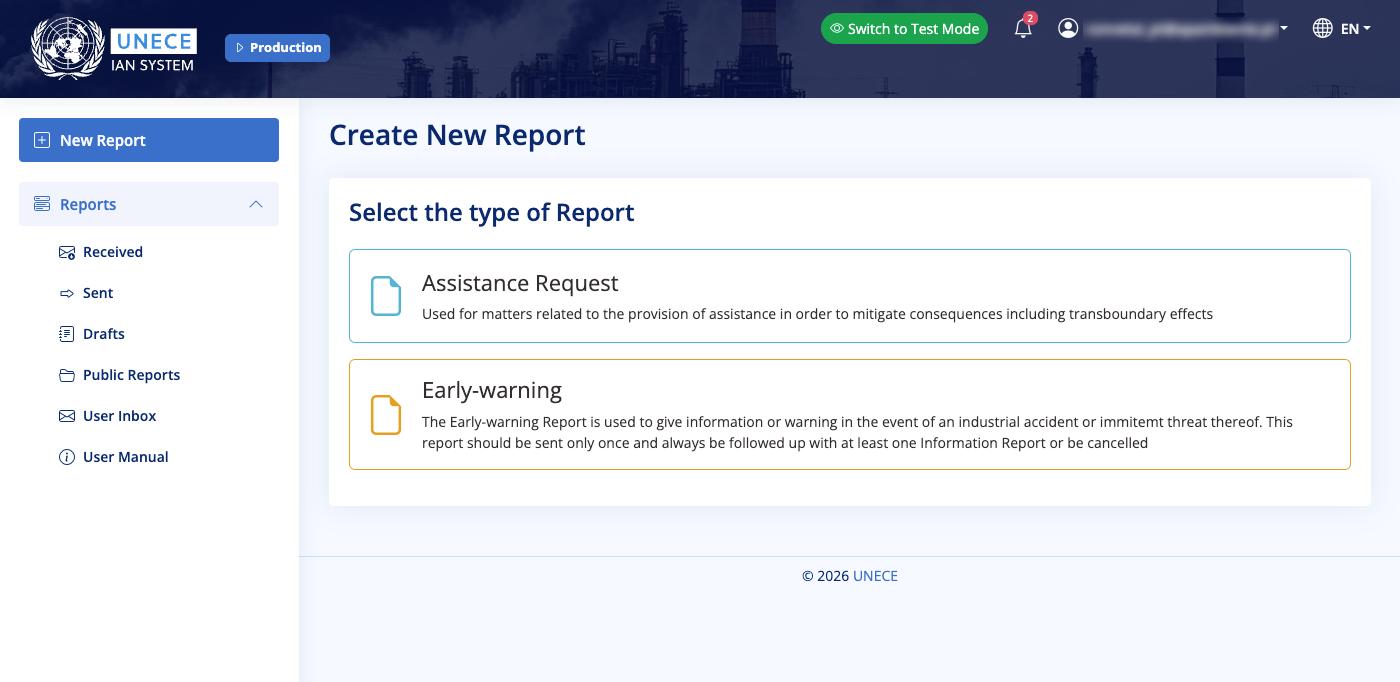
The PoC should select the type of Report they wish to create. All report types follow the same format for the first steps.
After choosing the desired option, a new window will appear with the data necessary to prepare the early warning notification or assistance request:
The PoC should fill out the Sender Details with their correct contact information or ensure the pre-filled content is accurate.
Under the Recipient Information, the PoC should select the relevant member States and organizations who the notification or request will be sent to. Please note that if your country has multiple PoCs, they will all have access to any reports you send.
Please note that all notifications and requests will also be sent to the UNECE secretariat to ensure efficient operations of the mechanism and support as needed.
Under Designate Final Report, only select the Mark as Final Report if there will be no further follow-ups or subsequent reports to the report being prepared; normally this will only be checked when sending a subsequent Information Report (see later).
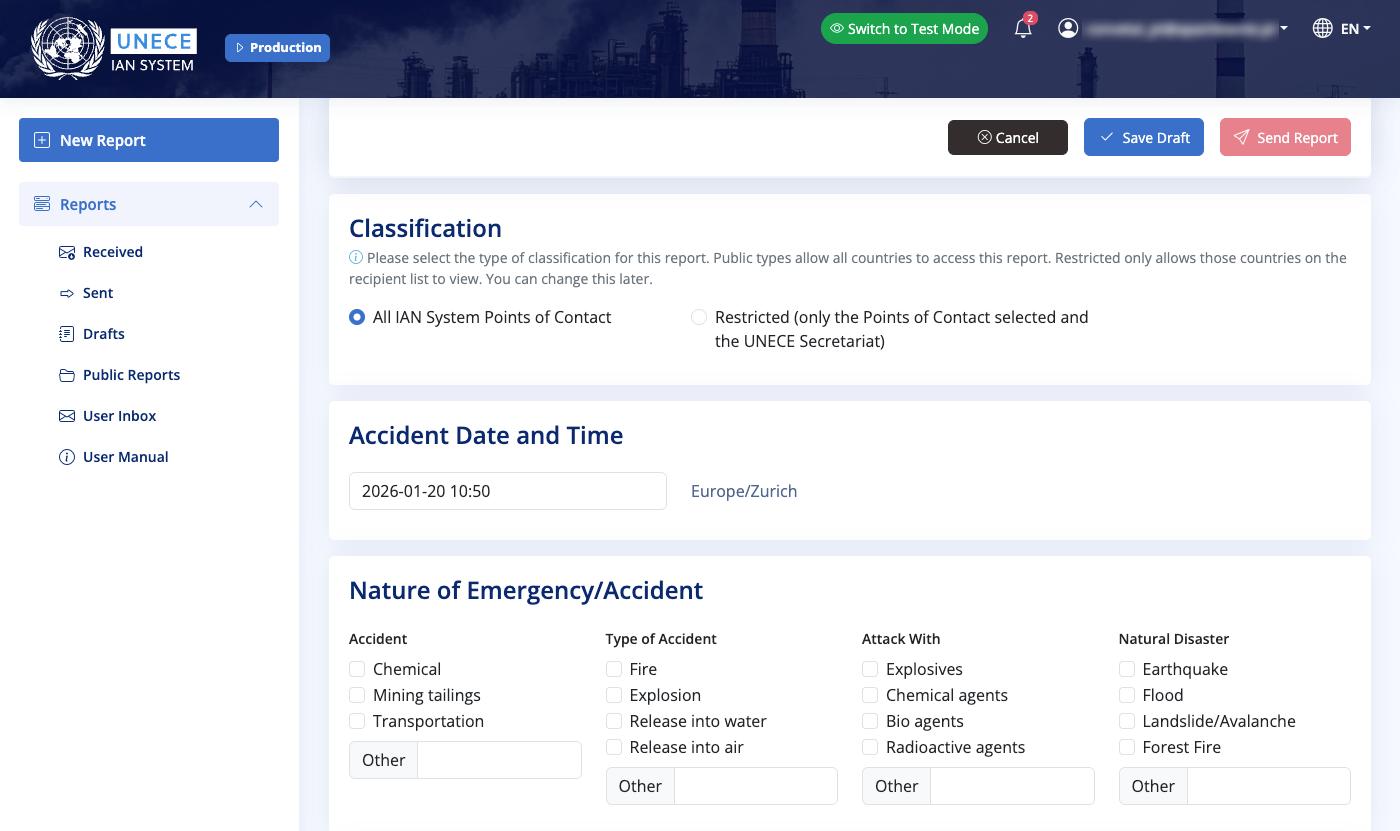
In the following sections, the PoC can fill out details about the accident, including:
Classification: selecting if the report should be restricted to the selected member States (and the UNECE secretariat) or be made public (i.e. for all PoCs).
Accident Date and Time
Nature of the Emergency/Accident:
The PoC must describe the emergency/accident in terms of the nature of the accident, natural disaster or emergency. PoCs can check one or multiple boxes under each category or use the Other box to specify.
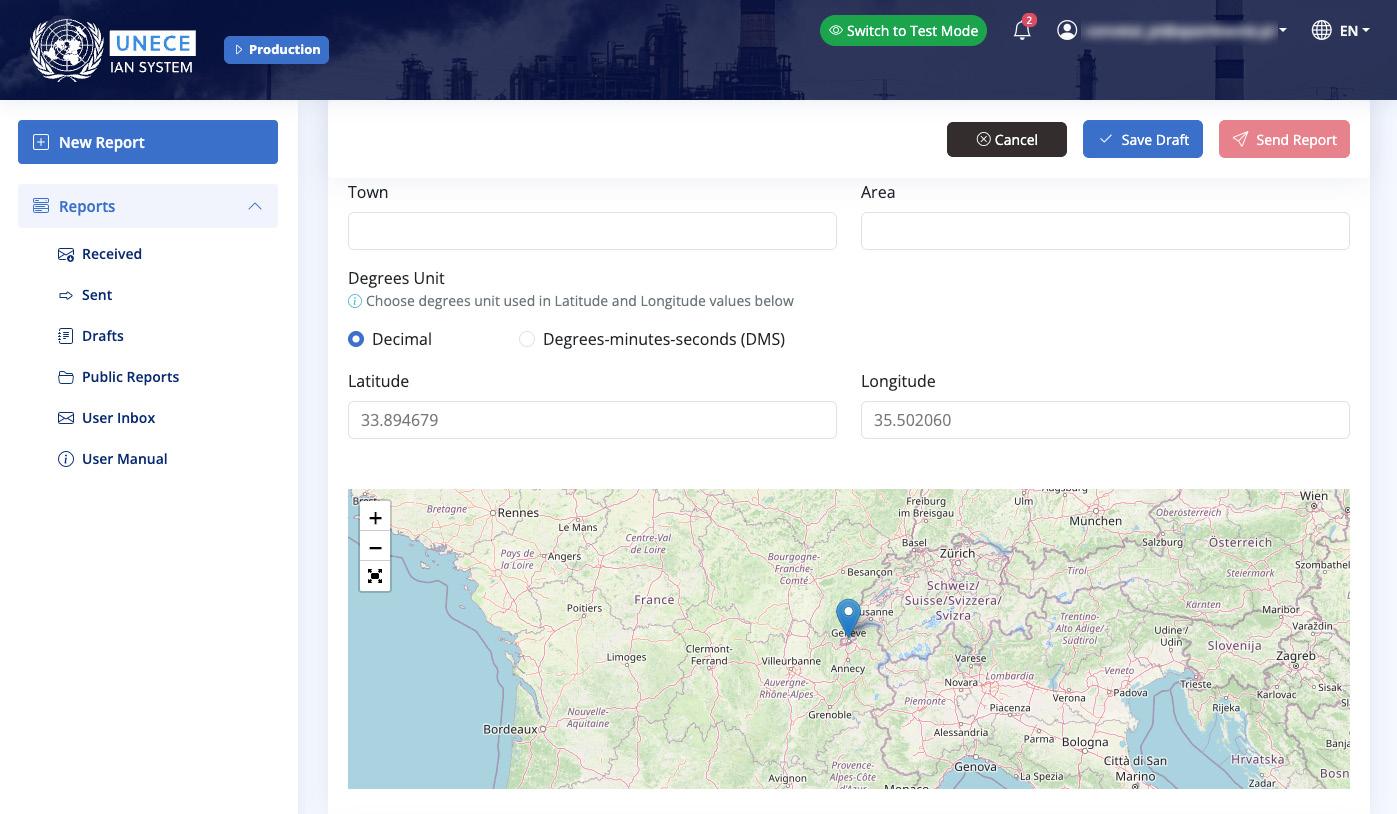
Location: the PoC should clarify the location of the emergency/accident. This can be done by providing the coordinates of the location or selecting it on the map.
The next steps differ depending on the type of report being prepared: (1) EarlyWarning or (2) Assistance Request
1
Completing an Early-Warning report
When preparing an Early-Warning report, the PoC must then provide comprehensive information to ensure sufficient information is shared:
Outflow/Threat (Risk): The PoC should provide sufficient information on the risks caused by the accident based on initially available information on the outflow. This includes the prognoses, i.e. the expected development of the accident based on available computer model scenario, and the measurements, i.e. the expected consequences on the basis measurements from monitoring systems (if available).
Substance/Chemical Formula or Name: The PoC can select a chemical from the drop-down list, then specify the amount (if known). They are then prompted to check boxes giving more details about the substance (Toxic, Ecotoxic, Explosive). Multiple boxes can be selected. And additional substances/ chemicals can be added to cover all that are applicable.
Weather Conditions: Information should be provided, where applicable, on natural conditions, such as wind direction, wind speed, temperature, percentage of cloud coverage, rain or snow and beyond.
Emergency and Mitigation Measures Already Taken: The PoC should report on the evacuation, sheltering, and other components taken to protect people and the environment and to respond to the accident.
Accident Information: A summary of the accident and its effects on people and the environment should be indicated (e.g. fatalities and injuries, ecological or material damage, disruption of public services). The PoC can include additional information in the Other Information box.
Attachments: Attach any useful and relevant information for the request being submitted. For example, this could include maps or images of the site, images of damage, contingency plans, rapid assessment results, information shared with the public, lists of materials needed, etc.
Report Validation Date: The time and date the report was validated should be recorded.
Once complete, press Send report. In case an error notification appears, make sure to add the missing information. Once sent, the report should appear in your Sent box.
2
Completing an Assistance Request
When preparing an Assistance Request, the PoC must then provide comprehensive information to ensure an effective response:
Request for Assistance: Information should be provided regarding the on-site assessment and/or advice, such as the current status of the accident, extent of damage and type of assistance required
Response Teams and Equipment: Select from four predefined options or use the Other field with an additional text box for comments. Additional text boxes are available to elaborate on needs across different areas, including for Humanitarian Assistance, Sampling and Analysis and Clean-up/Restoration
When and How (Delivery of Assistance): This information is key for the recipient of the request to consider the scope for rendering assistance and who to contact for planning and coordination purposes.
Logistics: The PoC should clearly define what and where is needed with the request, such as supplies and the destination.
Emergency and Mitigation Measures Already Taken: The PoC should report on the evacuation, sheltering, and other components taken to protect people and the environment and to respond to the accident.
Accident Information: A summary of the accident and its effects on people and the environment should be indicated (e.g. fatalities and injuries, ecological or material damage, disruption of public services). The PoC can include additional information in the Other Information box.
Attachments: Attach any useful and relevant information for the request being submitted. For example, this could include maps or images of the site, images of damage, contingency plans, rapid assessment results, information shared with the public, lists of materials needed, etc.
Report Validation Date: The time and date the report was validated should be recorded.
Once complete, press Send report. In case an error notification appears, make sure to add the missing information. Once sent, the report should appear in your Sent box.
Provision of subsequent information/reports
Following the sending of either an Early-Warning or Assistance Request, the PoC can find their sent report in their Sent box.
If the sent report had been marked as final, then no further options should be available.
If the sent report was NOT marked as final, then PoCs have the options to add either an Information Report or Assistance Request. The Information Report follows the same process as outlined above for the Early-Warning and the Assistance Request. Please note that these subsequent reports should contain new information from the original report, i.e. explaining new developments, changing circumstances or additional requests, and as such will be assigned a new serial number.
Receiving an Early-Warning, Assistance Request or Information Report
PoCs will be notified on the web application (i.e. where the notification icon is on the top of the page, upon opening, re-opening or refreshing the webpage) and via their registered email address when they have received an Early-Warning, Assistance Request or Information Report. To view the report, PoCs must login to the IAN System and check either their Received box or the Public Reports
Upon receiving an Early-Warning, Assistance Request or Information Report, the PoC should confirm receipt with the sender. For Early-Warning Reports, Parties shall take immediate actions such as implementing contingency plans, notifying affected communities, mobilizing emergency responders, and ensuring coordinated response across affected countries. For mutual assistance requests, the PoC should ensure the Article 12 procedures are followed and promptly respond to the request accordingly.
When opening a received Early-Warning, Assistance Request or Information Report, the Discussion feature enables PoCs to communicate more immediately and backand-forth as needed. PoCs can ask for clarifying information or share details on the steps being taken from both ends. The discussion threads will appear at the bottom of each report. They will be visible to the sender when viewing the report in the Sent box, and to the recipient(s) when opening it in the Received box. If the sender marks the report as accessible to all PoCs, the discussion threads will also be visible in the Public Reports box. PoCs will be similarly notified of discussion messages on the web application (i.e. where the notification icon is on the top of the page, upon opening, re-opening or refreshing the webpage) and via their registered email address.
In addition, the Administrators of the IAN System may send messages to PoCs. These will appear in the User Inbox
Acknowledgements
The United Nations Economic Commission for Europe (UNECE) prepared this manual in cooperation with Zoï Environment Network, with the generous support of the European Investment Bank and the European Union under the Neighbourhood, Development and International Cooperation Instrument – Global Europe “Action for Strengthening the Safe and Secure Management of Hazardous Substances to Prevent and Mitigate Industrial Accidents Worldwide”.
Cover photo by z ww on Unsplash
Contact info
For more information and inquiries, please contact ece-teia.conv@un.org