
1234
International Research Journal of Engineering and Technology (IRJET) e-ISSN: 2395-0056 p-ISSN: 2395-0072

Volume: 12 Issue: 01 | Jan 2024 www.irjet.net

1234
International Research Journal of Engineering and Technology (IRJET) e-ISSN: 2395-0056 p-ISSN: 2395-0072
Volume: 12 Issue: 01 | Jan 2024 www.irjet.net
Anurup Yemle1 , Shreepad Wadgave2 , Rohan Jadhav3 , Karan Anarase4 , Kashmira Jayakar5
Student, Dept. of Information Technology, RMD Sinhgad School of Engineering ,Warje ,Pune, Maharashtra, India
5Professor, Dept. of Information Technology, RMD Sinhgad School of Engineering ,Warje ,Pune, Maharashtra, India
Abstract - Computer vision has advanced significantly, allowing computers to identify their users through simple
image processing programs. This technology is now widely applied in everyday life, including face recognition, color detection, autonomous vehicles, and more. In this project, computer vision is utilized to create an optical mouse and keyboard controlled by hand gestures. The computer’s camera captures images of hand gestures, and based on their movements, the mouse cursor moves accordingly. Gestures can also simulate right and left clicks, while specific gestures enable keyboard functions, such as selecting alphabets or swiping left and right.
This system operates as a virtual mouse and keyboard, eliminating the need for wires or external devices. The project hardware requirement is limited to a webcam, with Python used for coding on the Anaconda platform. Convex hull defects are calculated, and analgorithm maps these defects to mouse and keyboard functions. By linking specific gestures with these functions, the computer interprets user gestures and executes corresponding actions.
Key Words: Computer Vision, Optical Mouse, Optical Keyboard, Hand Gestures, Python, Convex Hull Defects, Gesture Recognition, Virtual Input Devices
1.
Thecomputer'swebcamcaptureslivevideooftheperson sittinginfrontofit.Asmallgreenboxappearsinthecenter of the screen, where objects displayed within the box are processed by the program. If an object matches the predefinedcriteria,thegreenboxchangestoaredborder, indicating that the object has been recognized. Once recognized, moving the object allows the mouse cursor to moveaccordingly.Thisfeatureenhancescomputersecurity andprovidesavirtualinteractionexperience.
Hand gestures are used in place of objects, with different gestures assigned to specific functions. For instance, one gesturecontrolsthecursormovement,anotherperformsa right-click, and a third triggers a left-click. Similarly, keyboard functions can also be performed using simple gestures,eliminatingtheneedforaphysicalkeyboard.Ifthe gesture does not match any predefined patterns, the box remains green, while a recognized gesture changes the bordertored.

Gestures, commonly used in personal communication, play a significant role in enhancing interactions between humansandmachines.Theyprovideanaturalandintuitive way to control devices, eliminating the need for physical interfaces.Thisopensupvastopportunitiesfordeveloping uniquemethodsofhuman-machineinteraction,allowingfor seamless integration of technology into daily life. By leveraginggestures,innovativeapplicationscanbecreatedto enhance accessibility, efficiency, and user experience in variousdomains.
Traditionally, computers and laptops rely on physical mice or touchpads, which were developed years ago. However, this project eliminates the need for external hardwarebyusinghuman-computerinteractiontechnology. It detects hand movements, gestures, and eye features to control mouse movements and trigger mouse events, offeringamoreinnovativeandintuitiveapproach.
Thesystemfeaturesinvolveacomprehensiveapproachto understanding the problem statement, which is the foundationforidentifyingthecoreobjectivesandgoalsofthe proposedsystem.Bythoroughlyanalyzingtheproblem,one candeterminethespecificrequirementsandchallengesthat needtobeaddressed.Theidentificationofbothhardware andsoftwarerequirementsplaysacrucialroleinensuring thatthesystemiscompatiblewiththenecessarytechnologies andwillfunctionasintended.Understandingtheproposed systemindetailisessentialtoensurethatallcomponentsand processesarealignedwiththeintendedfunctionality.This enablesaseamlessintegrationofvariouselements,suchas sensors, processing units, and user interfaces, to work together efficiently. Furthermore, careful planning of activities is vital for maintaining a structured approach throughoutthesystemdevelopmentlifecycle.Usingaplanner allowsfortheorganizationoftasks,resources,andtimelines toensurethatallsteps,fromdesigntoimplementation,are executed in a timely manner. This includes stages such as system design, where architectural decisions are made, programming,wherethecodeiswritten,andtesting,where thesystem’sfunctionalityisverified.

Volume: 12 Issue: 01 | Jan 2024 www.irjet.net
International Research Journal of Engineering and Technology (IRJET) e-ISSN: 2395-0056 p-ISSN: 2395-0072
Debuggingandrefinementarealsokeyphasesthatensure the system runs smoothly, with any issues identified and resolvedpromptly.Throughoutthisprocess,collaboration amongteammembersandcontinuousfeedbackareessential for improving the system's performance and usability. Ultimately,thesuccessfuldevelopmentanddeploymentof the system rely on effective planning, well-defined requirements,andthoroughexecution.
Activitydiagramsarevisualrepresentationsthatdepict workflows through a sequence of activities and actions, incorporatingchoices,repetitions,andparallelprocesses.In Unified Modeling Language (UML), they are designed to representbothcomputationalprocessesandorganizational workflows, while also illustrating how data flows interact withtheassociatedactivities.
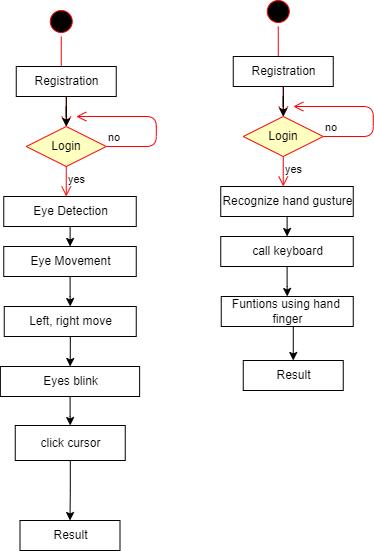
Whileactivitydiagramsmainlyfocusonillustratingthe overallcontrolflow,theycanalsoincorporateelementsthat representdatamovementbetweenactivities,ofteninvolving oneormoredatastoragepoints.
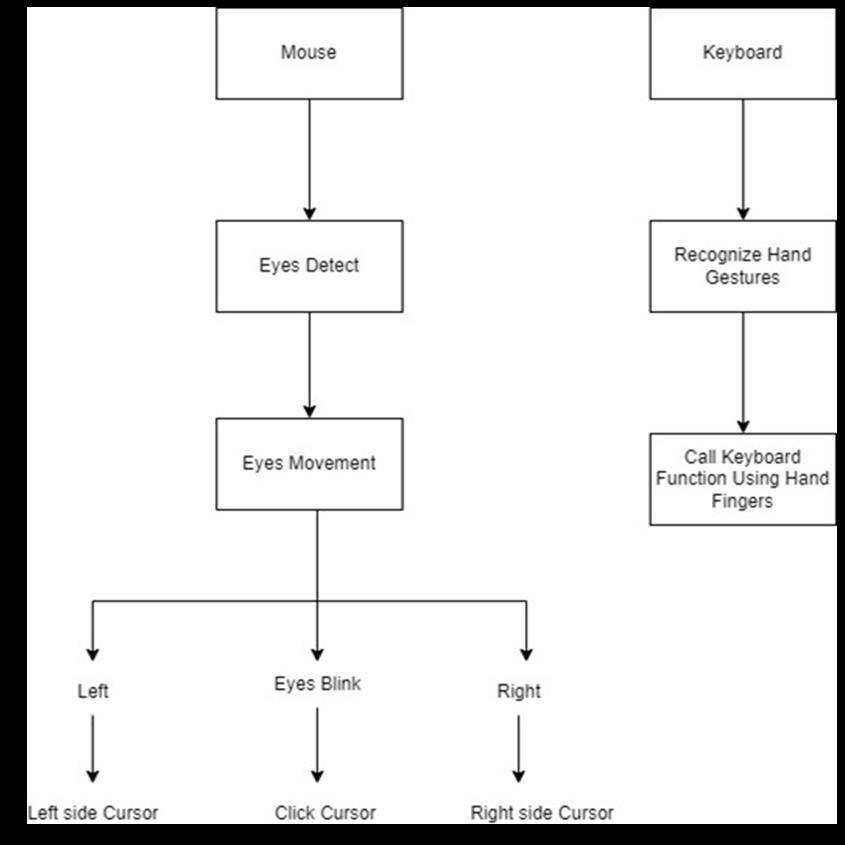
The architecture of this project integrates a webcam to capture real-time hand gestures for virtual mouse and keyboard functionality. The video frames undergo preprocessingusingtechniqueslikebackgroundsubtraction, skincolordetection,andcontouranalysistoisolatethehand. Gestures are recognized through convex hull defects and classified using algorithms like Haar cascade or CamShift. Recognizedgesturesaremappedtosystemactions,suchas cursormovementorclicks,usinglibrarieslikePyAutoGUI. Visual feedback is provided with a green box turning red upongesturerecognition.This touchlesssystemenhances userinteraction,providingaccessibilityandsecuritywithout externalhardware.
Thesystemoffersseveraladvantages,makingitaneffective solutionforvirtualmouseandkeyboardoperations.Hand geometryissimpleandeasytoimplement,allowingusersto interactwiththesystemeffortlessly.Additionally,itiscosteffective, as it eliminates the need for external hardware, relyingsolelyonawebcamandsoftware.Thesystemsaves timebyprovidingquickandintuitiveinteraction,enhancing productivity. Furthermore, it is resilient to environmental factorssuchasdryweather,whichcanaffectotherbiometric systems.Thisrobustanduser-friendlyapproachmakesita practicalchoiceformodernhuman-computerinteraction.
Volume: 12 Issue: 01 | Jan 2024 www.irjet.net
International Research Journal of Engineering and Technology (IRJET) e-ISSN: 2395-0056 p-ISSN: 2395-0072
Theauthorscanacknowledgeanyperson/authoritiesinthis section.Thisisnotmandatory.
Thesystemfindsdiverseapplicationsacrossvarioussectors, enhancing efficiency and interaction. In colleges, it can be utilized for interactive learning and virtual lab setups, offering students a hands-on experience with innovative technology. In the government sector, it can streamline operations, improve accessibility, and provide secure, touchless interfaces for public services. Similarly, in the banking sector, it can enhance customer experience by enabling secure, gesture-based interactions, reducing the needforphysicaltouchandensuringhygiene.Thisversatile systemprovesbeneficialinanydomainrequiringintuitive andcontactlesshuman-computerinteraction.
Thisprojectintroducesanadvancedsystemforrecognizing handgestures,offeringamodernalternativetotraditional mouseandkeyboardfunctions.Byleveraginghandgestures, users can control the movement of the mouse cursor, perform drag-and-click operations, and execute keyboard functionssuchastypinglettersand othercommands.The system employs an innovative process called skin segmentation to accurately distinguish the hand from the background,ensuringseamlessinteraction.Additionally,it incorporates an arm-exclusion method, effectively addressing challenges where the entire body might unintentionally appear in the camera frame. This robust algorithmisdesignedtodetectandinterprethandgestures, creating a virtual interface that enables users to control mouseandkeyboardfeatureseffortlessly.Itswiderangeof potential applications includes areas such as 3D printing, architectural design, and performing remote medical operations.Thissystemisparticularlyvaluableinscenarios requiringhighlevelsofcomputationalinteraction,whichare often hindered by the lack of efficient human-computer interfaces.
In its current state, the system is optimized for basic gestures such as pointing and pinching, but there is significantroomforimprovementtoenhanceitscapabilities. Forinstance,theexistingsystemfunctionseffectivelyagainst astaticbackground,butextendingitsusabilitytodynamic environmentswouldgreatlyenhanceitsversatility.Future iterations of the system could involve integrating handtracking technology into augmented reality (AR) environments.Thiswouldallowuserstoengagewithvirtual 3D spaces using devices like head-mounted displays, bridgingthegapbetweenphysicalanddigitalinteractions. Toachievethis,amultidimensionalcamerasetupwouldbe essential for accurately capturing intricate hand motions. Furthermore,thedeploymentofthishand-trackingsystem couldrevolutionizeuserinteractioninvariousfields,from immersiveARapplicationstoreal-worldscenariosrequiring
precision and accuracy. These advancements would open new avenues for innovation, making human-computer interactionmoreintuitiveandaccessiblethaneverbefore.
[1] S.SadhanaRao,”SixthSenseTechnology”,Proceedings oftheInternationalCon-ferenceonCommunicationand ComputationalIntelligence–2010,pp.336-339.
[2] Game P. M., Mahajan A.R,”A gestural user interface to Interactwithcomputersystem”,InternationalJournal on Science and Technology (IJSAT) Volume II, Issue I, (Jan.-Mar.)2011,pp.018–027.R.Nicole,“Titleofpaper withonlyfirstwordcapitalized,”J.NameStand.Abbrev., inpress.
[3] International Journal of Latest Trends in Engineering andTechnologyVol.(7)Is-sue(4),pp.055-062
[4] Imperial Journal of Interdisciplinary Research (IJIR) Vol-3,Issue-4,2017.
[5] Christy,A.,Vaithyasubramanian,S.,Mary,V.A.,Naveen Renold, J. (2019),” Artificial intelligence based automaticdeceleratingvehiclecontrolsystemtoavoid misfortunes “, International Journal of Advanced Trends in Computer Science and Engineering, Vol. 8, Issue.
[6] G. M. Gandhi and Salvi, ”Artificial Intelligence Integrated Blockchain For Train- ing Autonomous Cars,” 2019 Fifth International Conference on Science Technology Engineering and Mathematics (ICONSTEM),Chennai,India,2019,pp.157-161.
[7] http://www.iosrjournals.org/iosrjce/papers/Vol10
[8] S. Sadhana Rao,” SixthSense Technology”, Proceedings of the International Con- ference on Communication andComputationalIntelligence–2010,pp.336-339.
[9] Game P. M., Mahajan A.R,”A gestural user interface to Interactwithcomputersystem”,InternationalJournal on Science and Technology (IJSAT) Volume II, Issue I, (Jan.-Mar.)2011,pp.018–027.
[10] International Journal of Latest Trends in Engineering andTechnologyVol.(7)Is-sue(4),pp.055-062.
[11] ImperialJournalofInterdisciplinaryResearch(IJIR)Vol3,Issue-4,2017.
[12] Christy,A.,Vaithyasubramanian,S.,Mary,V.A.,Naveen Renold, J. (2019),” Artificial intelligence based automaticdeceleratingvehiclecontrolsystemtoavoid misfortunes “, International Journal of Advanced Trends in Computer Science and Engineering, Vol. 8, Issue.6,Pp.3129-3134.
Volume: 12 Issue: 01 | Jan 2024 www.irjet.net
International Research Journal of Engineering and Technology (IRJET) e-ISSN: 2395-0056 p-ISSN: 2395-0072
[13] G.M.GandhiandSalvi,”ArtificialIntelligenceIntegrated BlockchainForTrain-ingAutonomousCars,”2019Fifth International Conference on Science Technology Engineering and Mathematics (ICONSTEM), Chennai, India,2019,pp.157-161.JesudossA.,andSubramaniam, N.P.,“EAM:ArchitectingEfficientAuthenticationModel for Internet Security using Image-Based One Time PasswordTechnique
[14] IndianJournalofScienceandTechnology, Vol.9Issue 7,Feb.2016,pp.1-6.
[15] M.S.Roobini, DrM.Lakshmi,(2019),”Classification of Diabetes Mellitus using Soft Computing and Machine Learning Techniques”, International Journal of Innovative Technology and Exploring Engineering, ISSN: 2278-3075,Volume-8,Issue-6S4