INSIDER TECHNOLOGY
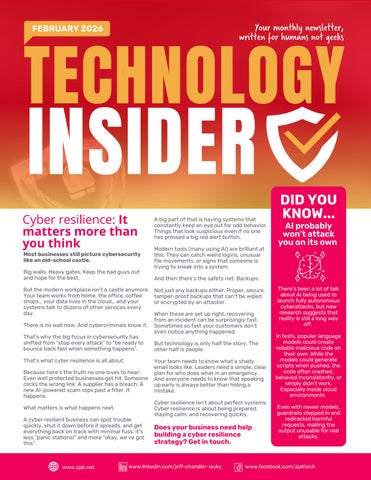
Cyber resilience: It matters more than you think
Most businesses still picture cybersecurity like an old-school castle.
Big walls Heavy gates Keep the bad guys out and hope for the best.
But the modern workplace isn’t a castle anymore Your team works from home, the office, coffee shops your data lives in the cloud and your systems talk to dozens of other services every day.
There is no wall now And cybercriminals know it
That’s why the big focus in cybersecurity has shifted from “stop every attack” to “be ready to bounce back fast when something happens”
That’s what cyber resilience is all about
Because here’s the truth no one loves to hear: Even well protected businesses get hit Someone clicks the wrong link A supplier has a breach A new AI-powered scam slips past a filter. It happens
What matters is what happens next
A cyber resilient business can spot trouble quickly, shut it down before it spreads, and get everything back on track with minimal fuss. It’s less “panic stations!” and more “okay, we’ve got this”
A big part of that is having systems that constantly keep an eye out for odd behavior Things that look suspicious even if no one has pressed a big red alert button
Modern tools (many using AI) are brilliant at this. They can catch weird logins, unusual file movements, or signs that someone is trying to sneak into a system
And then there’s the safety net: Backups
Not just any backups either. Proper, secure, tamper-proof backups that can’t be wiped or encrypted by an attacker
When these are set up right, recovering from an incident can be surprisingly fast Sometimes so fast your customers don’t even notice anything happened
But technology is only half the story The other half is people.
Your team needs to know what a shady email looks like. Leaders need a simple, clear plan for who does what in an emergency And everyone needs to know that speaking up early is always better than hiding a mistake
Cyber resilience isn’t about perfect systems. Cyber resilience is about being prepared, staying calm, and recovering quickly
Does your business need help building a cyber resilience strategy? Get in touch.
DID YOU KNOW...
AI probably won’t attack you on its own
There’s been a lot of talk about AI being used to launch fully autonomous cyberattacks, but new research suggests that reality is still a long way off
In tests, popular language models could create reliable malicious code on their own While the models could generate scripts when pushed, the code often crashed, behaved inconsistently, or simply didn’t work Especially inside cloud environments
Even with newer models, guardrails stepped in and redirected harmful requests, making the output unusable for real attacks
1
Before the iPad ever existed, Microsoft showed off its own tablet, way back in 2000. Bill Gates stood on stage with a pen-powered Windows tablet and confidently predicted it would become “the most popular PC in America”. Hint: It didn’t quite work out (the $2,000 price tag didn’t help), and the idea never took off. A decade later, Apple launched the iPad and stole the spotlight.
2
On February 25, 2010, Apple sold its 10 billionth song on iTunes. It was Johnny Cash’s “Guess Things Happen That Way.” The lucky buyer, Louie Sulcer from Georgia, won a $10,000 iTunes gift card for clicking Buy. Even more impressive? It took Apple over five years to sell its first 5 billion songs… and only 18 months to sell the next 5 billion. Talk about hitting fast-forward.
3
A Chinese humanoid robot recently walked its way into the Guinness World Records. AgiBot’s A2 robot travelled 66 miles (106 km) over three days without ever powering down. Thanks to hot-swappable batteries, dual GPS, lidar and depth cameras, it managed to navigate city streets, bridges and slopes all on its own. It’s a big leap forward compared to earlier robots that collapsed after a few steps.
Techn logy update
Use guest chat in Microsoft Teams with caution
Microsoft Teams recently introduced a guest chat feature that lets anyone start a conversation with you using just your email address, even if you don’t normally use Teams.
Handy. But researchers have spotted a gap. When you join someone else’s Teams environment as a guest, you’re protected by their security settings, not your own. That means a malicious host could send phishing links or harmful files that your usual security tools might miss.
It’s unlikely to affect most people, but only accept Teams invites from people you trust. And be cautious with unexpected messages, no matter which platform they arrive on.
INSPIRATIONAL QUOTE OF THE MONTH
“Your most unhappy customers are your greatest source of learning.”
Bill Gates, American businessman and philanthropist.
It’s time for February’s fun tech quiz
1.What word means to switch a computer off and on again?
2.What name is given to malware that’s disguised as a legitimate software?
3.What’s the name given to unsolicited e-mail messages?
4.Which computer software company developed and published Photoshop?
5.Which fruit and Greek letter combine to give the name of the credit-card sized computer released in 2012? The answers are below.
Microsoft is testing a ‘resume from phone’ feature
Windows 11 is testing a new “resume from phone” feature that lets you continue what you were doing on your Android device directly on your PC.
If you open an online Word, Excel or PowerPoint file in the Microsoft 365 Copilot app on your phone, you can hand it off to your Windows PC with a single tap. Some phones can also pass browser tabs or Spotify sessions.
It’s early days. Only a few Android brands support it, and it only works for online files, but it’s a promising step toward smoother cross-device working on Windows.
There’s been some talk recently about a technique called “HashJack” that can trick certain AI-powered browser assistants
Sounds dramatic, but don’t panic This isn’t something the average business is suddenly at high risk from.
But it is something worth being aware of as AI becomes more common in everyday tools.
Some AI browsers now have assistants that help you summarize pages, explain content or answer questions The research found that, in some cases, those assistants can be influenced by text hidden at the end of a URL (after the little # symbol you sometimes see in a link)
This hidden text never leaves your device, so normal security tools don’t spot it.
If an attacker crafted a very specific, very unusual link, the AI assistant could potentially misunderstand it and offer misleading guidance or try to perform an action you didn’t ask for
Importantly, the actual website you’re viewing still looks completely normal.
Now for the reassuring part: This isn’t something you’ll accidentally stumble into It requires someone deliberately clicking a suspicious link, and even then, only certain AI assistants behave this way And many vendors have already patched their tools
The same good habits that protect you from phishing attacks work here too.
Stick to links you trust
Check the address bar before logging in anywhere
Keep your browser, devices, and security tools up to date
And if something feels off about a page or the assistant’s response, close the tab and start again
You can add an extra layer of safety by keeping strong security software in place and making sure firewalls and filters are up to date But you don’t need anything complicated.
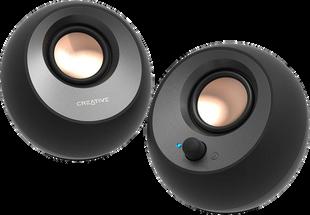
If you want great sound on your desk without spending a fortune (or filling your workspace with giant speakers), the Creative Pebble range is a brilliant pick.
These compact little spheres deliver surprisingly rich, deep audio. Far better than you’d expect for the price.
They’re perfect for Teams calls, focus music, or a bit of background LoFi while you work. Plus, they take up hardly any space and look stylish on any desk A small upgrade that makes a big difference.
$44.99 from Amazon.
Q: How do I know if our cybersecurity tools are working?
A: Good security tools should give regular reports, alerts and logs. We can review these with you and check whether anything looks unusual or needs improving.
Q: What’s the difference between a backup and a disaster recovery plan?
A: A backup saves your data A disaster recovery plan gets your whole business running again quickly after an outage You need both
Stay aware, stay updated, and you’ll stay safe.
Q: How can we tell if one of our suppliers is a security risk?
A: Ask whether they use multi-factor authentication, encryption, and regular security audits We can help you assess their risk level.
Creative Pebble V3 Minimalistic Desktop Speakers
Business gadget of the month