Basecamp Reviews: Features, Pricing, Pros &
Cons—Is It the Right Tool for Your Team?
Choosing the right project management tool can directly impact your team’s productivity, collaboration, and overall efficiency. Among the many options available, Basecamp stands out as a simple, all-in-one solution. But is it enough for modern teams?
In this blog, we’ll break down basecamp reviews, explore basecamp features, analyze basecamp pricing plans, and highlight basecamp software pros and cons—so you can decide if it’s the right fit or if you need something more advanced.
What Is Basecamp?
Basecamp is a project management and team collaboration tool designed to help teams organize tasks, communicate, and track progress in one place.
It combines messaging, task management, file sharing, and scheduling into a single platform. Many businesses appreciate its simplicity and clean interface, especially for small teams or
straightforward projects.
Basecamp Features: What You Get
One of the reasons Basecamp remains popular is its all-in-one approach. Instead of juggling multiple tools, it offers a centralized workspace.
Key Basecamp Features
To-Do Lists & Task Management – Organize work into actionable tasks
Message Boards & Chat (Campfire) – Keep communication within projects
Automatic Check-ins – Collect updates from team members
Hill Charts – Visualize project progress and identify bottlenecks
File Sharing & Document Storage – Keep everything in one place
Client Access – Collaborate with external stakeholders easily
These basecamp features make it a solid choice for teams looking for simplicity and structured collaboration. In fact, its integrated communication tools help reduce scattered conversations and improve focus.
Basecamp Pricing Plans: What Does It Cost?
Understanding basecamp pricing plans is essential before making a decision.
1. Basecamp Plan
Around $15 per user/month
Includes all core features
Suitable for small teams
2. Basecamp Pro Unlimited
Around $299/month (billed annually)
Unlimited users and clients
Best for larger teams
While the pricing is straightforward, it may feel expensive for small teams compared to competitors offering free plans.
Basecamp User Ratings &
Market Feedback
When looking at basecamp user ratings, the platform generally scores around 3.8–4.0 out of 5 on major review platforms.
What Users Like:
Simple and easy to use
Strong communication tools
Clean and distraction-free interface
What Users Don’t Like:
Limited customization
Missing advanced project management features
Reliance on integrations for key functionalities
This mixed feedback highlights that Basecamp works well for some teams—but not all.
Basecamp Software Pros and Cons
✅ Pros
All-in-one collaboration platform
Easy onboarding and minimal learning curve
Strong internal communication features
Transparent pricing structure ❌ Cons
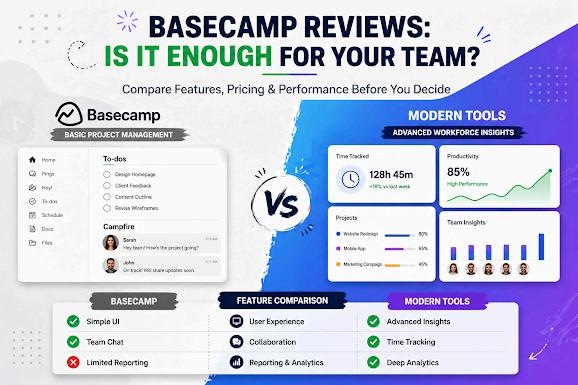
No built-in time tracking or billing
Limited advanced features (like Gantt charts or dependencies)
Fewer integrations compared to competitors
Can feel restrictive for growing teams
Notably, the lack of time tracking and advanced reporting is a major limitation for businesses that need deeper insights into performance.
�� Ready for More Than Just Project Management?
If you’re looking beyond basic tools and want full visibility into your team’s performance, Workstatus can help. Book a demo today and see how smarter tracking drives better results.
Where Basecamp Falls Short (And Why It Matters)
While Basecamp delivers on ease of use, modern businesses often need more than just task management and communication.
Key gaps include:
No native time tracking
Limited performance analytics
No workforce insights or productivity tracking
Lack of advanced automation
For growing teams, these limitations can lead to inefficiencies, missed insights, and reduced scalability
A SmarterAlternative: Why Businesses Choose Workstatus
If you’re exploring basecamp reviews, you’re likely looking for a tool that not only manages tasks but also improves productivity and visibility.
This is where Workstatus stands out.
Unlike Basecamp, Workstatus offers:
Built-in time tracking and productivity monitoring
Real-time workforce insights
Advanced reporting and analytics
Better visibility into team performance
Automated workflows and tracking
Instead of just managing projects, Workstatus helps you optimize how work gets done—making it a more complete solution for modern teams.
Final Verdict: Should You Choose Basecamp?
Basecamp is a solid tool for teams that value simplicity and communication. Its clean interface and straightforward approach make it ideal for small teams or less complex projects.
However, if your business requires deeper insights, better tracking, and scalability, you may quickly outgrow it.
That’s why many businesses start with Basecamp—but switch to more advanced solutions as they grow.