WSB TECHNOLOGY MONTHLY


Technology monthly Announcements






- New CAD Standards Manual is posted on Partner Services for use on current pilot projects
- Autodesk announcements are typically posted @ WSB-UG-Autodesk


- Civil 3D 2024 with Desktop Connector is on the horizon and starting to be implemented with new pilot projects
- Bentley announcements are typically posted @ WSB-UG-Bentley
Stay up to date with news headlines, articles, and updates from Autodesk @ WSB.

Continue reading page 3-5
Autodesk Technology Management Bulletins
Hear from our Autodesk Design Technology Manager.
Continue reading page 9
Stay up to date with news headlines, articles, and updates from Bentley @ WSB.
Continue reading page 6-8
Learn about best practices, design and tricks from Autodesk SME’s.
Continue reading page 12-13
Hear from our Bentley Design Technology Manager.
Continue reading page 10
Learn about best practices and tricks from Bentley SME’s.
Continue reading page 11
 Autodesk Digital Trends & Headlines
Bentley Digital Trends & Headlines
Bentley Technology Management Bulletins
Technical Leads Corner
Digital Application Specialist Corner
Autodesk Digital Trends & Headlines
Bentley Digital Trends & Headlines
Bentley Technology Management Bulletins
Technical Leads Corner
Digital Application Specialist Corner
AUTODESK DIGITAL TRENDS

There is increasing rise of cloud technology and adoption across all teams within the industry, let alone WSB. What is cloud you ask? Well, the cloud is simply an interconnected world where the applications, data, work share and more happen in an environment that can be accessed anywhere if the user has an internet connection.
In recent years, cloud technology has experienced newfound popularity within the AEC industry. Originally, there were limitations, especially in the construction industry with the adoption of new technologies, but the construction industry has seen rapid growth in digital collaboration. In fact, according to Autodesk, “there has been 2.5x more collaboration events on issues and tasks and a 121% increase in digital collaborators since 2020.” Autodesk Build is changing the way construction projects operate by combining robust project management capabilities and simple field collaboration tools within one seamless collaboration environment.
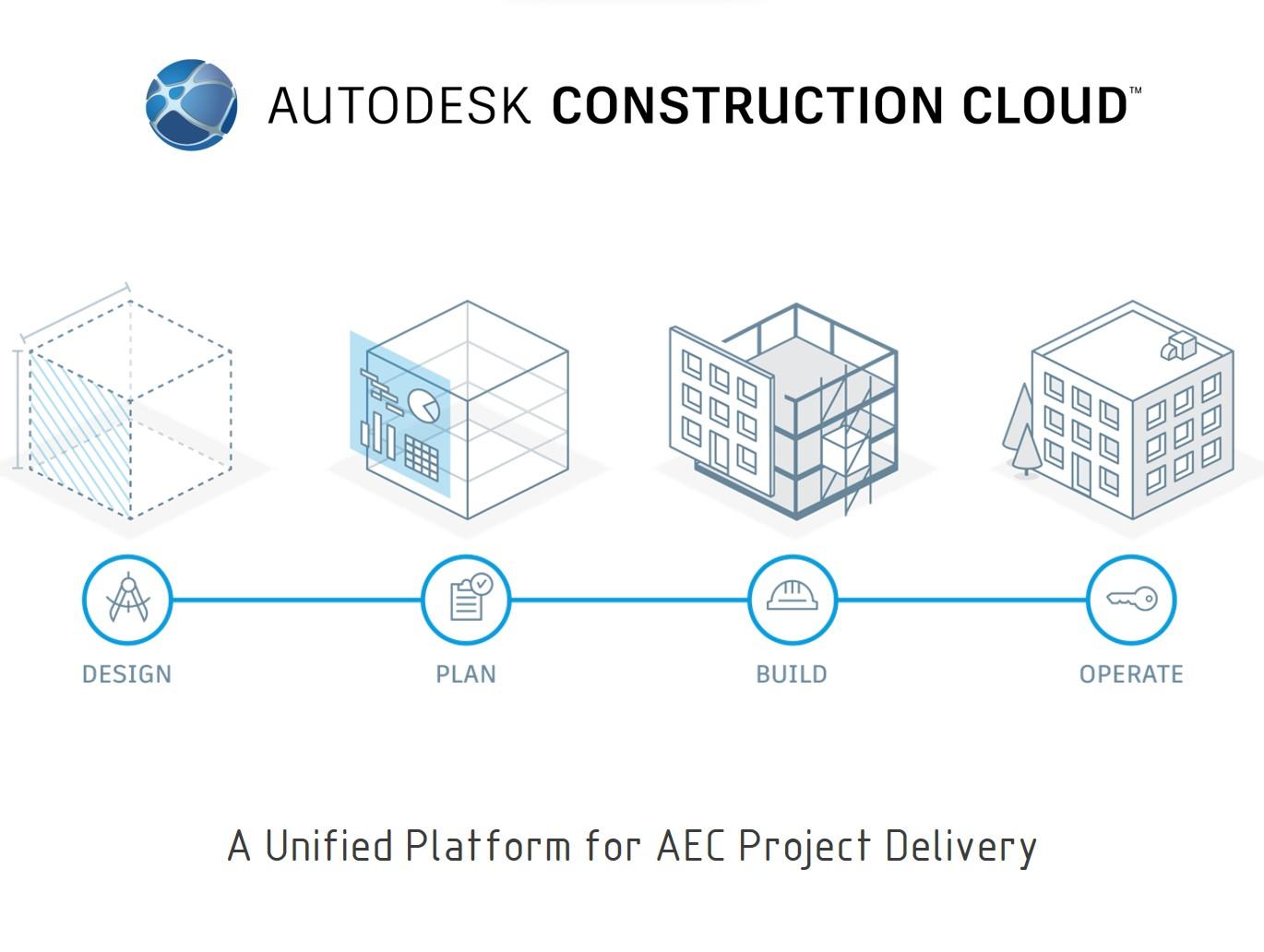
How does this affect WSB? It is simple, as a company we forge ahead and build what’s next and harnessing these tools allows to do just that. We plan to put forth many efforts in establishing our common data environment custom to WSB standard. Digital collaboration is accelerating at a rapid pace, and WSB is going to accelerate with this trend. Please reach out to the CAD Management Team for more updates and information on how you can get started in this cloud environment today!
Project Insights

Coauthoring
Design Collaboration
By: Matt Adams
Model Coordination
Meetings & Emails
Document Management Issues
Project Change Analysis

ACC
AUTODESK NEW FINDS – Q & A
What is Autodesk Construction Cloud?
Autodesk construction cloud turns a fragmented industry process into a connected, collaborative environment for all members of the team. It is a cloud-based construction management and collaboration tool built on a unified platform and common data environment.
How do I get started with Autodesk Construction Cloud?
Before we ask that question, we need to know how to access ACC. This is as simple as going to a website for projects you have been granted access to. Visit https://acc.autodesk.com/projects. This will give you a quick look at all the projects available to you. Note: it is recommended to use chrome as a best practice.
What is the best way to manage documents within the project?
Files is how we manage the documents for the project. Although this may not be the most exciting part of the construction process, it is essential to completing the project successfully by getting project team members the right information at the right time.
Administrators can set folder structures and set permissions, while users can upload, view, review, and download files
We can share folders and files with all project stakeholders, even those who aren’t members in a project, depending on permission levels.
What are the differences in viewing 2D and 3D files via Web?
One main difference of viewing 2D or 3D design files. The 2D compare tools are available for the following files types:
(1) PDF, (2) RVT and (3) DWG. The 3D compare tools are available for these file types: (1) RVT, (2) DWG, (3) DXF, (4) IFC, (5) NWD, and (6)F3D. With 2D compare, you can compare two versions of the same drawing or model or two entirely different drawings. With 3D compare, you can ONLY compare versions of the same 3D model. Users do have the ability to view designs side-by-side or together as an aggregate overlay.
How do I access my design drawings?
Simply open files through the Civil 3D application software itself just like you were working locally on a server. Users will NEVER double click to open files through the web, unless the user is attempting to view through the web base viewer.
By: Matt Adams
BENTLEY NEW FINDS -

Add ProjectWise access to a Microsoft Team Channel
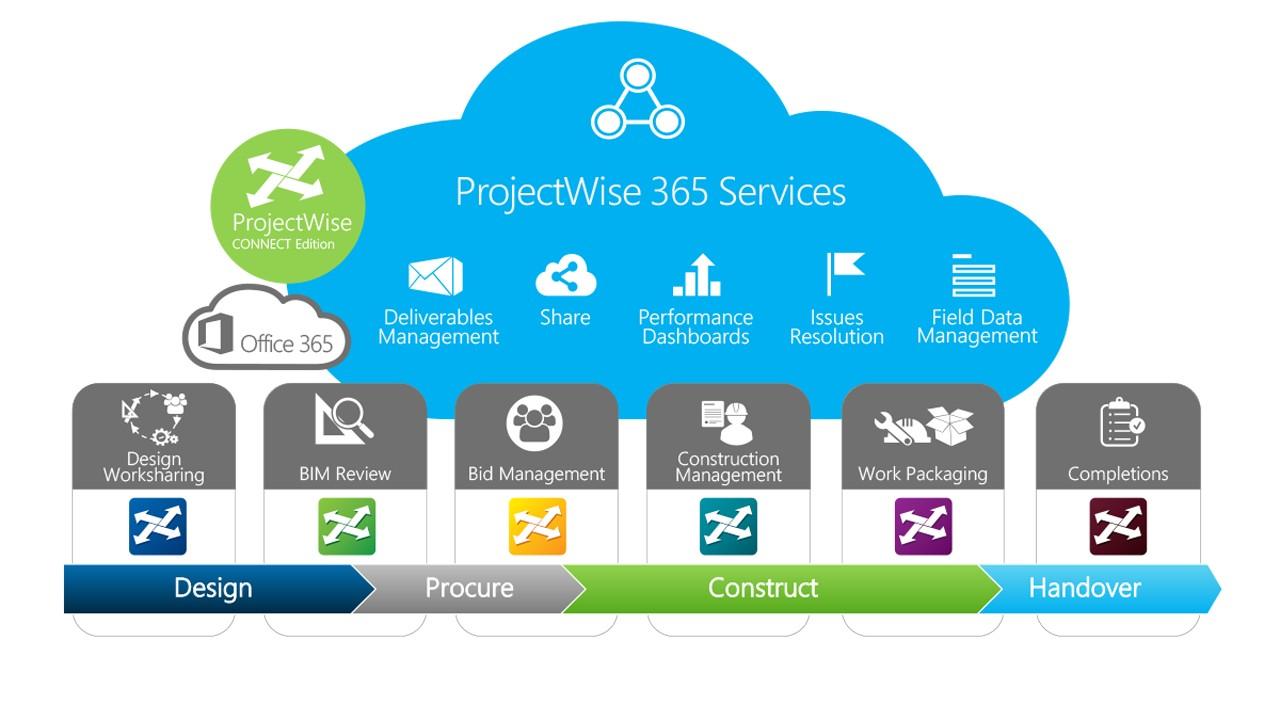
Create desktop shortcut to ProjectWise location
How to pin a channel, then hide a Team
Deliverables Management
Deliverables Management is a ProjectWise-Integrated utility that allows WSB teams to transfer project documents in a controlled manner without needing to remove the documents from ProjectWise. Managers and Team members can build deliverable packages directly from their project folder. The tool allows for the automatic creation of cover letters, application of relevant metadata, and a system for receipt acknowledgement and responses. Most clients or consulting partners who use ProjectWise already have access to this tool, allowing WSB to seamlessly transfer project information to external ProjectWise data sources.
By: Michael Skoviera and Brian Glaser
BENTLEY NEWS AND UPDATES
Important Announcements!
In general, important announcements will be posted to the WSB-UG-Bentley > General page.
Licensing Costs: Bentley charges us for the consumption of licenses on a per day basis for most of our design software. Some daily costs are high, $100.92/day, others not horrible.
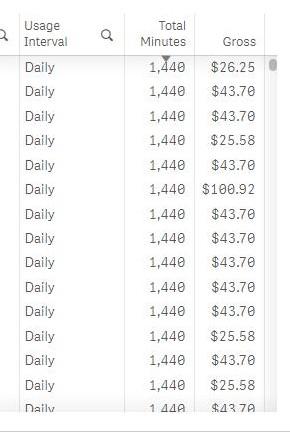
If machines are left on overnight and it runs into the weekend, we’re getting charged for Saturday and Sunday usage.
Take away: Close the program at the end of the day!
Tips!
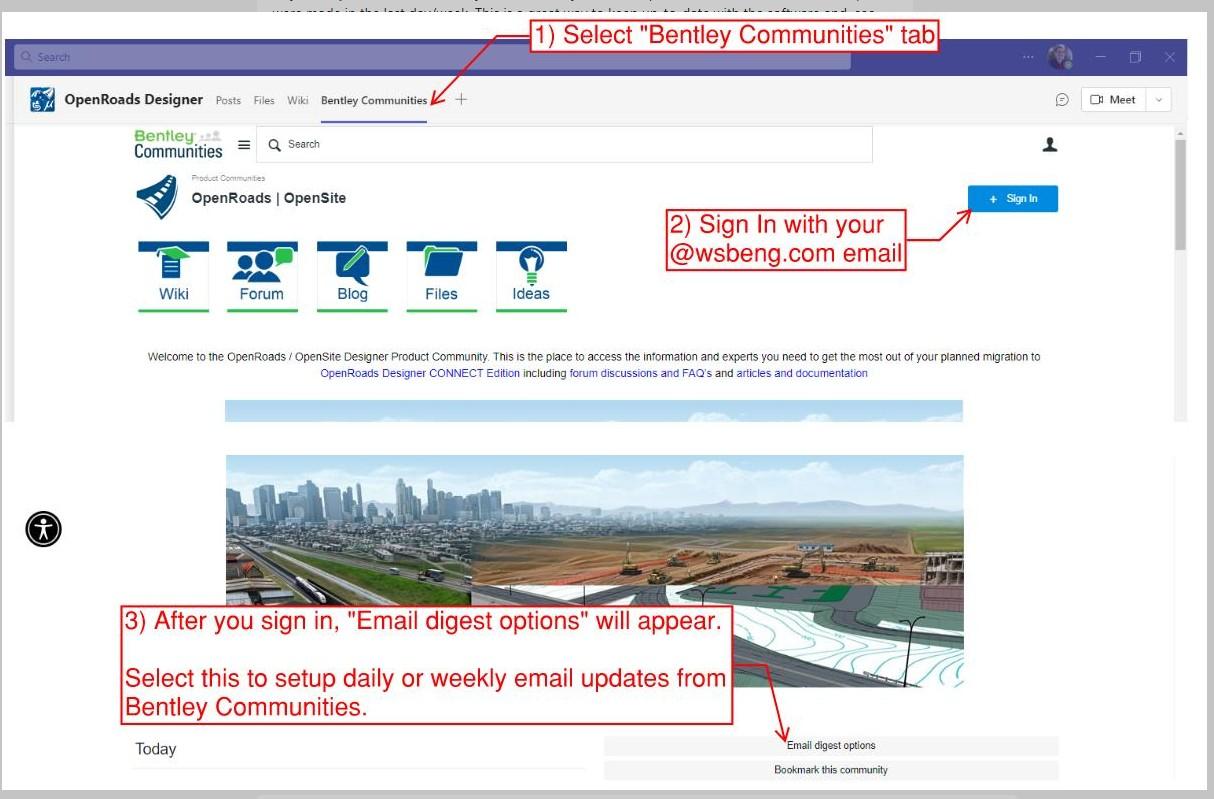
Daily/Weekly Digest emails
In the Bentley Communities you can setup automated emails to see which posts were made in the last day/week. This is a great way to keep up-to-date with the software and see what issues other users are facing.
 By: Michael Skoviera and Jennifer Mullins
BENTLEY NEWS AND UPDATES
By: Jennifer Mullins
DID YOU KNOW!
Bentley View is a FREE cad viewing software.

If you occasionally access cad files but are not actually doing work in them, utilize Bentley View. Bentley view will open DGN and DWG. Contact IT Help Desk for installing this software!
AUTODESK TECHNOLOGY MANAGEMENT BULLETIN


We have gone through a lot of change and growth over the last couple of years in the Autodesk technology group. We have seen upgrades in Autodesk software from 2020 to 2022. We have seen updates in Citrix, to upgrades in local laptops and the addition of ProjectWise. We have seen changes in CAD Standards to changes in training platforms. These are just the beginning of the change and growth we will continue to see at WSB in our technology groups. Socrates said, “The secret of change is to focus all of your energy, not on fighting the old, but on building the new.” That is what we will continue to do, build the new, with our upgrades to Autodesk 2024 platforms, the introduction of Autodesk Construction Cloud, and continual updates to CAD Standards and workflows, as well as a unified CAD Services Group between Bentley and Autodesk developing a unified WSB Standard.
But all these changes pale in comparison to the greatest change we have seen, building a solid team. In the last year we have brought in Matt Adams as CAD Manager from Kiewit, Dan Lench Technical Lead Land Development from Walter P Moore. Promoted Dan Horejsi to Technical Lead in Municipal and promoted Justin Sepanski to Technical Lead in Renewables. As well as Jason Kreger’s return to WSB as Technical Lead in Renewables. We have assembled an exceptional team to support our design and technical teams in technical support, mentoring, and building the new that will keep WSB as a technical leader in our industry. I am incredibly proud of this team and their efforts to build what is next in infrastructure. We are also excited for the Technical Leads and CAD Managers of EST to be joining in the efforts of supporting and developing technology at WSB.
We understand that change can be hard, but WSB has an exceptional technology team in Bentley, Autodesk and IT, here to support this growth and change that will accomplish amazing things in the coming years.
 By: David E. Neill
BENTLEY TECHNOLOGY MANAGEMENT BULLETIN

Hi Team!
My first three months here at WSB have been a whirl-wind of activity and discovery; the “to-do” list continues to grow.

We have been evaluating our practices across all groups; identifying issues, implementing scalable practices that work for multiple design technologies, and making signifant changes to critical path items to fully embrace the digital workflows. We are still in the fine tuning stage, more to come in the near future!
The change that you’ll see first is the standardization of our Microsoft Team and the intended use for it.
Microsoft Team – WSB-UG-Bentley and WSB-UG-Autodesk
This will be the first level of support for users. This Team has channels for each software and is monitored by the Digital Application Specialists (DAS) and myself so that we can answer or elevate the question to the appropriate resourses such as IT or Bentley. It is always encouraged to post questions and share tips/tricks for other users to learn from.
We will be having monthly 15-30 min. meetings for all Bentley Users to join. We will cover major updates, items to be on the lookout for, share best practices, or show the progress of initiatives. This is intended to start building a system of collaboration across all groups and teams.
I’m happy to hear ideas and suggestions to make our Bentley Team function more efficiently.
By: Jennifer Mullins
Controlling what is displayed and symbology overrides on sheets.
To turn off levels, set overrides and change symbology on sheets you will need to go into the design model space defined below. Once in this model space adjust display as needed and save settings before exiting.
Plan view - 2D default Design model space in View 1
Profile view - Go into a profile drawing model space and open the reference dialog, select the AttachedLongSection reference then right click and select exchange. Once in the AttachedLongSection View 1 make changes .
Cross Section view - 3D default Design model space in View 1
Drawing model reference files need to have Synchronize View: Settings From Design Model.

DIGITAL APPLICATION SPECIALIST CORNER
Video explaining how to control the view of cross sections when changes are made to the 3D model space. All changes to what is displayed in cross sections must be done in the 3D model space in View 1.
Video explaining how to modify the Right Click View menu to add a Plan\3D for XS option. (Admin tip)
By: Mike Molitor
Everyone in the company plays an important role in the Project lifecycle. The role of the Technical Lead is like that of a tree trunk in the water cycle. We are the connection between CAD Management and the workforce that supports a Project.

Knowledge transfer between a project workforce and CAD management (CAD MGMT) often passes through the Tech Lead. We ensure that teams follow the standards and vision of the company and CAD MGMT and share any friction points that arise during production. We are bound by the standards set forth by CAD MGMT but also convey design challenges and suggestions that drive the standards.
We are subject matter experts (SMEs) in the execution of design within the constraints of the software we use. We assist in piloting new software, developing workflows, and assisting with tasks related to the upgrade paths for new versions.
Technical Leads are power users who possess the desire, curiosity, and experience to address challenges in all areas of a project’s scope of work. We conduct model reviews and mentor the workforce. We identify issues that affect planning and production. Tech Leads work alongside the Production/Design leads to ensure that projects are delivered on time while having the most confidence available in the model and plans. We work on projects with different teams simultaneously, collaborating with each other and CAD MGMT for support.
TECHNICAL LEAD’S CORNER
By: Daniel Lench
As an introduction to the new monthly newsletter and as a Technical Lead in the Land Development department let me share one of my favorite tips and tricks.

Know and use your network!
I encourage each of you to know who your Tech Lead is and to reach out to them to schedule a quick meeting. Engage them to learn how they can support you and your team. Let them know the friction points in your daily CAD usage. Reach out to your Tech Lead instead of YouTube. Online learning has its place, and your Tech Lead can help direct you toward relevant materials but too much time is wasted searching for solutions when the whole picture is not in view. I mentioned above that we help ensure the vision of the company is on track, please help us to do this by helping you. We look forward to talking with you!
TECHNICAL LEAD’S CORNER
By: Daniel Lench



FOLLOW US