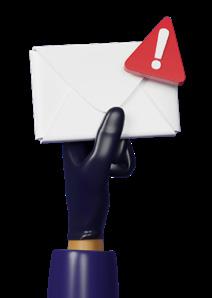
You’re not imagining it. Scam emails are getting harder to spot.
Phishing attacks are becoming more convincing, more targeted, and more frequent.
Let’s rewind a moment… Phishing is when criminals pretend to be a company you trust and try to trick you into clicking a link, opening an attachment, or logging in to a fake website.
Their goal is usually to steal passwords, money, or access to your systems.
The reason it works so well is simple: It relies on familiarity and distraction.
Last year, the company most often impersonated by scammers was Microsoft.
That’s not because Microsoft has done anything wrong, but because so many businesses rely on its email, files, and cloud services. One stolen Microsoft login can open the door to email accounts, documents, and even financial data.
Close behind were Facebook and Roblox, with other familiar names like Amazon, Google, and PayPal also commonly abused.
Security researchers noticed a big spike in phishing towards the end of last year. That makes sense. People are busy, inboxes are
full, and there’s a lot going on with shopping, renewals, year-end tasks, and even job hunting in January.
Scammers know this and time their attacks carefully. What makes things more worrying is how realistic these messages have become. Criminals now use AI to create fake login pages and “security alerts” that look almost identical to the real thing.
Some attacks don’t just steal your password, but also grab the extra security codes you use to log in, allowing attackers straight through the front door.
So how do you stay safe?
The most important habit is to slow down. Any email or text that claims there’s an urgent problem with an account should immediately raise suspicion.
Instead of clicking, open your browser and go directly to the company’s website yourself to check. If something feels off, it probably is.
Extra protection also matters. Using multi-factor authentication, which is a second check like a code sent to your phone, can stop criminals even if they get your password.
Keeping devices protected with up-to-date security software and making sure your team knows what phishing looks like can make a huge difference.
Phishing isn’t going away. But with the right awareness and a few sensible safeguards, it doesn’t have to catch you out.
DID YOU KNOW... a clever domain name may cost you?
Buying a clever domain name can look like an easy way to make money, but it can also go badly wrong. A man in the US bought Lambo.com for $10,000 (around £7,400) and gradually listed it for tens of millions of dollars, hoping to cash in on the popularity of the Lamborghini name.
The car manufacturer disagreed, took legal action, and won. The courts ruled that he was acting in bad faith and trying to profit from an established brand. In the end, he lost the domain and was left with legal costs too.
TechFacts
There’s a Microsoft Excel World Championship. Every year, Excel powerusers from around the world compete to solve fiendishly tricky spreadsheet challenges as fast as possible. Last year, one competitor beat 23 others in the final to take home a $5,000 (around £3,700) cash prize… and a gloriously, ridiculously oversized championship belt. 1
A notorious cyber crime group made headlines recently by claiming they’d broken into a cyber security company… only to discover they’d walked straight into a digital trap called a “honeypot”, filled with fake data designed to catch attackers. Their activity was logged, their identities were partially uncovered, and law enforcement was alerted. The hunters quickly became the hunted.
Scientists have built robots smaller than a grain of salt. These microscopic robots can move through liquids, sense changes around them, and make simple decisions, all powered by light. They don’t have motors or tiny legs. Instead, they use electrical forces to glide through fluid. Because they’re so small and cheap to produce, they could one day help with medical research, diagnostics, or building tiny devices at a scale that was previously impossible. 2 3
Windows 11 will get faster, friendlier, and smarter
Microsoft is working on a big upgrade to Windows 11. It will make new laptops faster, more efficient, and better at using AI, with longer battery life too. They’re also improving everyday features, like a cleaner dark mode and a taskbar calendar that shows your upcoming meetings.
And in Microsoft Teams, new updates will make hybrid working easier by automatically recognising when you’re in the office.
INSPIRATIONAL QUOTE OF THE MONTH
“A good leader inspires people to have confidence in the leader; a great leader inspires people to have confidence in themselves.”
Eleanor Roosevelt, former First Lady of the United States.
JULIAN’S NEWS UPDATE MICROSOFT
With spring just on the horizon, it finally feels like we’re turning a corner after a long winter - longer days, more daylight, and a renewed sense of momentum for the months ahead. This month is also a big one for us, as we celebrate 15 years of Woodstock IT - a genuinely mind-blowing milestone when we look back at how far the business has come. From our early days of break-fix support to the managed services and cyber security focus we have today, it’s been quite a journey. As always, you can scan the QR code to book a free health check!
We also recently celebrated a personal milestone for the team, with Joggie tying the knot in South Africa earlier this year. A great reminder that it’s the people, as much as the technology, that make all of this possible. Cheers, Julian
Agent Mode makes Excel easier to use
Microsoft has added a powerful new feature to Excel called Agent Mode. It changes how Copilot works with your spreadsheets. Instead of answering questions like a chatbot, Agent Mode can carry out multi-step tasks for you inside Excel itself. That means it can analyse large sets of data, fix broken formulas, create new ones, and even build charts that automatically update as your data changes.
You can see and check each step it takes, so nothing happens behind the scenes without you knowing.
Agent Mode is available now in Microsoft Excel on the web for businesses using Microsoft 365 Copilot, with Windows and Mac versions coming soon.
Passwords protect people, not just data
Machines start up. Systems talk to each other. Processes run automatically, hour after hour, day after day. For many businesses, this technology is the business.
Behind that sits something called Operational Technology, or OT.
Unlike office IT systems such as email or file storage, OT controls the physical world. It’s the software and hardware that tells machines what to do, when to do it, and how safely to do it.
Production lines, control panels, monitoring systems and sensors all fall into this category.
The uncomfortable truth is that OT security often hasn’t evolved at the same pace as modern cyber threats have.
Many of these systems were installed years ago, designed to be reliable and safe rather than secure. And one of the biggest weak spots is still surprisingly simple: Passwords.
In OT environments, it’s common to see shared logins, passwords written down, or credentials that haven’t changed in years. That might have worked when
A criminal who gains access to an office email account or laptop can sometimes move across into operational systems, especially where passwords are reused. This matters because OT attacks don’t only affect data. They can stop production, damage equipment, or create safety risks for staff.
The good news is that strengthening password security is one of the most effective steps you can take…
• Longer passwords are dramatically harder to crack than short ones
• Using unique passwords prevents attackers from hopping between systems if one account is compromised
• Adding multi-factor authentication, which asks for a second proof like a code on a phone, can stop intruders even if a password is stolen
OT systems are designed to be dependable and invisible when everything is working properly. That can make security easy to overlook. But the systems that control physical processes deserve the same care and attention as office IT.
Getting password policies right isn’t glamorous, but it remains one of the simplest ways to protect operations, people, and the continuity of the business.
Still work with a lot of paper?
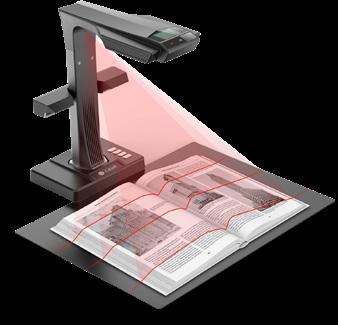
Sometimes it’s unavoidable, so you may find the CZUR ET24 Pro is useful.
It’s a dedicated book scanner designed to quickly turn physical pages into clean, readable digital files. Even when those pages are curved, bound, or awkward to lay flat (which is something phone apps and flatbed scanners struggle
with). That makes it ideal for scanning training manuals, contracts, reference books, archived documents, or signed paperwork that can’t be taken apart without damage.
When you need accurate digital records, searchable documents, or a simple way to preserve important paper materials, it’s a practical timesaver that does one job very well. £580 from Amazon.
Q: How often should we review our IT setup?
A: At least once a year. Your business changes, and your technology should change with it.
Q: How soon should we remove old employee accounts?
A: As soon as someone leaves the business. Unused accounts are easy entry points for attackers. If someone doesn’t work for you anymore, their access shouldn’t exist.
Q: Can cyber insurance replace good security?
A: No. Insurance helps with recovery, not prevention. Insurers expect security basics (at the very least) to be in place.