10 WhatsApp Marketing Automation Workflows That Boost Revenue
Why WhatsApp Is Now the #1 Revenue Channel in 2026
WhatsApp has over 3 billion monthly active users globally. But more importantly, it has something no other channel can claim: a 98% open rate. While email campaigns fight for inbox space and social media algorithms throttle organic reach, WhatsApp messages land directly — and get read within minutes.
Businesses that implement WhatsApp marketing automation workflows are not just saving time. They are generating measurable, attributable revenue. According to recent industry data:
What Is WhatsApp Marketing Automation? (And Why It Matters)
WhatsApp marketing automation is the use of software — connected to the WhatsApp Business API — to send, manage, and respond to WhatsApp messages at scale without manual intervention. Instead of replying to every customer one-by-one, automation handles entire conversation flows, campaign sequences, and follow-ups automatically.
Think of it as a system that works 24/7 to move customers through your sales funnel — qualifying leads, sending the right message at the right time, recovering abandoned carts, and re-engaging dormant contacts — all without your team lifting a finger.
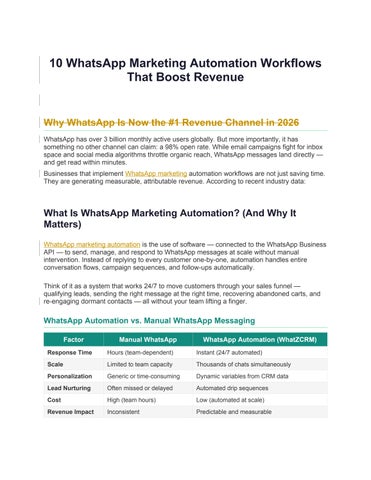
WhatsApp Automation vs. Manual WhatsApp Messaging
(24/7 automated)
Scale Limited to team capacity Thousands of chats simultaneously
Personalization Generic or time-consuming
variables from CRM data
Lead Nurturing Often missed or delayed Automated drip sequences
Cost High (team hours) Low (automated at scale)
Revenue Impact Inconsistent
and measurable
According to industry research, businesses using automated WhatsApp sequences convert existing contacts at 60–70% higher rates than those relying on one-time broadcasts. The 10 workflows below are the exact automations driving that performance.
10 WhatsApp Marketing Automation Workflows That Boost Revenue
Each workflow below includes the trigger, the step-by-step automation flow, and the revenue impact. All workflows can be built inside WhatZCRM using the visual no-code automation builder.
Workflow 1: WhatsApp Lead Capture & Instant Qualification
This is the foundation of every WhatsApp marketing automation strategy. The moment a prospect shows interest — via a Facebook ad, landing page, or QR code — an automated flow captures their details and qualifies them in real time.
Workflow 1: Lead Capture & Instant Qualification
Trigger: User clicks Click-to-WhatsApp ad or scans a QR code ⚡ Steps:
1. WhatZCRM sends an instant welcome message: "Hi [Name]! Thanks for reaching out to [Company]. How can I help you today?"
2. Chatbot presents quick-reply buttons: Product Inquiry / Pricing / Book Demo / Other
3. Based on selection, chatbot asks 2–3 qualifying questions (budget, timeline, requirement)
4. Lead is automatically scored and tagged in WhatZCRM CRM (Hot / Warm / Cold)
5. Hot leads are instantly routed to the best available sales agent with full context
6. Warm leads enter a 5-day WhatsApp drip nurture sequence
7. All data is synced to the CRM pipeline — zero manual entry
✅ Revenue Impact: 3× faster lead response time. Up to 40% higher conversion from ad spend. Zero cold leads slipping through.
Workflow 2: Abandoned Cart Recovery Sequence
This is arguably the highest-ROI WhatsApp automation workflow for e-commerce businesses. On average, 70% of online shoppers abandon their cart before completing purchase. A welltimed WhatsApp recovery sequence can recapture 30–40% of that lost revenue.
Workflow 2: Abandoned Cart Recovery Sequence
Trigger: Customer adds items to cart but does not complete checkout ⚡ (Shopify/WooCommerce integration)
Steps:
1. After 30 minutes: WhatZCRM sends Message 1 — "Hey [Name], you left something behind! Your cart is saved: [Cart Link]. Complete your order before it sells out!"
2. After 4 hours (if no purchase): Message 2 — Personalized product image + price reminder + urgency cue ("Only 3 left in stock!")
3. After 24 hours (if still no purchase): Message 3 — Exclusive 10% discount code: "Here's a special offer just for you: [CODE]. Valid for 24 hours."
4. Purchase detected → Automation stops, order confirmation workflow triggers instead
5. No purchase after 48 hours → Lead tagged for re-engagement campaign next week
✅ Revenue Impact: 30–40% cart recovery rate. Average 12% uplift in monthly e-commerce revenue. One WhatZCRM customer recovered 40% of abandoned carts using this exact workflow.
Workflow 3: Post-Purchase Upsell & Cross-Sell Workflow
The easiest sale is to someone who just bought from you. This workflow uses purchase data from your CRM to trigger a personalized upsell sequence at exactly the right moment.
Workflow 3: Post-Purchase Upsell & Cross-Sell
Purchase confirmed in Shopify / WooCommerce / CRM
Steps:
1. Immediately: Order confirmation message sent via WhatsApp with order summary and tracking link
2. Day 3: Personalized upsell message based on product purchased (e.g., phone case buyer → screen protector offer)
3. Day 7: Cross-sell message — "Customers who bought [Product A] also love [Product B] — here's 15% off"
4. Day 14: Review request — "How was your [Product]? Leave a review and get 10% off your next order"
5. Day 30: Re-engagement — "It's been 30 days! Ready to reorder? Your favourites are waiting"
✅ Revenue Impact: Up to 30% increase in average order value (AOV). Customer LTV increases by an average of 25% when post-purchase WhatsApp sequences are active.
Workflow 4: WhatsApp Drip Campaign for Lead Nurturing
Most leads are not ready to buy immediately. A WhatsApp drip campaign keeps your brand topof-mind and moves prospects through the funnel automatically — without your sales team doing manual follow-ups.
Workflow 4: WhatsApp Drip Nurture Campaign
New lead captured (via form, ad, or chatbot); tagged as Warm in CRM
Steps:
1. Day 1: Welcome message + free value (guide, checklist, or case study relevant to their interest)
2. Day 2: Educational message — "Did you know [key insight related to their pain point]?"
3. Day 4: Social proof — Customer success story or testimonial with results
4. Day 6: Feature spotlight — Show how WhatZCRM/your product directly solves their specific problem
5. Day 8: Soft CTA — "Book a free 20-minute demo. No pressure, just value."
6. Day 10: Final push — Limited-time offer or urgency-based CTA
7. No response after Day 10 → Move to re-engagement sequence after 30 days
✅ Revenue Impact: Automated drip campaigns convert leads at 60–70% higher rates than onetime broadcasts. Sales team closes deals faster because leads arrive pre-educated and prequalified.
Workflow 5: 24/7 AI Customer Support Automation
Every unanswered customer question is a potential lost sale. This workflow deploys an AI chatbot that handles the most common customer inquiries instantly — around the clock — and escalates to a human agent only when necessary.
Workflow 5: 24/7 AI Customer Support Chatbot
Customer sends any inbound WhatsApp message (keywords, FAQs, or free-text)
Steps:
1. AI chatbot detects intent from customer message using keyword matching + NLP
2. Common queries resolved instantly: order status, return policy, shipping timelines, product info, pricing
3. If unresolved: chatbot collects additional details and escalates to the right human agent with full conversation context
4. Human agent picks up conversation with complete history — no repetition required
5. After resolution: automated CSAT survey sent: "How did we do? Rate your experience 1–5"
6. Positive ratings trigger a referral request; negative ratings escalate to a manager
✅ Revenue Impact: 80% of common queries resolved without human involvement. Support team handles complex, high-value issues only. Average response time drops from hours to seconds.
✅ WhatZCRM AI Chatbot Builder
Build and deploy your customer support chatbot in minutes using WhatZCRM's no-code AI
Chatbot Builder. Set keyword triggers, dynamic responses, and human handoff rules — zero developer needed.
Workflow 6: WhatsApp Broadcast Campaign for Promotions & Launches
When you have a time-sensitive offer — a product launch, a flash sale, or a seasonal promotion — a targeted WhatsApp broadcast campaign reaches your opted-in audience with nearguaranteed visibility. This is WhatsApp's most direct revenue-generation workflow.
Workflow 6: Segmented Broadcast Campaign
Promotional event scheduled (sale, product launch, seasonal offer)
Steps:
1. Create a personalized broadcast message template: "Hi [Name], we have something special for you — [Offer]"
2. Schedule broadcast for peak engagement time (research shows 10–11 am and 7–9 pm perform best)
3. Include a single clear CTA: shop now button, coupon code, or direct checkout link
4. Track delivery rate, open rate, and click-through rate in the WhatZCRM Analytics Dashboard
5. Non-openers receive a follow-up broadcast 24 hours later with a different angle
6. Responders who did not convert enter an automated cart recovery sequence
7.
✅ Revenue Impact: Businesses using segmented WhatsApp broadcasts report 35–40% higher repeat engagement than email-only programs. One broadcast to a 5,000-person list with 60% CTR equals 3,000 direct sales conversations.
Workflow 7: Re-Engagement Campaign for Dormant Contacts
Every database has a graveyard of contacts who went silent — past customers, old leads, and unresponsive prospects. A WhatsApp re-engagement workflow brings them back to life and recovers revenue that would otherwise be permanently lost.
Workflow 7: Dormant Contact Re-Engagement
Trigger: Contact has not responded or purchased in 60+ days (automated tag in WhatZCRM ⚡ CRM)
Steps:
8. Message 1 — Curiosity trigger: "[Name], we miss you! Something big is coming and you're on our exclusive early-access list"
9. If opened but no response after 48 hours: Message 2 — Personalized offer based on their last purchase/interest
10. If clicked/responded: Move contact to active nurture sequence; remove dormant tag
11. If no response: Message 3 — Final re-engagement offer with clear expiry: "Your 20% off expires in 24 hours"
12. No response after Message 3 → Contact tagged as Inactive; removed from regular broadcasts to protect sender reputation
✅ Revenue Impact: Reactivating even 10% of a 1,000-person dormant list at a $150 AOV = $15,000 in recovered revenue per campaign. Protecting sender reputation by cleaning unresponsive contacts also improves deliverability for all future campaigns.
Workflow 8: Appointment Booking & Reminder Automation
For service businesses — clinics, salons, real estate agencies, coaching businesses, and more — no-shows are a direct hit to revenue. This WhatsApp automation workflow eliminates noshows and fills your calendar automatically.
Workflow 8: Appointment Booking & Reminder Workflow
Trigger: Customer requests appointment via WhatsApp, website form, or Facebook ad
Steps:
1. Chatbot presents available time slots dynamically from your calendar integration
2. Customer selects slot → Booking confirmed automatically with WhatsApp confirmation message
3. Reminder 1: 24 hours before appointment — "Your appointment with [Company] is tomorrow at [Time]. Reply CONFIRM or RESCHEDULE"
4. Reminder 2: 2 hours before appointment — "See you in 2 hours, [Name]! Here's the address/link: [Location]"
5. Customer confirms → Marked as confirmed in WhatZCRM CRM
6. Customer requests reschedule → Chatbot presents new available slots automatically
7. Post-appointment: Automated follow-up sent for review, referral, or upsell booking
✅ Revenue Impact: Up to 80% reduction in no-shows. Service businesses report 25–35% increase in appointment volume when self-booking is available via WhatsApp 24/7.
Workflow 9: Referral & Loyalty Program Automation
Word-of-mouth is the highest-converting acquisition channel. This workflow automates referral requests and loyalty rewards through WhatsApp — making it frictionless for happy customers to bring in new paying customers.
Workflow 9: Referral & Loyalty Program Workflow
Trigger: Customer completes a purchase or leaves a 4–5 star review
Steps:
1. Automated thank-you message sent with personalized referral link: "You're amazing, [Name]! Share this link with a friend — they get 15% off, and you earn store credit!"
2. Referral tracked in WhatZCRM CRM — when friend makes a purchase, referrer
automatically receives credit notification
3. Loyalty milestones triggered: After 3rd purchase → "You've hit Gold Status! Here's your exclusive member reward"
4. Monthly loyalty digest: Personalized WhatsApp message showing points balance, exclusive member offers
5. Birthday automation: Automated birthday message + special offer sent 3 days before birthday
6. Referral leaderboard resets monthly — top referrers receive bonus rewards automatically
✅ Revenue Impact: Referred customers have a 16% higher lifetime value than non-referred customers. Automated loyalty programs increase repeat purchase rate by an average of 27%.
Workflow 10: Sales Pipeline Follow-Up Automation
This workflow ensures that no deal in your sales pipeline ever goes cold due to a missed followup. It integrates WhatZCRM's CRM pipeline directly with WhatsApp automation — so the right message goes to the right prospect at exactly the right stage of the sales process.
Workflow 10: Sales Pipeline Follow-Up Automation
Trigger: Deal stage changes in WhatZCRM CRM pipeline (e.g., Proposal Sent, Demo
Completed, Quote Shared)
Steps:
1. Proposal Sent → Automated WhatsApp follow-up after 24 hours: "Hi [Name], just checking in on the proposal we sent yesterday. Any questions I can answer?"
2. Demo Completed → Follow-up within 2 hours: "Great speaking with you today! Here's a quick summary of what we covered: [Summary]. Ready for the next step?"
3. No response after 3 days → Automated nudge with a different angle: social proof, case study, or limited-time offer
4. Deal stalled for 7+ days → Notification sent to sales manager for manual review
5. Deal Won → Automatically triggers onboarding workflow + upsell sequence
6. Deal Lost → Automatically triggers a re-engagement sequence 30 days later
7. All WhatsApp interactions logged back to the CRM deal record automatically
✅ Revenue Impact: Sales teams using WhatsApp pipeline automation close deals 3× faster and report 45% fewer deals lost to lack of follow-up. Zero cold leads. Zero missed follow-ups.
How to Set Up WhatsApp Marketing Automation with
Getting started with WhatsApp automation does not require a developer, a long implementation project, or a technical team. WhatZCRM is built for businesses that need to move fast. Here's how to go from zero to your first live workflow in under 30 minutes:
Step 1 Connect your WhatsApp Business API number to WhatZCRM (guided setup — takes 5 minutes)
Step 2 Import or sync your existing contacts — from Shopify, Facebook Ads, Google Ads, or CSV
Step 3
Choose a workflow template from WhatZCRM's library (all 10 workflows above are available as pre-built templates)
Step 4 Customize the messages, triggers, and conditions using the no-code visual builder
Step 5 Test the workflow on your own number to review the experience
Step 6 Activate and monitor performance in the Analytics Dashboard
✅ Start Free Today
WhatZCRM offers a free trial — no credit card required. Connect your WhatsApp number, launch your first automation workflow, and start seeing results before you spend a penny. Start your free trial at whatzcrm.com
Conclusion
WhatsApp is no longer just a messaging app. For businesses that use it strategically — with the right automation workflows in place — it is a full-stack revenue channel. With a 98% open rate, near-instant engagement, and the ability to personalise at scale, WhatsApp marketing automation outperforms every other marketing channel in 2026.
The 10 workflows covered in this guide — from lead capture to loyalty automation — represent the complete customer journey on WhatsApp. Each one is proven, implementable today, and available natively inside WhatZCRM.
The businesses winning on WhatsApp are not the ones with the largest budgets. They are the ones that automated first.
Frequently Asked Questions
What is WhatsApp marketing automation?
WhatsApp marketing automation is the use of software — connected to the WhatsApp Business API — to send, manage, and respond to WhatsApp messages at scale automatically. Automation workflows handle tasks like lead qualification, abandoned cart recovery, follow-ups, and customer support without manual intervention.
How much does WhatsApp marketing automation cost?
Costs vary by platform and message volume. WhatZCRM offers a free trial, with paid plans designed for businesses of all sizes — from startups sending a few hundred messages per week to enterprises managing hundreds of thousands of conversations per month. The ROI from automation (recovered carts, increased conversions, reduced support costs) far exceeds the platform cost in most cases.
Can small businesses use WhatsApp automation?
Yes. WhatZCRM is designed for businesses of all sizes. The no-code automation builder means you do not need a technical team to build and launch automation workflows. Small businesses typically start with 2–3 high-impact workflows (lead capture, abandoned cart, and customer support) before expanding to the full suite.
Which WhatsApp automation workflow gives the best ROI?
The abandoned cart recovery workflow consistently delivers the highest immediate ROI for ecommerce businesses, with documented recovery rates of 30–40%. For service businesses, the appointment reminder workflow (reducing no-shows by up to 80%) often has the biggest impact on revenue. For B2B businesses, the sales pipeline follow-up automation drives the most measurable deal closure improvement.
Is WhatsApp marketing automation legal and compliant?
Yes — when done correctly. Businesses must use the official WhatsApp Business API (not unofficial tools), ensure all contacts have opted in to receive WhatsApp messages, and follow WhatsApp's messaging policy guidelines. WhatZCRM is built on top of the official Metaapproved WhatsApp Business API and includes opt-in management tools to ensure full compliance.
What is the difference between WhatsApp automation and WhatsApp broadcast?
WhatsApp broadcast is a one-to-many message sent to a list of opted-in contacts at a specific time. WhatsApp automation is a trigger-based system that sends personalised messages based on specific customer actions (such as abandoning a cart, completing a purchase, or signing up). Automation is more dynamic, more personalised, and typically delivers higher conversion rates than broadcast alone.