OAKPARK.COM | RIVERFOREST.COM
CONNECTS
Wednesday Journal, January 29, 2020
B1
A YEAR-LONG SERIES FOCUSING ON COMMUNICATING OUR PRIORITIES FOR CHILDREN
Tech connects, levels learning differences With a device in every backpack, teachers extol new options BY LACEY SIKORA
Contributing Reporter
T
ech in the classroom has developed rapidly in just a generation. Parents of local students might recall taking typing classes in high school or visiting the computer lab while in college. Today, it’s a given that tech is personalized and in every student’s backpack. Oak Park and River Forest school districts report the use of tablets and technology in the school environment goes hand in hand with increased security measures and increased learning potential. Oak Park and River Forest High School is in its fourth year of using Chromebooks on a one-to-one basis, and Chris Thieme, senior director of educational technology, says there are many benefits to the use of technology in the classroom. About the general use of tech in the school he says, “The educational field is reflecting what society is doing. Collaboration and creativity and being used to working in a digital environment are all key for the work force and for life at a university.” After piloting tablets and Chromebooks, Thieme says Chromebooks were determined to be best suited to the high school environment and the ways the curriculum is presented to high school students. Currently, the school uses a mix of traditional textbooks and books provided on the Chromebook platform, which Thieme says is great for allowing teachers flexibility in the classroom. One benefit of the Chromebook is its accessibility to the cloud. Thieme says this feature is key in making sure materials are always available even if something happens to an individual device. OPRF works to incorporate good
digital citizenship efforts through the Technology Learning Center, and through librarians who work individually with classes to help students learn to recognize and use appropriate sources. Thieme says it is a balancing act to help teens use tech responsibly. He says, “There are platforms that have a dual purpose. For instance, You Tube can be used for entertainment and education.” Basic security measures are employed, and firewall and protective software goes with the devices when they leave campus with students. On campus, teachers can use software to
See DEVICES on page B4
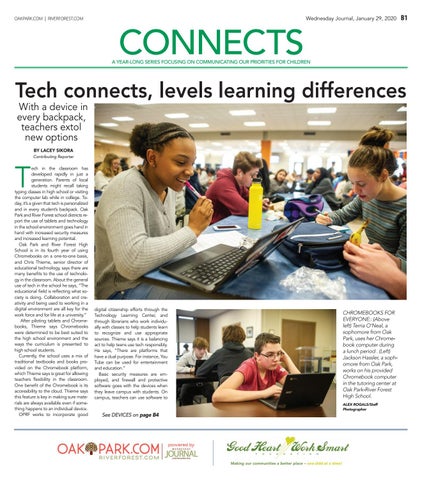
CHROMEBOOKS FOR EVERYONE:: (Above left) Terria O’Neal, a sophomore from Oak Park, uses her Chromebook computer during a lunch period . (Left) Jackson Hassler, a sophomore from Oak Park, works on his provided Chromebook computer in the tutoring center at Oak Park-River Forest High School. ALEX ROGALS/Staff Photographer
B2
Wednesday Journal, January 29, 2020
OAKPARK.COM | RIVERFOREST.COM
Separating students from cell phones
Vague policies no more. While OPRF plans, D90 and 97 go ‘Away for the Day’ BY LACEY SIKORA
Contributing Reporter
O
nce an item solely for adults with high-powered jobs or deep pockets, cell phones have become ubiquitous across all of society in the past 20 years. As the average age of acquisition has dropped, schools are grappling with a new world, and local districts have had to develop policies to make sure that cell phones aren’t distracting students from the real purpose of the school day. At District 90, the elementary and middle schools in River Forest, Tina Steketee, assistant principal at Roosevelt Middle School, says the cell phone policy is crystal clear: students can have cell phones at school, but they must be kept in their lockers in the off position. “Cell phones,” she says, “are not used for educational content.” The consequences for using a cell phone during the school day are also concrete. Students receive discipline infractions if caught with their phones. Steketee says the first instance might result in a warning, but after that, a detention is issued and for a further infraction, parents will be contacted. She says parents and students accept the policy. Students who need to contact parents know they can use the phones in the office during the school day, and Steketee says that parents know to call the office if they need to get in touch with a child during the day. As with any issue involving the junior high set, she says occasionally rules are broken, stating “sometimes they try to sneak their phones at lunch,” but adds “they know they are not to power them up until they leave school. Home room at the end of the day is not the time to use your phone.” After receiving a lot of feedback from parents, District 97, Oak Park’s elementary and middle schools, implemented a similar program called Away for the Day at Gwendolyn Brooks and Percy Julian Middle Schools this fall. Stacie Klein, culture and climate assistant principal at Brooks, says the phones are meant to be off and in lockers. “Research has shown that if a phone is on their person or in a backpack or close by, they are distracted by it. You have to remove it from the space.” She says parents, including medical professionals, proposed the district follow the national Away for the Day program. The previous policy left cell phone usage in the classroom up to the discretion of the teacher, which Klein says could result in power struggles when different teachers had different policies. Under the district’s previous policy, cell phones were not to be used in common spaces such as locker rooms or the cafeteria, and Klein says that remains the case. Students know that if they are caught with a cell phone during the school day, it will be taken to the office where they can pick it up at the end
ALEX ROGALS/Staff Photographer
CONNECTED AND NOT CONNECTING AT LUNCH: Students are seen checking their phones and using their Chromebook computers during a lunch period n the cafeteria at Oak Park-River Forest High School. of the school day. If caught with a phone three times, students have to turn their phones into the office at the start of the school day or leave it at home for the remainder of the trimester. After four months, compliance is not 100 percent, but Klein says teachers are already seeing improvements. “Teachers are reporting that students are more engaged in the classroom and they are interacting more with each other out of the classroom in the cafeteria.” While the junior high schools have both created policies with clear rules and consequences, Oak Park and River Forest High School is at the early stages of creating new policies and procedures. Dan Wolman, an OPRF history teacher, is part of a recently formed committee made up of teachers, counselors, social workers, and administrators who are working to develop procedures to put in place in the fall of 2020. Wolman says the group is “looking to change the day-to-day expectations about phones in school.” He points to widely publicized incidents at the school last year involving pictures or messages air-dropped via cell phones during the school day and says not only was the cell phone the vehicle for those problems, but says those situations were inflamed by student use of cell phones in the aftermath. The committee is considering a wide range of research on teen life and cell phones, which Wolman says focuses a lot on the mental health
effects of cell phone use. The committee also surveyed parents and teachers about their thoughts. Wolman says the corresponding student survey which included questions about how phones are used at school, what the benefits are and when and where students use phones was eye-opening. “What the kids told us they were using their phones for often violated our codes of conduct -- things like sharing homework or taking videos in the locker room. It really showed their thoughts on what is acceptable if they were willing to share this in the survey. They don’t always even know what is acceptable.” The current cell phone policy at the high school leaves cell phone use in the classroom up to the teachers’ discretion. The handbook states that outside of the classroom, cell phones can be used in designated areas only, but Wolman says that part of the policy is currently not enforced. As part of its movement towards creating a policy, this fall, the committee rolled out an education campaign for parents and faculty, distributing information online and in pamphlets handed out at open houses and parent-teacher conferences. Wolman says the next step is to educate students, and make sure they know that the change in policy isn’t punitive or just about taking something away. “We’re really getting into the ‘why’ of why cell phones might not be great to use all day, says
Wolman, “I describe it as giving something back, giving a reduced dependency on screens.” This semester, the group is kicking off two pilot programs aimed at helping students experience time at school without their phones. The first is using a product designed by Yondr, frequently in use at concerts or comedy clubs, in which participants voluntarily put their cell phones in a pouch at the start of the event. The pouch locks and cannot be opened until the event is over. He said this pilot will take place on a limited basis in the Testing Center, where students take make up tests, and in the Tutoring Center. In the second pilot, Wolman and a group of roughly 20 other teachers will be participating in Away for the Day and are working on getting students to participate as well. Students will drop off their phones before first period, and they will be locked away safely until the end of the school day. Wolman says the pilot will run for three weeks and offer rewards to incentivize students to give it a try. Adults will participate, too, Wolman says because, “The truth is, when we write our policy, we need language about how adults are using phones too.” He says teachers are good participants, but students are the key. “A voice that’s missing right now are the students who can speak to what it feels like to have a school day without a phone.”
Wednesday Journal, January 29, 2020
OAKPARK.COM | RIVERFOREST.COM
B3
Dealing with the dark side of phones OPRF teachers get real about screen addiction and offer ways of dealing with it BY MICHAEL ROMAIN Contributing Reporter
“W
hen we talk about addiction, phones are not what first come to mind,” says Dan Wolman, an Oak Park and River Forest High School history teacher. “We often think of more socially unacceptable behaviors like drugs, alcohol or gambling. We may even give technology a pass. Why? Who knows?” Wolman sits on the high school’s Cell Phone Committee — an entity created last year to come up with some common sense regulations on cell phone usage at the high school. The high school’s newspaper, Trapeze, reported last month that at OPRF, “there is a lenient and rarely enforced cell phone policy,” with expectations about phone usage varying from classroom to classroom. “Some teachers quickly send student’s phones straight to the dean, while others merely give a gentle reminder,” the Trapeze reported. Cell Phone Committee members like Wolman have been working to change that culture, but the first step toward cultural change is acknowledging reality. And the reality, Wolman said during a presentation he gave during a Parent University session in November, is that many OPRF students are suffering from addiction and their drug of choice is the cell phone. Wolman cited a range of researchers like Trevor Haynes, a researcher in the Department of Neurobiology at Harvard Medical School. “Platforms like Facebook, Snapchat and Instagram leverage the same neural circuitry used by slot machines and cocaine to keep us using their products as much as possible,” Haynes writes. According to a 2018 study by Pew Research, around 95 percent of teenagers report having a smartphone or access to a smartphone — a percentage that is roughly the same at OPRF, Haynes said, referencing a survey the committee conducted recently that generated roughly 1,100 student responses. Wolman cited other studies showing that 13to 18-year-olds in America spend an average of more than seven hours a day on screens, which doesn’t include time spent doing homework. “Informally, I like to ask my students to tell me what kind of screen time they’re looking at each day and the numbers are astronomical,” he said. “Ten, 12, 13, 15 hours.” But all hope is not lost, said Wolman and his colleague, Meghan Cahill, an OPRF counselor who also sits on the Cell Phone Committee. Here are some tips that the educators provided for parents to help wean their children off of smartphones:
SCREEN TIME: Students check their phones during lunch while students check their cell phones during passing periods in the hallway near the cafeteria at Oak Park-River Forest High School. ALEX ROGALS/Staff Photographer
Utilize parental control apps
Introduce them to JOMO
Get a kSafe (or something similar)
Wolman said he and his colleagues asked 3,300 students at OPRF what it would take to get them to go “phone-free for three straight weeks of school.” “We thought maybe we’d get zero hits from 3,300 students, but they do respond to things,” he said. The most popular incentives were: Points to use at local restaurants/retailers (306 responses), free outside lunch (287), job references from OPRF faculty (265), free movie tickets (258) and free prom/homecoming tickets (248).
Cahill said that she utilizes a timed lock box that she puts her family’s smartphones in when they need to deprogram from the devices. Once the container is locked (for however many seconds, minutes, hours or days you set it to lock), it can’t be opened until the timer reaches zero. And there’s no code to open them prematurely. Although there are a variety of brands that play on the same theme, one of the most popular is the kSafe. This brand has a timer on the lids, which come in a bright assortment of colors.
Cahill said that she also utilizes a third-party app that allows her to limit her children’s screen time by logging them out of certain apps or shutting the phone down altogether. For instance, “Snapchat can be off while they’re at school.” “It took a solid two weeks to deal with either the box or the screen time limits set on their phones,” she said. “Like anything else, it’s habit-forming, but you can schedule everything.” Some of the more popular parental control apps include FamilyTime, Qustodio and Web Watcher (all three run on both Android and Apple smartphones).
B4
Wednesday Journal, January 29, 2020
OAKPARK.COM | RIVERFOREST.COM
DEVICES continued from page B1 monitor what their students are doing on their school-issued Chromebooks. When it comes to protecting the privacy of student data, Thieme says all apps and websites that collect student data are run through a rating system that alerts the school if there are any concerns before the apps are used. Social media sites are blocked at school, but Thieme says school security measures on Chromebooks only address that issue in part. “About 50 percent of the “More importantly, devices at school are not ours,” he we can differentiate says referring to material based on cell phones. “That’s why it’s very importhe needs of the tant to promote kids, and other kids digital citizenship to kids in general. are not even aware They will and do of it.” use social media at school beRob Breit cause they all have Fifth grade teacher at phones.” Lincoln School in Oak Park In River Forest’s District 90 elementary and middle schools, Kevin Martin, director of technology, says students at Roosevelt Middle School each have an iPad that they are allowed to bring home, while students in grades kindergarten to fourth have one-to-one access to devices while at school. District 90 uses software such as Securely, Gaggle and Education Framework to vet apps, filter information and make sure that privacy is protected, while also monitoring school-issued emailed address for any spam or threatening messages. From calendars, to Power School for grades and to Schoology for communication with teachers, Martin says of the programming, “We use it for soups to nuts.” Knowing that the technology is so heavily relied upon, he says, “We really stress that the iPad we’re giving you is a tool, not a toy. It’s for research and learning executive functioning.” He says the iPads allow teachers to do things they just can’t do with traditional textbooks. “Our special ed department is one of the biggest proponents. Any student with an IEP or 504 qualifies for free books through bookshare.org.” At Oak Park’s District 97 elementary and middle schools, all students wing. It wasn’t equitable in terms of all in grades three through five receive of the kids experiencing it.” As the district considered how to tablets, and all students in the junior best prepare kids in the future, they high schools receive Chromebooks. Michael Arensdorff, senior director of began a pilot program in 2014 with technology, says the one-to-one ratio fifth graders, and eventually gave was driven by equity. “Historically, we all students in grades three through had shared carts by grade level or on a five iPads that can be taken home at
DIFFERENTIATION TOOL: Technology can be a strong tool allowing teachers to create specific lessons for each student. ALEX ROGALS/Staff Photographer
night. Over two years ago, the district launched Internet for All, a program that provides hot spots to families who did not have internet connectivity at home. These changes Arensdorff says, “give all kids that ability because not everyone had that at home.” Arensdorff stresses that security is
built into the plan. Students attend a digital bootcamp to learn how to be safe on the internet, and by law, the school-issued devices have filtering tools and security devices built-in to keep kids from accessing any material that is not safe. Fifth grade teachers Marvin Chil-
dress and Rob Breit say the use of iPads and Chromebooks at Lincoln School in Oak Park has greatly enhanced their ability to teach and reach all students in their classes. Breit says using an iPad instead of textbooks, workbooks and papers, is environmentally friendly. “More importantly, we can differentiate material based on the needs of the kids, and other kids are not even aware of it. We can also have ongoing communication beyond the eight to three hours. Kids can email me questions about their homework while they are doing it.” Childress agrees and says the ability to take the classwork home is helpful, noting that a student who is home sick can participate in classwork as it is going on. He says kids who are struggling readers can use headphones in the classroom to follow along with texts and get the content at their own pace. “From my perspective,” says Childress, “the technology kind of levels the playing field and brings those struggling learners to the ball game.”