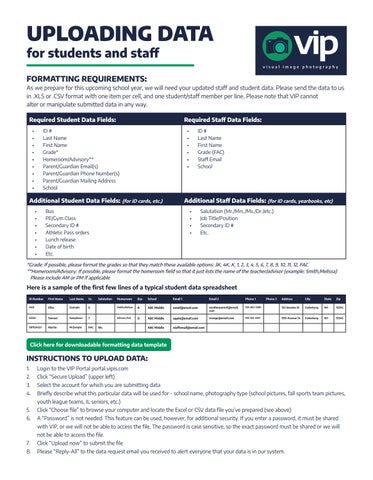
UPLOADING DATA for students and staff FORMATTING REQUIREMENTS: As we prepare for this upcoming school year, we will need your updated staff and student data. Please send the data to us in .XLS or .CSV format with one item per cell, and one student/staff member per line. Please note that VIP cannot alter or manipulate submitted data in any way. Required Student Data Fields:
Required Staff Data Fields:
• • • • • • • • •
• • • • • •
ID # Last Name First Name Grade* Homeroom/Advisory** Parent/Guardian Email(s) Parent/Guardian Phone Number(s) Parent/Guardian Mailing Address School
Additional Student Data Fields: (for ID cards, etc.) • • • • • • •
ID # Last Name First Name Grade (FAC) Staff Email School
Additional Staff Data Fields: (for ID cards, yearbooks, etc)
Bus PE/Gym Class Secondary ID # Athletic Pass orders Lunch release Date of birth Etc.
• • • •
Salutation (Mr./Mrs./Ms./Dr./etc.) Job Title/Position Secondary ID # Etc.
*Grade: If possible, please format the grades so that they match these available options: 3K, 4K, K, 1, 2, 3, 4, 5, 6, 7, 8, 9, 10, 11, 12, FAC **Homeroom/Advisory: If possible, please format the homeroom field so that it just lists the name of the teacher/advisor (example: Smith,Melissa) Please include AM or PM if applicable
Here is a sample of the first few lines of a typical student data spreadsheet ID Number
First Name
Last Name
Gr.
11111
Eliza
Example
22222
Samuel
987654321
Martin
Salutation
Homeroom
Bus
School
Email 1
Email 2
Phone 1
Address
City
State
Zip
6
Smith,Melissa
A
ABC Middle
email@email.com
anotherparent@email. com
555-867-5309
123 Sesame St
Cedarburg
WI
12345
Sampleson
7
Johnson,Ted
D
ABC Middle
apple@email.com
orange@email.com
555-123-4567
999 Avenue St
Cedarburg
WI
12345
McSample
FAC
ABC Middle
staffemail@email.com
Mr.
Phone 2
Click here for downloadable formatting data template
INSTRUCTIONS TO UPLOAD DATA: 1.
Login to the VIP Portal portal.vipis.com
2.
Click “Secure Upload” (upper left)
3.
Select the account for which you are submitting data
4.
Briefly describe what this particular data will be used for - school name, photography type (school pictures, fall sports team pictures, youth league teams, IL seniors, etc.)
5.
Click “Choose file” to browse your computer and locate the Excel or CSV data file you’ve prepared (see above)
6.
A “Password” is not needed. This feature can be used, however, for additional security. If you enter a password, it must be shared with VIP, or we will not be able to access the file. The password is case sensitive, so the exact password must be shared or we will not be able to access the file.
7.
Click “Upload now” to submit the file
8.
Please “Reply-All” to the data request email you received to alert everyone that your data is in our system.