
WhatsApp Bots

Page 1


WhatsApp Bots

1. WhatsApp Business API Overview

The WhatsApp Business API is designed for medium and large businesses to connect with customers at scale. It allows automation, integration with CRM systems, and personalized communication through verified business profiles

Key Features:

● Two-way messaging with customers

● Rich media support (images, PDFs, buttons)

● Supports automation, analytics, and integration with tools

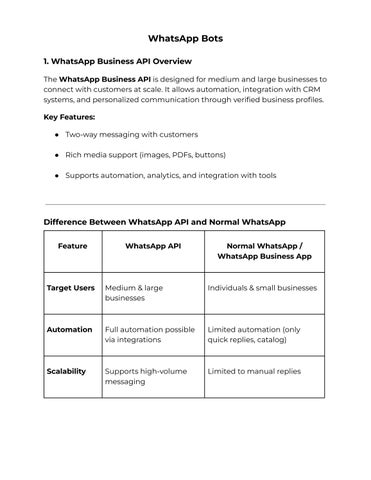
Difference Between WhatsApp API and Normal WhatsApp

Target

Automation

Medium & large businesses Individuals & small businesses

Full automation possible via integrations

Scalability Supports high-volume messaging

Limited automation (only quick replies, catalog)

Limited to manual replies

WhatsApp Bots

Integration Can connect with CRM, ERP, marketing tools

No direct integration

Verification Requires a verified business profile

No official verification needed

2. Requirements to Use WhatsApp Business API for Automation

To access and use the WhatsApp API through a Business Solution Provider (BSP), you need:

● A website for your business

● A professional business email ID (eg, info@yourcompanycom)

● Business registration documents

● GST certificate (for Indian businesses) or equivalent tax ID

● Facebook Business Manager account with verification

● A phone number not linked to a regular WhatsApp account

3. Setting Up a Chatbot Using Platforms

You can use third-party platforms to create and manage WhatsApp bots without coding.
Popular Platforms:

● WATI – User-friendly interface, built-in automation, CRM sync

WhatsApp Bots

● Zoko – Focuses on commerce and sales funnel automation

● AiSensy – Ideal for eCommerce businesses, integrates with Shopify and WooCommerce

Steps to Set Up:

1. Create a WhatsApp Business API account via a BSP

2 Integrate it with your chosen platform (WATI, Zoko, etc )

3. Build chat flows for FAQs, product recommendations, appointment booking, etc.

4 Set triggers (based on user messages or actions)

5. Test and launch the bot

4. Automating FAQs, Reminders, and Lead Responses

Automation Capabilities:

● FAQs – Instant replies for pricing, location, policies

● Reminders – Events, appointments, cart checkouts

● Lead Responses – Welcome messages, product/service info, lead qualification

Benefits:

● 24/7 customer support

● Faster lead conversion

WhatsApp Bots

● Reduced manual workload

5. Compliance and Opt-in Policies

Why Compliance Matters:

WhatsApp enforces strict opt-in and content policies to ensure user privacy and prevent spam

Key Guidelines:

● User Opt-In – Get explicit consent (via website, ads, forms)

● Template Messages – Promotional content must be pre-approved

● Opt-Out Mechanism – Allow users to unsubscribe (e.g., “Reply STOP”)

Regulations to Follow:

● GDPR – Consent & privacy (Europe)

● India’s DPDP Act – Data usage policies for Indian users

FAQs

Q1. Do I need coding knowledge to set up a WhatsApp bot?

A: No, platforms like WATI and AiSensy offer drag-and-drop setup

Q2. Can I send promotional messages through WhatsApp?

A: Yes, but only with pre-approved templates and to opted-in users.

Q3. Is WhatsApp bot suitable for small businesses?

A: Small businesses may prefer the WhatsApp Business App; however, bots can help if handling high message volumes.

WhatsApp Bots

Q4. How much does it cost to use WhatsApp bots?

A: Depends on BSP and number of messages Pricing is often per conversation or user

Q5. Can I integrate WhatsApp bots with my CRM?

A: Yes, most platforms offer native or third-party CRM integrations.

Turn static files into dynamic content formats.

Create a flipbook
WhatsApp Bots by Urvashi Patel - Issuu