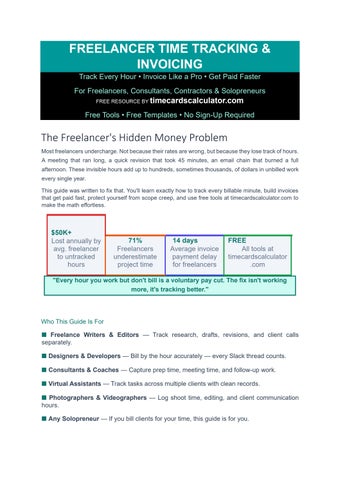
Track Every Hour • Invoice Like a Pro • Get Paid Faster For Freelancers, Consultants, Contractors & Solopreneurs FREE RESOURCE BY timecardscalculator.com Free Tools • Free Templates • No Sign-Up Required
The Freelancer's Hidden Money Problem
Most freelancers undercharge. Not because their rates are wrong, but because they lose track of hours. A meeting that ran long, a quick revision that took 45 minutes, an email chain that burned a full afternoon. These invisible hours add up to hundreds, sometimes thousands, of dollars in unbilled work every single year.
This guide was written to fix that. You'll learn exactly how to track every billable minute, build invoices that get paid fast, protect yourself from scope creep, and use free tools at timecardscalculator.com to make the math effortless.
$50K+ Lost annually by avg. freelancer to untracked hours 71% Freelancers underestimate project time 14 days
Average invoice payment delay for freelancers FREE All tools at timecardscalculator .com
"Every hour you work but don't bill is a voluntary pay cut. The fix isn't working more, it's tracking better."
■ Designers & Developers Bill by the hour accurately every Slack thread counts.
■ Consultants & Coaches Capture prep time, meeting time, and follow-up work.
■ Virtual Assistants Track tasks across multiple clients with clean records.
■ Photographers & Videographers Log shoot time, editing, and client communication hours.
■ Any Solopreneur If you bill clients for your time, this guide is for you.
01 TIME - WHY FREELANCERS LOSE MONEY ON
The Psychology of Under tracking & How to Fix It
The Invisible Hours Problem
Ask any freelancer how long a project took and they'll almost always underestimate. This isn't dishonesty it's how the human brain works. We remember the focused work blocks clearly but forget the friction: the 20-minute email explaining a revision, the 40-minute call that wasn't on the schedule, the hour spent fixing a file the client sent in the wrong format.
These invisible hours are real work. They cost you time, energy, and focus. But without a system to capture them, they never appear on an invoice.
Where Freelancers Actually Lose Time
Client communication
●Emails, Slack messages, quick calls easily 30-90 min/day per active client
Revisions & feedback rounds
●Each round typically takes 40-120% of the original task time
Admin & project management
●Proposals, contracts, invoicing 3-5 hrs/week for busy freelancers
Research & learning
●Background work the client expects but often doesn't see
File handling & tech issues
●Waiting for uploads, fixing formats, troubleshooting tools
Scope creep tasks
●'Quick additions' that each take 15-60 minutes
The Real Cost Calculation
The 3 Tracking Mindset Shifts
Before any tool or system works, these beliefs have to change:
SHIFT 1
From 'I'll remember it' to 'I'll record it now'
Memory is unreliable. A 5-second timer start beats a 5-minute reconstruction at end of day.
Build the habit: task starts → timer starts. No exceptions.
SHIFT 2
SHIFT 3
From 'That was too quick to bill' to 'Every minute is billable'
If the client required it, it's billable. A 10-minute fix is still 10 minutes. Multiply by your rate.
Multiply by how often it happens. That's real money.
From 'I don't want to seem greedy' to 'I'm running a business'
Charging for your full time isn't greedy it's accurate. Clients who respect your work respect accurate billing. Clients who don't aren't worth keeping.
02 CHOOSING YOUR BILLING METHOD
Hourly vs Project vs Retainer, Pros, Cons & When to Use Each
One of the biggest decisions in freelancing is how you charge. Each billing model works best in different situations and choosing the wrong one can leave money on the table or damage client relationships.
HOURLY BILLING
You charge a fixed rate per hour worked. Total invoice = Hours × Rate.
• Best for: Open-ended projects, ongoing work, new clients
• Best for: Work where scope is hard to predict in advance
• Pros: Protected if scope grows, easy to calculate, transparent
• Cons: Penalizes efficiency faster workers earn less
• Cons: Clients may feel nervous about an open-ended commitment
• Tip: Always give a time estimate range upfront to ease client anxiety
PROJECT / FLAT RATE
You charge a single fixed price for the entire project deliverable.
• Best for: Well-defined projects with clear deliverables
• Best for: Experienced freelancers who can predict time accurately
• Pros: Rewards efficiency finish fast, earn the same
• Pros: Easier for clients to budget and approve
• Cons: Risky if scope isn't locked always use a contract
• Tip: Add 20-30% buffer to your estimate before quoting
RETAINER
Client pays a fixed monthly fee for a set number of hours or deliverables.
• Best for: Ongoing relationships with regular predictable work
• Best for: Established clients you trust to respect boundaries
• Pros: Less time spent on proposals and invoicing each month
• Cons: Requires clear terms on what's included (and what isn't)
• Tip: Always define monthly scope clearly in writing rollover policy too
Billing Method Comparison Table
predictability
from scope creep
time per project
for new clients
Good for complex projects
Rewards your efficiency
Requires accurate time tracking
At quoting stage For reporting PRO TIP: Most successful freelancers use all three models — hourly for new/unknown work, project rates for familiar deliverables, and retainers for their best long-term clients. You don't have to pick just one.
03- HOW TO TRACK TIME ACCURATELY
Tools, Methods, Habits & the Daily Tracking System
The Daily Time Tracking System
The most effective time tracking system is the one you'll actually use consistently. Complexity kills habits. Here is a simple daily routine that works for any freelancer:
START OF DAY
5 min
TASK STARTS
List today's tasks by client
Write down every task you plan to work on. Group by client. This becomes your tracking checklist.
5 sec Start timer immediately
The moment you open a file or begin work, start your timer. Not when you 'feel ready' when you start.
TASK ENDS
10 sec Stop timer, add a note
Stop the timer. Add a brief description: 'Homepage design, first draft'. This saves invoice writing time later.
INTERRUPTI -ONS
5 sec
END OF DAY
5 min
Pause, don't stop
Phone call? Pause the timer. When you return, resume. Don't try to estimate, just pause.
Review & export
Check total hours per client. Export or download your timecard from timecardscalculator.com as PDF/Excel.
Time Tracking Tools Comparison
What to Include in Every Time Entry
Client name
→ Which client does this work belong to?
→ Project / task name What specifically were you working on?
→ Date Which day did this work happen?
→ Start time & end time Or total duration if using a timer
→ Short description One sentence: what did you do? (Helps invoice writing later)
→ Billable or non-billable Some admin time may not be billed tag it clearly
04 CALCULATING YOUR REAL HOURLY RATE
What You Actually Earn After Taxes, Expenses & Downtime
Most freelancers quote a rate without knowing what they actually take home. Your real hourly rate accounts for taxes, business expenses, unpaid admin time, vacation, and downtime between projects. The number is almost always lower than you think. The Real Rate Formula
Step-by-Step Real Rate Calculation
vs Non-Billable Hours Reality Check
05 THE FREELANCE INVOICE BLUEPRINT
Anatomy of a Professional Invoice
A professional invoice does three things: it clearly states what work was done, how much is owed, and exactly when and how to pay. Here is every element your invoice must include:
Invoice Line-Item Examples How to write clear, professional line items that clients understand: