06 GETTING PAID FASTER
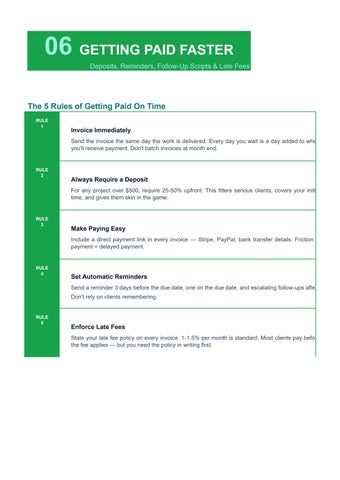
The 5 Rules of Getting Paid On Time
Send the invoice the same day the work is delivered. Every day you wait is a day added to when you'll receive payment. Don't batch invoices at month end.
For any project over $500, require 25-50% upfront. This filters serious clients, covers your initial time, and gives them skin in the game.
Include a direct payment link in every invoice Stripe, PayPal, bank transfer details. Friction in payment = delayed payment.
Send a reminder 3 days before the due date, one on the due date, and escalating follow-ups after. Don't rely on clients remembering.
State your late fee policy on every invoice. 1-1.5% per month is standard. Most clients pay before the fee applies but you need the policy in writing first.
HANDLING SCOPE CREEP
Tracking Extra Work, The Conversation & Charging For It
What Is Scope Creep?
Scope creep is when a project gradually expands beyond what was originally agreed usually through small additions that seem reasonable in the moment but accumulate into significant unpaid work. It's the #1 reason freelancers finish projects feeling underpaid.
Common Scope Creep Examples
■ 'Can you just add one more page to the website?'
■ 'Can we have a quick call to discuss the direction?' (third time this week)
■ 'Can you make it look more like [competitor]?' (after final approval)
■ 'We need this in a different file format too'
■ 'Can you also do this for our sister company?'
■ 'We changed the brief can you redo the first section?'
The Scope Change Script
When a client asks for something outside the original agreement, use this language:
"That's a great addition! That falls outside our original project scope, so I'll put together a quick change order for [X hours/price] and send it over. Once approved, I'll get started. Does that work for you?"
Scope Creep Prevention Checklist
Detailed written contract
✓
Specify exact deliverables, number of revisions, and what's excluded
Change order process
✓
✓
Any changes require written approval before work begins Track all extra time
Use timecardscalculator.com to log every out-of-scope task separately
Bill for approved changes
Never absorb scope additions always invoice for approved extra work
Monthly scope reviews
✓
For retainer clients, review what was delivered vs contracted monthly
TAX & RECORD KEEPING BASICS
What to Track for Tax Season as a Self-Employed Professional
Freelancers are self-employed, which means you pay both the employee AND employer portions of Social Security and Medicare a combined 15.3% self-employment tax on top of income tax. Good records mean legal deductions. Deductions reduce your tax bill.
What Records to Keep
Design tools, project management, time tracking software $
Percentage
Online courses, books, conferences in your field
$ Health Insurance
Self-employed health insurance premiums fully deductible
$ Retirement Contributions
SEP-IRA, Solo 401k up to $69,000/year (2024 limits)
$ Accounting & Legal Fees
Your accountant, contract lawyer, business filing fees
IMPORTANT: Always consult a qualified CPA or tax professional for your specific situation. Tax rules change annually and vary by state. This guide provides general information only.
TIME TRACKING FOR MULTIPLE CLIENTS
Staying Organized When You're Juggling 3-5+ Clients
Managing time across multiple clients is where most freelancers break down. Without a system, you'll lose track of who owes what, accidentally mix up hours, or forget to bill tasks entirely. Here's the system that works.
The Multi-Client Tracking System
Color-code clients
→ Assign each client a color in your tracking system visual sorting is faster than reading names
→ Separate timers per client
Never run one timer across clients. Each work session = one client = one timer
→ Weekly client review
Every Friday: check hours logged per client, flag anything missing, note anything unbilled
→ Monthly invoice batch
Pick one day per month (or per billing cycle) to send all invoices builds habit and routine
→ Separate folders per client
Keep contracts, briefs, and time logs organized by client saves hours during disputes
Sample Multi-Client Weekly Summary
FREE TEMPLATES & CALCULATOR GUIDE
Everything at timecardscalculator.com is free no account required, no subscription, no hidden fees. Here's exactly how freelancers use each tool:
Available free at: timecardscalculator.com
• Enter your clock-in and clock-out times for each work session
• Add break time calculator subtracts it automatically
• Works for multiple entries in one day (e.g., morning + afternoon sessions)
• Export as PDF, Excel, or CSV ready for invoicing
• Works on mobile, tablet, and desktop no download
Available free at: timecardscalculator.com
• Download the .xlsx file open in Excel or Google Sheets
• Pre-built formula automatically calculates total hours
• Weekly and monthly views available
• Add hourly rate to see automatic pay totals
• Export to CSV for accounting software import
• Print-ready A4 format professional appearance
• Use for client-facing time reports
• Space for project name, client, date range, and signature
• Download instantly no sign-up required
• Ideal for freelancers who invoice by deliverable with hour documentation
No account needed open directly in any browser on any device
STEP 2
STEP 3
Enter your hours for the work session
Clock in time, clock out time, and break duration
Export your timecard
Download PDF for client records or Excel for your own bookkeeping