![]()


R U L E :

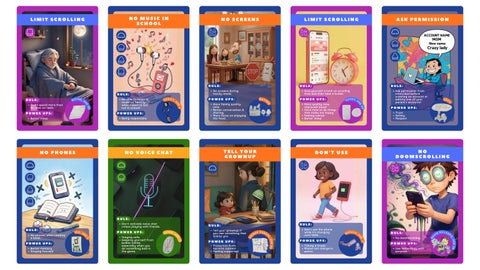
No phones when reading a book.
P O W E R U P S :
Better memory
Staying focused

of


R U L E :
Be able to listen to music on Spotify when I want to but not in school!
P O W E R U P S : Being responsible

VERITY, AGE 6

R U L E :
Don't use the phone while it's charging until 100%. P O W E R U P S : Taking a break Phone can charge in peace.


R U L E :
Completely private and no sharing accounts.
P O W E R U P S : To make me feel safe

RIDWAN, AGE 9/ 1 0

We should all have specific times when using electronics: Phones, computers, iPads, watches, TV.
Everyone in the house is on their electronics too much. We need to interact with each other.


P O W E R U P S : Safety AT LEAST ONE PARENT
R U L E : Screens only in the family room (and at least 1 parent present).


R U L E :
No screens during family meals.
P O W E R U P S :
More family quality time. Better conversation & sharing. More focus on enjoying the food.


R U L E :
Put your phone away during eating or dinner time, whether at home or at a restaurant.
P O W E R U P S :
Better connection
Better conversation
More quality time
Enjoying the moment

49

P O W E R U P S :

WAYNE, AGE 5 0


Screen-free while getting ready to go out.
Better focus on time management. More awareness of achieving each task. Move with purpose. Focus on intentions. Switch gratification from an external object to internal goals.


R U L E : Do not give apps money.
P O W E R U P S : Save money for real things

, A G E 84

R U L E :
No phones while someone talks to you.
O W E R U P S :
Focus, respect, also when you really listen, you can actually learn something.


R U L E :
Charge devices 1 hour before bedtime.
P O W E R U P S :
Better sleep
More family time Prepared in the AM


R U L E :
No loud noises (clicking, music, voices, etc.) out of your device bothering others.
P O W E R U P S :
More respect for others and more quiet time.


R U L E :
No phone at least 30 mins before sleeping.
P O W E R U P S :
Better sleep
Relax before sleeping


R U L E :
Don't activate voice chat unless playing with friends.
P O W E R U P S :
Staying safe. Keeping yourself from bullies online, especially when you do something bad in the game.

11

R U L E :
Give yourself a limit on scrolling time and then take a break.
P O W E R U P S :
More quality time, improved mood
More time to do things that make me happy
Feeling calmer
Better sleep
49


R U L E :
Only watch YouTube after 8am.

P O W E R U P S :
Do a morning routine without screens

R U L E :
Don't spend more than 30 mins on reels.
P O W E R U P S : Better sleep

5 0

NO

R U L E : No doomscrolling. P O W E R U P S :
Use technology with purpose.

KEVIN
, A G E 84


For this Remix, each category has it’s own color combinations, please make sure to use them correctly acording to this guide:
General Cards:
Social Media
Artificial Intelligence
Texting
Gaming
BACKGROUND COLORBLUE #20419A
BACKGROUND COLORNEON PINK #B12BB4
BACKGROUND COLORVIVID AZURE 35B1ED
BACKGROUND COLORSALMON #FF751F
BACKGROUND COLORDARK GREEN #307911
RULE BANNER COLORSALMON #FF751F
RULE BANNER COLORROYAL BLUE #5271FF
RULE BANNER COLORBLUE #20419A
RULE BANNER COLORDARK TURQUOISE #00663E
RULE BANNER COLORWARM ORANGE #FFA51F
If there is a 1 LINE title text box use the RED overlay guidelines If there is a 2 LINE title text box use the GREEN overlay guidelines
According to the number of lines of the title follow the green or red icon OVERLAY, the space between the colored box and the first icon shape should be of 25px, and the spacing between each icon shape should also be 25px
You can check the spacing between elements by selecting one of them, then while pressing ALT on your keyboard hover your mouse to the next element
The space between the “Rule” title+text group and the “Power ups” title+text group should always be of 30 px
MAKE SURE TO FOLLOW THE GUIDEMARKERS AND USE THE OVERLAY TO CHECK IF YOUR DESIGN IS CORRECT BEFORE YOU SHOW THE PM
Use these icons as a reference for the correct size they should have
Answer text Font: Quicksand Size 28
MAKE SURE TO FOLLOW THE GUIDEMARKERS AND USE THE OVERLAY TO CHECK IF YOUR DESIGN IS CORRECT BEFORE YOU SHOW THE PM