Redeeming guest card offers 1
FAQ: surselva.info/App-PartnerIn
Support email: miasurselva@surselva.info
2
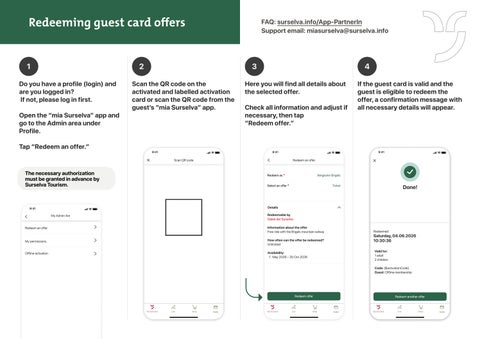
Do you have a profile (login) and are you logged in? If not, please log in first.
Open the “mia Surselva” app and go to the Admin area under Profile. Tap “Redeem an offer.”
3
Scan the QR code on the activated and labelled activation card or scan the QR code from the guest’s “mia Surselva” app.
9:41
4
Here you will find all details about the selected offer.
Check all information and adjust if necessary, then tap “Redeem offer.”
9:41
Scan QR code
If the guest card is valid and the guest is eligible to redeem the offer, a confirmation message with all necessary details will appear.
9:41
Redeem an offer
The necessary authorization must be granted in advance by Surselva Tourism.
Redeem as *
Bergbahn Brigels
Select an offer *
Ticket
Done!
Details
9:41
Redeemable by
Gäste der Surselva
My Admin Are Admin-Bereich
Information about the offer
Free ride with the Brigels mountain railway
Redeem an offer
My permissions
How often can the offer be redeemed?
Unlimited
Offline activation
Availability
May 2026 – 30 Oct 2026
Redeemed:
Saturday, 04.06.2026
10:30:36 Validfor:
for:
Valid aduult lt
11ad ildren
n
22cchhildre Code:{$ {$activation activationCCode ode} }
Code: Guest:Offline Offlinemem membbers ershhipip Guest:
Redeem another offer
Redeem offer
mia Surselva
Live
Shop
Wallet
mia Surselva
Live
Shop
Wallet
mia Surselva
Live
Shop
Wallet