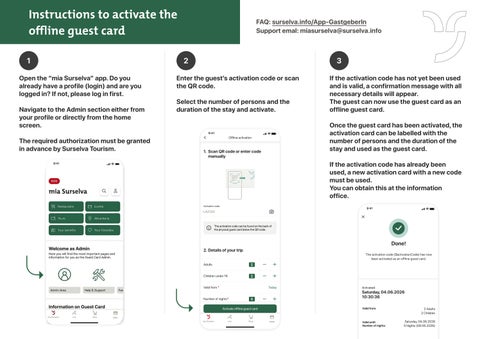
Instructions to activate the offline guest card 1 Open the “mia Surselva” app. Do you already have a profile (login) and are you logged in? If not, please log in first.
Navigate to the Admin section either from
your profile or directly from the home screen.
FAQ: surselva.info/App-GastgeberIn
Support emal: miasurselva@surselva.info
2
3
Enter the guest’s activation code or scan the QR code.
Select the number of persons and the duration of the stay and activate.
9:41
The required authorization must be granted in advance by Surselva Tourism.
If the activation code has not yet been used and is valid, a confirmation message with all necessary details will appear. The guest can now use the guest card as an offline guest card.
Once the guest card has been activated, the activation card can be labelled with the number of persons and the duration of the stay and used as the guest card.
Offline activation
1. Scan QR code or enter code manually
If the activation code has already been used, a new activation card with a new code must be used. You can obtain this at the information office. Activation code
9:41
LA2134
The activation code can be found on the back of the physical guest card below the QR code.
Done!
2. Details of your trip
The activation code {$activationCode} has now been activated as an offline guest card.
Adults
2
Children under 16
2
Valid from *
Today
Number of nights*
5
Activate offline guest card mia Surselva
Live
Shop
Activated:
Saturday, 04.06.2026
10:30:36 Valid from:
Wallet
Valid until:
Number of nights:
2 Adults
2 Children
Saturday, 04.06.2026
5 Nights (09.06.2026)