Instructions to activate
the Guest Card 1
FAQ: surselva.info/App-Gast
Support email: miasurselva@surselva.info
2
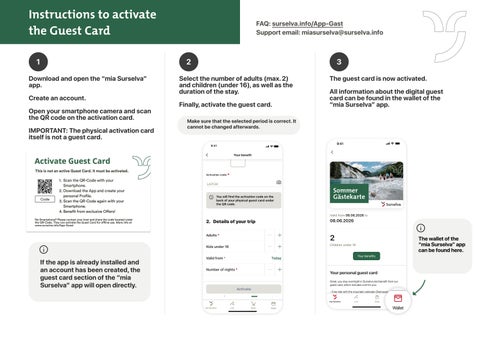
Download and open the “mia Surselva” app.
Create an account.
Open your smartphone camera and scan the QR code on the activation card.
IMPORTANT: The physical activation card itself is not a guest card.
3
Select the number of adults (max. 2) and children (under 16), as well as the duration of the stay.
Finally, activate the guest card.
The guest card is now activated.
All information about the digital guest card can be found in the wallet of the “mia Surselva” app.
Make sure that the selected period is correct. It cannot be changed afterwards. 9:41
9:41
Your benefit
1. Scan the QR code or enter the code manually Already scanned? Continue to step 2
LA2134
Activation code
Valid from 06.06.2026 to
LA2134
08.06.2026
The activation code can be found on the back of the physical guest card below the QR code.
2
The wallet of the “mia Surselva” app can be found here.
Children under 16
If the app is already installed and an account has been created, the guest card section of the “mia Surselva” app will open directly.
Your benefits
2. Details of your trip Children under 16
2
Valid from *
Your personal guest card Today
Number of nights*
Great, you stay overnight in Surselva and benefit from our guest card, which includes a lot for you:
- Free ride with the mountain railroads Obersaxen Mundaun Lumnezia
- Free ride with the mountain railroads Brigels
2
mia Surselva mia Surselva
Live
Shop
Wallet
Live
Shop
Wallet