
GUIDE FOR ONLINE PARTICIPATION SOILTECH
ASA 24 April 2025
Soiltech ASA will hold annual general meeting on April 24th 2025 at 14:00 pm CET as a digital meeting, where you get the opportunity to participate online with your PC, phone or tablet. Below is a description of how to participate online.
We also point out that you also can vote in advance or give a proxy before the meeting See the notice for further details on advance voting and how to authorize a proxy. If you vote in advance or give a proxy, you can still log on to the general meeting to follow and ask questions, but you will not have the opportunity to vote on the items.
By participating online, shareholders will receive a live webcast from the general meeting, the opportunity to ask written questions, and vote on each of the items. Secure identification of shareholders is done by using the unique reference number and PIN code assigned to each shareholder by the Norwegian Central Securities Depository (Euronext VPS) in relation to this General Meeting
Registration is required for shareholders who want to participate online, and shareholders must be logged in before the general meeting starts. Log ins after meeting has started will receive access, but with no voting rights.
Shareholder who do not find their reference number and PIN code for access, or have other technical questions is welcome to call DNB Registrars Department on phone + 47 23 26 80 20 (between 08:00-15:30)
HOW TO ACCESS THE ONLINE GENERAL MEETING
To be able to participate online, you must go to the following website: https://dnb.lumiagm.com either on your smartphone, tablet or PC. All major known browsers, such as Chrome, Safari, Edge, Firefox etc. are supported. enter Meeting ID: 195-930-868 and click Join: Alternatively put direct link in your browser https://dnb.lumiagm.com/195930868
As the company has decided to allow for guest log ins you will be prompted to decide between
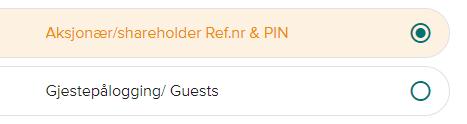
If you choose Guests, you will be asked to state your name and e-mail. You will not have voting rights or the right to speak in the meeting.
If you are a shareholder, choose Shareholder Ref.nr & PIN You must then identify yourself with.
a) Ref. number from VPS for the general meeting
b) PIN code from VPS for general meeting
Once you have logged in, you will be taken to the information page for the general meeting. Here you will find information from the company, and how this works technically. Note that you must have internet access throughout the meeting. If you for some reason log off, just log in again following steps above.
All shareholders registered in the VPS are assigned their own unique reference and PIN code for use in the General Meeting, available to each shareholder through VPS Investor Services. Access VPS Investor Services, select Corporate Actions, General Meeting. Click on the ISIN and you can see your reference number (Ref.nr.) and PIN code
All VPS directly registered shareholders have access to investor services either via https://investor.vps.no/garm/auth/login or internet bank. Contact your VPS account operator if you do not have access.
Shareholders who have not selected electronic corporate messages in Investor Services will also receive their reference number and PIN code by post together with the summons from the company (on registration form).
Custodian registered shareholders: Shares held through Custodians (nominee) accounts must exercise their voting rights through their custodian. Please contact your custodian for further information
HOW TO VOTE

When items are available for voting, you can vote on all items as quickly as you wish Click on the vote icon on top of your screeen to access You may also experience that Items are pushed to your screen by technical operator.
To vote, press your choice on each of the items. FOR, AGAINST or ABSTAIN
Once you have cast your vote, you will see a confirmation text stating your vote You may also get a choice where you can vote jointly on all items. If you use this option, you can still override the choice on singel items one by one if desired.
You can change or cancel your votes as many times as you like, until the chair of the meeting concludes the voting on the individual items. Your last choice will be valid.
NB: Logged in shareholders who have voted in advance or given a power of attorney, will not have the opportunity to vote. They can still follow the meeting and write messages if desired.

QUESTIONS / COMMENTS TO THE GENERAL MEETING

Questions or comments relating to the items on the agenda can be submitted by shareholders and appointed proxy at any time during the meeting as long as chair of the meeting holds this open.
If you would like to ask a question relating to the items on the agenda, select MESSAGING on top of you screen
Enter your question in the message box that says "Ask a Question". When you have finished writing your question, click on the submit button.
Questions submitted online will be moderated before going to the chair. This is to present question/comment at appropiate time, avoid repetition of questions as well as possibly removal of particular inappropriate language.
All shareholders who submit questions will be identified with their full names, but not holding of shares.