Computing Overview 2022-23 Autumn 1
Year 1
Autumn 2
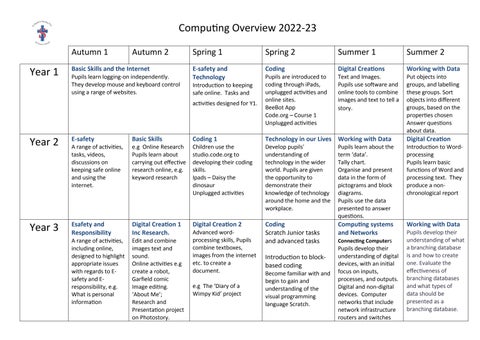
Basic Skills and the Internet
Pupils learn logging-on independently. They develop mouse and keyboard control using a range of websites.
Spring 1
Spring 2
Summer 1
Summer 2
E-safety and Technology
Coding
Digital Creations
Working with Data
Introduction to keeping safe online. Tasks and activities designed for Y1.
Pupils are introduced to coding through iPads, unplugged activities and online sites. BeeBot App Code.org – Course 1 Unplugged activities
Text and Images. Pupils use software and online tools to combine images and text to tell a story.
Year 2
E-safety
Basic Skills
Coding 1
Technology in our Lives Working with Data
Year 3
Esafety and Responsibility
Digital Creation 1 Inc Research.
Digital Creation 2
Coding Scratch Junior tasks and advanced tasks
A range of activities, tasks, videos, discussions on keeping safe online and using the internet.
A range of activities, including online, designed to highlight appropriate issues with regards to Esafety and Eresponsibility, e.g. What is personal information
e.g Online Research Pupils learn about carrying out effective research online, e.g. keyword research
Edit and combine images text and sound. Online activities e.g create a robot, Garfield comic Image editing. ‘About Me’; Research and Presentation project on Photostory.
Children use the studio.code.org to developing their coding skills. Ipads – Daisy the dinosaur Unplugged activities
Advanced wordprocessing skills, Pupils combine textboxes, images from the internet etc. to create a document. e.g The ‘Diary of a Wimpy Kid’ project
Develop pupils' understanding of technology in the wider world. Pupils are given the opportunity to demonstrate their knowledge of technology around the home and the workplace.
Introduction to blockbased coding
Become familiar with and begin to gain and understanding of the visual programming language Scratch.
Pupils learn about the term ‘data’. Tally chart. Organise and present data in the form of pictograms and block diagrams. Pupils use the data presented to answer questions.
Computing systems and Networks Connecting Computers
Pupils develop their understanding of digital devices, with an initial focus on inputs, processes, and outputs. Digital and non-digital devices. Computer networks that include network infrastructure routers and switches
Put objects into groups, and labelling these groups. Sort objects into different groups, based on the properties chosen Answer questions about data.
Digital Creation
Introduction to Wordprocessing Pupils learn basic functions of Word and processing text. They produce a nonchronological report
Working with Data
Pupils develop their understanding of what a branching database is and how to create one. Evaluate the effectiveness of branching databases and what types of data should be presented as a branching database.