
Scholes Junior and Infant School
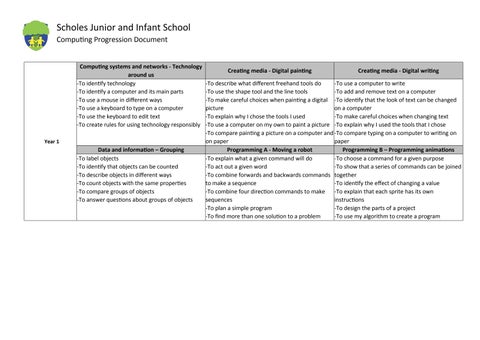
-To identify technology
-To identify a computer and its main parts
-To use a mouse in different ways
-To use a keyboard to type on a computer
-To use the keyboard to edit text
-To create rules for using technology responsibly
Computing Progression Document Year 1 Computing systems and networks - Technology around us
-To describe what different freehand tools do
-To use the shape tool and the line tools
-To make careful choices when painting a digital picture
-To explain why I chose the tools I used
-To use a computer on my own to paint a picture
-To compare painting a picture on a computer and on paper
-To use a computer to write
-To add and remove text on a computer
-To identify that the look of text can be changed on a computer
-To make careful choices when changing text
-To explain why I used the tools that I chose
-To compare typing on a computer to writing on paper
Data and information – Grouping Programming A - Moving a robot Programming B – Programming animations
-To label objects
-To identify that objects can be counted
-To describe objects in different ways
-To count objects with the same properties
-To compare groups of objects
-To answer questions about groups of objects
-To explain what a given command will do
-To act out a given word
-To combine forwards and backwards commands to make a sequence
-To combine four direction commands to make sequences
-To plan a simple program
-To find more than one solution to a problem
-To choose a command for a given purpose
-To show that a series of commands can be joined together
-To identify the effect of changing a value
-To explain that each sprite has its own instructions
-To design the parts of a project
-To use my algorithm to create a program
Year 2
Computing systems and networks - Information technology around us
-To recognise the uses and features of information technology
-To identify the uses of information technology in the school
-To identify information technology beyond school
-To explain how information technology helps us
-To explain how to use information technology safely
-To recognise that choices are made when using information technology
Data and information – Pictograms
-To recognise that we can count and compare objects using tally charts
-To recognise that objects can be represented as pictures
-To create a pictogram
-To select objects by attribute and make comparisons
-To recognise that people can be described by attributes
-To explain that we can present information using a computer
Creating media - Digital music
-To say how music can make us feel
-To identify that there are patterns in music
-To experiment with sound using a computer
-To use a computer to create a musical pattern
-To create music for a purpose
-To review and refine our computer work
Creating media - Digital photography
-To use a digital device to take a photograph
-To make choices when taking a photograph
-To describe what makes a good photograph
-To decide how photographs can be improved
-To use tools to change an image
-To recognise that photos can be changed
Programming A - Robot algorithms
-To describe a series of instructions as a sequence
-To explain what happens when we change the order of instructions
-To use logical reasoning to predict the outcome of a program
-To explain that programming projects can have code and artwork
-To design an algorithm
-To create and debug a program that I have written
Programming B - Programming quizzes
-To explain that a sequence of commands has a start
-To explain that a sequence of commands has an outcome
-To create a program using a given design
-To change a given design
-To create a program using my own design
-To decide how my project can be improved
Year 3
Computing systems and networks - Connecting computers Creating Media - Desktop publishing Creating Media - Stop- frame animation
-To explain how digital devices function
-To identify input and output devices
-To recognise how digital devices can change the way we work
-To explain how a computer network can be used to share information
-To explore how digital devices can be connected
-To recognise the physical components of a network
Data and Information - Branching databases
-To create questions with yes/no answers
-To identify the attributes needed to collect data about an object
-To create a branching database
-To explain why it is helpful for a database to be well structured
-To plan the structure of a branching database
-To independently create an identification tool
-To recognise how text and images convey information
-To recognise that text and layout can be edited
-To choose appropriate page settings
-To add content to a desktop publishing publication
-To consider how different layouts can suit different purposes
-To consider the benefits of desktop publishing
-To explain that animation is a sequence of drawings or photographs
-To relate animated movement with a sequence of images
-To plan an animation
-To identify the need to work consistently and carefully
-To review and improve an animation
-To evaluate the impact of adding other media to an animation
A - Sequencing sounds Programming B – Events and actions in programs
-To explore a new programming environment
-To identify that commands have an outcome
-To explain that a program has a start
-To recognise that a sequence of commands can have an order
-To change the appearance of my project
-To create a project from a task description
-To explain how a sprite moves in an existing project
-To create a program to move a sprite in four directions
-To adapt a program to a new context
-To develop my program by adding features
-To identify and fix bugs in a program
-To design and create a maze-based challenge
"
Computing systems and networks - Connecting computers - The internet
-To describe how networks physically connect to other networks
-To recognise how networked devices make up the internet
-To outline how websites can be shared via the World Wide Web (WWW)
-To describe how content can be added and accessed on the World Wide Web (WWW)
-To recognise how the content of the WWW is created by people
-To evaluate the consequences of unreliable content
Data and Information - Data logging
-To explain that data gathered over time can be used to answer questions
-To use a digital device to collect data automatically
-To explain that a data logger collects ‘data points’ from sensors over time
-To recognise how a computer can help us analyse data
-To identify the data needed to answer questions
" -To use data from sensors to answer questions
Creating
Media - Audio production
-To identify that sound can be recorded
-To explain that audio recordings can be edited
-To recognise the different parts of creating a podcast project
-To apply audio editing skills independently
-To combine audio to enhance my podcast project
-To evaluate the effective use of audio
Creating Media - Photo editing
-To explain that the composition of digital images can be changed
-To explain that colours can be changed in digital images
-To explain how cloning can be used in photo editing
-To explain that images can be combined
-To combine images for a purpose
-To evaluate how changes can improve an image
-To identify that accuracy in programming is important
-To create a program in a text-based language
-To explain what ‘repeat’ means
-To modify a count-controlled loop to produce a given outcome
-To decompose a task into small steps
-To create a program that uses count-controlled loops to produce a given outcome
-To develop the use of count-controlled loops in a different programming environment
-To explain that in programming there are infinite loops and count controlled loops
-To develop a design that includes two or more loops which run at the same time
-To modify an infinite loop in a given program
-To design a project that includes repetition
-To create a project that includes repetition
Computing systems and networks - systems and searching Creating Media - Introduction to vector graphics
-To explain that computers can be connected together to form systems
-To recognise the role of computer systems in our lives
-To experiment with search engines
-To describe how search engines select results
-To explain how search results are ranked
-To recognise why the order of results is important, and to whom
Year 5
Data and Information - Flat-file databases
-To use a form to record information
-To compare paper and computer-based databases
-To outline how you can answer questions by grouping and then sorting data
-To explain that tools can be used to select specific data
-To explain that computer programs can be used to compare data visually
-To use a real-world database to answer questions
-To identify that drawing tools can be used to produce different outcomes
-To create a vector drawing by combining shapes
-To use tools to achieve a desired effect
-To recognise that vector drawings consist of layers
-To group objects to make them easier to work with
-To apply what I have learned about vector drawings
-To control a simple circuit connected to a computer
-To write a program that includes countcontrolled loops
-To explain that a loop can stop when a condition is met
-To explain that a loop can be used to repeatedly check whether a condition has been met
-To design a physical project that includes selection
-To create a program that controls a physical computing project
Media – Video production
-To explain what makes a video effective
-To identify digital devices that can record video
-To capture video using a range of techniques
-To create a storyboard
-To identify that video can be improved through reshooting and editing
-To consider the impact of the choices made when making and sharing a video
-To explain how selection is used in computer programs
-To relate that a conditional statement connects a condition to an outcome
-To explain how selection directs the flow of a program
-To design a program which uses selection
-To create a program which uses selection
-To evaluate my program
Quizzes
Computing systems and networksCommunication and collaboration Creating media - Webpage
-To explain the importance of internet addresses
-To recognise how data is transferred across the internet
-To explain how sharing information online can help people to work together
-To evaluate different ways of working together online
-To recognise how we communicate using technology
-To evaluate different methods of online communication
Data and Information - Introduction to spreadsheets
-To create a data set in a spreadsheet
-To build a data set in a spreadsheet
-To explain that formulas can be used to produce calculated data
-To apply formulas to data
-To create a spreadsheet to plan an event
-To choose suitable ways to present data
creation
-To review an existing website and consider its structure
-To plan the features of a web page
-To consider the ownership and use of images (copyright)
-To recognise the need to preview pages
-To outline the need for a navigation path
-To recognise the implications of linking to content owned by other people
Media 3D Modelling
-To recognise that you can work in three dimensions on a computer
-To identify that digital 3D objects can be modified
-To recognise that objects can be combined in a 3D model
-To create a 3D model for a given purpose
-To plan my own 3D model
-To create my own digital 3D model
-To define a ‘variable’ as something that is changeable
-To explain why a variable is used in a program
-To choose how to improve a game by using variables
-To design a project that builds on a given example
-To use my design to create a project
-To evaluate my project
- Sensing movement
-To create a program to run on a controllable device
-To explain that selection can control the flow of a program
-To update a variable with a user input
-To use a conditional statement to compare a variable to a value
-To design a project that uses inputs and outputs on a controllable device
-To develop a program to use inputs and outputs on a controllable device