Cycle B Aspect
Class Theme(s) Knowledge
Programming
Skill
Theme(s)
Knowledge
Data and information
Skill
Theme(s) Knowledge Programming
Skill
Theme(s)
Knowledge
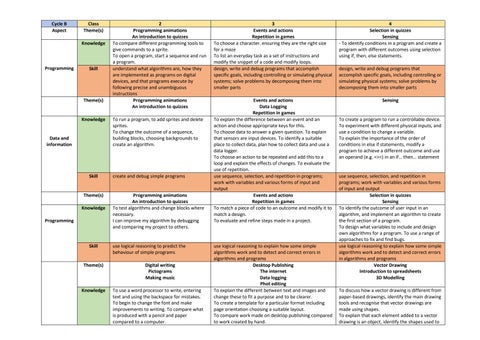
2 Programming animations An introduction to quizzes To compare different programming tools to give commands to a sprite. To open a program, start a sequence and run a program. understand what algorithms are, how they are implemented as programs on digital devices, and that programs execute by following precise and unambiguous instructions Programming animations An introduction to quizzes To run a program, to add sprites and delete sprites. To change the outcome of a sequence, building blocks, choosing backgrounds to create an algorithm.
create and debug simple programs
Programming animations An introduction to quizzes To test algorithms and change blocks where necessary. I can improve my algorithm by debugging and comparing my project to others.
use logical reasoning to predict the behaviour of simple programs Digital writing Pictograms Making music To use a word processor to write, entering text and using the backspace for mistakes. To begin to change the font and make improvements to writing. To compare what is produced with a pencil and paper compared to a computer.
3 Events and actions Repetition in games To choose a character. ensuring they are the right size for a maze To list an everyday task as a set of instructions and modify the snippet of a code and modify loops. design, write and debug programs that accomplish specific goals, including controlling or simulating physical systems; solve problems by decomposing them into smaller parts
4 Selection in quizzes Sensing - To identify conditions in a program and create a program with different outcomes using selection using if, then, else statements.
Events and actions Data Logging Repetition in games To explain the difference between an event and an action and choose appropriate keys for this. To choose data to answer a given question. To explain that sensors are input devices. To identify a suitable place to collect data, plan how to collect data and use a data logger. To choose an action to be repeated and add this to a loop and explain the effects of changes. To evaluate the use of repetition. use sequence, selection, and repetition in programs; work with variables and various forms of input and output Events and actions Repetition in games To match a piece of code to an outcome and modify it to match a design. To evaluate and refine steps made in a project.
Sensing
use logical reasoning to explain how some simple algorithms work and to detect and correct errors in algorithms and programs Desktop Publishing The internet Data logging Phot editing To explain the different between text and images and change these to fit a purpose and to be clearer. To create a template for a particular format including page orientation choosing a suitable layout. To compare work made on desktop publishing compared to work created by hand.
design, write and debug programs that accomplish specific goals, including controlling or simulating physical systems; solve problems by decomposing them into smaller parts
To create a program to run a controllable device. To experiment with different physical inputs, and use a condition to change a variable. To explain the importance of the order of conditions in else if statements, modify a program to achieve a different outcome and use an operand (e.g. <>=) in an if… then… statement
use sequence, selection, and repetition in programs; work with variables and various forms of input and output Selection in quizzes Sensing To identify the outcome of user input in an algorithm, and implement an algorithm to create the first section of a program. To design what variables to include and design own algorithms for a program. To use a range of approaches to fix and find bugs. use logical reasoning to explain how some simple algorithms work and to detect and correct errors in algorithms and programs Vector Drawing Introduction to spreadsheets 3D Modelling To discuss how a vector drawing is different from paper-based drawings, identify the main drawing tools and recognise that vector drawings are made using shapes. To explain that each element added to a vector drawing is an object, identify the shapes used to