ISSN 2348-1196 (print)
International Journal of Computer Science and Information Technology Research ISSN 2348-120X (online) Vol. 10, Issue 2, pp: (82-86), Month: April - June 2022, Available at: www.researchpublish.com

ISSN 2348-1196 (print)
International Journal of Computer Science and Information Technology Research ISSN 2348-120X (online) Vol. 10, Issue 2, pp: (82-86), Month: April - June 2022, Available at: www.researchpublish.com
1Junaid Jan, 2Mohammed Mujtaba, 3Qasim T. Zaidi, 4Zaki S. Ahmed
Saudi Arabian Oil Company, Dhahran, Kingdom of Saudi Arabia
DOI: https://doi.org/10.5281/zenodo.6616588
Published Date: 07-June-2022
Abstract: Phishing is an act of luring unsuspecting recipient of a message into revealing information which can be used against the recipient. Email is the most common medium of creating a Phishing attack against individuals and organizations. Phishing is a type of social engineering attempt, usually via emails, designed to trick the recipient. These attacks often result in malicious software getting deployed, steal user data including credentials or financial data, and victimize the entire infrastructure for ransom etc. First step in preventing this attack is to identify what a Phishing attempt is, to report it, and take similar actions for others. The golden rule of prevention is when you are in doubt, do not open that email, download its attachments or click on any hyperlinks inside.
Keywords: Phishing, Spam, Email, Malware, Social Engineering.
According to Phishing.org, a website for IT professionals to make smarter security decisions related to email security, phishing is defined as “a cybercrime in which a target or targets are contacted by email, telephone or text message by someone posing as a legitimate institution to lure individuals into providing sensitive data such as personally identifiable information, banking and credit card details, and passwords.” All of us have experienced receiving an email which seemed legitimate and from a known entity, whether it be a person we recognized, an unknown wealthy and generous person willing to part from a percent of his/her savings, or more commonly an organization offering an opportunity such as a free Apple iPhone. All these and many others are examples of attempts to gain access to our personal information which could be instrumental for an attacker or a group of attackers to cause either financial damage or use it to inject malware for some form of ransom.
This research paper briefly discusses the common themes of the phishing attacks and ways we can protect ourselves and the organization we work for, from revealing sensitive information thereby preventing the attack from ever taking shape. The paper focuses primarily on email as it is the most common means of spearheading a phishing campaign, making individuals and infrastructures vulnerable to cybercriminals. The paper also provides simple techniques as well as advanced features available to individuals and organizations for lowering the potential of a compromise cause by phishing attacks. The mitigations included in this paper is approaches consisting of technology, process, and people; together these defences can be really effective in thwarting the email-based phishing attacks
Explanation of the terms used extensively in this paper
Phishing Phishing is a type of social engineering where an attacker sends a fraudulent (e.g., spoofed, fake, or otherwise deceptive) message designed to trick a person into revealing sensitive information to the attacker or to deploy malicious software on the victim's infrastructure like ransomware. Read more here
Attacker A person, a group, or a program determined to lure individuals into providing sensitive data. This data is often used to create a Phishing attack.
Malware Software that is specifically designed to disrupt, damage, or gain unauthorized access to a computer system.
Social Engineering In the context of information security, social engineering is the psychological manipulation of people into performing actions or divulging confidential information. More here
Internet Email Gateways An email gateway is a type of email server that protects an organizations or users internal email servers. This server acts as a gateway through which every incoming and outgoing email passes through
ISSN 2348-1196 (print)
International Journal of Computer Science and Information Technology Research ISSN 2348-120X (online) Vol. 10, Issue 2, pp: (82-86), Month: April - June 2022, Available at: www.researchpublish.com
Most users at home have either a laptop or desktop which they use to do all their work as well as reading and replaying to emails. Whether you use Microsoft Outlook or a browser to interact with your email service, there are many good practices that can be utilized to keep yourself safe from Phishing scams. While the service provide such as Google Inc. or Microsoft Corporation filters many of the emails and suspicious content, these malicious emails may still end up in your Junk or Spam folder. Often, people are fooled into moving these emails to Inbox as they look familiar, either from a person you know or the subject which would not seem questionable at first glance. It is always good to be extra cautious as one click on an otherwise innocent hyperlink could jeopardize not only the device you are using but it could leak financially and/or personally damaging information to the spammer. Below are the best practices to consider before you open an email or click on a link inside it.
1. Never move an email from Junk/Spam folder until you have verified the sender and the content. Junk/Spam folder disables all attachments and links inside the email message hence it is always safe to keep it there and delete the email from the same folder if it looks suspicious.
2. Always click on the Sender to further identify the email address from where the email originated. This is instrumental as the sender Display can be spoofed to come from a known sender luring the recipient to believe in the content and take action
3. Watch for activity that asks you to do something right away such as clicking on an offer. These offers are always too good to be true. Scammers create fake links to websites from where they can steal personal information
4. Use the built-in features of Outlook to create Rules for known email domains; all other emails should continue to be filtered with the Junk/Spam filters
5. Keep the software on your device up to date; whether it be Microsoft Windows, Microsoft Office, Apple iOS, or Google Android. These large organizations do a very good job in securing their infrastructure and protecting you with bug-fixes as well as software updates. Patching your device means you are protected better against any vulnerabilities that may be exploited by hackers or spammers if you do click on a suspicious link
6. Never leave your device unattended, especially in a public place. The physical security of your device is as important as its technical security.
7. Never connect a non-trusted USB stick to your device. This may have been left intentionally by a malicious actor to entice the unsuspecting user.
8. If using a mobile device, always have a pin an auto-lock enabled. This way even if you were to lose the mobile, it would be hard to impossible to gain access to the information on it.
9. Install antivirus or antimalware on your device from trusted security companies.
10.Always have a backup of your data. If you do become victim to a malicious attempt, you can always repair your device and copy the data back.
Almost everything that one can do on his personal laptop, it can also be done on a Smart Phone. As the number of these smart phones have increased, virtually everyone is at a higher risk of being compromised. Malicious actors are very well aware of this potential and often target smart phones due to the shear volumes of the usage. Phishing attacks on smart phones are constantly rising, “The main aim of a substantial proportion of mobile malware is to steal usernames and passwords for email or bank accounts, but many forms of mobile malware are also equipped with invasive snooping capabilities to record audio and video, track your location, or even wipe your content and data. As mobile malware evolves, more attacks are employing these advanced capabilities” [1].
Below best practices can help with protection against these enormous amounts of constant threats on Smart Phones:
1. Use a pin, a password, or a pattern to lock you phone. Enable auto lock after a min of inactivity
2. Use two-factor authentication. Just like passwords, it serves a purpose by providing an extra layer of protection in case someone gets hold of your password, such as a pin or SMS
ISSN 2348-1196 (print)
International Journal of Computer Science and Information Technology Research ISSN 2348-120X (online) Vol. 10, Issue 2, pp: (82-86), Month: April - June 2022, Available at: www.researchpublish.com
3. Download applications from trusted sources only.
4. Keep your operating system and applications up to date with latest versions to avoid exposure to vulnerabilities
5. Never store your credentials on the websites or pages you browse such as bank sites. If banking on a smart phone is important to you, look for their approved application and only use it.
6. Avoid answering all calls from unknown callers. Do not give personal information to callers. None of the financial or legitimate institutions ask for your credentials. Be careful in what to share with whom.
7. Never connect to open or insecure hotspots or Wi-Fi access points.
8. Enable remote wipe on your smart phone. In the case of losing it, you can perform removal of your personal data from it.
9. Control permissions your applications have or grant to your smart phone’s operating system. Be mindful of which applications have access to your location, your camera, and data on your device.
10.Do not jailbreak. Jailbreaking your phone exposes it to viruses, malware and phishing attempts are more successful on phones which do not adhere to the built in security of the Operating System.
These days more and more people rely on a web browser to view their emails. Web browsers have become the most heavily used programs on computers or smart phones. These browsers should be updated periodically to take advantage of updates which protect the end users from phishing and malware. All popular web browsers come with below features; many of which are enabled by default.
1. Anti-phishing: this feature provides filtering for suspicious results of a web search
2. Anti-malware: browsers are by default configured to block suspicious content from being downloaded. This feature prevents opening or saving malicious attachments to emails or from links which are not considered safe.
3. Plugin protection: any extension or plugin installation is not allowed. Insecure plugins are evaluated and blocked.
4. Sandboxing: processes inside the web browser are prevented from modifying or affecting the Operating System. Sandboxing imitates Operating System to identify the behaviour of downloaded material and isolates it in a secure manner.
5. Reporting: browsers have the ability to report a fake site and prevents access to known malicious sites
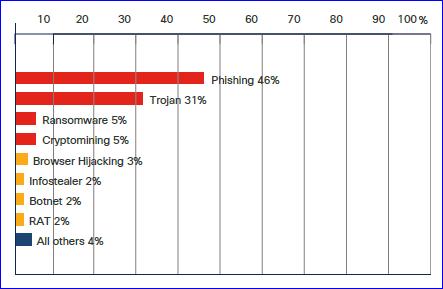
6. Pop-up windows: Browsers prevent pop-up windows and this feature must not be disabled for non-trusted sites. FIGURE I: PHISHING HIGHEST LEVEL OF MALICIOUS ACTIVITY
ISSN 2348-1196 (print)
International Journal of Computer Science and Information Technology Research ISSN 2348-120X (online) Vol. 10, Issue 2, pp: (82-86), Month: April - June 2022, Available at: www.researchpublish.com
Organizations are much well equipped to thwart any form of attacks, including and not limited to viruses, Trojans, malwares, spam, as well phishing emails from external senders to internal recipients. Organizations spend a large sum of their IT budget in keeping their infrastructure secure; they constantly evaluate and update their security posture, invest heaving in people protecting their environment and thus are unlikely to be victim of a successful phishing attack.
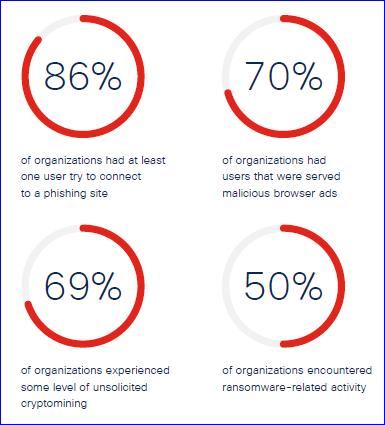
According to Cisco’s Cyber security threat trends [2], 86% of the organizations have had at least one user try to connect to a phishing site. Other numbers in the same report reveal staggering amounts of malicious attempts and potential compromises faced by organizations.
Organizations rely on security appliances or products, one or more or a combination, to protect themselves from external malicious actors. These tools have varied degree of catching a compromise before it can arrive at the employee’s desk for possible infections. According to Gartner, "Dramatic increases in the volume and success of phishing attacks and migration to cloud email require a re-evaluation of email security controls and processes." [4]
1. Cisco IronPort provides, among other security features, email hygiene and protects against viruses, spam, and phishing alike. These appliances have granular control over the information which is sent to your organization or which can leave it. Many organizations consider IronPort as their first line of defence against malware, viruses, and phishing emails [5]
2. ProofPoint is a product similar to Cisco IronPort, provides end-to-end solution for email security.
3. Email Security Solution: FortiMail. Email is a critical tool for everyday business communication and productivity. It’s also a popular attack vector among threat actors trying to steal credentials, obtain sensitive data or hold it for ransom, or steal funds by gaining access to banking information [6]
4. Exchange Online Protection for Microsoft 365. Exchange Online Protection (EOP) is the cloud-based filtering service that protects your organization against spam, malware, and other email threats. EOP is included in all Microsoft 365 organizations with Exchange Online mailboxes [7]
5. Windows Defender Application Guard is a hardware-based endpoint defence, a security tool that is built into Microsoft Edge. Application Guard isolates enterprise-defined untrusted sites from the desktop (host) in a virtual machine (VM) to prevent malicious activity from reaching the desktop.
ISSN 2348-1196 (print)
International Journal of Computer Science and Information Technology Research ISSN 2348-120X (online) Vol. 10, Issue 2, pp: (82-86), Month: April - June 2022, Available at: www.researchpublish.com
In today’s world, security is paramount. It is needed not only by business to protect their business but also by individuals to protect their valuable identity and access to their information. Almost everyone, regardless of age or understanding of the security exploits, must be careful when dealing with information shared on the public internet. This paper highlights some of the key areas and offers suggestions to protect individuals and organizations. While this is not a complete study of either the phishing attacks or protection available in the market, it only highlights the importance of some of the features which individuals and companies should consider. We all have information that needs protection including financial accounts, social security numbers, passwords, credit card numbers etc.; protecting who has access to this information has become a daunting task for all. Threats are all around us and Phishing is the most common form of an attack, whether it be social engineering or a luring link in an email. The biggest threat to security is careless user who does not understand the impact of a click on a wrong link or shares personal information without thinking twice.
[1] Smart Phone Malware: https://www.zdnet.com/article/smartphone-malware-is-on-the-rise-heres-what-to-watch-outfor/
[2] CISCO Cyber Security Threat Trends 2021: https://learn-umbrella.cisco.com/ebook-library/2021-cyber-securitythreat-trends phishing-crypto-top-the-list
[3] How to protect your smartphone from hackers and intruders: https://www.digitaltrends.com/mobile/how-to-protectyour-smartphone-from-hackers-and-intruders/
[4] Gartner, Market Guide for Email Security, Mark Harris, Peter Firstbrook, Ravisha Chugh, 8 September 2020
[5] Gartner, Market Guide for Email Security, 7 October 2021, Mark Harris, Peter Firstbrook, Ravisha Chugh, Mario de Boer
[6] 2022 Fortinet, Inc https://www.fortinet.com/products/email-security
[7] Exchange Online Protection overview: https://docs.microsoft.com/en-us/microsoft-365/security/office-365-security/ exchange-online-protection-overview?view=o365-worldwide