The Faculty Process a Clear Guide for Parishes

Discerning the Need

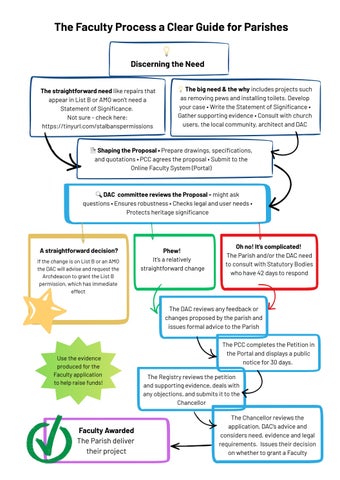
�The straightforward need like repairs that appear in List B or AMO won’t need a Statement of Significance.
Not sure - check here: https;//tinyurl.com/stalbanspermissions


�The big need & the why includes projects such as removing pews and installing toilets. Develop your case • Write the Statement of Significance • Gather supporting evidence • Consult with church users, the local community, architect and DAC
Shaping the Proposal • Prepare drawings, specifications, and quotations • PCC agrees the proposal • Submit to the Online Faculty System (Portal)

�DAC committee reviews the Proposal - might ask questions • Ensures robustness • Checks legal and user needs • Protects heritage significance

A straightforward decision?
If the change is on List B or an AMO the DAC will advise and request the Archdeacon to grant the List B permission, which has immediate effect

Use the evidence produced for the Faculty application to help raise funds!

Faculty Awarded
The Parish deliver their project

Phew!
It’s a relatively straightforward change




Oh no! It’s complicated! The Parish and/or the DAC need to consult with Statutory Bodies who have 42 days to respond

The DAC reviews any feedback or changes proposed by the parish and issues formal advice to the Parish

The PCC completes the Petition in the Portal and displays a public notice for 30 days.
The Registry reviews the petition and supporting evidence, deals with any objections, and submits it to the Chancellor

The Chancellor reviews the application, DAC’s advice and considers need, evidence and legal requirements. Issues their decision on whether to grant a Faculty