Product:WHEELLOADER
Model:988KWHEELLOADERTWX
Configuration:988KWheelLoaderTWX00001-UP(MACHINE)POWEREDBYC18Engine
OperationandMaintenanceManual
Cat®CommandforLoading,Gen3.5RemoteControlOperatorConsolewithRFIDfor 988KLargeWheelLoader
MediaNumber-M0084307-01PublicationDate-01/09/2019DateUpdated-18/09/2019
Foreword
SMCS-1000;7000
LiteratureInformation
Thismanualshouldbestoredintheliteratureholder.
Thismanualcontainssafetyinformation,operationinstructions,andmaintenancerecommendations.
Somephotographsorillustrationsinthispublicationshowdetailsorattachmentsthatcanbedifferent fromyourproduct.
Continuingimprovementandadvancementofproductdesignmighthavecausedchangestoyour productwhicharenotincludedinthispublication.Read,studyandkeepthismanualwiththeproduct.
Wheneveraquestionarisesregardingyourproduct,orthispublication,pleaseconsultyourCatdealer forthelatestavailableinformation.
Safety
Thesafetysectionlistsbasicsafetyprecautions.Inaddition,thissectionidentifiesthetextand locationsofwarningsignsandlabelsusedontheproduct.
Operation
Theoperationsectionisareferenceforthenewoperatorandarefresherfortheexperiencedoperator. Thissectionincludesadiscussionofgauges,switches,productcontrols,attachmentcontrols,and programminginformation.
s00514343
Photographsandillustrationsguidetheoperatorthroughcorrectproceduresofchecking,starting, operatingandstoppingtheproduct.
Operatingtechniquesoutlinedinthispublicationarebasic.Skillandtechniquesdevelopasthe operatorgainsknowledgeoftheproductanditscapabilities.
Maintenance
Themaintenancesectionisaguidetoequipmentcare.
Copyright1993-2023CaterpillarInc. AllRightsReserved. PrivateNetworkForSISLicensees.
ThuMay2523:41:09UTC+05302023
Product:WHEELLOADER
Model:988KWHEELLOADERTWX
Configuration:988KWheelLoaderTWX00001-UP(MACHINE)POWEREDBYC18Engine
OperationandMaintenanceManual
Cat®CommandforLoading,Gen3.5RemoteControlOperatorConsolewithRFIDfor 988KLargeWheelLoader
MediaNumber-M0084307-01PublicationDate-01/09/2019DateUpdated-18/09/2019
CabMountedComponents-Check-Daily
SMCS-7008-535
ManualOverrideSwitch
•Checkthatthemanualoverrideswitchissecure
•Checkthatthemanualoverrideswitchhasnoexternaldamage
•Checkthewiringforthemanualoverrideswitch
AccessPointandBackHaulRadio-Inspect
•Ensurethattheradioissecurelymounted.
•Ensurethatallconnectionsarecleanandtight.
•Checktheradioforexternaldamage.
Copyright1993-2023CaterpillarInc. AllRightsReserved. PrivateNetworkForSISLicensees. ThuMay2523:45:50UTC+05302023
i07078499
Product:WHEELLOADER
Model:988KWHEELLOADERTWX
Configuration:988KWheelLoaderTWX00001-UP(MACHINE)POWEREDBYC18Engine
OperationandMaintenanceManual Cat®CommandforLoading,Gen3.5RemoteControlOperatorConsolewithRFIDfor 988KLargeWheelLoader
MediaNumber-M0084307-01PublicationDate-01/09/2019DateUpdated-18/09/2019
ConsoleActionAlarm-Check-Daily
SMCS-7008-535;7407-535
Note:ThisConsoleActionAlarm-Checkoccursataminimumdailyandasachangeinambient noiseoccurs,orasotherrelevantchangesoccur.
FollowtheproceduresinStep1throughStep8tochecktheoperatorconsolealarmandevent feedback.
i07896234
Illustration1g06274117
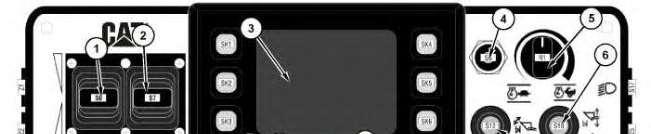
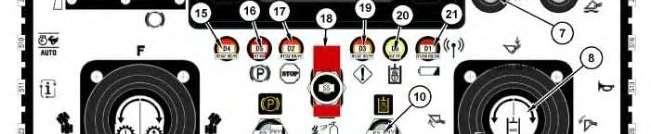
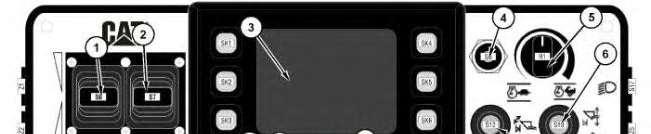
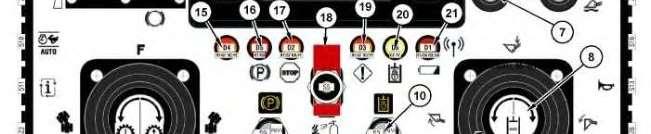
Operatorconsole
(1)Impellerclutchlever (2)Servicebrakelever (3)Statusdisplay (4)Manual/autodigselectswitch (5)Enginespeedselectdial (6)Liftandlowerkickout/floatbutton (7)Rackanddumpkickoutbutton (8)Auxiliarythirdfunctioncontrolknob (9)Implementscontrol (10)Implementlockoutswitch (11)Machinepower/enginecrankswitch (12)Parkingbrakeswitch (13)Steering/directioncontrol (14)Gearshiftup/downknob (15)Notused (16)ParkingbrakeLED (17)SoftwarestopLED (18)Firesuppressionswitch(ifequipped) (19)ActivefaultLED (20)ImplementlockoutLED (21)Battery/wirelessstatusLED
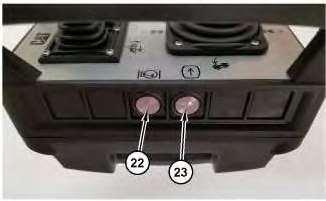
Illustration2g06298573
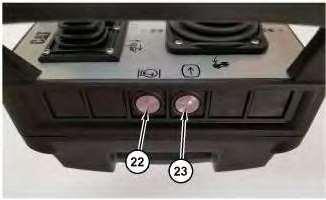
Leftsideofoperatorconsole (22)Enginespeeddialtogglebutton (23)Displayselectbutton
Illustration3g06298577
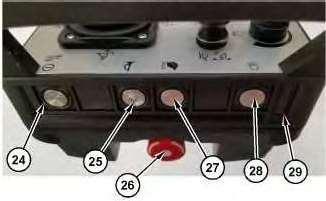
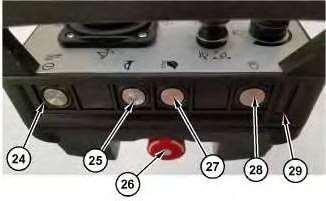
Rightsideofoperatorconsole (24)Operatorconsolepowerbutton (25)Hornbutton (26)Operatorconsolecommandedstopswitch (27)Ecomodebutton (28)Machineworklightbutton (29)RFIDchipslot
1.ConfirmthattheOperatorConsoleCommandedStop(26)isturnedoff,turntheswitch clockwisetodisengage.
2.Turnthefollowingswitchestothedefaultposition.
"ImplementLockout"(10)ON
"ParkingBrake"(12)ON
"MachinePower/EngineCrank"(11)OFF
"ImplementsControl"(9)CENTER
"Steering/DirectionControl"(13)CENTER
3.Makesurethattheoperatorconsoleisupright.
Note:Theoperatorconsolehasabuilt-ininclinometer/accelerometersensorwhich preventsoperationwhentheconsoleistiltedpast45degreesinanydirectionoris dropped.
4.PresstheOperatorConsolePowerbutton(24)topowerontheoperatorconsole.
Illustration4g06246621
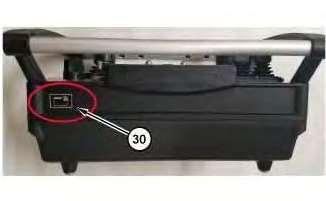
Operatorconsoleaccesscardscanarea (30)Front-rightcorner
5.Within8seconds,scantheOperatorConsoleAccessCardonthefront-rightcornerofthe OperatorConsolewheretheindicatorlabelis.AdimCatlogowillappearuntiltheOperator ConsoleAccessCardisswiped.TheCatlogowillappearbrighterwhenthecardissuccessfully swiped.
Note:IftheOperatorConsoleAccessCardisnotscannedwithin8seconds,theOperator Consolewillpoweroff,andtheprocedurewillrequirerepeated.
6.PlacetheMachinePower/EngineCrankswitch(11)ontheoperatorconsoletotheON(center) position.
Note:ForthistestprocedurethereisnoneedtosoundthehorntoactivateRCorstartthe machineengine.
7.PresstheOperatorconsolecommandedstopswitch(26)ontheconsole.
Note:Afterperformingthisstep,theactionalarmontheconsoleshouldactivate.The"Active FaultLED"(19)shouldflash"RED"witheverysoundoftheactionalarm.Ensurethatthe actionalarmcanbeheardovertheambientnoise.
8.ResettheOperatorconsolecommandedstopswitch(26)ontheconsolebyrotatingthebutton clockwisetorelease.
Note:OperatorConsolecheckisnowcomplete.
RefertotheOperationandMaintenanceManual,M0084307,"PreliminaryRemoteConsoleChecks" sectionwithinthismanualforadditionalinformationtocontinuetoactivateRC.
Copyright1993-2023CaterpillarInc. AllRightsReserved. PrivateNetworkForSISLicensees.
ThuMay2523:46:01UTC+05302023
Product:WHEELLOADER
Model:988KWHEELLOADERTWX
Configuration:988KWheelLoaderTWX00001-UP(MACHINE)POWEREDBYC18Engine
OperationandMaintenanceManual
Cat®CommandforLoading,Gen3.5RemoteControlOperatorConsolewithRFIDfor 988KLargeWheelLoader
MediaNumber-M0084307-01PublicationDate-01/09/2019DateUpdated-18/09/2019
GeneralMaintenanceInformation
SMCS-7008
Note:TheRFIDChip,whichcanbeinsertedintotheOperatorConsoleunitandispairedtothe Receiverlocatedonthemachine.ThereceiverandRFIDChiparepairedtoeachother,however,a singleOperatorConsolecanoperatemultipleremotecontrolmachinesdependingontheRFIDChip insertedintheOperatorConsole.
PersonalSafety
Makesurethatthemachineryandthesurroundingareaareclearbeforeoperating.Donotactivatethe remotesystemunlesssafetodoso.Alwaysdisconnecttheremotesystembeforedoingany maintenancetopreventaccidentaloperationofthemachine.TurntheManual/RemoteModeswitch ontherearbumperservicecentertothemanualpositionandlockouttheswitch.
Care
Keepdry.DonotcleantheOperatorConsoleunderhighpressure.Ifwaterorotherliquidsgetinside theconsolebatterycompartment,immediatelydrytheunit.Removethebatteryandlettheunitair dry.
Cleantheunitafteroperation.Removeanymud,dirt,concrete,andsoon,fromtheunittoprevent cloggingofbuttons,switches,andsoon,byusingadampcloth.
Whenthetimecomestoreplacethebatteries,usethesamemodelandthesamemanufacturerofthe originalbatteries.
Alwaysrecycleabattery.Neverdiscardabattery.Returnusedbatteriestoanappropriaterecycling facility.ChecklocallawsandregulationsregardingappropriatebatteryrecyclingorcontactaCat Dealerformoreinformation.
i07078497
Transportation
CareshouldbetakenwhentransportingtheOperatorConsole.Topreventdamagetotheconsoleand theconsolescontrols,usethecarrycaseprovidedtostoreandtransporttheoperatorconsole.
FormoreinformationrefertoOperationandMaintenanceManual,M0084307,"Cat®Commandfor Dozing,OperatorConsole","SystemComponents"chapterinthe"CarryCaseandEquipment" section.
Copyright1993-2023CaterpillarInc. AllRightsReserved. PrivateNetworkForSISLicensees.
ThuMay2523:45:27UTC+05302023
Product:WHEELLOADER
Model:988KWHEELLOADERTWX
Configuration:988KWheelLoaderTWX00001-UP(MACHINE)POWEREDBYC18Engine
OperationandMaintenanceManual Cat®CommandforLoading,Gen3.5RemoteControlOperatorConsolewithRFIDfor 988KLargeWheelLoader
MediaNumber-M0084307-01PublicationDate-01/09/2019DateUpdated-18/09/2019
Horn-Test-Daily
Operatorconsole
(1)Impellerclutchlever
(2)Servicebrakelever (3)Statusdisplay
i07270805
This is the sample of the manual Click on the download link for complete Manual
(4)Manual/autodigselectswitch (5)Enginespeedselectdial (6)Liftandlowerkickout/floatbutton (7)Rackanddumpkickoutbutton (8)Auxiliarythirdfunctioncontrolknob (9)Implementscontrol (10)Implementlockoutswitch (11)Machinepower/enginecrankswitch (12)Parkingbrakeswitch (13)Steering/directioncontrol (14)Gearshiftup/downknob (15)Notused (16)ParkingbrakeLED (17)SoftwarestopLED (18)Firesuppressionswitch(ifequipped) (19)ActivefaultLED (20)ImplementlockoutLED (21)Battery/wirelessstatusLED
Illustration2g06298573
Leftsideofoperatorconsole (22)Enginespeeddialtogglebutton (23)Displayselectbutton
Illustration3g06298577
Rightsideofoperatorconsole (24)Operatorconsolepowerbutton (25)Hornbutton (26)Operatorconsolecommandedstopswitch (27)Ecomodebutton (28)Machineworklightbutton (29)RFIDchipslot
1.ConfirmthattheOperatorConsoleCommandedStop(26)isturnedoff,turntheswitch clockwisetodisengage.
2.Turnthefollowingswitchestothedefaultposition.
"ImplementLockout"(10)ON
"ParkingBrake"(12)ON
"MachinePower/EngineCrank"(11)OFF
"ImplementsControl"(9)CENTER
"Steering/DirectionControl"(13)CENTER
3.Makesurethattheoperatorconsoleisupright.
Note:Theoperatorconsolehasabuilt-ininclinometer/accelerometersensorwhich preventsoperationwhentheconsoleistiltedpast45degreesinanydirectionoris dropped.
4.PresstheOperatorConsolePowerbutton(24)topowerontheoperatorconsole.
Illustration4g06246621
Operatorconsoleaccesscardscanarea (30)Front-rightcorner
5.Within8seconds,scantheOperatorConsoleAccessCardonthefront-rightcornerofthe OperatorConsolewheretheindicatorlabelis.AdimCatlogowillappearuntiltheOperator ConsoleAccessCardisswiped.TheCatlogowillappearbrighterwhenthecardissuccessfully swiped.
Note:IftheOperatorConsoleAccessCardisnotscannedwithin8seconds,theOperator Consolewillpoweroff,andtheprocedurewillrequirerepeated.
6.PlacetheMachinePower/EngineCrankswitch(11)ontheoperatorconsoletotheON(center) position.
7.Holdthe"Horn"Button(25)ontheconsolefor4seconds.
8.VerifytheHornsoundsandtheLightsbecomeactive.
Copyright1993-2023CaterpillarInc. AllRightsReserved. PrivateNetworkForSISLicensees.
ThuMay2523:46:13UTC+05302023
Product:WHEELLOADER
Model:988KWHEELLOADERTWX
Configuration:988KWheelLoaderTWX00001-UP(MACHINE)POWEREDBYC18Engine OperationandMaintenanceManual
(4)Manual/autodigselectswitch (5)Enginespeedselectdial (6)Liftandlowerkickout/floatbutton (7)Rackanddumpkickoutbutton (8)Auxiliarythirdfunctioncontrolknob (9)Implementscontrol (10)Implementlockoutswitch (11)Machinepower/enginecrankswitch (12)Parkingbrakeswitch (13)Steering/directioncontrol (14)Gearshiftup/downknob (15)Notused (16)ParkingbrakeLED (17)SoftwarestopLED (18)Firesuppressionswitch(ifequipped) (19)ActivefaultLED (20)ImplementlockoutLED (21)Battery/wirelessstatusLED
Illustration2g06298573
Leftsideofoperatorconsole (22)Enginespeeddialtogglebutton (23)Displayselectbutton
Illustration3g06298577
Rightsideofoperatorconsole (24)Operatorconsolepowerbutton (25)Hornbutton (26)Operatorconsolecommandedstopswitch (27)Ecomodebutton (28)Machineworklightbutton (29)RFIDchipslot
1.ConfirmthattheOperatorConsoleCommandedStop(26)isturnedoff,turntheswitch clockwisetodisengage.
2.Turnthefollowingswitchestothedefaultposition.
"ImplementLockout"(10)ON
"ParkingBrake"(12)ON
"MachinePower/EngineCrank"(11)OFF
"ImplementsControl"(9)CENTER
"Steering/DirectionControl"(13)CENTER
3.Makesurethattheoperatorconsoleisupright.
Note:Theoperatorconsolehasabuilt-ininclinometer/accelerometersensorwhich preventsoperationwhentheconsoleistiltedpast45degreesinanydirectionoris dropped.
4.PresstheOperatorConsolePowerbutton(24)topowerontheoperatorconsole.
Illustration4g06246621
Operatorconsoleaccesscardscanarea (30)Front-rightcorner
5.Within8seconds,scantheOperatorConsoleAccessCardonthefront-rightcornerofthe OperatorConsolewheretheindicatorlabelis.AdimCatlogowillappearuntiltheOperator ConsoleAccessCardisswiped.TheCatlogowillappearbrighterwhenthecardissuccessfully swiped.
Note:IftheOperatorConsoleAccessCardisnotscannedwithin8seconds,theOperator Consolewillpoweroff,andtheprocedurewillrequirerepeated.
6.PlacetheMachinePower/EngineCrankswitch(11)ontheoperatorconsoletotheON(center) position.
7.Holdthe"Horn"Button(25)ontheconsolefor4seconds.
8.VerifythattheBlueIndicatorLampsareflashing.
9.PresstheOperatorConsoleCommandedStop(26)buttonandconfirmthattheRedIndicator Lampsonthetractorareilluminated.
10.Withthecommandedstopstillactive,approachthemachine.Enterthemachinecabandpress themanualoverrideswitch.
11.VerifythattheGreenindicatorlampisonandsolid,andtheredandblueindicatorsareoff.
12.Exitthemachine,disengagethecommandedstop,andpowerdowntheconsole.Cyclethe machinemasterpowerswitch,themachinewillstartinRCenable.
Copyright1993-2023CaterpillarInc. AllRightsReserved. PrivateNetworkForSISLicensees. ThuMay2523:46:24UTC+05302023
Product:WHEELLOADER
Model:988KWHEELLOADERTWX
Configuration:988KWheelLoaderTWX00001-UP(MACHINE)POWEREDBYC18Engine
OperationandMaintenanceManual Cat®CommandforLoading,Gen3.5RemoteControlOperatorConsolewithRFIDfor 988KLargeWheelLoader
MediaNumber-M0084307-01PublicationDate-01/09/2019DateUpdated-18/09/2019
MaintenanceIntervalSchedule
SMCS-7008
WhenRequired
Monitor-Clean Every10ServiceHoursorDaily
CabMountedComponents-Check ConsoleActionAlarm-Check Horn-Test
MachineOverrideControls-Check OffBoardRadio-Check RearBumperServiceCenter-Check RoofMountedComponents-Check
Copyright1993-2023CaterpillarInc. AllRightsReserved. PrivateNetworkForSISLicensees.
ThuMay2523:45:38UTC+05302023
i07901164
Product:WHEELLOADER
Model:988KWHEELLOADERTWX
Configuration:988KWheelLoaderTWX00001-UP(MACHINE)POWEREDBYC18Engine
OperationandMaintenanceManual
Cat®CommandforLoading,Gen3.5RemoteControlOperatorConsolewithRFIDfor 988KLargeWheelLoader
MediaNumber-M0084307-01PublicationDate-01/09/2019DateUpdated-18/09/2019
Monitor-Clean-WhenRequired
SMCS-7347-070
MakesurethattheStatusDisplayscreenisclean.
CleantheStatusDisplayscreen
Sometimesaspotofdirtonthemonitorcancauseapixelation.Followtheinstructionsbelowtoclean theLCD:
NOTICE
Isopropylalcoholisaflammableliquid.Neversprayorpouranyliquid directlyontheStatusDisplayscreen.Donotcleanthescreenwhilethe OperatorConsoleison.
1.ShutdowntheOperatorConsole.
2.RemovethebatteryfromtheOperatorConsole.
3.Wipethescreengentlywithasoft,drycloth.Ifanymarksremain,moistentheclothwithan LCDcleaner,andthengentlystroketheclothacrossthedisplayinonedirection,movingfrom thetopofthedisplaytothebottom.
i07270807
Donotuseanyofthefollowingchemicalsoranysolutionsthatcontain thefollowing:
Ifyouhaveadifferentchemicalorsolutionandarenotsurewhether thechemicalorsolutionissuitable,donotusethechemicalorsolution. Usinganyofthechemicalsinthepreviouslistmaycausepermanent damagetotheStatusDisplayscreen.Somecommercialwindow cleanerscontainammoniaandare,therefore,unacceptable.
4.BesurethatthescreenisdrybeforeusingtheOperatorConsole.
Note:ManycleaningsolutionsaresoldspecificallyasLCDcleaners.Thesecleanerscanbeusedto cleanthescreenontheOperatorConsole.Alternately,youmayusea50/50isopropylalcoholand watermixture.Microfiberclothssuchasthoseusedtocleaneyeglassesareexcellentforusewith LCDs.
Copyright1993-2023CaterpillarInc. AllRightsReserved. PrivateNetworkForSISLicensees. ThuMay2523:46:39UTC+05302023
Product:WHEELLOADER
Model:988KWHEELLOADERTWX
Configuration:988KWheelLoaderTWX00001-UP(MACHINE)POWEREDBYC18Engine
OperationandMaintenanceManual Cat®CommandforLoading,Gen3.5RemoteControlOperatorConsolewithRFIDfor 988KLargeWheelLoader
MediaNumber-M0084307-01PublicationDate-01/09/2019DateUpdated-18/09/2019
OffBoardRadio-Check-Daily
SMCS-733T-535
OperatorConsole-Inspect
•Checktherubberbootsonthejoysticksandbuttonsforripsanddirtordebris
•Checkfordamagedseals
•Checkforanydamagetotheconsole
Copyright1993-2023CaterpillarInc. AllRightsReserved. PrivateNetworkForSISLicensees.
ThuMay2523:46:50UTC+05302023
Product:WHEELLOADER
Model:988KWHEELLOADERTWX
Configuration:988KWheelLoaderTWX00001-UP(MACHINE)POWEREDBYC18Engine
OperationandMaintenanceManual
Cat®CommandforLoading,Gen3.5RemoteControlOperatorConsolewithRFIDfor 988KLargeWheelLoader
MediaNumber-M0084307-01PublicationDate-01/09/2019DateUpdated-18/09/2019
RearBumperServiceCenter-Check-Daily
SMCS-7513-535
Manual/RemoteModeSwitch-Inspect
•CheckthattheManual/RemoteModeswitchissecureandnotdamaged.
•CheckthatManual/RemoteModeswitchhasnoexternaldamage.
•CheckthatthewiringfortheManual/RemoteModeswitchisnotdamaged.
EngineShutdownSwitch-Inspect
•Checkthattheengineshutdownswitchissecureandnotdamaged.
•Checkthatengineshutdownswitchhasnoexternaldamage.
•Checkthatthewiringfortheengineshutdownswitchisnotdamaged.
ThuMay2523:47:01UTC+05302023
Product:WHEELLOADER
Model:988KWHEELLOADERTWX
Configuration:988KWheelLoaderTWX00001-UP(MACHINE)POWEREDBYC18Engine
OperationandMaintenanceManual Cat®CommandforLoading,Gen3.5RemoteControlOperatorConsolewithRFIDfor 988KLargeWheelLoader
MediaNumber-M0084307-01PublicationDate-01/09/2019DateUpdated-18/09/2019
RoofMountedComponents-Check-Daily
SMCS-7008-535;7278-535
Improperoperationofanaccessplatformcouldresultininjuryor death.Operatorsmustcarryouttheirdutiesproperlyandfollowall instructionsandguidelinesgivenforthemachineandaccessplatform.
Besureallpersonnelareclearoftheequipmentwhiletheequipmentis beinglowered.
Failuretostayclearoftheequipmentwhiletheequipmentisbeing loweredmayresultinpersonalinjury.
Note:Whenyouaccesstheroof-mountedcomponents,besuretoobservesafeproceduresforaccess. Maintainathree-pointcontactand/oruseabodyharness. RadioAntennasandAntennaConnections-Inspect
i07078511
•Checkthatthecoaxialcableconnectionsarecleanandtight
•Checkthatthemountingoftheantennasissecureandnotdamaged
•Checkthatthecoaxialcablesarenotdamagedorchaffing
Copyright1993-2023CaterpillarInc. AllRightsReserved. PrivateNetworkForSISLicensees.
ThuMay2523:47:12UTC+05302023
Product:WHEELLOADER
Model:988KWHEELLOADERTWX
Configuration:988KWheelLoaderTWX00001-UP(MACHINE)POWEREDBYC18Engine
OperationandMaintenanceManual
Cat®CommandforLoading,Gen3.5RemoteControlOperatorConsolewithRFIDfor 988KLargeWheelLoader
MediaNumber-M0084307-01PublicationDate-01/09/2019DateUpdated-18/09/2019 i07078496
Specification
SMCS-7008
OperatorConsole Table1
Frequency Management FrequencyHoppingSpread Spectrum AutomaticFrequencySelection (AFS)
Operatingtemperature
Storagetemperature
Features
•IndicatorsandDiagnosticsLCDScreen,Battery,RemoteActiveLED,Software,and CommandedStopLEDStatusIndicators
•ConsolelinkstomachinereceiverviaRFIDchipthatcontainsthereceiversuniqueIDcode, whichisfactoryprogrammed
•CRC-16errordetection
•InputPower3.7VDCLi-IonRechargeableBattery
•Batterylife22hours
•Weight(withbattery)Approx.3.6kg(8.00lb)
•Construction:Highimpact,lowtemperatureplastic
•WeatherproofIP65
•Internalantenna(OperatorConsole)
•900MHzcontainsAutomaticFrequencySelection.TheOperatorConsolechoosesanopen frequencyuponpower-up.
BatteryandCharging
ContinuousOperatingTime 18Hours
ChargingTime 4Hoursorless
AllowedAmbientChargingTemperature0°C(32.0°F)to45°C(113.0°F)
AverageChargingCapacity 500Cycles
BatteryStorage
Receiver
ReceiverLEDs
Table3
ReceiverData
MeaningColor Information
ONYellowIlluminateswhenthereceiverisconnectedtotheoperatingvoltage.
RFRedIlluminateswhentheradioconnectionisinterrupted.
Si1Green IlluminateswhentheE-Stoprelaysareclosed.
Si2Green Illuminateswhenadrivecommandisoutput.
Table2
This is the sample of the manual Click on the download link for complete Manual