MenuNavigation
Illustration2g06570474
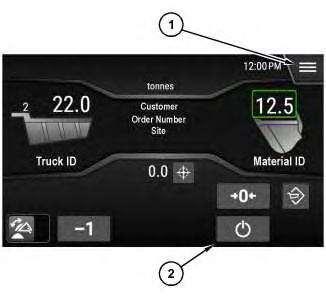
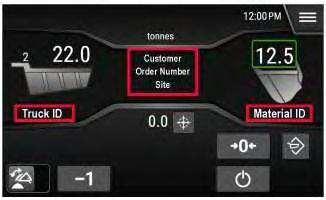
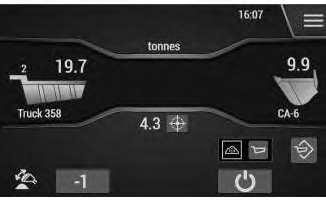
HomeScreen
(1)Menubutton (2)Standbybutton
Note:FormoreinformationaboutotheritemsandbuttonsontheHomescreen,referto"Normal WeighingOperation"
EnhancedNavigation(CatAdvancedPayload)
TheAnalysisDisplayModulesoftwareincludesnavigationfeaturesthatallowtheoperatortoaccess commonfunctionsandfindinformationquickly.Theenhancedfeaturesincludethefollowing:
•Homescreenshortcuts
•Mainmenufunctionsarea
•Sortablelists
•Searchablelists
HomeScreenShortcuts
Illustration4g06570702
Homescreen
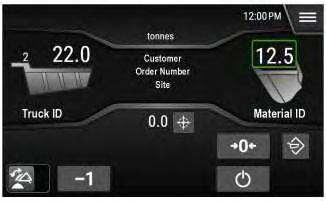
OntheHomeScreen,selectanyuniqueID.Therelevantlistscreenwillopendirectly:
•SelecttheTruckIDtogodirectlytotheTruckList
•SelecttheMaterialIDtogodirectlytotheMaterialList
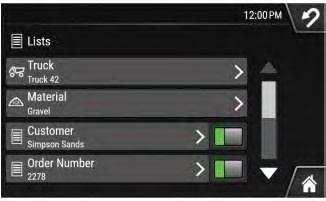
•SelecttheIDareainthecenteroftheHomescreentogodirectlytotheListsMenu Referto"Lists(CatAdvancedPayload)"formoreinformation.
MainMenu
Illustration5g06564569
MainMenuscreen
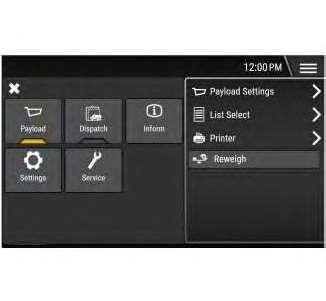
Selectingthe"Menu"button(1)bringsupthemainmenuscreen.
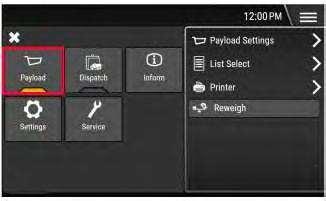
Note:The"Payload"applicationispreselectedbydefault.
MainMenuFunctionsArea
Illustration6g06570703
Payloadapplicationfunctionsarea
Illustration7g06570704
Dispatchapplicationfunctionsarea
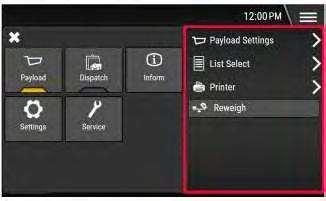
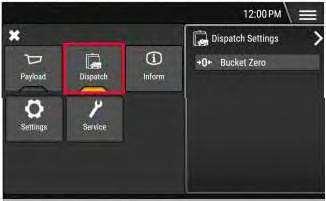
FromtheMainMenu,selecteitherthePayloadorDispatchapplication.Afunctionsareaontheright sideofthescreenwillappear.Selectafunctionfromthefunctionsareatogodirectlytotherelevant screen.
Illustration8g06570485
MainMenuscreen
FromtheMainMenu,selectthe"Payload"applicationbutton.
ThePayloadApplicationcontainsmostofthefunctionalityoftheCatPayloadsystem.Referto "PayloadSettings"forinformationonthemenusandfunctionsoftheCatPayloadApplication.
DispatchApplication(CatAdvancedPayload)
Home>Menu>Dispatch
Note:Formoreinformationaboutthesetup,operation,andserviceoftheDispatchApplication,refer to:
http://dealer.cat.com/
Illustration9g06570616 MainMenuscreen
Illustration10g06570630
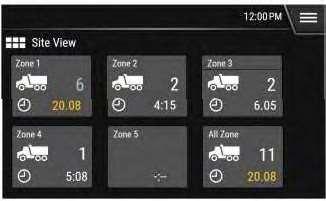
ExampleSiteViewscreen
1.FromtheMainMenu,selectthe"Dispatch"applicationbuttontoopentheSiteViewMenu.
TheSiteViewscreendisplaysthezonesatthecurrentsite.Eachzonetileshowsthenumberof trucksinthezone,andthetimeforthetruckthathasbeeninthezonethelongest.
Illustration11g06570634
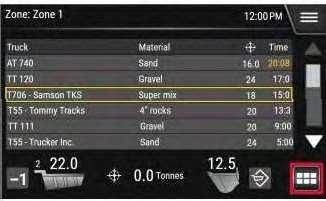
ExampleZoneSummaryscreen
2.SelectazonetiletoopentheZoneSummaryview.Selectthe"SiteView"buttontoreturnto theSiteViewscreen.
TheZoneSummaryviewliststhe"TruckID","MaterialID","TargetWeight",andthe"Time InZone"foreachtruckinthezone.
InformTile
Home>Menu>Inform
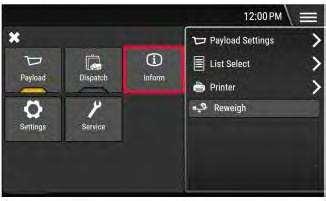
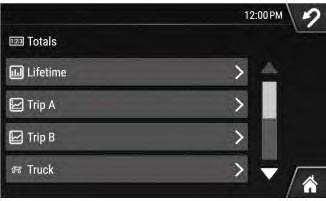
Illustration13g06565602
TotalsMenuscreen
FromtheMainMenu,selectthe"Inform"tiletoopentheTotalsMenu.
FormoreinformationontheInformtile,see"InformMenu"
SettingsTile
Home>Menu>Settings
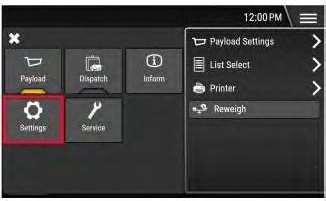
Illustration14g06569024
FromtheMainMenu,selectthe"Settings"tiletoopentheSettingsMenu.
PayloadSettings
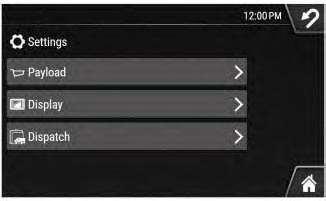
Home>Menu>Settings>Payload
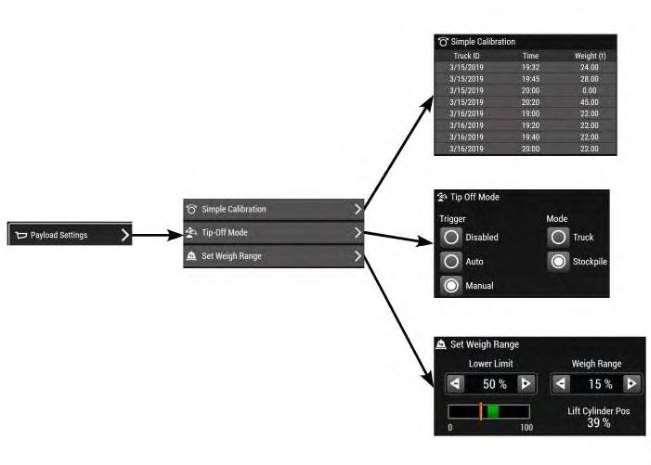
PayloadSettingsMenuStructure
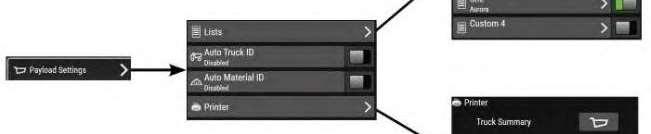
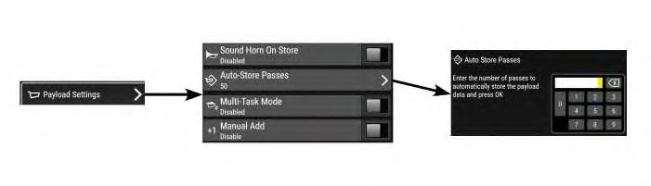
FromtheMainMenu,selectthe"Settings"tile,thenselect"Payload"toseethePayloadSettings Menuoptions.
This is the sample of the manual Click on the download link for complete Manual
Illustration19g06565167
SimpleCalibrationscreen
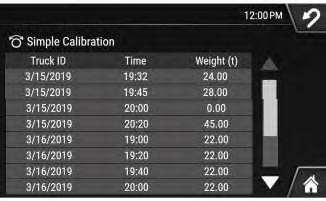
1.Fromthe"Settings"tile,select"Payload",thenselect"SimpleCalibration".
Illustration20g06565173
SimpleCalibrationentryscreen
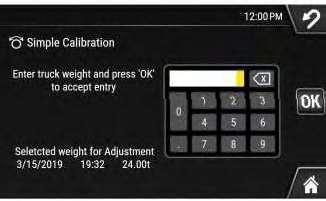
2.Selectanentryfromthe"SimpleCalibration"listtoopentheSimpleCalibrationadjustment screen.Herethesimplecalibrationcanbeadjustedusingtheactualweightofthetruck.
Referto"SimpleCalibration"formoreinformation.
TipOff
Home>Menu>Settings>Payload>TipOff
TipOff-Alive,estimatedweightshownonthescreenwhilepartiallydumpingabucket.
TheattributesofTipOffare:
•Theliveweightismostaccurateatmid-liftheight
•Eliminatestheneedtopressthe"RemoveLastPass"buttonafterpartiallydumpingthebucket
•Allowsfastercycletimeonfinalpassoftruckloading
•Lessaccuratethanthescaledweight
Note:Forbestaccuracy,confirmTipOffweightwithscaledweightbyliftingthefinalpayload throughtheweighrange.
Note:Whenbeginningtipoffinanymode,theestimatedweightmayincreaseasmallamountdueto linkagedesignandbucketloading.Addingtheincrementalchangetothetargetweightwillallow yourfinalweightoncerackedtobeclosertotarget.
TipOffModes
Menu>PayloadSettings>TipOffMode
Illustration21g06567453
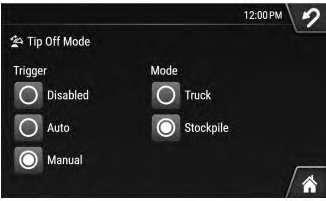
TipOffModescreen
TheTipOffmodeisselectedinthePayloadSettingsmenu.
FollowingaretheTipOffmodeoptions:
StockpileTipOff-Usedfordiscardingexcessmaterialatthestockpile.Theexpectationisthatthe materialremaininginthebucketisfullydumpedintothetruck.
TruckTipOff-Usedfortippingmaterialdirectlyintothetruck,tippedoffmaterialisaddedtothe truckweight.
StockpileTipOffMode
ThestockpileTipOffmodehasthefollowingattributes:
•Whenaweightismeasured(EstimatedorScaled),thatweightisaddedtothetrucktotaland removedfromtheremainingtruckweight.
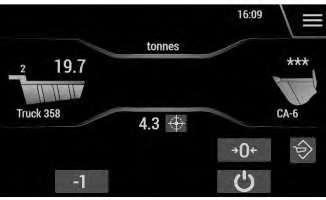
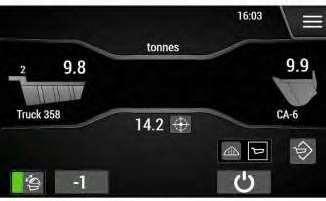
•ThesystementersTipOffmodeafteraweighthasbeenmeasured,andthebucketistipped partially.The"BucketZero"button(5)onthehomescreenchangesto"TipOffToggle"once TipOffmodeisactive.Aliveestimatedweightwillbeshown(noGreenBox).
•Asmaterialisdumpedoutofthebucket,andtheestimatedbucketweightdecreases,thetruck weightdecreasesandtheremainingtruckweightincreases.
•Whenthedesiredtruckweightisachieved,rackbackthebucketcompletelybeforedumping thebucketweightintothetruck.Thelastrackedweightiswhatwillbecommittedtothetruck whenafulldumpisdetected,orthe"Store"button(3)ispressed.
•Ifafulldumpismissed,andtheStorebuttonisnotpressed:Thesystemassumesthatthelast passwasnotaTipOffpassandcommitsthefirstmeasuredweightwhenanewdigisdetected.
•Ifthe"Store"button(3)ispressedwhilethebucketisnotrackedback:Thelastrackedweight willbestoredtothetruckandthetruckweightwillbepresentedtotheoperatorforafew seconds.
StockpileTipOffModeOperation
ThestockpileTipOffmodeoperationis:
1.Enddigwithbucketaslowaspracticalandfullyrackedback.
2.Slowlyliftuntilanestimatedweightappears.
3.Slowlydumpmaterialbacktostockpileuntildesiredweightisreached.
4.Achievescaledweightbyliftingthroughtheweighrangewhileapproachingtruck.
5.Dumpscaledweightintothetruck.
Note:Tocommitlastbucketweighttothetruckweight,eitherfullydumpthebucketorpress the"Store"button(3).
6.Pressthe"Store"button(3)toendthetruck.
TruckTipOffMode
Usefulwhenleftovermaterialfromthefirsttruckcanbeimmediatelydumpedintothenexttruck. Couldresultinhigherfuelburnifunwantedmaterialiscarriedandliftedthroughthecycle.
TruckTipOffModeOperation
1.Enddigwithbucketfullyrackedback.
2.Whenapproachingatruck,executeascaledweightbyliftingthroughweighrange.
3.Slowlydumpmaterialintothetruckuntildesiredweightisreached.
4.Toachievemostaccurateweight,lowerandraiseagaintoachievescaledweight.
Ifscaledweightisnotachievable,fullyrackbuckettogetamoreaccurateestimatedweight.
5.Pressthe"Store"button(3)toendthetruck.
TipOffOperatorTechnique
ThefollowingfactorswillaffectthepayloadaccuracyduringTipOff:
•Pausingbefore,during,oraftertipping
•Amountandpositionofmaterialinthebucketatthestartoftipping
•Liftheightwhentipping
•Speedofdumpcommandwhiletipping
HigheraccuracycanbeachievedfromestimatedTipOffweightsby:
•Developingaconsistentmachineoperation.
•Developingrepeatableoperatorbehavior:Oneoperatormayneedtostop0.2tonsshortof targetweight.Othersmaybeabletostopattargetweight.
TipOffToggleTechniqueforLoadingStandardTrucks
ThefollowingscenariosexplainhowtouseTipOfftoggletoloadatypicaltruckwithasingletrailer.
Scenario1:WhenDefaultTipOffModeIsSetto"Stockpile"
Thisdefaultsettingissetbytheoperatorbygoingto:Menu>PayloadSettings>TipOffModeand settingtheTipOffModeto"Stockpile".Confirmationofthissettingwillbeawhiteboxoutliningthe MaterialIDSelectionbuttonontheHomeScreen.
Thisscenarioisanexampleofa972Mwith9tonsinthebuckettryingtoload24tonsintoatruck.
1.FirstPass:
a.Loadthebucketwith9tons.
b.Scaletheweight.
c.Fullydumpthebucketintothetruckbed.
Thetrucknowhas9tonsloadedinthebed.
2.SecondPass:
a.Loadthebucketwith9tons.
b.Scaletheweight.
c.Fullydumpthebucketintothetruckbed.
Thetrucknowhas18tonsloadedinthebed.
3.ThirdPass:
a.Loadthebucketwith9tons.
b.Obtainalowliftweighestimatedweight.
c.UseStockpileTipOfftogetapproximately6tonsinthebucket.
d.Scaletheweight.
e.Dumpthebucketintothetruckbed.
Thetruckshouldshowapproximately24tonsloaded.
Scenario2:WhenDefaultTipOffModeIsSetto"Truck"
Thisdefaultsettingissetbytheoperatorbygoingto:Menu>PayloadSettings>TipOffModeand settingtheTipOffmodeto"Truck".Confirmationofthissettingwillbeawhiteboxoutliningthe TruckIDSelectionbuttonontheHomeScreen.
Note:ThefollowingprocedureassumesnoTipOfftostockpileisperformed.IfaTipOffto stockpileisperformed,aSplitWeightiscreatedinthebackground. Thisscenarioisanexampleofa972Mwith9tonsinthebuckettryingtoload24tonsintoatruck.
1.FirstPass:
a.Loadthebucketwith9tons.
b.Scaletheweight.
c.Fullydumpthebucketintothetruckbed.
Thetrucknowhas9tonsloadedinthebed.
2.SecondPass:
a.Loadthebucketwith9tons.
b.Scaletheweight.
c.Fullydumpthebucketintothetruckbed.
Thetrucknowhas18tonsloadedinthebed.
3.ThirdPass:
a.Loadthebucketwith9tons.
b.Scaletheweight.
c.Partiallydumpthebucketintothetruckbed,untilthetargetweightisobtained.
d.Theoperatorcanchoosetopressthe"Store"button(3)atthispointtosavethatmaterial tothetruck.
Ifamoreaccurateweightisdesired,priortopressingthe"Store"button(3),theoperator couldlowerthebucket.Thenraiseupthebucketthroughtheweighrangeforascaled weight.Nowwhenstored,thehaulingunitweightwillbeadjustedappropriatelytothe newscaledweight.Theoperatorcanpressthe"Store"button(3)tocloseoutthetruck withamoreaccuratecumulativetruckweight.
e.Returntheremainingmaterialinthebuckettothestockpileorsaveforthenexttruck.
Toobtainaweightforthematerialremaininginthebucket,theoperatorcanpressthe "EstimateWeight"button(4).Forabetterestimatedweight,slightlyliftthebucket.Fora scaledweight,liftthebucketthroughtheweighrange.
Thisdefaultsettingissetbytheoperatorbygoingto:Menu>PayloadSettings>TipOffModeand settingtheTipOffModeto"Disabled".
Thisscenarioisanexampleofa972Mwith9tonsinthebuckettryingtoload24tonsintoatruck.
1.FirstPass:
a.Loadthebucketwith9tons.
b.Scaletheweight.
c.Fullydumpthebucketintothetruckbed.
Thetrucknowhas9tonsloadedinthebed.
2.SecondPass:
a.Loadthebucketwith9tons.
b.Scaletheweight.
c.Fullydumpthebucketintothetruckbed.
Thetrucknowhas18tonsloadedinthebed,butneeds6tonsmore.
3.ThirdPass:
a.Loadthebucketwithapproximately6tons.
b.Scaletheweight.
c.Iftheweightisoff,adjustthebucketloadbyeitheraddingorsubtractingmaterial.
Note:WithTipOffsetto"Auto",oncetheoperatorpassesacertaindumpthresholdthe weightwillbecomelive.Thentheoperatorcanadjusttheweight.WithTipOffdisabled, oncetheoperatorpassesacertaindumpthreshold(slightlylowerthantheoneusedfor TipOffactivation)thebucketweightwilldisplay****andthepasswillbeaddedtothe "TruckWeight"(12).Toknowhowmuchmaterialwasactuallytippedoff,theoperator willneedtogenerateanewweight,whichwillstartanewpass.Beforedoingthat,the operatormustpressthe"RemoveLastPass/ClearTruck"button(9)tonegatethe previouspass.Thisprocessisfunctionallythesameashowthereweighingprocedure usedtoworkonStandaloneandK-seriesPCS.
d.Scaletheweight.
e.Readjustasnecessary.
f.Dumpthebucketintothetruckbed.
g.Pressthe"Store"button(3)toresetthesystemforthenexttrucktoload.
TipOffToggleTechniqueforLoadingTruckswithMoreThanOneTrailer
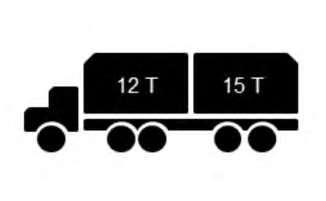
Whenloadingtruckswithmorethanonetrailer,theTipOfftogglebuttoncanbeusedtogetthe correctamountineachtrailer.ThefollowingprocedureexplainshowtouseTipOfftoggletoloada truckwithtwotrailerswitha10tonloader.
Scenario
1.FirstPass:
a.Loadthebucketwith10tons.
b.Scaletheweight.
c.Fullydumpthebucketintothefirsttruckbed. Thefirstbedneeds2tonsmore.
2.SecondPass:
a.Loadthebucketwith10tons.
b.Scaletheweight.
c.Slowlystartdumpingintothefirsttruckbed.
d.EnsurethatthesystemisintruckTipOffmode.IfinstockpileTipOffmode,pressthe "TipOffToggle"buttononcewhilethebuckethaspartiallydumped.
e.Tip2tonsintothefirstbed.
f.Rackthebucketback.
Thefirstbediscompletewith12tons.
g.Movetothesecondbed.
h.Fullydumptheremainder(8tons)ofthebucketintothesecondtruckbed. Thesecondbedneeds7tonsmore.
3.ThirdPass:
a.Loadthebucketwith10tons.
b.Obtainalowliftweighestimatedweight.
c.ThesystemautomaticallyswitchesbacktostockpileTipOffmode.
d.UsestockpileTipOfftoget7tonsinthebucket.
e.Scaletheweight.
f.Fullydumpthebucketintothesecondtruckbed.
Thesecondbediscompletewith15tons.
TipOffToggleTechniqueforLoadingaTruckwithTarpBraces
Whenloadingatruckwithoneormultipletarpbraces,theoperatorisrequiredtodumppartialpasses intoonetrailertospreadtheloadevenly.Inthisscenario,theTipOfftogglebuttoncanbeusedto dispersetheload,accordingly.ThefollowingscenariosexplainhowtouseTipOfftoggleindifferent situationsassuminga9tonloader.
Note:Manyvariantsofthissystemcanbesuccessfullyusedtoloadatruckwithmultipledumpsto positionthematerialevenly.Forexample,theoperatorcouldchoosetosettheTipOffDefaultmode eithertoTruckortoStockpile.TheoperatorcouldalsochoosetodisabletheTipOffmode altogether,whichmaybetheeasiest.
Scenario1:WhenDefaultTipOffModeIsSetto"Stockpile"
Thisdefaultsettingissetbytheoperatorbygoingto:Menu>PayloadSettings>TipOffModeand settingtheTipOffModeto"Stockpile".Confirmationofthissettingwillbeawhiteboxoutliningthe MaterialIDSelectionbuttonontheHomeScreen.
Thisscenarioisanexampleofa972Mwith9tonsinthebuckettryingtoload24tonsintoatruck.
1.
a.Loadthebucketwith9tons.
b.Scaletheweight.
c.Fullydumpthebucketintothetruckbedtowardthefront.
Thetrucknowhas9tonsloadedinthebed.
2.SecondPass:
a.Loadthebucketwith9tons.
b.Scaletheweight.
c.Fullydumpthebucketintothetruckbedtowardtherear.
Thetrucknowhas18tonsloadedinthebed.
3.ThirdPass:
a.Loadthebucketwith9tons.
b.Obtainalowliftweighestimatedweight.
ThesystemautomaticallyswitchesbacktostockpileTipOffmode.
c.UsestockpileTipOfftogetapproximately6tonsinthebucket.
Now,pressthe"RemoveLastPass/ClearTruck"button(9).Thisactionclearsthesplit weightforthestockpile.
d.Scaletheweight.
e.Partiallydumpthebucketintothetruckbedtowardthefront.
f.Oncethebucketispartiallydumped,pressthe"TipOffToggle"buttontoswitchtotruck TipOffmode.Thisactionmustbedonesothatthesystemdoesnotthinkthismaterialis beingleftatthestockpile.
g.Tip3tonsintothisfrontportionofthetruckbed.
h.Rackthebucketback.
Thefrontportionofthebediscompletewithapproximately12tons.
i.Repositiontheloadertowardtherearofthetruck.
j.Thetruckshouldshowapproximately24tonsloaded.Theoperatorcanpressthe"Store" button(3).ThePayloadScaleresetstozeroforthenexttruckandTipOffmodereturns tothedefaultsetting.
Scenario2:WhenDefaultTipOffModeIsSetto"Truck"
Thisdefaultsettingissetbytheoperatorbygoingto:Menu>PayloadSettings>TipOffModeand settingtheTipOffmodeto"Truck".Confirmationofthissettingwillbeawhiteboxoutliningthe TruckIDSelectionbuttonontheHomeScreen.
Note:ThefollowingprocedureassumesnoTipOfftostockpileisperformed.IfaTipOffto stockpileisperformed,aSplitWeightiscreatedinthebackground.
Thisscenarioisanexampleofa972Mwith9tonsinthebuckettryingtoload24tonsintoatruck.
1.FirstPass:
a.Loadthebucketwith9tons.
b.Scaletheweight.
c.Fullydumpthebucketintothetruckbedtowardthefront.
Thetrucknowhas9tonsloadedinthebed.
2.SecondPass:
a.Loadthebucketwith9tons.
b.Scaletheweight.
c.Fullydumpthebucketintothetruckbedtowardtherear.
Thetrucknowhas18tonsloadedinthebed.
3.ThirdPass:
a.Loadthebucketwith9tons.
b.Scaletheweight.
c.Partiallydumpthebucketintothetruckbedtowardthefront.
d.Rackbackandrepositiontheloadertowardtherearofthetruck.
e.Partiallydumpthebucketintothetruckbed,untilthetargetweightisobtained.
f.Theoperatorcanchoosetopressthe"Store"button(3)atthispointtosavethatmaterial tothetruck.
Ifamoreaccurateweightisdesired,priortopressingthe"Store"button(3),theoperator couldlowerthebucket.Thenraiseupthebucketthroughtheweighrangeforascaled weight.Nowwhenstored,thehaulingunitweightwillbeadjustedappropriatelytothe newscaledweight.Theoperatorcanpressthe"Store"button(3)tocloseoutthetruck withamoreaccuratecumulativetruckweight.
g.Returntheremainingmaterialinthebuckettothestockpileorsaveforthenexttruck.
Toobtainaweightforthematerialremaininginthebucket,theoperatorcanpressthe "EstimateWeight"button(4).Forabetterestimatedweight,slightlyliftthebucket.Fora scaledweight,liftthebucketthroughtheweighrange.
Scenario3:WhenDefaultTipOffModeIsSetto"Disabled"
Thisdefaultsettingissetbytheoperatorbygoingto:Menu>PayloadSettings>TipOffModeand settingtheTipOffModeto"Disabled".
Thisscenarioisanexampleofa972Mwith9tonsinthebuckettryingtoload24tonsintoatruck.
1.FirstPass:
a.Loadthebucketwith9tons.
b.Scaletheweight.
c.Fullydumpthebucketintothetruckbedtowardthefront.
Thetrucknowhas9tonsloadedinthebed.
2.SecondPass:
a.Loadthebucketwith9tons.
b.Scaletheweight.
c.Fullydumpthebucketintothetruckbedtowardtherear.
Thetrucknowhas18tonsloadedinthebed,butneeds6tonsmore,evenlydispersed.
3.ThirdPass:
a.Loadthebucketwithapproximately6tons.
b.Scaletheweight.
c.Iftheweightisoff,adjustthebucketloadbyeitheraddingorsubtractingmaterial.
Note:WithTipOffenabled,oncetheoperatorpassesacertaindumpthresholdthe weightwillbecomelive.Thentheoperatorcanadjusttheweight.WithTipOffdisabled, oncetheoperatorpassesacertaindumpthreshold(slightlylowerthantheoneusedfor TipOffactivation)thebucketweightwilldisplay****andthepasswillbeaddedtothe "TruckWeight"(12).Toknowhowmuchmaterialwasactuallytippedoff,theoperator willneedtogenerateanewweight,whichwillstartanewpass.Beforedoingthat,the operatormustpressthe"RemoveLastPass/ClearTruck"button(9)tonegatethe previouspass.Thisprocessisfunctionallythesameasthereweighingprocessusedto workonStandaloneandK-seriesPCS.
d.Scaletheweight.
e.Readjustasnecessary.
f.Partiallydumpthebucketintothetruckbedtowardthefront.
g.Rackbackandrepositiontheloadertowardtherearofthetruck.
h.Dumpthebucketintothetruckbed.
i.Pressthe"Store"button(3)toresetthesystemforthenexttrucktoload.
SelectingTipOffTrigger
TheTipOfftriggerisselectedinthePayloadSettingsmenuandisindicatedonthehomescreen.
Thetipofftriggermaybesettooneofthefollowingoptions:
Thetipoffmodemaybesettooneofthefollowingoptions:
•Truck
•Stockpile
Illustration24g06567515
HomescreenwithTipOffdisabled
Disabled-NoTipOfftriggerisactive.Thisisthedefaultsetting.
Illustration25g06362199
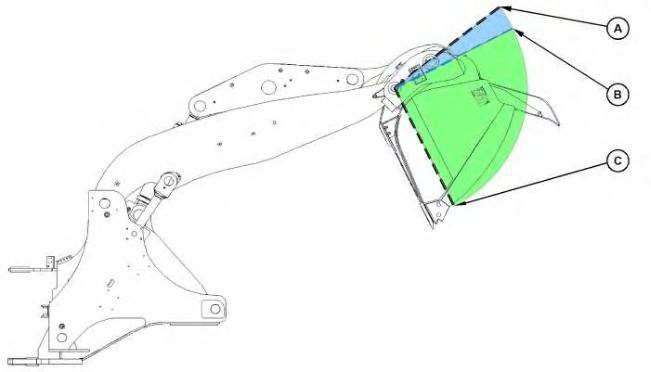
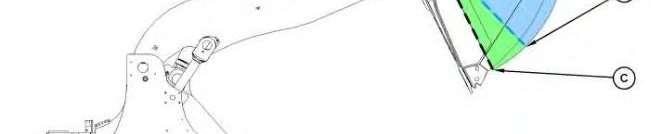
BucketpositionswithTipOfftriggersetto"Disabled".
(A)Fullrackbackposition
(B)Dumpthresholdposition
(C)Fulldumpposition
WhentheTipOfftriggerissetto"Disabled",thesystemwilltransferthefullscaledbucketweight (2)tothetruckweight(12)andincreasethepasscount(11)whenthebucketpassesthedump thresholdposition(B).Thebucketweight(2)inthedisplaywillchangeto****aswell.
Illustration26g06567516
HomescreenwithTipOfftriggersetto"Auto"andtheTipOffmodesetto"Stockpile"
Auto-RequiresnooperatorinputandimmediatelyentersTipOffwhenthebucketbeginstodump. TheTipOffenable/disablebuttonisnowjustanicon,notabutton.TheBucketZerobuttonalso changestoTipOffmodeselectionbuttons.
Illustration27g06362187
BucketpositionswithTipOfftriggersettoAuto.
(A)Fullrackbackposition
(B)Dumpthresholdposition
(C)Fulldumpposition
WhentheTipOfftriggerissettoAuto,thesystemwillenterTipOffimmediatelyafterthebucket movesfromthefullrackbackposition(A).TipOffremainsactiveuntilthebucketreachesthedump thresholdposition(B).Anybucketmovementpastthedumpthresholdposition(B)willcausethefull scaledbucketweighttobetransferredtothetruckweight,andthepasscountwillbeincreasedby one.
Illustration28g06567517
HomescreenwiththeTipOfftriggersetto"Manual"andmanualTipOffenabled.TheTipOffmodeissetto"Truck".
Manual-Requirestheoperatortoselectthe"TipOffEnable/Disable"button(10)manuallywhen choosingtoenterandexitTipOff.
SetWeighRange
Illustration29g06565185
SetWeighRangescreen
1.Fromthe"Settings"tile,select"Payload",thenselect"SetWeighRange"
2.Fromthe"SetWeighRange"screen,usetheIncrementbartosetthe"LowerLimit" percentage:
Todecrease"LowerLimit",selectthe"-"Button.Whenadesirednumberappears, select"OK"toset.Thenewlysetnumberwillappearinwhitetext."LiftCylinder"will appearasafixedpercentageonthepage.
Toincrease"LowerLimit",selectthe"+"Button.Whenadesirednumberappears, select"OK"toset.Thenewlysetnumberwillappearinwhitetext."LiftCylinder"will appearasafixedpercentageonthepage.
3.Fromthe"SetWeighRange"screen,usetheIncrementbartosetthe"WeighRange":
Todecrease"WeighRange",select"-"Button.Whenadesirednumberappears,select "OK"toset.Thenewlysetnumberwillappearinwhitetext."LiftCylinderPos"will appearasafixedpercentageonthepage.
Toincrease"WeighRange",select"+"Button.Whenadesirednumberappears,select "OK"toset.Thenewlysetnumberwillappearinwhitetext."LiftCylinderPos"will appearasafixedpercentageonthepage.
Referto"NormalWeighingOperation"formoreinformation.
Lists(CatAdvancedPayload)
Home>Menu>Settings>Payload>Lists
Illustration30g06565552 ExampleviewoftheListsscreen.
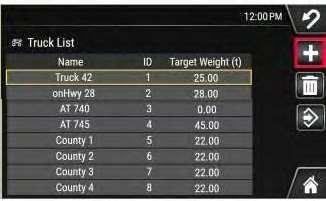
Fromthe"Settings"tile,select"Payload",thenselect"Lists". TruckList Home>Menu>Settings>Payload>Lists>Truck
Illustration31g06570204
ExampleListsscreen
AddingATruck
1.Selectatruckfromthetrucklist.Thenewtruckmaybeaddedbeforeoraftertheselectedtruck inthelist. Illustration32g06570148
2.Selectthe"Edit"button.
This is the sample of the manual Click on the download link for complete Manual