CATERPILLAR®
EUDeclarationofConformity
ThisDeclarationofConformityisissuedunderthesoleresponsibilityofthemanufacturer.
Theundersigned,representingthe manufacturer:
Caterpillar,Inc.
100N.E.Adams Peoria,IL61629
USA
herebydeclaresthattheproduct,objectofthis description:
CaterpillarDEA500modelentertainmentradios
Brand:CaterpillarModel:DEA500
PartNumbers:462-9618,462-9619,462-9620,462-9621,439-1562,439-1563,439-1564
IsinconformitywiththerelevantUnionharmonizationlegislation:Directive2014/53/EU
Conformityisshownbycompliancewiththeapplicablerequirementsofthefollowing documents:
ConformityAssessmentProcedure:____AnnexII,___X___AnnexIII,_______AnnexIV
2014/53/EU
LVD(Sec3.1a):EN60950-1:2006+A11:2009+A12:2011+ AC:2011+A2:2013
EN62479:2010
EMC(Sec3.1b):EN301489-1V2.2.0
EN301489-17V3.2.0
EN55020:2007+A11:2011
EN55032:2015
EN61000–3–2:2006+A1:2009+A2:2009
EN61000–3–3:2008
RF(Sec3.2)EN300328V2.1.1
FinalDraftEN303345V1.1.7
Table2
NotifiedBodyName:DekraTestingandCertification,S.A.U.
NotifiedBodyNumber:1909
ExaminationCertificate#:53627RNB.001 Illustration1g06233980
Copyright1993-2020CaterpillarInc. AllRightsReserved. PrivateNetworkForSISLicensees. SatApr1813:34:29UTC+05302020
Product:EXCAVATOR
Model:350EXCAVATOR8HK
Configuration:350&350LExcavators8HK00001-UP(MACHINE)POWEREDBY3306Engine
OperationandMaintenanceManual CaterpillarCorporateRadio
MediaNumber-M0085473-03PublicationDate-01/02/2018DateUpdated-14/02/2018 i07214447
RegulatoryCompliance
SMCS-7606
FCCNotice
Thefollowingnoticesareprovided.
ModificationStatement
Caterpillarhasnotapprovedanychangesormodificationstothisdevicebytheuser.Anychanges ormodificationscouldvoidtheusersauthoritytooperatetheequipment.
Interference
ThisdevicecomplieswithPart15oftheFCCRulesandIndustryCanadalicense-exemptRSS standards.Operationissubjecttothefollowingtwoconditions:(1)thisdevicemaynotcause interference,and(2)thisdevicemustacceptanyinterference,includinginterferencethatmay causeundesiredoperationofthedevice.
RadiationExposure
ThisdevicecomplieswithFCC/ICradiationexposurelimitssetforthforanuncontrolled environmentandmeetstheFCCradiofrequency(RF)ExposureGuidelines.RFExposure guidelinescanbefoundinSupplementCtoOET65.ThedevicealsocomplieswithRSS-102of theICradiofrequency(RF)Exposurerules.Donotlocatethetransmitternearanantennaor operatingwithanyotherantennaortransmitter.
FCCClassBdigitaldevicenotice
ThisequipmenthasbeentestedandfoundtocomplywiththelimitsforaClassBdigitaldevice, pursuanttopart15oftheFCCRules.Theselimitsaredesignedtoprovidereasonableprotection againstharmfulinterferenceinaresidentialinstallation.Thisequipmentgenerates,uses,andcan
radiateradiofrequencyenergy.iftheequipmentisnotinstalledandusedinaccordancewiththe instructions,maycauseharmfulinterferencetoradiocommunications.However,thereisno guaranteethatinterferencewillnotoccurinaparticularinstallation.Ifthisequipmentdoescause harmfulinterferencetoradioortelevisionreception,whichcanbedeterminedbyturningthe equipmentoffandon.Theuserisencouragedtotrytocorrecttheinterferencebyoneormoreof thefollowingmeasures:
•Reorientorrelocatethereceivingantenna.Increasetheseparationbetweentheequipment andreceiver.
•Connecttheequipmentintoanoutletonacircuitdifferentfromthattowhichthereceiveris connected.
•Consultthedealeroranexperiencedradio/TVtechnicianforhelp.
Changesormodificationstothisdevicewithouttheexpressapprovalmayvoidtheusersauthority tousethisdevice.
CANICES-3(B)/NMB(B)
ThisClassBdigitalapparatuscomplieswithCanadianICES-003.
SimplifiedEUDeclarationofConformity/RED2014/53/EU Directive
Thisdevicehasbeenevaluatedagainsttheessentialrequirementsofthe2014/53/EUDirective.
RadioFrequencyRange
ThefollowingDriverSafetySystemcommunicationdevicespecificationsareprovidedtoaidin conductinganyrelatedhazardassessmentandtoensurecompliancewithalllocalregulations:
Bluetooth
FrequencyRange:2402–2480MHzcarrierfrequencies
MaximumRFoutput power: +4dBm
Modulations:
ChannelSpacing:1MHz
Numberofchannels:79
Channelbandwidth:1MHzforGFSK,
TypeofAntenna:
BrandAmotechpartnumber:AL.A321C3chipantenna/Gain 2.3dbi
Antennagain: +2.3dBiMax
Table1
Note:TheDEA500radiocanoperateinBelgiumwithoutinfringingonapplicablerequirements ontheuseofBelgiumsradiospectrum.
Table2 AM
FrequencyRange:531kHzto1602kHz
MaximumRFoutputpower:+/-6dBitypical
Modulations: Amplitudemodulation
ChannelSpacing:9kHz
TypeofAntenna: 0.75mtypicalmonopole
Antennagain: 0dBuVto130dBuV
Table3 FM
FrequencyRange:87MHzto108MHz
MaximumRFoutputpower:+/-6dBitypical
Modulations: Frequencymodulation
ChannelSpacing:100kHz
TypeofAntenna: 0.75mtypicalmonopole
Antennagain: 0dBuVto130dBuV
Table4
EnglishHereby,CaterpillardeclaresthatthisDEA500isincompliancewiththeessential requirementsandotherrelevantprovisionsofDirective2014/53/EC.
Tosatisfytheessentialrequirementsof2014/53/ECDirective,theproductiscompliantwiththe followingstandards:
Caterpillardeclaresonoursoleresponsibilitythatthefollowingproductisincompliancewith Directive2014/53/EUandtheessentialrequirementsofCarRadio.
TypeDesignation:
•DEA500
•HWRevASWRevBServices
•Frequencyrangeandmaxoutputpower:Bluetooth2402-2480Mhz4dBm(2.5mW)EIRP
•AM531–1602kHz
•FM87.5–108.0MHz
TheconformityassessmentperDirective2014/53/EChasbeenfollowedwiththeinvolvementof thefollowingNotifiedBody:DEKRATestingandCertificationno:1909,S.A.U.Parque TechnologicodeAndaluclaC/ServeroOchoa229590Campanillas-MalagaSPAINperformedan EUtypeexaminationandissuedthecertificate:53627NRB.001.
Table5
3.1(a):HealthandSafetyofthe User
3.1(b):Electromagnetic Compatibility
EN60950-1:2006+A11:2009+A12:2011+AC:2011+ A2:2013
EN301489-1V2.2.0,EN301489-17V3.2.0,EN 55020:2007+A11:2011
3.2:Effectiveuseofspectrum allocated EN300328V2.1.1,EN303345V1.1.1
ThereisnorestrictionforthecommercializationofthisdeviceinallthecountriesoftheEuropean Union.
Copyright1993-2020CaterpillarInc. AllRightsReserved. PrivateNetworkForSISLicensees.
SatApr1813:34:16UTC+05302020
Product:EXCAVATOR
Model:350EXCAVATOR8HK
Configuration:350&350LExcavat/rs8HK00001-UP(MACHINE)POWEREDBY3306Engine
OperationandMaintenanceManual
SMCS-7338
Whendriving,alwayskeepyoureyesontheroadandhandsonthe steeringwheel,payingcarefulattentiontonormaldrivingtasks.As always,thedriverisresponsibleforsafevehicleoperation.Notkeeping youreyesontheroadandhandsonthewheelwhiledrivingcouldresult ininjurytoyouorothers.
Introduction
Informationincludedinthisownersmanualwasaccurateatthetimeofpublication.Caterpillar, however,reservestherighttoandperformancewithoutpriornotice.Checkwithyourdealerfor detailsregardingchangesthatmayhaveoccurredsincetimeofprinting.
TheRadiosystemiscontrolledbyusingthebuttons,RSA,orsteeringwheelcontrols.
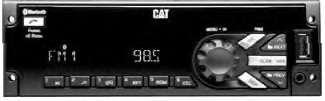
StereoReceivers
Illustration2g03566527
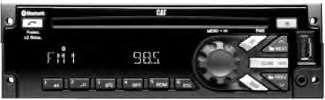
MP3/USB/iPod/Aux/Bluetooth/CDReceiver
Illustration3g03566571
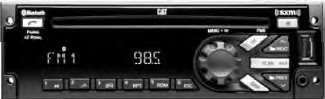
MP3/USB/iPod/Aux/Bluetooth/CD/SATReceiver
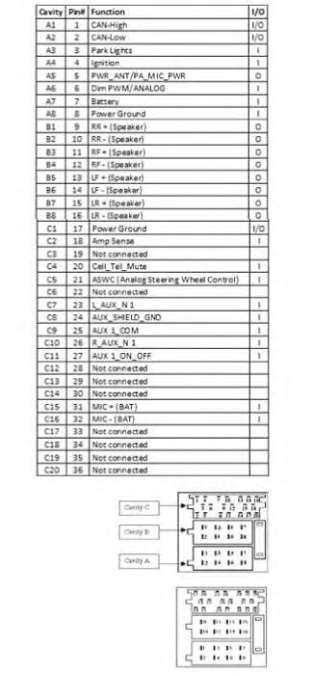
RadioPinout
Radiopinoutisshownbelow
Illustration4g03566584
GeneralRadioReceiverFunctions
This is the sample of the manual Click on the download link for complete Manual
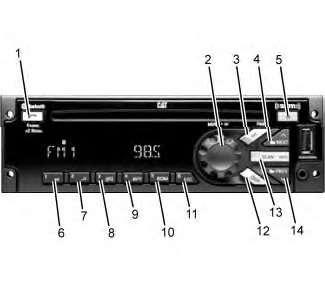
Illustration5g03566592 (1)Phone (2)Knob (3)SRC/PWR(Source/Power) (4)Next (5)Eject (6)Play/Pause (7)Browse (8)Clock/Alarm (9)RPT(Repeat) (10)RDM(Random) (11)ESC(Escape) (12)DISP(Display) (13)SCAN/ASCN(Scan/Autoscan) (14)PREV(Previous)
Options
•AnAMbandwith6AMpresets
•ThreeFMbandswithatotalof18FMpresets
•OneweatherbandwithsixWXpresets
SRC/PWR(Source/Power)
PresstoswitchtoFM->AM->WX->SXM->CD->USB/iPod->AUX->BluetoothAudio(if equipped)andtoturnRadioON.PressandholdtoturnradioOFF.
OneHourTimer
Withtheignitionoff,pressingtheSRC/PWRbuttonwillturnonthereceiverandactivatethe receiversone-hourtimer.Thereceiverwillturnoffafter1hourorbypressingandholdthe SRC/PWRbutton.
VOLUMEKNOB/OK
Pressforlessthan3secondstodisplayAudioControlMenu.Pressformorethan3secondstoshow theusermenu.Rotatetoincrease/decreasevolumeorduringamenufornavigation.Presswhileina menutoconfirmtheselectedaction.
PREV(Previous/Reverse)
Presstoselectprevioustrackorstation.PressandholdforFRorTuneDown
NEXT(Next/Forward)
Presstoselectnexttrackorstation.PressandholdforFForTuneUp
EJECT
PresstoejecttheCD
Phone(ifequipped)
PressthePhonebuttonformorethan3secondstoshowtheBluetoothMenu.WhenBluetoothis enabled,pressthebuttontodisplaytheDialMenuortoacceptanIncomingCall(ifaPhoneis paired).Duringacallpressthebuttonformorethan3secondstotransferthecallfromtheradioto thePhone.
CLOCK/ALARM
PressduringAlarmactivationtocanceltheAlarm.
SCAN/ASCAN
Scansstations/CDtracks/MP3/WMAfilesandfolderandintuner,storesstationstopresets
PLAY/PAUSE
Presstopause/unpausecurrentMedia.
RPT(Repeat)
Presstorepeatcurrenttrack.Pressagaintostoprepeat.LookfortheRPTiconintheradiodisplayto turnthisfeatureONorOFF.
BROWSE
Presstonavigateonthedeviceandselectaspecificsongorplaycontext(ApplicabletoUSBsticks, CDMP3discsandiPod).
RDM(Random)
Presstoplaythetracksrandomly.Pressagaintostoprandommode.LookfortheRDMicontoturn onintheradiodisplay.
ESC(ESCAPE)
PresstoexitoneMenuLevel.
IfthesystemisequippedwithBluetooth,presstheESCbuttonduringBluetoothcalloperationto rejectorcancelacall.
DISP(DISPLAY)
IfvehicleignitionisON:Presstochangesourcedisplay
Pressformorethan3secondstoshowtheClockforashorttime.
Radio(Audiosource)
ToaccessAM,FM,WX,SXM(ifequipped),iPod,USB,RearAux,FrontAux,CD,orBTAudiodo oneofthefollowing:
1.PresstheSRCradiobuttontoscrollthroughtheoptionsandselectdesiredoption.
2.PresstheSRCradiobuttonandthenscrollthesourcemenubyknobrotationorNEXT/PREV shortpressesandthenselectbyshort-pressingtheknob.
TheCD/MP3,USB/iPod,FrontAUX,andBTAudioshallbeaccessedonlyiftheradiomodel supportsthoseoptionsandadeviceisconnected/insertedforthatspecificsource.
Note,ifadeviceisconnectedthroughdifferentsourcesatthesametime,thefunctionalitycannotbe guaranteed(DeviceDependent).Example:DeviceconnectedthroughFrontAuxandBluetoothor USBandBluetoothatthesametime.
AM-FM-WXRadio
Tuning:Setthedesired"TunerConfiguration"followingthestepsintheMenusection.
Iftheradioissettomanual,theradiowillallowforexecutionofthefollowingfunctions:
•ExecutemanualtuningwhentheNEXTorPREVbuttonsareshortpressed.
•ExecuteSeekwhentheNEXTorPREVbuttonsarelongpressed.
IftheradioissettoAuto,theradiowillallowforexecutionofthefollowingfunctions:
•ExecuteSeekwhentheNEXTorPREVbuttonsareshortpressed.
•ExecutemanualtuningwhentheNEXTorPREVbuttonsarelongpressed.
Manualtuning
Thecurrentfrequencywillbeincreased/decreasedby1stepof0.2MHz(USAFMmode),10kHz (USAAMmode)andonechannel(25kHz)inWXmode.
SeekingaStation
WhentheSeekfunctionisactivated,theradioincrements/decrementsthefrequencyuntilatunable stationisfound.
Ifatunablestationisnotfound,theradiowilldisplay"NOSTATIONFOUND".
Presets
StoringRadioStationPresets:
1.Tunethedesiredfrequency,andthenlongpressanyofthePreset(1-6)buttonsuntiltheradio producesabeep.
TuningRadioStationPresets
1.ShortpressanyofthePreset(1-6)buttons.Thefrequencystoredatthepresetlocationistuned whenthebuttonisreleased.
Scan
ToinitiatetheScanfunction,shortpresstheSCAN/ASCNbutton.WhenSCANisinitiated,theradio seeksupinfrequencyandstopsonthenextstrongfrequencyfor8secondsbeforecontinuingtoseek forthenextstrongstation.
Ifnostationisfoundintwopassesthroughtheband,theradiowilldisplay“NOSTATIONFOUND” andthentunetothestartingfrequency.
Autoscan
Thisfunctiontemporallystoresthestrongest6stationsofthecurrentbandinthepresetsuntilthe radioispoweredofforthesourceischanged.
AUTOSCANdoesnotstorethefrequenciesonthepresetsonnumericalorder.Frequenciesarestored basedontheordertheywerefoundandonthequalityofthefrequency.
ToinitiatetheAUTOSCANfunction,longpresstheSCAN/ASCANbuttonuntiltheradioperformsa beep.Thenthe"AUTOSCAN"iconwillblinkwhiletheradioisstoringthetemporarypresets.
WhentheAutoscanprocessfinishes,theradiowilltunetothestationstoredinPreset1andthe "AUTOSCAN"iconshallbeilluminatedwhilethemodeisactive.
Totuneanyofthe6frequenciesortostorenewpresets,followthestepsdefinedinthePresets section.
Toexitthismodeandreturntotheoriginalpresetsexecuteanyofthefollowingactions:
1.PressandholdtheSCAN/ASCANbutton
2.PresstheSCR/PWRbutton.
3.Turnofftheradio.
4.Performanignitioncycle
5.Disconnectthebattery.
TheWXbandisfortheGovernmentalweatherradioservicesfrequencies.Theradiocantunetothe sevenweatherchannelsfollowingthestepsinTuning,Presets,andSCANsections.
SXM(IfEquipped)
VehicleswithavalidSiriusXM®satelliteradiosubscriptioncanreceiveSiriusXMprogramming. SiriusXMsatelliteradiohasawidevarietyofprogrammingandcommercial-freemusic,coastto coast,andindigital-qualitysound.
SiriusXM®
SXMDisplay
WhenSiriusXMisactive,thechannelnumber,channelname,artistname/contentinfo,songtitle,or categorynamecouldbedisplayedonthescreen.SiriusXMmayupdatetheinformationatanytime.
Tochangethecurrentdisplayview,shortpresstheDISPbutton.
Whenanewchannelisselected,asongchangeoccurs,SXMsourceisselected(frompower-upor sourcechange)ortheinformationisupdated,alltheelementswillbedisplayedusingpaging.The pagingcanbestoppedbyshortpressingtheDISPbutton.
Displaylabels
Torecognizethedisplayedtext,theradiousesthefollowingconvention:
•ChannelNumber:CH
•ChannelName:CH
•ArtistName:ART
•ContentInfo:INFO
•SongTitle:SONG
•Categoryname:CAT
SXMCategories
SiriusXMstationsareorganizedincategories.
ThecategorylistforSXMisinthefollowingwebpage: "http://www.siriusxm.com/sxm/pdf/sirius/channelguide.pdf"
Tochangethecurrentcategory,longpresstheNEXT/PREVbuttonandtheradiowilltunethefirst channelonnextorpreviouscategory.
CategorymodeEnable/Disabled
CategorySearchModeEnabledmeansthatonlychannelsinthecurrentCategoryaresearched.When enabled,theCATEGORYiconisturnedon.
CategorySearchModeDisabledmeansthatallchannelsaresearched.Whendisabled,the CATEGORYiconisturnedoff.
Toenable/disablethecategorybrowsemode,followthestepsintheUserMenusection
Thedefaultafterapower-upisCategoryDisabled.
SXMChannelSelection
PresetsandSCANfunctionsworkthesameasdefinedintheSCANsubsectionofAM-FM-WX Radio.
NEXTbutton
WhileinSXMtheradiowillscrolltothenextchannelavailableinnumericalorder.
PREVbutton
WhileinSXMtheradiowillscrolltothepreviouschannelavailableinnumericalorder
Note:IftheSXMserviceisnotactivated,onlythefree-to-airchannelswillbepresent.
SXMRadioID
Iftunedtochannel0,"RADIOID"labelalternateswiththeSXMradioeight-digitcode.Thiscodeis neededtoactivatetheservice.
DISPbuttondoesnotworkinchannel0.Channel0isnotavailableincategorymodeenabled.
SXMMessages
SXMBUSY-Theaudiosystemisacquiringand/orprocessingaudioand/ortextdata.Noactionis needed.
ARTUNAVAIL-ThereisnotArtistNamerelatedwiththecurrentsong.
SONGUNAVAIL-ThereisnotSongTitlerelatedwiththecurrentsong.
CHANUNAVAIL-ThereisnoChannelNamerelatedwiththecurrentchannel.
CHECKANTENNA-SXMantennaorantennacableisnotconnectedtotheradioortheantennais shorted.
NOSIGNAL-SXMtunermodulereportstheNoSignalcondition.Underthisconditiononly Channel0willworkasstatedinthismanual.
CHANUNSUB-Activechannelhasbecomeunsubscribedortherequestedchannelisnot unsubscribed.
SUBSCRIPTIONUPDATED-PRESSOKTOCONTINUE-Thesubscriptionoftheradiowas updated.Toremovethemessageandreturntothepreviousstatepres"OK"(Knob).
CHUNAVAIL-Requestedchannelisreportedunavailableforanewlyselectedchannelorthe currentlyselectedchannel.Unavailablechannelsareinthelegalchannelrangebutarenotcurrently
availablefordisplayorsubscriptionasabroadcastservice.After3secondsthepreviouschannel(if available)orchannel1willbetuned.
iPod
ThisradiosupportsthefollowingiPodmodels:
•iPodclassic(sixthgeneration)
•iPodnano(6G)
•iPodtouch(4G)
•iPhone(3G,3GS,4,and4S)
OtheriPodsmaybeplayed,butfunctionalityisnotguaranteed.
Radioprovidesupto1Aofcharge,soanydeviceconnectedtotheUSBthatrequireslessthan1A willbecharged.
Theremaybeproblemswiththeoperationandfunctioninthefollowingsituations:
•When,connectinganiPodonwhichamorerecentversionofthefirmwareisinstalledthanis supportedbytheRadio
•When,connectinganiPodwithfirmwarefromotherprovidersisinstalled
PlayingfromaniPod
ToconnectaniPod:
1.ConnectoneendofthestandardiPodUSBcabletotheiPodsdockconnector.
2.ConnecttheotherendtotheUSBportinthefrontradiodisplay.
1.RadiowillstartplayingtheUSBandshowsthetracknumber,Song,Artist,elapsedtime,and Albuminformationwhenavailable.
2.iPodmusicinformationdisplaysontheradiosdisplayandbeginsplayingthroughthevehicles audiosystem.
3.IftheiPodisanunsupportedmodel,itcanbelistenedtointhevehiclebyconnectingtothe auxiliaryinputjackusingastandard3.5mm(1/8in)stereocable.
ExpectedbehaviorwheniPodisconnected:
•TheiPodbatteryrechargesautomaticallywhilethevehicleison.
•TheiPodshutsoffandstopschargingwhenthevehicleisshutoff.
iPodMenu
UsethefollowingstepstonavigatetheiPodMenu:
1.Pressthemagnifyingglass(preset1)buttonwhileUSBsource(iPodconnected)isactiveto accesstheiPodMenu.
2.UsetheVolumeKnoborNext/Prevbuttontonavigatethroughthedifferentoptions.
3.UsetheiPodMenutoselect.
Playlists
Usethefollowingstepstonavigateplaylists:
1.PresstoviewtheplaylistsontheiPod.
2.Selectaplaylistnametoviewalistofallsongsintheplaylist.
3.Selectthesongfromthelisttobeginplayback.
Artists
Usethefollowingstepstonavigateartists:
1.PresstoviewtheartistsontheiPod.
2.Selectanartistnametoviewalistofallalbumswithsongsbytheartist.
3.Selectanalbum.
4.Selectthesongfromthelisttobeginplayback.
Albums
Usethefollowingstepstonavigatealbums:
1.PresstoviewthealbumsontheiPod.
2.SelectanalbumnametoviewalistofallsongsonthealbumorselectAllSongstoviewall songsontheiPod.
3.Selectthesongfromthelisttobeginplayback.
Genres
Usethefollowingstepstonavigategenres:
1.PresstoviewthegenresontheiPod.
2.Selectagenrenametoviewalistofartistsofthatgenre.
3.SelectanartisttoviewalbumsorAllAlbumstoviewallalbumsofthatgenre.
4.SelectArtisttoviewalbums.
5.SelectAlbumtoviewsongs.
6.Selectthesongfromthelisttobeginplayback.
Podcasts
Usethefollowingstepstonavigatepodcasts:
1.PresstoviewthepodcastsontheiPod.
2.Selectapodcastnametobeginplayback.
Songs
Usethefollowingstepstonavigatesongs:
1.PresstoviewalistofallsongsontheiPod.
2.Selectthesongfromthelisttobeginplayback.
Composers
Usethefollowingstepstonavigatecomposers:
1.PresstoviewthecomposersontheiPod.
2.Selectthecomposertoviewalistofsongsbythatcomposer.
3.Selectasongfromthelisttobeginplayback.
AudioBooks
Usethefollowingstepstonavigateaudiobooks:
1.PresstoviewtheaudiobooksontheiPod.
2.Selecttheaudiobookfromthelisttobeginplayback.
WhenaniPhoneoriPodTouchwithiOSlowerthaniOS5.0isconnectedthroughUSBorBluetooth, theaudiomaynotbeheardwhentheiPodsourceisselected.Tocorrectthissituation,selecteither thedockconnectorinthephoneordisconnectandreconnecttheAppledevice.
Note:iOSistheAppleOperativeSystem.
UsethefollowingcontrolstoplaytheiPod:
PREV(Previous)-Presstoseektothebeginningofthecurrentorprevioustrack.
Note:Ifthetrackhasbeenplayingforlessthan10seconds,itwillseekfortheprevioustrack.If longerthan10seconds,thecurrenttrackstartsfromthebeginning.
NEXT(Next)-Presstoseektothenexttrack.
FF/FR(FastForward/FastReverse)-Tofastforwardorreversethroughatrack,pressandhold NextorPREVbutton.
RDM(Random)-Presstoplaythetracksrandomly.Pressagaintostopshufflemode.Lookforthe RDMicontoturnonintheradiodisplay.
RPT(Repeat)-Presstorepeatcurrenttrack.Pressagaintostoprepeat.LookfortheRPTiconto turnonintheradiodisplay.
ErrorMessages-Ifan"UNSUPPORTED"messageisdisplayed,itcouldbeforoneofthe followingreasons:
•When,theiPodconnectedisnotsupported(lookatpageXforthelistofiPodssupported).
•TheiPoddoesnotrespondtotheradiocommands,inthiscaseresettheiPod,andtryagainthe connection.
Ifan"NOMUSIC"messageisdisplayed,itcouldbeforoneofthefollowingreasons:
•TherearenotanyplayablefilesintheiPod.
USB
PlayingfromaUSB
AUSBmassstoragedevicecanbeconnectedtotheUSBport.
TheUSBportisinthefrontoftheradiodisplay.
FivevoltsDCpowerislimitedto1ampfromthisport.DevicessuchasiPadthatrequiregreater currentwillnotchargefromthisport.
USBMP3PlayerandUSBDrives.TheUSBMP3playersandUSBdriveconnectedmustcomply withtheUSBMasswiththeUSBMassStoragespecification:
•MS-DOSpartitiononly
•Classspecification(ESBMSC)andsupportsformatsofFAT32,FAT16,NTFS,andHFS+.
•Harddiskdrivesmaybeplayed,butarenotsupported.
•Theradiowillnotbeabletoplaywrite-protectedmusic.
•MTPplayersarenotsupported.
ThefollowingguidelinesmustbemetwhencreatingMP3files,otherwisethefilesmightnotplay:
ForMP3Files:
•Bitrates:32,40,48,56,64,80,96,112,124,160,192,224,256,320kbpsforMPEG-1Audio Layer3.
•Samplingfrequencies:32,44.1and48kHzforMPEG-1AudioLayer3.
•Maximumnumberoffolders:Eightfolderswith255filesperfolder.
•Maximumof1,000filesonadisc.
•M3uandplsplaylistversionssupported
•RecordedonaCD-RorCD-RWwithamaximumcapacityof700MB.
ForUnprotectedWMAFiles:
•Versions:1,2,7,8,9and9.1.
•Bitrates:32-320kbps.
•Samplingfrequencies:32-48kHz.
PlayingaUSBDevice
UsethefollowingstepstonavigateandplayaUSBdevice:
1.ConnecttheUSBanditbeginstoplay.
2.UsingtheSRCButtonselectstheUSBsource.
3.RadiowillstartplayingtheUSBandwillshowthetracknumber,Song,Artist,elapsedtime, andAlbuminformationwhenavailable.
Usethefollowingcontrolstoplaythedisc:
PREV(Previous)-Presstoseektothebeginningofthecurrentorprevioustrack.
Note:Ifthetrackhasbeenplayingforlessthan10seconds,itseekstotheprevioustrack.Iflonger than10seconds,thecurrenttrackstartsfromthebeginning.
NEXT(Next)-Presstoseektothenexttrack.
FF/FR(FastForward/FastReverse)-Tofastforwardorreversethroughatrack,pressandhold NextorPREVbutton.
RDM(Random)-Presstoplaythetracksrandomly.Pressagaintostopshufflemode.Lookforthe RDMicontoturnonintheradiodisplay.
RPT(Repeat)-Presstorepeatcurrenttrack.Pressagaintostoprepeat.LookfortheRPTiconto turnonintheradiodisplay.
FolderUp-Presstoselectnextfolder.
Note:Ifplayingaspecificplayablescope,whenpressedtheradiowilljumpandstartsplayingtrack1 asnewlyinsertedUSB.
FolderDown-PresstoselectpreviousFolder.
Note:Ifplayingaspecificplayablescope,whenpressedtheradiowilljumpandstartsplayingtrack1 asnewlyinsertedUSB.
SCAN:
•ShortpresstostarttheSCANofthecurrentplayingcontext.
•LongpresstoSCANthewholedevicestartingontrack1.
ErrorMessages-Ifan"UNSUPPORTED"messageisdisplayed,theerrorcouldbeforoneofthe followingreasons:
•WhenanMTPPlayeroraUSBdevicewithunsupportedformatorpartitionisconnected.
•Whenthedeviceisdamaged.
•Whentheconnecteddevicewasnotconnectedasmassstoragedevice.
Ifan"NOMUSIC"messageisdisplayed,itcouldbebecausetherearenotMP3orunprotected WMAfilesthatcanbeplayed.
FrontAuxiliary
Inthefrontauxiliarymode,youcanplayanexternaldevicesuchasaniPod®orMP3playerviathe auxiliaryinputjackonthefrontofthereceiver.
Touseanexternaldevice,simplyconnectthedeviceviatheauxiliaryinputjack.
Frontauxiliarymodewillnotbeavailableifnodeviceisconnectedtotheauxiliaryinputjackonthe frontofthereceiver
RearAuxiliary
Inrearauxiliarymode,youcanplayanexternaldevicethatyouhaveconnectedviathereceiversrear powerauxiliaryinputlines.
Touseanexternaldevice,simplyconnectthedeviceviatheauxiliaryinputjackandselectitusing thesourcebutton.
RearAuxsourcewillbeavailableevenwhennodeviceisattachedtotherearinput.
Bluetooth(IfEquipped)
TheradiocanconnecttoaBluetoothDevice.TousethisfunctionalityyourdevicerequiresBluetooth andtobepairedandconnectedtotheradio.
SupportsmostBluetoothdevices.
Youcanconnectupto10devicestotheradio,theradiowillconnecttothefirstavailablepaired device,startingfromthelastpaired/connecteddevice.
TheBluetoothMenuisavailablewhenthePhonebuttonispressedformorethan3seconds.To navigatethroughit,rotatetheknob.
TheBluetoothMenuconsistsofthefollowingoptions:BTENABLE,CONNECTPH, DISCONNECTPH,ADDPHONE,andDELETEPH(someoptionsareonlyavailablewhena devicehasbeenpairedpreviously).
Enabling/DisablingBluetooth
ToEnable/DisableBluetoothinyourRadio(ifitisnotalreadyactivated):
•Pressthephonebuttonformorethan3secondswhiletheRadioisON.TheBluetoothMenu willbeshown.
•Rotatethevolumeknobuntilthedisplayshows:"BTDisable"or"BTEnable".Pressthe volumeknobtoEnableorDisabletheBluetooth.
•PresstheVolumeKnowtoEnableorDisabletheBluetooth.
Whenthedevicewaspreviouslypaired,thePhoneIconwillbeactiveandthearrowiconswillblink untilthereconnectionofthepreviouslypairedphonesisattempted(eachphonewillbeattempted threetimes).
PairingaBluetoothDevice
Tocompletepairingthefollowingstepsmustbefollowed:
1.EnableBluetoothontheradioandonthedevice.RefertoyourdevicesManualformore information.
2.PairtheDevicetotheRadio:
PressthePhonebuttonformorethan3secondsTheBluetoothMenuwillbeshown.
RotatetheVolumeKnobuntilthedisplayshows:ADDPHONE.
PresstheVolumeKnobtoconfirmtheaction.
TheradiowilldisplayADDINGPHfor3seconds.Inthisdiscoverablemode,theBluetoothstatus iconwillblinkforupto3minutes.Ifnophonewasfound,theradiowilldisplayNOPHFOUNDand thePhoneandarrowsiconwillbedisabled.
Duringthediscoverablemode,setyourcellphonetoaddaBluetoothdeviceandlookforthename "DEA500RADIO":
•Followtheinstructionsonyourphonetoaddaconnection.Whennecessary,usethe4-number PIN0000toconnecttotheradio.
•Whenthecellphonehasbeensuccessfullyadded,theradiowilldisplayPHCONNECTEDand thentheBluetoothdevicename.ThePhoneIconwillbeactiveonthedisplayandthearrows willbedisabled.
•Whentheradioconnects,theBluetoothiconwillblink.Theblinkingiconsignifiesthatthe receiverisattemptingtodownloadthecellphonesCONTACTS(fortheDIALCONTACTS function).Theiconwillceasetoblinkifallcontactshavebeendownloadedoriftheradio timesoutfromreceivingcontactsfromthecellphone.Seeyourphonesuserguideformore information.
Note:Ifadeviceisconnectedthroughdifferentsourcesatthesametime,thefunctionalitycannotbe guaranteed(DeviceDependent).Example:DeviceconnectedthroughFrontAuxandBluetoothor USBandBluetoothatthesametime.
Note:TheiOSistheAppleOperativeSystem.
Note:Ifthetrackhasbeenplayingforlessthan10seconds,itseekstotheprevioustrack.Iflonger than10seconds,thecurrenttrackstartsfromthebeginning.
ConnectingaDevice
Ifyourdevicewaspreviouslypaired,youcansimplyconnecttothedevice:
1.PressthePhonebuttonformorethan3seconds.TheBluetoothMenuwillbeshown
2.RotatetheVolumeKnobuntilthedisplayshowsCONNECTPH.
3.Presstheknobtoconfirmtheaction.SelectthedesiredDevice(rotatetheknobandconfirmby pressingtheknob).TheradiowillshowCONNECTINGfor3seconds.
4.Whentheradioconnects,theradiowilldisplayPHCONNECTEDandtheDeviceFriendly Name,theBluetoothiconwillblink.Theblinkingiconsignifiesthatthereceiverisattempting todownloadthecellphonesCONTACTS(fortheDIALCONTACTSfunction).Theiconwill
ceasetoblinkifallcontactshavebeendownloadedoriftheradiotimesoutfromreceiving contactsfromthecellphonedevice.PhoneIconwillbeactiveonthedisplay.
DisconnectingaDevice
Ifyourdeviceisconnectedandyourequireddisconnectingitfromtheradio,followthenextactions:
1.PressthePhonebuttonformorethan3seconds.TheBluetoothMenuwillbeshown.
2.RotatetheVolumeKnobuntilthedisplayshowsDISCONNECTPH.
3.Presstheknobtoconfirmtheaction.TheradiowillshowDISCONNECTPHforashorttime. Once,thePhoneisdisconnectedtheradiowilldisplayDISCONNECTEDandthenthe Bluetoothdevicename.ThePhoneIconwillbeinactive.
DeletingoneorallDevices
Todeleteadevicefromtheradio,oneoralldevicespreviouslypaired:
1.PressthePhonebuttonformorethan3seconds.TheBluetoothMenuwillbeshown.
2.RotatetheVolumeKnobuntilthedisplayshowsDELETEPH.
3.Presstheknobtoenterthesubmenu.
4.Theradiowillshowadevicelist(navigatethroughitbyrotatingtheknob).Selectthedeviceto bedeletedorselectDELETEALLtoeraseallthepaireddevicesinthelistbypressingthe VolumeKnob.TheradiowillshowPHDELETED.
HandsFree/BluetoothFeatures
Onceyourdeviceisproperlypaired(seeParingaBluetoothDevice)andconnected(seeConnectinga Device),theradiosupportsthefollowingHandsFreefeaturesiftheconnecteddevicehashandsfree functionality.
DialMenu
Theradiocanretrievethelastcallsandcontactinformationfromthedevice(HandsFreeprofilemust beavailableinthedeviceandsometimestheactionmustbeacceptedbytheuser).
ThedialmenuisaccessedwhenthedeviceisnotinacallandthePhonebuttonispressed.
Dial/Redial
Theusercanretrievethelastphonenumbercalledandplaceacall.PressthePhonebuttonandthe lastphonenumbercalledwillbedialed.
QuickDial
Theradiocanstorephonenumbersinanyoftheavailablepresetbuttons.
Tosaveaphonenumber,youcanselectthecontactusingeithertheDIALCONTACTSfeatureorthe LASTCALLSfeature.Whenthedesiredcontactphonenumberisdisplayed,pressandholdanyof thePRESETbuttonsuntilyouhearabeepconfirmingthephonenumberhasbeensaved.
Todialasavedphonenumber,selectQUICKDIALfromthemenuandrotatetheknobtoselectthe appropriatePRESETnumber.Presstheknobtoplaceacalltosavedphonenumber.
Tochangepresetssimplyrepeattheprocesswiththedesiredphonenumber.Presetsareoverwritten.
DialContact
Theradioisabletoreadanddisplaycellphonecontacts.PressthePhonebuttontoshowtheDIAL MENUandrotatetheknobuntilDIALCONTACTSisshown,presstheknobtoselectthisfeature. Rotatetheknobtoselectbetweenthedifferentstoredcontacts(upto500numbersfromthephone and250contactsfromtheSIM).PresstheOKbuttonifyouwanttodialtothelistedcontact.
Theradiowilldownloadthefollowingphonenumbersfromeachcontact(ifavailable):HOME, WORK,MOBILE,OTHER,andPREFERRED.Withinthemenuphonenumberswillbedisplayed aseither:H,W,M,O,orPplusthe10-digitnumber(XXXXXXXXXX).
Whenthetransferissuccessful,theradiowillshowtheDIALCONTACTSsubmenu.Eachtimethe radioconnectstoyourphone,theDIALCONTACTSsubmenuisupdated,soyoumayneedtorepeat thismanualoperationasneeded.
LastCalls
Theradioiscapableoflistingthelast10calls(DIALED,RECEIVEDANDMISSED).Rotatingthe knobwillnavigatetheuserthroughtheselectedcalllist.PresstheOKbuttontoplacethecall.
Note:Ifadeviceisconnectedthroughdifferentsourcesatthesametime,thefunctionalitycannotbe guaranteed(DeviceDependent).Example:DeviceconnectedthroughFrontAuxandBluetoothor USBandBluetoothatthesametime.
CallOptions
ThefollowingoptionsareavailableduringaHandsFreecall.
AcceptingaCall
Whenanincomingcallisreceived,theradiowillplaytheinbangringtoneifthedevicesupportsthis feature,otherwiseadefaultringtonewillbeplayed,theusercanadjusttheVolumeoftheringtone, whiletheringtoneisplayed.Anyvolumelowerthan13,willnotbeconsideredforthenextincoming call.Volumeabove13willbestoredforthenextcall.
Whenanincomingcallisreceived,theradiowilldisplaythename(ifavailable)andnumberofthe caller.Toacceptthecall,pressanyofthefollowingradiobuttons:Phone,Knob,orNEXT.
RejectingaCall
Whenanincomingcallisreceived,theradiowilldisplaythename(ifavailable)andnumberofthe caller.Torejectthecall,pressanyofthefollowingradiobuttons:ESCorPREV.
EndingaCall
WhenaHandsFreecallisinprogress,theradiowilldisplaythecallersnumberandtheelapsedtime. Toendacall,pressanyofthefollowingradiobuttons:Phone,ESC,orPREV.
MicrophoneMute
WhenaHandsFreecallisinprogress,pressingPause/Playwillmutetheradiosmicrophone.Press againtodeactivatemute.
BluetoothMicrophone
ProcedurefortroubleshootingtheBluetoothCabMicrophonewhentheotherpartiescallreception audioisunclear.
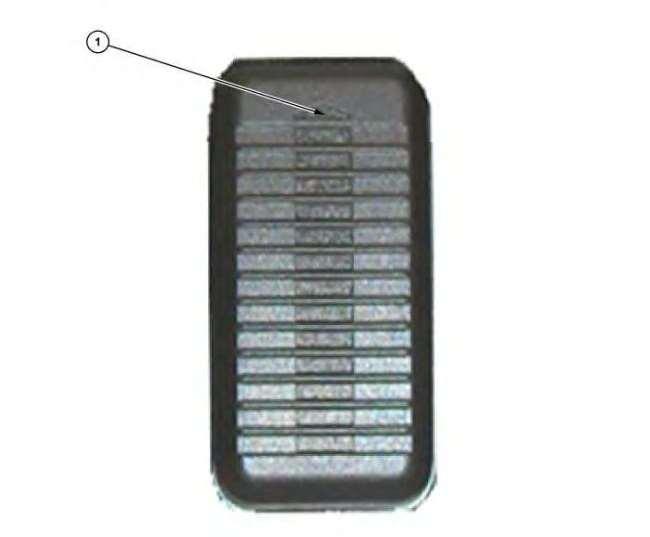
Illustration6g06281504 (1)UPArrow
Therearecommonconditionsthatcanaffecttheaudiovolumeofacallreceiverthatisnotthe machineoperator.
1.TheUParrow(1)oftheBluetoothMicrophoneshouldalwaysbepointeduporawayfromthe operator.(SeeIllustration7)
2.Ifnot,attempttoremoveandrotatethemicrophoneandseeifthisimprovestheaudiovolume oftheotherparty.
This is the sample of the manual Click on the download link for complete Manual