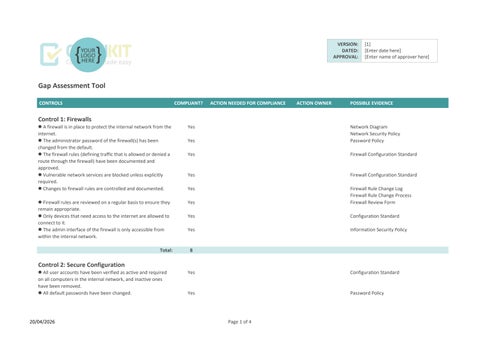

Gap Assessment Tool
Control 1: Firewalls
l A firewall is in place to protect the internal network from the internet.
l The administrator password of the firewall(s) has been changed from the default.
l The firewall rules (defining traffic that is allowed or denied a route through the firewall) have been documented and approved.
l Vulnerable network services are blocked unless explicitly required.
l Changes to firewall rules are controlled and documented.
l Firewall rules are reviewed on a regular basis to ensure they remain appropriate.
l Only devices that need access to the internet are allowed to connect to it.
l The admin interface of the firewall is only accessible from within the internal network.
Control 2: Secure Configuration
VERSION:
DATED:
APPROVAL: [1] [Enter date here] [Enter name of approver here]
Network Diagram
Network Security Policy
Password Policy
Firewall Configuration Standard
Firewall Configuration Standard
Firewall Rule Change Log
Firewall Rule Change Process
Firewall Review Form
Configuration Standard
Information Security Policy Total:
l All user accounts have been verified as active and required on all computers in the internal network, and inactive ones have been removed.
l All default passwords have been changed.
Configuration Standard
Password Policy
CONTROLS
l There is a policy for passwords which is approved, communicated and followed.
l Where sensitive data is accessed, multi-factor authentication is used (e.g. a one-time code sent to a phone).
l Auto-run is disabled for USB ports on computers.
l Only software that is required is installed on the organisation's computers.
l Installation of software on computers by users is restricted (either prevented or restricted to a vendor store, if appropriate).
l Client firewalls are active and appropriately configured on all computers.
l A secure standard configuration is used for all new computers.
l Remote access to the organisation's network is controlled via the use of Virtual Private Networks (VPNs).
l A list is maintained of all cloud services used.
Control 3: Security Update Management
l Security patches are applied to all computers and devices (including network and mobile devices such as smartphones) in a timely fashion.
l All software in use is supported by the vendor and patches are issued by the vendor to address security issues.
l Unsupported/unpatched software is removed from computers that are connected to the internet.
l High-risk and critical security updates are applied within 14 days of issue.
l All of our software is correctly licensed.
Control 4: User Access Control
l There is a formal process for the creation, review and removal of user accounts, including appropriate authorisation.
CONTROLS
l Allocation of admin access is strictly controlled. Yes
l All users have their own (named) user accounts. Yes
l Admin accounts are only used when required for activities that require that level of access.
l Admin accounts are protected from brute force attacks e.g. by lockout after a set number of logon attempts and multifactor authentication.
l A password policy is documented, approved and communicated which covers the creation and management of passwords according to best practice advice.
l Multi-factor authentication (MFA) is enabled on all cloud services, where available.
l Relevant passwords are changed in the event of a network compromise.
l Folder and file permissions are set appropriately to secure sensitive data, for example, Finance and HR information.
Total: 9
Control 5: Malware Protection
l One or more of anti-malware software or application allowlisting is in use on all computers to defend against malware.
l Updates to anti-malware software are downloaded and applied on a regular basis on all computers.
l Real-time anti-malware scanning is enabled on all computers.
l Scheduled anti-malware scans are performed on all computers.
l The applications permitted to run on computers are restricted to those that are approved by the organisation.
Access Approval Process

Cyber Essentials Gap Assessment dashboard
To refresh chart data, click on “Refresh All” on the Data ribbon.
Gap assessment results