Parent Guide: Parent Hub & iSAMS Parent Portal 1. How to Access Parent Hub Parent Hub is the school's communication platform used for announcements, messages, and important updates. STEP-BY-STEP GUIDE
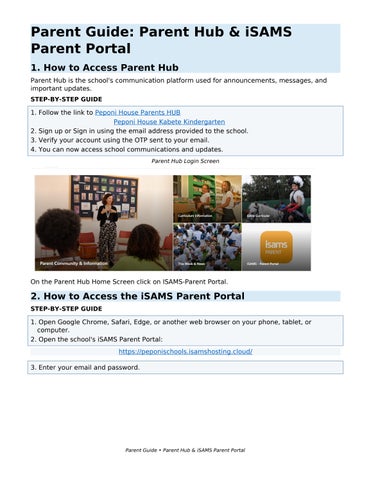
1. Follow the link to Peponi House Parents HUB Peponi House Kabete Kindergarten 2. Sign up or Sign in using the email address provided to the school. 3. Verify your account using the OTP sent to your email. 4. You can now access school communications and updates. Parent Hub Login Screen
On the Parent Hub Home Screen click on ISAMS-Parent Portal.
2. How to Access the iSAMS Parent Portal STEP-BY-STEP GUIDE
1. Open Google Chrome, Safari, Edge, or another web browser on your phone, tablet, or computer. 2. Open the school's iSAMS Parent Portal: https://peponischools.isamshosting.cloud/ 3. Enter your email and password.
Parent Guide • Parent Hub & iSAMS Parent Portal
4. Click Log In. 5. If you have forgotten your password, select Forgot Password and follow the instructions. iSAMS Parent Portal login screen.
3. How to View the School Calendar STEP-BY-STEP GUIDE
1. Log in to the iSAMS Parent Portal. 2. Select Calendar from the menu. School life →school calendar
3. Use the Month, Week, or Day view to browse events. 4. Click an event to view additional information. Calendar Menu Location
Parent Guide • Parent Hub & iSAMS Parent Portal
4. How to Check Contact Details STEP-BY-STEP GUIDE
1. Log in to the iSAMS Parent Portal. 2. Navigate to My Profile, Parent Details, or Personal Information. Review your:
Contact information Address Emergency contacts Profile Information
5. How to Update Contact Details 1. Open contact Information. 2. Click on the + change request form. 3. Update the relevant details. 4. Click send request.
Parent Guide • Parent Hub & iSAMS Parent Portal
Save Changes Confirmation
If you experience difficulties accessing Parent Hub or the iSAMS Parent Portal, please contact: Email: ithelpdesk@peponischool.org
Parent Guide • Parent Hub & iSAMS Parent Portal