Operating Instructions
power indicator light
Radar sensor icon
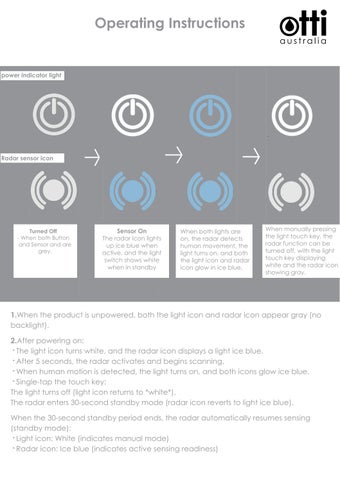
Turned Off - When both Button and Sensor and are grey.
Sensor On The radar icon lights up ice blue when active, and the light switch shows white when in standby
When both lights are on, the radar detects human movement, the light turns on, and both the light icon and radar icon glow in ice blue.
When manually pressing the light touch key, the radar function can be turned off, with the light touch key displaying white and the radar icon showing gray.
1.When the product is unpowered, both the light icon and radar icon appear gray (no backlight). 2.After powering on: · The light icon turns white, and the radar icon displays a light ice blue. · After 5 seconds, the radar activates and begins scanning. · When human motion is detected, the light turns on, and both icons glow ice blue. · Single-tap the touch key: The light turns off (light icon returns to *white*). The radar enters 30-second standby mode (radar icon reverts to light ice blue). When the 30-second standby period ends, the radar automatically resumes sensing (standby mode): · Light icon: White (indicates manual mode) · Radar icon: Ice blue (indicates active sensing readiness)