
How to Purchase Textbooks

Page 1


HOW TO: PURCHASE TEXTBOOKS

You will need to complete the following only one time for all books.

STEP 1

Open your Student Canvas App or Parent Canvas App
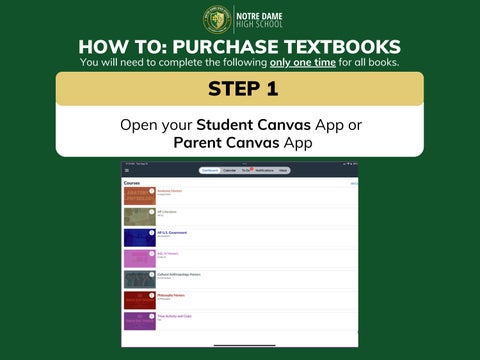
HOW TO: PURCHASE TEXTBOOKS

STEP 2

Click on any class requiring a textbook for example: Anatomy Honors

HOW TO: PURCHASE TEXTBOOKS

STEP 3

Once you click, you will be automatically logged in to your personal Shelf (see the next slide)

HOW TO: PURCHASE TEXTBOOKS

STEP 4

Once on your shelf - Click on Store

HOW TO: PURCHASE TEXTBOOKS

STEP 5

You are now on your personal Course Access Bundle page

Your Course Access Bundle is all the books you need for all classes.

HOW TO: PURCHASE TEXTBOOKS

STEP 6

HOW TO: PURCHASE TEXTBOOKS

STEP 7

Click on Go to Checkout and complete the process.

WHAT TO KNOW

You only need to complete this process one time/student

Parents/guardians with multiple ND Students would need to complete this process for each student.

The Course Access Bundle is all the books students need for all classes.

Since many classes use digital platforms, purchasing books on another site, such as Amazon, is not recommended, as students will not have access to their class materials.

Textbooks are pre-assigned to a l

Once you’ve purchased your bo

NotreDame Student

Turn static files into dynamic content formats.

Create a flipbook