


2.1 Top tips from a musician
Throughout these documents we thought it would be good to hear from musicians delivering the work to give you their top 3 tips for working as a Noise Solution musician. Click to watch the video

Click to hear Reuben’s top three tips for new musicians
In Part 1 Simon discussed about how we talk about Noise Solution, why it works and an overview of your role within that. In Part 2 of training we’re going to introduce you to the following
• Introducing equality and diversity
• How might you talk to families and key workers about setting up your sessions;
• How to log into the platform; finding your participant’s details and feed;
• How you book sessions so everyone knows what’s going on and is kept up to date;
• How to record a personalised video for your participant and how to post that to the feed and what to do then
• An overview of the participants digital Journey
2.2 Equality, diversity and inclusion
We work with people facing a wide variety of challenges and barriers. As such we committed to thinking about and acting in ways that reduce these barriers. As part of that focus on inclusion I’m going to introduce you to Ronda, who spent a couple of years on the Noise Solution board…here she is

The transcript of the video is in the grey box below
Greetings, my name is Dr Ronda Zelezny-Green. I'm an American Fulbright scholar, an academic and a professional with specialisms in tech, gender and inclusion and I joined the board of Noise Solution in 2020. In that same year, the world watched a horrific 8-minute video that documented the murder of George Floyd in the United States. Suddenly, instantly, an awakening about racial injustice went global, including here in the UK.
2.3 READ THIS IT IS A LEGAL REQUIREMENT!
There is one piece of legislature, linked to safeguarding, that states if you do any work in a school (highly likely) that you have a legal responsibility to read. You need to read Part one. The paper is called ‘Keeping children safe in education.’ you can access it here.
2.4 The first conversation with families and professionals.
So you’ve received an email and been assigned someone to work withexciting and terrifying - now what? The sooner the session is set up the better for everyone. It’s possible families have spent years in services where young people through no fault of their own were left waiting for provisions to kick in and we definitely want to avoid that at all costs. Click


Our ideal scenario is for you to get sessions set up asap, but definitely within the week of you receiving notification that you have been assigned someone. You are going to need to know about the person you’re working with before calling anyone. What their strengths and weaknesses are, things to focus on, things to avoid? If you log into the platform you can find all that basic information about the referral, I’ll show you how to do that in a bit - once you have, you’ll have access to the contact details for family and key workers and what people have said about the referral….fair warning some referrals are more complete than others :) All of that information is reliant on what the referring organisation add, so it can sometimes be incomplete. If you are concerned contact the referring professional - or if you are struggling to track them down - speak to us and we’ll help.
Now you’re a bit better informed about your participant and their situationwho do you speak to first? Over the years we’ve found it is normally easiest to try and connect with the family first. This first conversation with family is really important - it sets the tone that we’re musicians not social workers or mental health workers. They will probably have had frustrations with professionals. We’re purposefully presenting a picture where we’re different and separate from them and our focus is different.
We’re reassuring them that we are aiming to create a space where their child can choose what they want to do, where we’re trying to create an experience of that child succeeding and being good at something quickly, where we increase their confidence, where they (the family) will be able to see and share in that journey through their participants digital story (if the participant is ok with that)
Families experiences with services may often have been quite frustrating - we’re aiming to be ‘on it’, professional quick, communicative and efficient (lots of that is handled automatically). Again, the chances are that this is not what they are used to.

We’re there to build that young persons self esteem and have fun! Let them know that. Calling home first can be a really good opportunity to connect and also potentially talk to the participant (always best to get their direct buy in if possible) - let the participant know they are just going to be making musictheir music - that they don’t have to have any experience - that they are in control of what we make, take the opportunity to be curious about their musical preference - mention the digital story and measure that they control what is posted on their it. Reassure them what we’re interested in doing is is to having fun and if we’re not having fun we’ll change what we’re doing until we are (Be autonomy supportive!).
This call is also a time a time to find out when sessions will work best for them. Try and work out a consistent time for the whole 10 sessions - and book them all in (even if they might change later).
It’s a chance to stress to those around the participant how important their comments and contributions are (more engagement in the digital story = better outcomes). It is also an opportunity to collect email addresses to add people to the digital story, if appropriate. Most of all though you are building a relationship and reassuring them that you are on their childs side. Relationship is everything - if that isn’t working nothing else will.
Sometimes it’s the professional or school that you need to set everything up with. It’s possible that the referring professional might have left some vital
info out of the referral though, If it’s anything you are worried about or a question comes up you don’t know the answer to - just call us.
So to recap what you need to cover when you call the family/carers:
1. Reassure them about what it is we do, our approach and what we hope to achieve.
2. Work out the best times for the sessions for all of you.
3. Speak to the participant if appropriate and be curious about their interests.
4. Outline the digital story element, the importance of them contributing to it - collect email addresses or at least plant the seed of that idea.
5. Check that they’ll be able to transport to the studio (if face to face and needed) we don’t do transport.
See the quick guide to the platform to see how to access contact details.
2.5 The Digital journey


Click to watch the video or read the script or both
Our platform is designed to be many things to many different people. You’ll use it to do the stuff needed to make sessions run smoothly. Like booking sessions and capturing the brilliant bits from your sessions to share with families and key workers and to report attendance and communicate with us and key-workers about what happened in each session.
How does the participant first experience their 'Digital Story'
Once a referral to pair a young person with a music producer has been received via the website and we’ve agreed a musician (you), the family/ participant and key workers will all receive an automated email. This takes them through the process of registering on the platform via a “click here to join and set up password” process, with social logins an option.
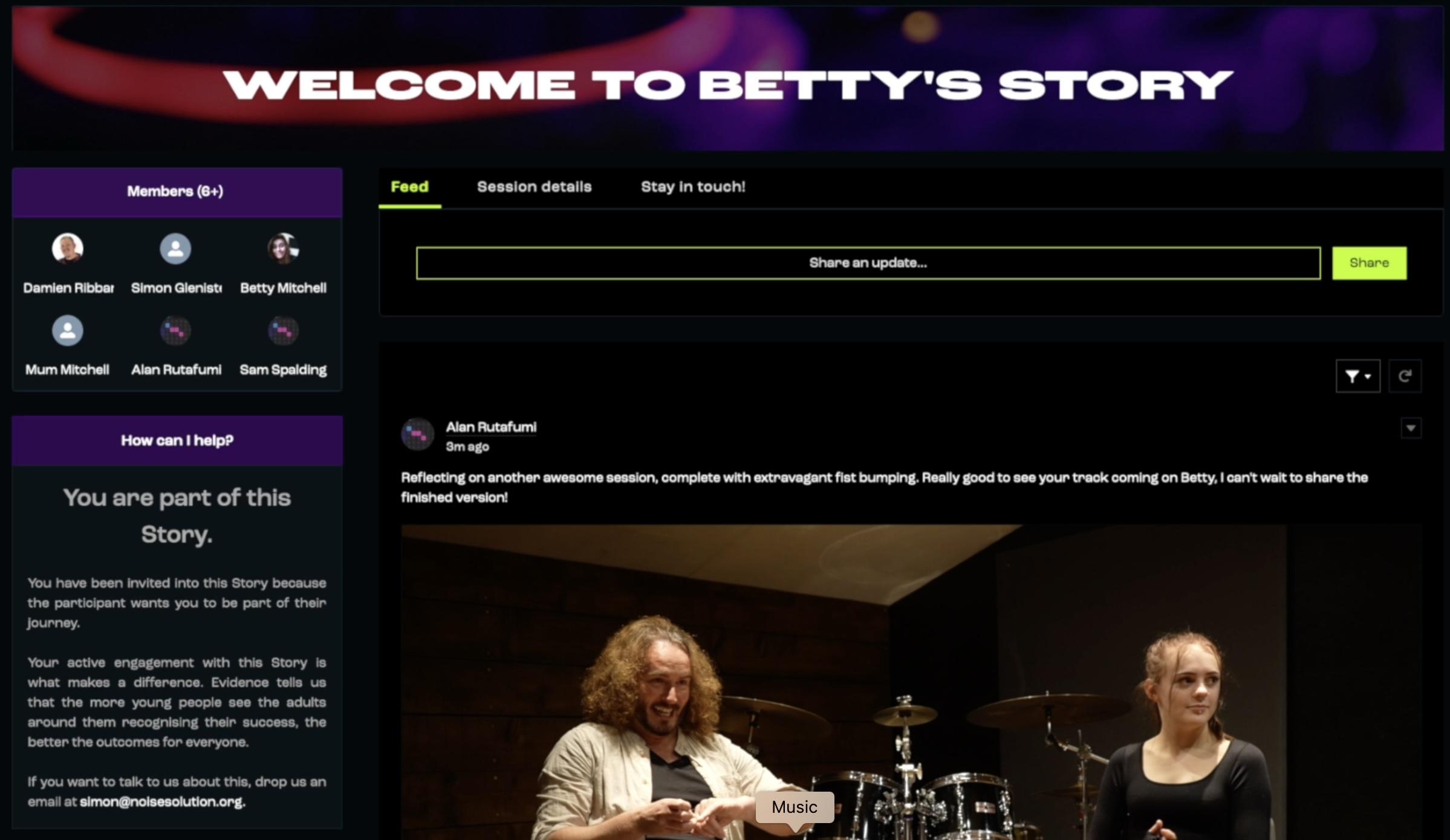
This takes them through to what we call the Participant Community (Digital Story). This is purposefully a ‘feed’ reminiscent of any other social media platform, where photos, MP3s video and web links will be posted by you and the participant and commented upon by those in the group. A big part of your role is to create a story that family and professionals want to engage with! The very first thing you do is record and post a video name checking the participant to introduce yourself. This is so a participant’s first experience with Noise Solution is logging into a personalised video message that you will have uploaded ‘talking directly to the participant’, introducing yourself and explaining that we’re here to have fun making their music, whatever that might be.
When the participant logs and you show them the landing page (there should also be a pop up message) you can discuss safeguarding. In the first session this is designed to prompt a conversation with you the musician about what
the boundaries are if they say something that means you’re nat sure if they are safe. The first session is also when that first Well-being questionnaire is done. This is also accessed from within their feed. The platform tracks and tells the musician if it has or hasn’t been done. The last bit of admin is about getting consent to analyse the reflection videos. This pop-up, consent and the well-being questionnaire are the only things we do that aren’t making music or capturing and sharing that process. But they are both really important. As is how we present them as incredibly useful and interesting to us, rather than a chore.
There are lots of things contained within the platform that are useful to you and to the participant. Link and password details to other software appear in participant’s feeds. There is also training available for the piano method we use to quickly teach chords. Some musicians use this to go through with participants.
It’s worth mentioning, some musicians will be delivering entirely digitally, utilising the annotation capability in zoom really helps to easily navigate exploration and music creation with the participant in control of the browser based music software, with the musician able to easily help them navigate the software.
To engage the participant better, you the musician also have access to literally millions of samples via the Loopcloud platform. Here they can be filtered by genre, key or tempo with the ability to time stretch and pitch shift to fit key and tempo automatically. We can then drag these loops and samples to the participants software, retaining authenticity of the genre’s that they want to create.
Once a track is created we have the ability to enable the participant to make an accompanying music videos using the amazing rotor platform (access details in the community again. In Rotor, tracks are uploaded, analysed for tempo and pre-recorded professionally shot clips are assembled and automatically cut and faded, filtered and effected to create stunning videos which can be posted to the participants feed. It can look absolutely stunning and is really great for impressing family /carers and key-workers (creating a story they want to engage with and comment on).
2.6 Some basics of using the platform
Here you can watch ` quick run through of how to get onto the digital stories community. It covers a brief introduction of all the following and more.
There is a quick run down of the welcome page.
What a participant sees.
How to post
What is available in terms of help
How to report
Where to flag a safeguarding concern
Where to do the Well-being questionnaire
Click on the picture below to see a video step through

2.6.1 How to book amend or cancel sessions in the system

2.7 How to record a welcome video for your participant
One of the issues we often face is getting the participant to the first session. They don’t know what to expect, might be nervous, might not trust services. 9 times out of 10 it’s fine once we get them there but think about how it could be really anxiety-inducing for a young person (or adult) if they don’t know what to expect or have any idea who it is they are going to meet. We’ve been thinking about ways to lower that anxiety.
We know that the reflection videos that participants do can really connect with their family and key workers as they see the participant describe the impact that the session has. It follows then that this works the other way around as well.
So we have a plan. We’re going to ask you to record a short introduction video, whenever you are assigned a participant. The idea is to connect, to introduce yourself to them and whoever has access to their digital story.
As an example for you here’s one a musician did for a young person he worked with. There is a script you can copy in the notes for this video (below)
Click the picture below to see an example of an introduction video

Here is a script you can use to base your introduction/welcome video on. Remember to record it in LANDSCAPE MODE! (Sideways)
Script example for your introduction video that you could use with a screen Autocue on your phone….
2.8 Posting a video correctly

A really quick guide above to correctly posting that and any other videos in the feed so they display correctly.
If you are not sure about any of this then do speak to your Noise Solution buddy (we’ll be telling you who they are very soon) or email us or give us a call - no question is silly - we value them all.
That’s it from me - your next video should be with you once we’ve confirmed which experienced Noise Solution musician you are going to be shadowing with. You should have been assigned a participant and you can check in with them about how you’ve done or how to do all the stuff in this video
Notes:
Appendix
It might feel daunting but remember we’ve got loads of musicians brilliantly doing this and they were felt as daunted as you when they started! Even Jimi Hendrix was rubbish at guitar the first time he picked one up - this takes practice and we are here to help.
Hopefully we’ve broken down everything in detail in this training aid above and it’s other parts 1 through to 5. Our intention was to deliver it in manageable chunks.
You are also going to shadow someone else for the first couple of sessions; you’ll have a Noise Solution ‘buddy’ too ask questions of and we’ll be on hand to answer questions as well. You are not alone! but we thought a complete quick overview of the ten weeks might be a useful as well. So there is a link to one below.
Click here to see a handy PDF reference you can download that is an overview of a set of sessions. It details what it looks like for you when we break down what needs to happen each week?