Healthcare Spending Account
®
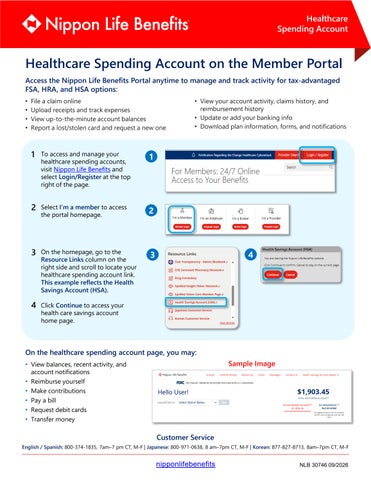
Healthcare Spending Account on the Member Portal Access the Nippon Life Benefits Portal anytime to manage and track activity for tax-advantaged FSA, HRA, and HSA options: • File a claim online • Upload receipts and track expenses • View up-to-the-minute account balances • Report a lost/stolen card and request a new one
1
To access and manage your healthcare spending accounts, visit Nippon Life Benefits and select Login/Register at the top right of the page.
1
2 Select I’m a member to access
2
3 On the homepage, go to the
3
the portal homepage.
Resource Links column on the right side and scroll to locate your healthcare spending account link. This example reflects the Health Savings Account (HSA).
• View your account activity, claims history, and reimbursement history • Update or add your banking info • Download plan information, forms, and notifications
4
4 Click Continue to access your health care savings account home page.
On the healthcare spending account page, you may: • View balances, recent activity, and account notifications • Reimburse yourself • Make contributions • Pay a bill • Request debit cards • Transfer money
Sample Image
Hello User!
Customer Service
English / Spanish: 800-374-1835, 7am–7 pm CT, M-F | Japanese: 800-971-0638, 8 am–7pm CT, M-F | Korean: 877-827-8713, 8am–7pm CT, M-F
nipponlifebenefits
NLB 30746 09/2026