Portal Registration Guide for Members
®
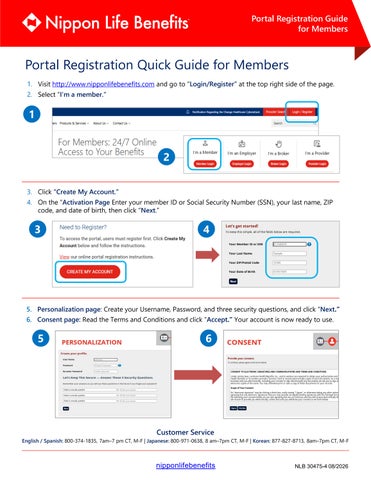
Portal Registration Quick Guide for Members 1. Visit http://www.nipponlifebenefits.com and go to “Login/Register” at the top right side of the page. 2. Select “I’m a member.”
1 2 3. Click “Create My Account.”
4. On the “Activation Page Enter your member ID or Social Security Number (SSN), your last name, ZIP code, and date of birth, then click “Next.”
3
4
5. Personalization page: Create your Username, Password, and three security questions, and click “Next.” 6. Consent page: Read the Terms and Conditions and click “Accept.” Your account is now ready to use.
5
6
Customer Service
English / Spanish: 800-374-1835, 7am–7 pm CT, M-F | Japanese: 800-971-0638, 8 am–7pm CT, M-F | Korean: 877-827-8713, 8am–7pm CT, M-F
nipponlifebenefits
NLB 30475-4 08/2026