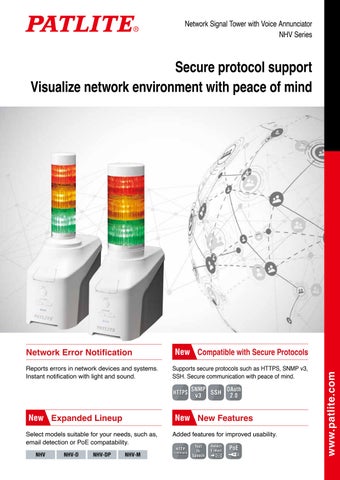
Network Signal Tower with Voice Annunciator NHV Series
Network Error Notification
New Compatible with Secure Protocols
Reports errors in network devices and systems. Instant notification with light and sound.
Supports secure protocols such as HTTPS, SNMP v3, SSH. Secure communication with peace of mind. HTTPS
SNMP OAuth v3 SSH 2.0
New Expanded Lineup
New New Features
Select models suitable for your needs, such as, email detection or PoE compatability.
Added features for improved usability.
NHV
NHV-D
NHV-DP
NHV-M
HTTP
Command
Text to Speech
Detect E-mail
PoE
www.patlite.com
Secure protocol support Visualize network environment with peace of mind
Signal Tower with Light and Sound
Lit
Off
Network Signal Tower with Voice Annunciator
NHV series
• Compatible with various protocols • Suitable for messages or melodies • Diverse lineup Software Features
HTTPS SNMP SSH OAuth PING HTTP V3/v2c/v1 RSH 2.0 SOCKET 24 Send E-mail
Hardware Features
Detect E-mail
Text to Speech
Web Browser Settings
IP v6/v4 Azure AWS
Model Number Configuration
PoE
NHV4-3D□N-RYG
Digital Contacts
Φ40 Φ60 4 Inputs RJ-45 (NHV4) (NHV6) 2 Outputs
88dB
Download User Manuals and Specifiactions
② ③ ④ ⑤
①
① 4 = Signal Tower Φ40 6 = Signal Tower Φ60 ② 0 or 3 tiers ③ None = No contact input/output D = Contact input/output
(* Use Google Chrome/Microsoft Edge when setting up browsers.)
▶︎
④ None = Standard specification M = E-mail detection ⑤ N = No AC adapter P = No AC adapter (Supports PoE power supply)
⑥
⑥ 3 tiers = RYG ●●●
NHV (Voice-enabled) Standard model with high network security. Product List No AC adapter
Φ40 Signal Tower
Φ60 Signal Tower
NHV4-0N
NHV6-0N
NHV4-3N-RYG
NHV6-3N-RYG
Error detected on the network
NHV-D (Voice-enabled, Digital IO) Standard NHV model plus 4 digital inputs and 2 digital outputs. Compatible with a wide range of applications, such as receiving outputs from sensors or controlling another device when the NHV is lit by sending digital contact outputs.
Digital Contacts 4 Inputs 2 Outputs
Product List No AC adapter
Φ40 Signal Tower
Φ60 Signal Tower
NHV4-0DN
NHV6-0DN
NHV4-3DN-RYG
NHV6-3DN-RYG
NHV-DP (Voice-enabled, Digital IO, PoE Power) Digital Contacts 4 Inputs 2 Outputs
PoE
NHV-D plus PoE power capability. It can be used in areas where it is difficult to secure power supply or to facilitate network camera connection. (IEEE802.3 at compliant) Can also be used with optional ADP-001 power adapter. Product List PoE power supply (No AC adapter)
PoE Compatible Hub (IEEE802.3at compliant)
01
Φ40 Signal Tower
Φ60 Signal Tower
NHV4-0DP
NHV6-0DP
NHV4-3DP-RYG
NHV6-3DP-RYG
NHV-M (Voice-enabled, Mail Detection) The NHV-M unit accesses the mail server and will light up or play a message when emails that meet preset conditions are received.
Detect E-mail
Product List
Urgent e-mail received
No AC adapter
Φ40 Signal Tower
Φ60 Signal Tower
NHV4-0MN
NHV6-0MN
NHV4-3MN-RYG
NHV6-3MN-RYG
Optional Parts
Wall Mount Bracket NH-001
Partition Mounting Bracket NH-002
AC Adapter ADP-001
Adding/Reconfiguring LED Unit Easily add, remove or reconfigure LED units by simply turning them by hand. No tools are required. Compatible with LR4 / LR6 series LED units. Clear lens and colored lens available. NHV6 also supports multi-color LED units. Φ60 LED Unit for NHV6
Φ60 Multi-color LED Unit for NHV6
Clear lens Model Number : LR6-E-□ □ : RZ / YZ / GZ / BZ Red / Amber / Green / Blue
Colored lens Model Number : LR6-E-□ □ : R/Y/G/B/C Red / Amber / Green / Blue / White
Display seven colors with a 1-tier Multi-color LED Unit. Model Number : LR6-E-MZ
Φ40 LED Unit for NHV4 Clear lens Model Number : LR4-E-□ □ : RZ / YZ / GZ / BZ Red / Amber / Green / Blue
Colored lens Model Number : LR4-E-□ □ : R/Y/G/B/C Red / Amber / Green / Blue / White
●A maximum of 5 LED Units (LR□-E-□) can be installed. ●Units other than supported LED Units cannot be connected. ●Multiple LED units (LR□-E-□) of the same color cannot be connected.
Dimming Function
* WDT-6LR-Z2 cannot be used when the multi-color LED unit is used.
WD Series Data Collection
4-level brightness adjustment function Factories and other similar locations, require LEDs to be bright so they can be seen from a distance.
Transmitter
However, in offices or places where people are close to the unit, the LEDs need to be dimmer. The NHV series offers four brightness settings so the appropriate light intensity can be set for your situation. Minimum Illumination
Maximum Illumination
LAN
PC
Receiver
The WD series, a part of PATLITE's IoT offering, can be used. The LED status is transmitted wirelessly from the transmitter mounted on the NHV to a dedicated receiver, and data is stored. Nothing needs to be added to the existing system.
* The maximum luminous intensity is displayed when the Multi-color LED unit or WDT unit is mounted and cannot be changed. (Dimming function cannot be selected.)
Similar to the LED unit, the transmitter can be mounted simply by turning it by hand, without any tools.
Transmitter for NHV4 WDT-4LR-Z2
Transmitter for NHV6 WDT-6LR-Z2
02
Basic Common Functions SNMP TRAP Receive Function
PING Monitoring
SNMP TRAP from network-compatible devices (such
Each NHV unit can PING up to 24 devices. If a line
promptly notify the administrator of errors and faults with
device cannot be obtained, the NHV considers it as
as UPSs, printers, routers, and switches) are received to
failure to a node or a response from a monitored
light and sound.
an error and notifies the administrator quickly with light and sound.
• Determine variable-bindings. • Register up to 16 groups (4 nodes per group).
SNMP Status Monitoring
Self-diagnosis Function
Actively get Device Status Equipped with an SNMP device monitoring function in
The test button on the front of the unit can be used to
When the MIB information of the network device is
alarm functions without control from the network.
easily check the operation of the indicator light and
addition to dead/alive monitoring by PING monitoring. actively acquired and the set conditions are met, the
Test Button
administrator is notified immediately by light and sound.
Extensive Communication Commands HTTPS/HTTP
Cloud Communication
All notification patterns can be controlled by HTTPS/HTTP communication commands.
Supported Cloud Platforms: AWS, Microsoft Azure AWS: Connect to AWS IoT Core Azure: Connect to Azure IoT Hub/Azure IoT Central
Receive Command Example (Red continuous on / Amber flashing 1 • CH 10 message is played once)
Control LEDs and audio directly from the connected cloud service.
https://192.168.10.1/api/control?led=12000&sound=10
Rotating beacon, other devices
Receive Command Example (Clear operation)
http://192.168.10.1/api/control?clear=1
Control LED lighting, digital output
Receive Command Example (Digital output ON)
http://192.168.10.1/api/control?output=1
* Digital Outputs are for D / DP Models Only
LED lighting, digital I/O information
Contact output
SSH/RSH
SOCKET Communication
Can be easily controlled by SSH/RSH, which is a generalpurpose protocol. Event information from integrated network management software or various monitoring tools can be used as triggers to turn on/flash lights and sounds.
Controlled by PATLITE's proprietary SOCKET communication commands, PNS and PHN commands. These commands can be used directly on existing systems. PNS Command All notification patterns can be controlled. Receive Command Example (Red, Amber, Green continuous on; Alarm sounds)
SSH Command Receive Command Example (Red, Amber, Green continuous on; Alarm sounds)
58H,58H,53H,00H,00H,06H,01H,01H,01H,00H,00H,01H
PHN Command Simple command control with 2 bytes.
ssh 192.168.10.1 -l root alert 111001
* Some functions are restricted.
RSH Command Receive Command Example (Red, Amber, Green continuous on; Alarm sounds)
Receive Command Example (Red, Amber, Green continuous on; Alarm sounds) 57H,17H (W) (00010111)
rsh 192.168.10.1 –l root alert 111001
Send HTTPS/HTTP Commands
Detailed Notification Settings E-mail
Easier to control in conjunction with other products
Send e-mail
HTTPS / HTTP commands can
Send up to 8 e-mails per event
be sent from NHV. Controlling another NHV or a separate
PATLITE product is possible. It is also possible to link with
Customize subject and message for various
Easy integration with PATLITE products.
products that can receive
HTTPS / HTTP commands,
such as cameras from other companies.
Number of registrations : 8 Number of command characters : Up to 128 characters per command
03
Easy integration with other companies' products.
events. Enhanced e-mail authentication features provide superior security.
Supports OAuth 2.0 authentication / password authentication (OAuth authentication only supports Gmail / Outlook)
Send SNMP TRAP/Inform Send up to 8 locations. ● SNMP v1/v2c/v3
Voice Function – MP3 Playback Function – The MP3 playback function enables notification with voice messages. Detailed emergency information and voice guidance can be played back.
Text To Speech
TTS (Text to Speech) This unit is equipped with a "Text to Speech (TTS)" function that converts text data to voice. This makes it easy for customers to create voice messages, or text can be automatically read aloud by typing text in the command. In addition, since the voice synthesis engine is built into the main unit, voice conversion can occur even when offline (not connected to the internet).
Generate Voice File for Registration Generate audio from text, register it to an audio channel, and
play it back with a command. Compared to traditional recording
Voice File Registration
methods, we have succeeded in dramatically reducing the time and effort required.
Generate audio for registration from the web browser and register it to any channel.
(Custom recording service is also available depending on customer's convenience, application and preference.)
Voice File Generation from Command Characters you want spoken can be entered directly in the
command and when a command is received the NHV will convert the text to voice and play it.
Temperature of the primary warehouse is abnormal. Please check immediately.
Command Example http://192.168.10.1/api/control?speech=Hello&lang=en
88dB
LINE OUT
Loud, Clear Audio
Connection to Existing Broadcasting Equipment
In spite of its compact size, the unique horn structure achieves a sound pressure of more than 88dB (at 1m).
Voice messages can be broadcast by connecting the digital output of the unit to an external amplifier.
The clear audio makes it easier to distinguish the information.
* Built-in sounds cannot be output from LINE OUT.
PA system, amplifiers, external speakers, etc.
Various settings and MP3 files can be uploaded from a web browser.
LINE OUT
* Use Google Chrome / Microsoft Edge when setting up browsers.
An error has occurred.
Coordinated with contact output
Coordinate Audio Playback and Contact Output Set 16 volume settings using the VOLUME buttons.
Digital contacts can be output during audio playback. Voice output can be delayed to prevent it from starting before the amplifier starts.
Volume change can be disabled in the software (in the browser settings) to prevent unintended changes in volume.
LINE OUT Output
ON
Contact output
ON
Volume + button Volume - button
Error detected on the network
Standard Sound
Audio playback
OFF
OFF
Set delay time Amplifier activation
Various Built-in Sounds
There are a total of 11 built-in audio data (5 alarms, 3 chimes, and 3 voice messages). These are available from the time of shipment for network error notification. Select alarms or messages according to monitoring requirements. ♪
Built-in Sounds
Alarm Sounds
Chime Sounds
♪ (Beep, Beep, Beep); ♪ (Slower Beep); ♪ (Very slow, Beep);
♪ Chime 1
♪ (Be-beep, Be-beep); ♪ (Beeee) (continuous sound)
♪ Chime 3
♪ Chime 2
Voice Messages An error was detected in the network.
An error occurred.
The error has been cleared. 04
Model Features Digital Input/Output (D Model/DP Model) Compatible with a wide range of applications, such as receiving information from sensors or sending digital signals to other devices when events trigger the NHV. 4 Digital inputs included
Elapsed Time Operation
2 Digital Contact Outputs Included Operate devices such as rotating
Monitor up to 4 outputs from
Light and sound can be activated based on elapsed time since
beacons and voice annunciators.
equipment with digital output capability.
the occurrence of the triggering event.
5 seconds IN
OUT Rotating beacon, voice annunciator, entry and exit gate, etc.
Contact Input
Abnormal output from equipment such as switches and relays; contact output from sensors, etc.
10 seconds
15 seconds have elapsed
15 seconds
PoE Power (DP Model) This model has the NHV-D features plus PoE power capability. It can be used in areas where it is difficult to secure power or to facilitate network camera connection. (IEEE802.3at compliant)
PoE
* If PoE power is used, a IEEE802.3at compliant PoE+ power supply (HUB, injector) is required. USB power cannot be supplied from the main unit’s USB connector if an IEEE802.3af compliant PoE power supply is used.
PoE Compatible Hub (IEEE802.3at compliant)
Mail Reception Detection (M Model) The NHV-M unit accesses the mail server and will light up or play a message when emails that meet preset conditions are received. No PC is required because the NHV-M accesses the server directly, so no modification is needed to the existing system. It is compatible with “OAuth2.0* ” as well as “Password Authentication”. * OAuth authentication is compatible with “Gmail” and “Outlook” only.
POP3S IMAPS POP3 IMAP Important E-mail
POP3S / POP3 IMAPS / IMAP
・Order e-mail ・Error message ・Simultaneous
Received an urgent email. Please check immediately.
Internet
communication to each branch, etc.
Detection Condition : "Sender (mail address)", "Subject" and "Body" (Matches with above/ includes / does not include / star ts with) Number of Conditions : 20
Function List by Series NHV
NHV-D
NHV-DP
NHV-M
Dimming Function
○
○
○
○
Cloud Control
○
○
○
○
Send HTTP
○
○
○
○
Audio Playback (MP3)
○
○
○
○
TTS (Text to Speech)
○
○
○
○
Digital I/O (4 inputs/2 outputs)
ー
○
○
ー
PoE-powered * IEEE802.3at Compliant
ー
ー
○
ー
Mail Detection Function
ー
ー
ー
○
Model Number
05
External Dimensions and Installation Method External Dimensions/Operation Panel NHV4 series
NHV6 series Φ60
Φ40
Head cover
Head cover
(
)
Overall Height Number of tiers
0 tiers : 150 1 tier : 190 2 tiers : 230 3 tiers : 270 4 tiers : 310 5 tiers : 350
LED unit
(
Nameplate
40
0 tiers : 150 1 tier : 190 2 tiers : 230 3 tiers : 270 4 tiers : 310 5 tiers : 350
Serial number
131
*2
*1
88
161
88
Front View
Side View
Back View
)
Overall Height Number of tiers
LED unit
Nameplate
40
Serial number
131
*1
*2
88
161
88
Front View
Side View
Back View
(mm)
*1 Enlarged View
*2 Enlarged View
(mm)
*2 Enlarged View
NHV/NHV-M Reset button
NHV-D/NHV-DP Reset button
Setup Switch Clear button
Maintenance slot
USB port
Test button
Status LED
Line Out USB port
I/O Terminal block
LAN port
Volume + button Volume - button
Setup Switch Maintenance slot
Line Out
Power cable clamp
LAN port
DC Power Jack
Power cable clamp
DC Power Jack
Installation Stationary
Tripod Mounting
Wall Mounting/VESA Mounting
Partition Mounting
Please obtain tripod separately. (Load capacity of 6 kg or more required)
Please obtain NH-001 separately.
Please obtain NH-002 separately. (For panels 22 to 60mm thick)
Product
❶Adhesive Sheets To mounting surface
Adhesive Sheets (Included with NHV)
Model Number DC24V AC adapter * 1 PoE Power Supply
Mounting Method
Network Communication Method IP Network
IP Address Setup
Ambient Temperature Ingress Protection
NHV
NHV-D
NHV-DP
NHV-M
○ *2
ー
○ ー
ー
Upright
Ethernet (IEEE 802.3 at Compliant) 10BASE-T / 100BASE-TX / 1000BASE-T (Auto MDI/MDI-X) IPv4/IPv6 Dual-stack
Manual setting and DHCP auto setting 0℃ to 40℃ IP20
Supported Protocols
HTTPS/HTTP, SSH, RSH, SMTPS/SMTP, IMAPS/IMAP, POP3S/POP3, SNMP(v3 / v2c / v1), NTP
Conformity Standards
UL62368-1, CSA C22.2 NO. 62368-1 FCC Part 15 Subpart B Class A EN 55032, EN 55035, EN IEC 63000 KS C 9610-6-4, KS C 9610-6-2* 3 TR CU 020, TR EEU 037* 3
*1. N and DP models of each series are compatible with the AC adapter, the adapter is not supplied with the product. *2. IEEE802.3at (PoE+) compliant. Please check the specifications of your device when powering with PoE. *3. N and P specifications only
06
Global Network
UNITED KINGDOM EUROPE HQ (GERMANY)
CHINA
KOREA TATSUNO GLOBAL HQ (JAPAN) SANDA TAIWAN
ITALY
U.S.A. MEXICO
FRANCE SPAIN THAILAND SINGAPORE INDONESIA
Head Office Subsidiary Sales Office Factory
www.patlite.com
PATLITE,the PATLITE logo are either registered trademarks or trademarks of PATLITE Corporation in JAPAN and/or other countries.
CAUTION
MPEG Layer-3 audio coding technology licensed from Fraunhofer IIS and Thomson Licensing. The names of other companies and products are trademarks or registered trademarks of their respective companies.
To ensure correct use of these products, read the “Instruction Manual” prior to use. Failure to follow all safeguards can result in fire, electric shock, or other accidents. Specifications are subject to change without notice.
O-BB01B
EN
2209