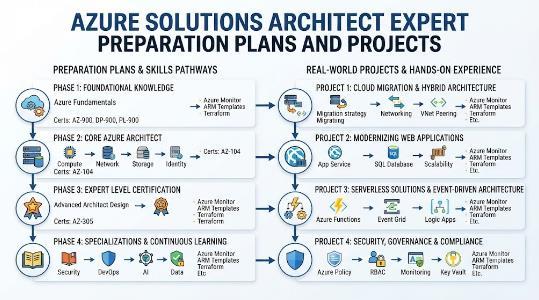
Azure SolutionsArchitect Expert Preparation Plans and Projects
Introduction
Microsoft Azure is widely used to run business applications, store data, manage infrastructure, and support digital services. However, building a successful Azure environment requires more than knowing how individual services work.
An Azure solutions architect must understand business needs, compare technical options, identify risks, and create a cloud design that is secure, scalable, reliable, and financially practical.
The Microsoft Certified Azure Solutions Architect Expert learning path is suitable for professionals who want to take responsibility for complete Azure solutions. It helps engineers move from service implementation to architecture planning and technical decision-making.
What Is This Certification?
This is an expert-level learning path focused on designing solutions on Microsoft Azure.
It teaches professionals how to choose suitable cloud services and combine them into a complete architecture based on performance, security, availability, governance, compliance, and budget requirements.
The main focus is not memorising Azure products. It is learning how to make better technical decisions.
Who Should Take It?
This certification path is suitable for:
Azure administrators moving towards architecture roles
Software engineers building applications on Azure
DevOps engineers managing deployment platforms
Cloud engineers working on infrastructure projects
Technical leads reviewing cloud solutions
Consultants preparing Azure recommendations
Infrastructure professionals planning cloud migration
Managers responsible for cloud projects
Existing architects expanding their Azure skills
Learners should already understand basic Azure services, including virtual machines, storage, networking, identity, monitoring, and security.
Important Skills You Will Develop
Through this certification path, you can learn how to:
Design secure Azure environments
Plan identity and role-based access
Organise subscriptions and resource groups
Create network and hybrid-connectivity designs
Select suitable compute services
Compare storage and database options
Design scalable applications
Practical Projects You Should Be Able to Handle
After gaining the required knowledge, you should be able to work on projects such as:
Designing a secure Azure landing zone
Planning a cloud environment for multiple departments
Building a hub-and-spoke network
Designing a highly available web application
Selecting Azure services for a business application
A good project should not only show which services are used. It should also explain why those services were selected.
Key Architecture Areas
Identity and Governance
Azure architects must control who can access resources and what actions they can perform.
This includes users, groups, managed identities, administrative roles, policies, subscriptions, naming rules, tagging, and compliance controls.
Compute and Applications
Different workloads need different compute platforms.
An architect may need to choose between virtual machines, App Service, Functions, containers, or Azure Kubernetes Service. The decision should depend on application design, scalability, maintenance effort, team capability, and cost.
Networking
Network architecture affects security, performance, and availability.
Important topics include virtual networks, subnets, peering, load balancing, DNS, firewalls, private endpoints, VPN connections, and hybrid connectivity.
Data and Storage
Applications may require object storage, file storage, relational databases, non-relational databases, caching, or data lakes.
The correct service depends on the data type, volume, availability needs, access speed, security, and growth expectations.
Security
Security should be included in the original design rather than added after deployment.
Architects must consider identity protection, network controls, encryption, secrets management, workload security, threat detection, logging, and compliance.
Reliability and Recovery
A cloud solution should continue operating during service failures whenever possible.
Architects need to define availability requirements, backup policies, recovery time objectives, recovery point objectives, failover processes, and disaster-recovery procedures.
Preparation Options
7–14 Day Plan
This plan is suitable for professionals who already have strong Azure experience.
Review the complete architecture syllabus
Identify weak technical areas
Compare similar Azure services
Practise architecture case studies
Build small labs
Create architecture diagrams
Complete assessment questions
Review the reason behind every incorrect answer
30-Day Plan
This option is suitable for learners with moderate Azure experience.
Week 1: Study identity, access management, governance, and Azure Policy.
Week 2: Focus on compute, networking, storage, and database services.
Week 3: Learn security, monitoring, availability, backup, and disaster recovery.
Week 4: Complete a practical architecture project and revise weak topics.
60-Day Plan
This plan is useful for working professionals who need stronger practical knowledge.
Weeks 1–2: Build a strong foundation in Azure administration.
Weeks 3–4: Study architecture patterns and service-selection methods.
Weeks 5–6: Practise security, observability, migration, recovery, and cost planning.
Week 7: Design one complete enterprise Azure solution.
Week 8: Complete mock assessments and revise important concepts.
Mistakes to Avoid
Many learners struggle because they focus only on theory. Common mistakes include:
Memorising product definitions
Ignoring business requirements
Using complicated services without a clear need
Forgetting cost and operational effort
Treating security as a separate activity
Ignoring monitoring and support responsibilities
Designing recovery without clear recovery targets
Choosing a database without studying the data
Assuming Kubernetes is required for every workload
Avoiding hands-on practice
Failing to document design assumptions
Learning practice answers without understanding the logic
Choose Your Career Path
The Azure Solutions Architect path can support several different career directions.
DevOps
Choose DevOps if you are interested in automated software delivery.
Focus on source control, continuous integration, continuous delivery, infrastructure as code, containers, deployment strategies, and platform automation.
DevSecOps
Choose DevSecOps if you want to combine cloud architecture with application and infrastructure security.
Learn secure pipelines, secrets management, vulnerability scanning, container security, policy automation, and compliance checks.
SRE
Choose SRE if your main interest is system reliability.
Study monitoring, alerting, service-level objectives, incident response, automation, capacity planning, and failure recovery.
AIOps/MLOps
Choose this path if you want to work with machine learning platforms or intelligent IT operations.
Focus on model deployment, machine learning pipelines, model monitoring, anomaly detection, event correlation, and automated operational actions.
DataOps
Choose DataOps if you work with data platforms and analytics.
Learn data pipelines, data quality, orchestration, governance, monitoring, metadata, and automated data delivery.
FinOps
Choose FinOps if you are involved in cloud budgets and financial management.
Study cost allocation, resource optimisation, budgeting, forecasting, tagging, pricing models, and cloud-value measurement.
Best Next Certification
The best next certification should match your chosen career direction.
A professional interested in security can continue with Azure security and identity learning.
A DevOps engineer can move towards automation, continuous delivery, infrastructure as code, and platform engineering.
A data professional can continue with Azure data engineering and analytics.
An SRE professional can strengthen monitoring, automation, incident management, and reliability skills.
Managers and cloud-cost owners can continue with FinOps and cloud financial-management learning.
Training and Certification Support Institutions
DevOpsSchool
DevOpsSchool provides training in Azure, DevOps, cloud architecture, security, SRE, automation, and related technologies.
Its learning approach can help professionals understand both architecture concepts and practical implementation through structured sessions, exercises, and projects.
Cotocus
Cotocus supports organisations and professionals with cloud consulting, technology training, automation, and digital transformation.
It may be useful for companies that need customised Azure learning programs for teams, managers, and technical departments.
Scmgalaxy
Scmgalaxy offers learning resources related to cloud computing, DevOps, source-code management, containers, and software delivery.
It can support Azure learners who want to strengthen their broader engineering and automation knowledge.
BestDevOps
BestDevOps focuses on DevOps practices, cloud technology, infrastructure automation, monitoring, and modern software delivery.
It can help learners understand how Azure architecture connects with development and operational processes.
devsecopsschool
devsecopsschool provides training focused on security within development, deployment, and cloud operations.
Its learning areas include secure pipelines, cloud security, vulnerability management, compliance, and security automation.
sreschool
sreschool concentrates on system reliability, observability, service-level management, incident handling, and automation.
It can help Azure professionals improve the operational and reliability parts of their architecture designs.
aiopsschool
aiopsschool focuses on intelligent IT operations, machine learning, anomaly detection, automation, and event analysis.
It is useful for professionals who want to apply AI and analytics to cloud monitoring and operational management.
dataopsschool
dataopsschool offers learning around data pipelines, data engineering, data quality, governance, automation, and observability.
It can support architects who are responsible for building and managing Azure data platforms.
finopsschool
finopsschool provides learning in cloud cost management, budgeting, forecasting, optimisation, and financial accountability.
It is helpful for architects and managers who need to balance technical requirements with cloud spending.
Conclusion
The Microsoft Certified Azure Solutions Architect Expert path is designed for professionals who want to make important cloud-design decisions.It develops knowledge across identity, networking, compute, databases, security, governance, monitoring, migration, reliability, and financial planning.Successful preparation requires more than reading course material. Learners should build Azure environments, solve architecture scenarios, compare services, create diagrams, and document the reasons behind each decision.After building a strong architecture foundation, professionals can continue into DevOps, DevSecOps, SRE, AIOps/MLOps, DataOps, or FinOps according to their career goals.