Post Enrollment Guide: Using the Online Benefit Platform Outside of Open Enrollment Access benefit information outside of Open Enrollment! Log into the online Benefit Enrollment Platform throughout the plan year to: View benefit elections Update term life insurance beneficiaries View and print documents from the Forms Library
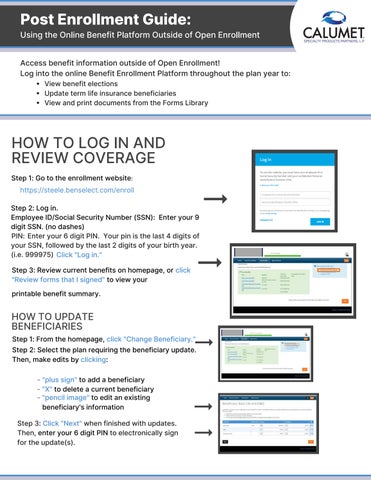
HOW TO LOG IN AND REVIEW COVERAGE Step 1: Go to the enrollment website: https://steele.benselect.com/enroll
Step 2: Log in. Employee ID/Social Security Number (SSN): Enter your 9 digit SSN. (no dashes) PIN: Enter your 6 digit PIN. Your pin is the last 4 digits of your SSN, followed by the last 2 digits of your birth year. (i.e. 999975) Click "Log in." Step 3: Review current benefits on homepage, or click "Review forms that I signed" to view your printable benefit summary.
HOW TO UPDATE BENEFICIARIES Step 1: From the homepage, click "Change Beneficiary." Step 2: Select the plan requiring the beneficiary update. Then, make edits by clicking: - "plus sign" to add a beneficiary - "X" to delete a current beneficiary - "pencil image" to edit an existing beneficiary's information Step 3: Click "Next" when finished with updates. Then, enter your 6 digit PIN to electronically sign for the update(s).
Post Enrollment Guide: Post Enrollment Guide:
Using the Online Benefit Platform Outside of Open Enrollment
THE FORMS LIBRARY The enrollment platform's forms library is an online warehouse of secure benefit documents. Easily retrieve signed benefit confirmation statements for every enrollment that has been recorded on the benefit platform. Access the forms library to view and print summary plan documents, brochures, annual wellness forms, policy claim forms and more.
HOW TO ACCESS THE FORMS LIBRARY Step 1: From your homepage, click the "forms icon" in the upper right corner of your screen. Step 2: Click "Next." Step 3: Select "the document" you want to review or print.