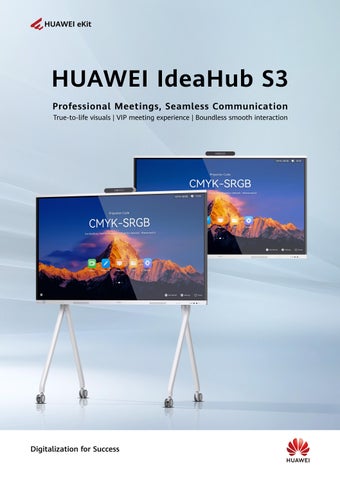
HUAWEI IdeaHub S3
Professional Meetings, Seamless Communication
HUAWEI IdeaHub S3
The HUAWEI IdeaHub S3 series boasts an intelligent dual-lens camera, delivering true-to-life visuals , VIP meeting experience and zero-delay collaboration. With enhanced HD audio, video, and AI capabilities, it captures every detail and intelligently identifies each need, breaking down the barriers of time and space in communication. This solution is tailored for executive o ces and meeting rooms, helping enterprises realize collaborative smart o ce, while boosting o ce e ciency and collaboration quality.
4K dual-lens camera + 5x zoom
4K dual-lens camera, 100% longer tracking Stable lens switching and speaker tracking
4K soft light screen
Distinct contrast and crystal clear details under any light
Professional eye-care certified by TÜV Rheinland
Dual systems
HarmonyOS and Windows
One-tap switching
24-mic + 15-meter sound pickup
24-mic array with intelligent noise reduction and multi-channel voice enhancement
Removes noise and improves speech quality for clearer communication
3D stereo sound
2 x tweeters + 2 x full-range speakers + 1 x woofer
Stereo surround sound for an immersive experience
Various interfaces

USB 3.0/HDMI/Type-C (65 W fast charging)
Broad device compatibility and feature-rich functions
VIP Meeting Experience
AI vision engine, reproducing true-to-life colors
With an industry-leading super-resolution algorithm, 720p conferences (BYOM or cloud meeting in OPS mode) are intelligently upscaled to near-1080p clarityómaking every image sharper and more lifelike for a true face-to-face experience.


BYOM, transfer meetings to the big screen
Transfer a video meeting from your phone or PC to enjoy immersive multi-sensory meetings, made possible by IdeaHub's camera, mic, and speaker systems.
Native Huawei Cloud Meeting delivers a 1080p HD experience. In OPS mode, various third-party meeting apps can be downloaded to cater to diverse customer needs. Cloud meeting, flexible app adaptation
intelligent tracking
Intelligent speaker tracking
Automatically tracks the speaker
Auto-Crop View
Intelligently divides participant video into 6 panes

Auto-Framing
Adjusts the image based on the number of participants for a panoramic view


Boundless Smooth Interaction
9-pane projection for e ortless material comparison
Seamlessly display information from phones, PCs, and tabletsóincluding documents, audio, and videoóall on one screen. Break down information silos.
Synchronized multi-dimensional information display
View/annotate content as you wish Automatic layout optimization
Work smarter with ultrasonic projection

No interference from Wi-Fi or Bluetooth signals. Automatically discover devices for one-tap projection, with no need for complex projection codes.
Tailored projection solutions for every conceivable scenario
IdeaShare app
Seamless HarmonyOS support
IdeaShare Key (Type-C/Type-A)
Type-C/HDMI cable
Miracast projection⁴
Seamless screen mirroring and control for a smarter o
ce⁵
The IdeaHub screen can be mirrored to your phone or tablet, allowing you to use your device as a controller.
It supports screen mirroring to up to 40 devices, with individual control over connection, casting, and mirroring, ensuring user privacy and data security.
Smart Control 2.0: instant control, flawless precision⁶
Smart Control 2.0 lets you point, swipe, and annotateóseamless control of the IdeaHub, right at your fingertips.
Pointing accuracy: < 3 @3 m
30+ days of usage on a single charge Operation response delay: < 0.06s
Notes: [1] The 9-pane projection feature is available only in non-meeting mode.
[2] You can control your personal devices on the IdeaHub after projection via Type-C/HDMI wired projection, IdeaShare Key, IdeaShare app, or NFC one-touch projection/drop-down menu from your phone. Di erent devices have di erent hardware capabilities.
[3] The IdeaShare app's projection code suggestion feature is compatible with HarmonyOS, Android, and Windows.
[4] Miracast supports Android and Windows.
[5] To use the mirroring and control function, the IdeaShare app must be installed on the projection source device.
[6] Data is from Huawei labs. Actual usage may vary slightly depending on habits, environment, and other factors.

Intelligent Whiteboard
Smoother and smarter handwriting
16 ms ultra-low writing latency
AI handwriting prediction algorithm for a smooth writing experience
Feels so write
Change colors, line thickness and more as you doodle away on screen
Image insertion
Add screenshots to the whiteboard with just a tap in Multi-Window mode
Instant writing with stylus
Intelligent writing
Intelligently recognizes Chinese and English text, as well as shapes
Whiteboard favorites
Content saving Save frequently used content to whiteboard favorites in just a tap
Scan the QR code to save whiteboard content right away
The device automatically enters annotation mode when the stylus touches the screen, allowing direct annotation on documents, images, web pages, and other interfaces. Handwritten marksósuch as underlines, circles, and notesóare displayed in real time, improving e ciency.

Notes: [1] In Multi-Window mode, you can tap Annotation from the toolbar to take a screenshot and add it to the whiteboard. This feature works with WeChat, browsers, Huawei Cloud Meeting SmartRooms, and WeLink.

Comprehensive, intelligent O&M
The IdeaManager device management platform remotely manages and controls multiple IdeaHubs.
Remote management
Remote setting of the shutdown time in batches
Remote OTA update in batches
Quick fault rectification
Inspection and fault alarm
Self-service diagnosis of typical faults
Precise operations
Device usage
Startup animation and bulletin board pushing


Components
Entire device
Product name
IdeaHub S3
Dimensions (H x W x D) (mm)
935.5 x 1484.5 x 91.6
Stylus pen
Model
65": IHS3-65SA 75": IHS3-75SA 86": IHS3-86SA
Package dimensions (H x W x D)
65": 1050 x 1650 x 220
1170 x 1900 x 220
1300 x 2090 x 250
Note: The dimensions and weight may vary with configuration, manufacturing process, and measurement method.
Cable
IdeaShare Key
121 x power cableOptional (Type-C/Type-A port)
Rolling stand
Wall-mounted bracket
Smart Control 2.0 OptionalOptionalOptional MTBF > 100,000 hours
Meeting
Supported meeting appsMeeting performance
Huawei Cloud Meeting SmartRooms
Smart functions
Speaker trackingAuto-Framing
Auto-Crop ViewAI
Camera
Zoom
Huawei Cloud Meeting SmartRooms: 1080p 30 fps video + 1080p 30 fps/4K 8 fps content sharing
Acoustic ba e DNN-based dereverberation
Instant writing with stylus
ResolutionLensesTV distortion
Lens material & manufacturingAperture
Horizontal field of view
High-end, glass-plastic hybrid lens (4G4P) Wide-angle: F1.8; telephoto: F1.85Wide-angle: 80 , telephoto: 65 Zero focus loss 5x 4K 30 fps 1 x wide-angle + 1 x telephoto < 2%
Speaker
Frequency domainNumber of unitsTotal power
60 Hz to 20 kHz70 W 2 x tweeters + 2 x full-range speakers + 1 x woofer
Microphone
Frequency domain
Hz to 20 kHz
Number of unitsSound
Focus stability
15 m
Automatic gain control (AGC)Acoustic echo cancellation (AEC)De-reverberationAI-powered noise removal
Brightness (typical value)Max. touch points Backlight typeScreen laminationOptical anti-blue light
350 nits32 (HarmonyOS)/50 (Windows)
Touch response time ≤ 5 ms
16 ms Touch sensing distanceIntelligent writing recognition ≤ 1.5 mm
Supports intelligent recognition of texts and 11 types of graphics
Chinese, English, French, Japanese, Arabic, Spanish, Russian, Portuguese, Italian, German, Thai, Turkish, Bulgarian, Traditional Chinese, Kazakh, Korean, Romanian, Serbian (Cyrillic), and Singhalese

Huawei Technologies Co., Ltd.
Huawei Industrial Base, Bantian, Longgang District, Shenzhen
Tel: +86-755-28780808
Post code: 518129 www.huawei.com
Copyright © Huawei Technologies Co., Ltd. 2025. All Rights Reserved. No part of this document may be reproduced or transmitted in any form or by any means without the prior written consent of Huawei Technologies Co., Ltd.
Disclaimer
The technical specifications described in this document include, but are not limited to, parameters and performance indicators and may vary depending on the actual release. This document does not constitute a warranty of any kind, expressed or implied. Huawei may occasionally update relevant information. Huawei reserves the right to update or correct information about related products or solutions. Updates are described in detail in the latest release notes or introduction.
Revision date: June 2025 , , and are trademarks or registered trademarks of Huawei Technologies Co., Ltd. Other trademarks and product, service, or company names mentioned are the property of their respective owners.