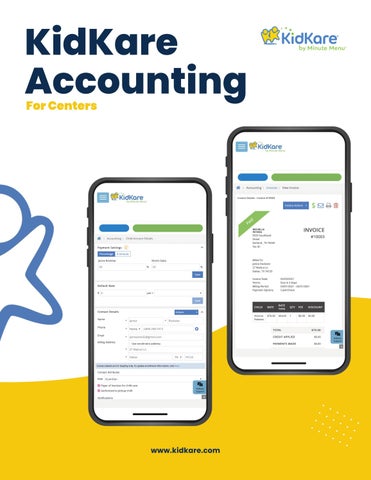
KidKare Accounting For Centers
MICHELLE MICHELLE MICHELLE PETERS PETERS PETERS
Daniel Torres Daniel Torres
MICHELLE PETERS
Daniel Torres
www.kidkare.com
KidKare Accounting provides automated, comprehensive billing and payment options for childcare centers. With KidKare Accounting, you can take payment from multiple parents and agencies, as well as split payment between them. Also, our easy-to-use messaging capabilities allow you to send updates and pictures of kids throughout the day, so parents have peace of mind. Just click and go!
3
Our enhancements: Accept payments online
4
Automate your billing process
5
Centralize your financial data
6
Bill for unique families & situations
7
Parent Portal
8
EasyPay Reports
9
Support Team
10
Never Chase Paper Again
Accept payments online and get paid faster
KidKare Accounting and ePay allows payers to pay their invoices electronically with a credit card or with ACH. Parents pay their invoices in KidKare, and payment deposits directly into your
account: no bank trip needed. What’s more, your records in KidKare are marked Paid
automatically so you always know what’s
outstanding. Encourage your parents to set
up AutoPay so you never have to chase late payments again.
Our payment processor meets the highest standards of security for financial
institutions. Rest easy knowing that your financial data—and your customers’ data—is protected by the best in the industry.
Learning Materials
Click the buttons below to learn more!
Manage ePay Understand ePay Sign Up for ePay
Use the Stripe Dashboard
Manage Invoices
Manage Participants
4
Work Less & Get Paid More
5
Automate your billing process
With our easy-to-use and automated system, you can collect payments in minutes and save countless hours of your time. We understand how hectic a day can be when
running a childcare business. Not only are you
responsible for the well being of children, you're also in charge of collecting tuition - all while keeping up with paperwork. That's why we created KidKare
Accounting, our automated payment solution that simplifies the billing process. You don't have to worry about missing a due date.
Plus, with KidKare Accounting, you will be able to split payments between parents, agencies, guardians, and so on by dollar amount or percentage.
Learning Materials
Click the buttons below to learn more!
Manage Invoices
Create Recurring Invoices Record Invoice Payments Record Refunds View Invoices
Email Invoices
MICHELLE MICHELLE MICHELLE PETERS PETERS PETERS
Daniel Torres Daniel Torres
Centralize Your Financial Data Save time hunting for information
With KidKare Accounting you will be able to set up billing for participants, manage payers, and payment methods, etc. in one easy-to-access place. Manage all aspects of billing, invoices,
and payments for participants' accounts with an easy-to-navigate dashboard. As a bonus, you can maintain billing information for participants without changing their enrollment records.
Learning Materials
Click the buttons below to learn more!
Manage Participants Accounts Manage Contacts Manage Agencies Set a Default Rate for Invoices Manage Invoices Manage Account Credits
6
Bill for Unique Families & Situations Easily split payments between parents!
Split payments between parents, agencies, guardians, and so on by dollar amount or percentage with KidKare Accounting. Each family has their own unique makeup. Easily
split payments between parents—so parents can
choose how they want to pay. Everyone gets their own invoice and statement of account.
Need to bill for agencies or subsidies? You can do that, too! Track payments with Statement of
Account and List of Itemized Payments for each of your payers throughout the year.
Learning Materials
Click the buttons below to learn more!
Split Payments Between Payers Manage Contacts
Manage Agencies
MICHELLE PETERS
Daniel Torres
7
Satisfied Customers 8 Are Happy Customers Parent portal is an easy-to-use service!
This feature will give peace of mind to your parents and you will never have to wait for payments ever again. Designate parent-guardians as Payers and give them access to their very own portal
where they can view and pay their invoices.
With ePay in hand, parents have the option to
opt-in to AutoPay and manage their childcare payments in one convenient place—no more forgetting payments.
Do your parents also enjoy child updates
during the day? Send them messages with
updates. They can see and respond to your messages right from KidKare.
Learning Materials For Parents/Guardians
Click the buttons below to learn more!
Manage Invoices
Renew Enrollment Manage Messages Reports
Parent Handbook
Start Saving Money & Time With KidKare Reports
With KidKare Reports, you'll have accurate records of your childcare business every step of the way. Just click and go! Running a childcare business can be a
tough and time-consuming job, but not if you have the right tools. With KidKare Accounting, you'll have access to
numerous reports that provide accurate records of your day-to-day operations. Better yet, you'll be able to identify risk areas before they become costly problems.
Learning Materials
Click the buttons below to learn more!
All Reports
Print Form W-10
Print the Other Income Report
Print the ePay Settlements Report Print a Statement of Account
Print the Statement of Itemized Payments Report
9
Our Support Team Is Here For You How can we help you?
Your KidKare software subscription comes with access to different support tools. We offer different ways for you to learn about
KidKare software quickly, including articles, live chat, and in-app tutorials.
Once you become a customer, you will be able to access our different support tools! In our Knowledge Base, you will find articles that teach you how to use the software
step-by-step. Our Live Chat allows you to get
help while using the software. And, our in-app guides walk you through setting up KidKare software.
Learning Materials
Click the buttons below to learn more!
Knowledge Base Live Chat
App-Guides
10