May 2026

Page 1


P H O T O I N S I G H T S

May 2026

Post-processing landscapes

Sky Replacement: Uploading your photos

Harsh midday lighting

Photo Tours

Photography quiz

Ask Jim Student Showcase

The Story Behind the Picture Back issues

Table of Contents

4. Post-processing landscapes

8. Sky replacement: Uploading your skies

11. Harsh, midday light

17. Photography quiz

19. Jim’s eBooks

22. What's wrong with this picture?

25. Short and Sweet

27. Ask Jim

28. Photography tours

30. Student Showcase

36. The story behind the picture

38. Past issues

46. Subject index

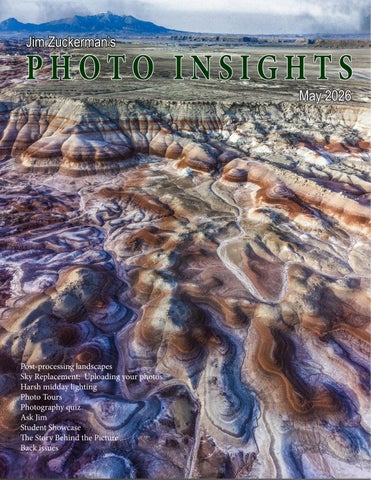
On the cover: A drone shot of the Bentonite Hills, near Torrey, Utah. On this page: Long Dong Silver, near Hanksville, Utah.

The recent photo tour I led to Utah made me think about what people who love photography will put up with to get wonderful pictures. One of the mornings during the tour, for example, we left the hotel at 3:45am to photograph the Milky Way. In the Spring, the galactic core is best photographed between 3 and 5 o'clock in the morning. When we all got great shots, we then returned to the hotel, packed up, and left at 5am to drive about 45 minutes to an incredible sunrise location called the Moonscape Overlook. The last few miles to the overlook was on a hellish gravel road.

During all of this, no one complained because they were here for one reason only: to take great pictures. On all of my tours, my clients put up with long drives, bad roads, extreme heat, brutal cold, uncomfortable humidity, and stressful airports just to take amazing pictures of amazing subjects. When they get back home, the physical discomforts is a distant memory. What stays poignantly in their minds is the experience of seeing great things, taking incredible pictures, and the lifelong pleasure they get of enjoying the images and sharing them with family and friends.

The picture on the opposite page is an example. From the parking area we had to walk a mile to get here and then climb a slope to position ourselves for the 'money shot.' Again, no one complained because what we were seeing and photographing was so unique and so beautiful.

The truth is, I feel sorry for non-photogaphers. They miss so much.

www.jimzuckerman.com

POST-PROCESSING

L A N D S C A P E S

The photograph below is a RAW file right out of the camera with no tweaking at all in post-processing. It is a formation called Factory Butte near Hanksville, Utah. I include this site in my Bentonite Hills photo tour because it's a dynamic subject when seen from pretty much any angle.

I took this shot with a 400mm focal length from a significant distance, and the dust in the air reduced contrast and desaturated the colors. But the truth is that RAW files are not intended to be

the end product. They come out of the camera with reduced contrast and saturation. Unlike film, they need to be 'processed', which basically means moving sliders back and forth until you like the results.

The software programs most people use to process RAW files are Lightroom and Adobe Camera Raw. I use the latter because, before Lightroom was introduced, all we had was ACR and I just stuck with it. Both programs do the same thing and have, essentially, the same or similar

tools. If you shoot in jpeg mode, which I don't recommend, you can tweak the images using the same sliders, but the detail in highlights and shadows is not as good as if you'd chosen to take pictures in RAW mode.

The difference between an original RAW file and its modified version is dramatic. See in the image below and on the previouis page. It's the difference between mundane and awesome!

For landscape photography, the sliders in Adobe Camera RAW -- and they are the same in Lightroom -- are shown at right. The three red arrows point to the sliders I use first and in this order: Contrast, clarity, and a small amount of vibrance. The contrast slider makes the biggest difference, then clarity adds drama and punch, and vibrance (not saturation) makes the colors really pop.

I usually find it necessary to then use the shadows slider because when contrast is applied, shadows become darker. The shad-

ows slider mitigates that problem. At the same time, increased contrast lightens highlights, so I have to apply the highlights slider. If you have a light sky, this same slider brings out more detail in the sky by reducing exposure in the bright areas of the image.

With respect to skies, there's nothing that dramatizes a landscape more than a beautiful and complimentary sky. The original picture of Factory Butte had a common blue sky, and while that is ok, the replacement sky I added in the final image is much better. Actually, that was the sky in the morning seen in the east; I was facing west to shoot the butte, so I simply used the eastern sky and composited it above the butte in the west. To do this, I used Edit > Sky Replacement in Photoshop.

[See the next artical beginning on page 8 to learn how to upload your own skies into the Sky Replacement dialog box.]

For those of you who enter contests in which this kind of manipulation is not allowed, I understand. But how many times have you heard "photography is an art"? If that's true, then you can be as creative as you want with your 'art', just like Picasso, Van Gogh, and Chagall did to their art . . . and Ansel Adams did to his images.

Another remarkable comparison between the original RAW file that came out of the camera and its tweaked version is shown below and on the next page. This is a shot from my DJI Air 3S drone with a 70mm lens. To go from

the original to the final version, I moved the contrast slider, the clarity slider, the shadows slider, and the vibrance slider. You have to be careful using vibrance because the image can quickly become garish and unreal. In this instance, I only used a small amount of vibrance. I know the colors in this picture look artificial, but that's actually how they look in diffused light. Drone photography in the Bentonite Hills is breathtaking, and ground-based shooting is also amazing.

The strong bluish hue comes from using daylight white balance with diffused light at dawn. Unlike most landscapes, these mountains look best in soft light. As soon as the sun comes up, they are still very photogenic, but the real magic happens before sunrise and after sunset. I know that's counterintuitive to photog-

raphers because we've been taught from the beginning of our involvement in photography that golden light is the best case scenario for landscapes and most nature subjects.

If a landscape is too bluish for your taste, the best way to address that issue is to use the color temperature slider in ACR or Lightroom. Moving the slider toward the warm (yellowish) end of the slider brings the colors back to what we would normaly see in the middle of the day. The bluish cast can be eliminated completely.

Personally, though, even though we don't typically see this kind of blue in nature, I think it's a compelling color in landscapes. No one ever said you have to photograph what you see. There is nothing wrong with photographing what you imagine. §

Sky Replacement

How to Upload and Use Your Own Images

Years before Adobe introduced the Sky Replacement feature in Photoshop, I was replacing boring or mundane skies to drastically improve photographs. The difference in the before and after is remarkable.

For example, compare the original shot of Ogrodzieniec Castle in Poland, right, taken with a boring white sky to the modified version below. The difference is night and day. Similarly, the jabiru stork on the next page was photographed against a white sky as it was flying to its nest to roost for the night in the Pantanal region

of Brazil. I added the pastel sunset colors and now the picture is much more compelling.

It's so easy now to add a sky thanks to the pull down menu command, Edit > Sky Replacement, in Photoshop. Most of you probably use this feature already.

The problem, though, when you first open Photoshop, the list of skies available as you scroll down the dialog box belong to other photographers. They come from Adobe Stock. We as Photoshop subscribers have permission to use these images, but there is something that really bothers me about using other people's images in my composites. My policy is if I don't push the shutter button, the picture isn't mine. And if the picture belongs to someone else, I don't want to use it.

Loading your own sky images

The screen capture on the next page shows the Sky Replacement dialog box. To upload your sky pictures here, click on the first photo (red arrow) -- whether it's yours or an image from Adobe Stock. A submenu opens up. At the bottom of that submenu, there are two important icons: a + and a trash can. To delete the skies from Adobe Stock, simply click on each sky picture, one by one, and then touch the trash can (purple arrow). That particular sky photo will be removed from the list of skies. Continue the process until all of them are gone.

To upload your own skies, select which images you want to upload. You can put them on your desktop or in a folder. They should be hi res, and you can use any type of format. Then, click

on the + icon (green arrow) and navigate to the place where your skies are located. Select the individual skies and then hit return or enter. This will upload all the skies you've chosen and they will appear in the list of images you can now use to replace any sky.

At any point, you can add more sky images using this same procedure. You will want to include skies with puffy white clouds on a blue background, storm clouds, sunrise and sunset clouds, rainbows, and even lightning if you have it. This

will give you a lot of options.

When replacing the sky, it's important to match the lighting with the landscape or cityscape. For example, if the light on the ground is midday sunshine, it wouldn't make sense that the sky is full of clouds taken at sunset.

On the other hand, with sunset lighting on the land, you could have a cloudy or stormy sky above. That does happen. The composite, below, shows this. The golden sunrise light at Moonscape Overlook near Hanksville, Utah, is framed by natural looking rain clouds that replaced a bland and pale blue sky.

Nature photographers are concerned about capturing a scene or subject with a complimentary or dramatic sky in the background. But once you learn to use the Sky Replacement feature in Photoshop -with your own images loaded -- it won't matter what the sky is because you can make it perfect in post-processing. Sure, it's always great to capture a great scene without manipulation, but you know that doesn't happen often. This technique puts all the odds in your favor. §

HARSH, MIDDAY LIGHTING

My recent photo tour to the Bentonite Hills in Utah was essentially a landscape tour. Everyone knows that the best images are taken at sunrise and sunset, so we'd get up early for sunrise, then come back to the hotel for breakfast. This was followed by a midday siesta to avoid the harsh light of an overhead sun, and then we would go out again in the late afternoon for low angled sunlight. We were tired for sure, but this also produced the best images.

On the 5th day of the trip we moved from one hotel to another, and on the way we visited Goblin Valley State Park. Due to our schedule, we had no choice but to shoot in the middle of the day. In fact, it was 12 noon when we entered the park. I was hoping for overcast, but instead the light on the intriguing land forms was disappointing. It was harsh and definitely unattractive.

In this kind of situation, there are only two things you can do to make it look better. It will never look as good as sunrise or sunset,

Iceland Drone Tour

August 24 - September 2, 2026

or even overcast light. But it's better than nothing. The first solution is HDR. Only this technique will fill in the shadows with detail and prevent the highlights from becoming overexposed.

The picture on page 11 is a 5-frame HDR composite. Unlike a single capture in which excessive contrast would force shadows to go black and overexpose highlights -- the multiframe composite reveals as much detail as possible. The more contrast in the scene, the more frames you need to mitigate the problem. I use 5 frames instead of 3; in some situations where deep shadows or brilliant highlights (like reflections on water) are present, I'll use 7 frames.

The only other possible approach to midday light is to have the sun at your back such that you are photographing subjects front lit as in

the hill below. There is still contrast; you can see dark shadows with little or no detail. But the majority of the image is illuminated well. On the hill itself, there is virtually no shadows at all so we can see complete detail throughout the landform. I could have done HDR here to bring out the detail in the shadows, especially those in the lower left portion of the image, but in this instance I felt it wasn't necessary.

Photography is all about showing detail. Sure, there are times when shadows are an important part of an image, but in most of the photograph -- especially in nature -- we want to see and appreciate the detail in the scene. When we are forced to take pictures in harsh, midday light, the only two solutions to deal with garish pictures is HDR and front lighting. The images won't be as attractive as when shooting in low angled sunlight, obviously, but it's the best we can do in a difficult situation. §

Frog and Reptile

Workshop

June 13 - 14, 2026

Exotic Birds of Colombia

Sept. 23 to Oct. 3, 2026

The Pantanal, Brazil

Nov. 11 - 19, 2027

Photography Quiz

1. In black and white photography, a color filter:

a. Lightens its own color and darkens its complementary color

b. Darkens its own color and lightens its complementary color

c. Has no effect on the tonal relationships in the image

d. Darkens the overall image uniformly

2. You can't photograph the galactic core of the Milky Way in the Northern Hemisphere from November to February.

a. True

b. False

3. Using a lens hood on a wide angle lens with a small f/stop like f/22 is not a good idea because a. Vignetting may occur

b. The image resolution suffers

c. Light reflects off the edge of the lens hood causing unwanted streaks of light

4. Dust on a telephoto lens will show up as dust specks in your pictures.

a. True

b. False

5. The best shutter speed for birds in flight to freeze even the wing tips is:

a. 1/2000

b. 1/2500

c. 1/3200

d. 1/8000

6. The best exposure mode when shooting the Milky Way is:

a. Program mode

b. Shutter priorty

c. Aperture priority

d. Manual mode

7. The worst thing that can ever come in contact with your camera is:

a. Excessive heat

b. Extreme cold

c. High winds

d. Salt water spray

8. Is it possible for a flash card to accidentally go through a washing machine cycle with images intact?

a. Yes

b. No

9. The best type of microscope for photography is a:

a. Monocular scope

b. Binocular scope

c. Trinocular scope

10. When using a tripod, you should turn off the image stabilization feature.

a. True

b. False

Answers on page 51

UPCOMING PHOTO WORKSHOPS

FROG & REPTILE WORKSHOP in Kansas City

This is an exciting macro workshop in which you will be able to photograph about 40 species of colorful dart frogs and exotic reptiles. Held in a hotel conference room, Jim sets up natural backgrounds for outstanding photos. The photo at left shows a Jackson chameleon with the background replaced in Photoshop.

June 13 - 14, 2026

GREAT GRAY OWLS, CANADA

Get up close and personal with these spectacular birds flying with their magnificent wing spans. The slow flying owls are easy to photograph, even for beginners, and you will absolutely love your pictures!

February 13 - 18, 2027

TEXAS BIRDS

Get up close and personal to many species of exotic and colorful birds. We shoot from a blind and get frame-filling shots of cardinals, green jays, crested caracaras, painted buntings, and more. Based in McAllen, Texas.

May 12 -15, 2027

Carnival in Venice

January 30 - February 5, 2027

What's Wrong with this Picture?

Iphotographed this jaguar on the hunt in the Pantanal region of Brazil. At the time, I was using a Canon 500mm f/4 super telephoto. The advantage of this lens is the large maximum aperture of f/4, but the disadvantage is its rigidity in terms of composition.

It's impossible to zoom in and out for the best framing of a subject, and that's what happened here. The jaguar was unexpectedly close to the boat I was in and I couldn't zoom back to include the cat's entire head. Therefore, I clipped the top of its head in an unattractive way. This is largely why I now use as my main telephoto the Canon 100-500mm zoom. Besides being lighter and less expensive, it gives me tremendous compositional flexibility.

I was able to save the picture by using Photoshop's brilliant AI algorithms. In

this case, I used Generative Expand to extend the area of the frame above the jaguar. By doing this, the software expanded the image area and filled it in with the top of the cat's head plus additional foliage was added. The result looks perfect -- there is no telltale editing at all.

This is one of the most useful tools in photography because, as you can see, it can solve all kinds of problems.

If you clip a bird's wing, cut off a person's feet, or inadvertently cut off part of a car, that's not a problem now. All of those things can be accurately re-built in Photoshop. In the past, we'd throw away those images. Now we can save them and even make them award winning photos. §

Indonesia Wildlife

October 29 - November 8, 2027

SHORT AND SWEET

1. In most situations when photographing landscapes, sunrise and sunset lighting is best. Golden light and long shadows plus pronounced texture make great images. But with the remarkable colors in the Bentonite Hills, Utah, diffused light is the ideal to bring out the amazing colors in the land formations.

3. If you like to work in Photoshop to create unique and compelling composites, photograph all kinds of backgrounds for future use. You never know when two images work perfectly together until you try them. This is the Paris opera house and a model I combined in Photoshop.

2. People who love photographing animals want to do so in the wild. The experience is exhilarating and the pictures reflect the natural behavior of the subjects. We can't always travel to exotic places to photograph animals, so don't overlook zoos. They are convenient and they house hundreds of exotic species like this panda I captured in the Memphis zoo.

4. The general consensus in photography is that you don't put subjects in the middle of the frame like this red barn in the Palouse region of Washington state. Sometimes I agree with this, but other times a centrally composed subject works perfectly. Rules are merely guidelines to be followed . . . sometimes.

Ethiopia photo tour

Go back in time 20,000 years

January 5 - 18, 2027

Surma tribe
Dallol Depression

ASK JIM

Every month, Jim answers a question from his online students, from people who participate in his tours and workshops, or from subscribers to this magazine. If you have a question you’d like Jim to answer, please drop him a note at photos@jimzuckerman.com.

Q: Jim . . .When I have a foreground element close to the camera position, I'm including in the composition a landscape in the distance, and I'm using a wide angle lens, where do I focus for maximum depth of field? On the foreground or the background?

Katherine Holton, Ann Arbor, Michigan

A:

Some photographers would answer you with a formula for the hyperfocal distance. While this would be correct, I have a much easier formula I've used for my entire career and it works perfectly. Take the focal length of the lens -- let's say it's a 24mm -- then divide that by 3. The answer, 8 in this case, is the number of feet from the camera where you focus for maximum depth of field. If you are using a 14mm lens, then you'd focus just under 5 feet for complete depth of field.

Partial List of Photography Tours

2026 - 2027

EXOTIC COLOMBIA BIRDS

Sept/Oct 2026

WINTER WILDLIFE WORKSHOP

Dec 2026

GREAT GRAY OWLS Feb 2027

VIETNAM Oct 2027

ASIA for BEGINNERS Oct 2026

ETHIOPIA Jan 2027

TEXAS BIRDS WORKSHOP May 2027

INDONESIA WILDLIFE Oct/Nov 2027

DUBAI & ABU DHABI Nov 2026

CARNIVAL in VENICE

Jan/Feb 2027

CHILE:THE DESERT to the SEA Sep 2027

THE PANTANAL, BRAZIL Nov 2027

WINTER WILDLIFE WORKSHOP

December 16 - 20, 2026

Mountain lion
Arctic fox

STUDENT SHOWCASE

Each month, Jim features one student who took beautiful and inspiring images on one or more of his photography tours or workshops. It’s really fascinating how photographers see and compose such different images even though we may go to the same places. Everyone takes great photographs on Jim’s trips. John Benitez, Bend, Oregon. Winter Wildlife Tour.

© John Benitez

Student Showcase,

© John Benitez

Student Showcase,

© John Benitez
© Robert Dominis
© Hank House
© John Benitez

DUBAI & ABU DHABI TOUR

November 14 - 22, 2026

Great Gray Owls workshop

February 13 - 18, 2027

spectacular action shots

The Story Behind

Behind the Picture

Tthis is the remarkable Bentonite Hills in Utah taken from my DJI Air 3S drone. Bentonite clay was formed from volcanic ash that covered the area 150 million years ago. The first rays of early morning sun can be seen hitting the top of the hill.

What's interesting here is that the golden color we love so much in landscape photography doesn't work here. The blue and red colors in the clay are drowned out by the intense yellow hues from the sun. While the texture and forms are still attractive, the beautiful natural colors that show so well in diffused light are lost after sunrise.

My photo tour group based in Torrey, Utah, left our hotel at 5am to arrive at an elevated vantage point about a half hour before sunrise. Both land-based photography and drones were able to capture these incredible colors before the golden light completely changed the color palette. In my career, this is the only time I've seen that sunrise colors reduced the visual impact of a landscape.

The camera settings were 1/1600, f/1.8, and 80 ISO. §

‘19 Jan. ‘20

Subject index for past Photo Insight issues

1/3 focus law Jul. ‘15

3D sphere Mar. ‘16

90 degree finder Mar. ‘13

Abstracts in soap Feb. ‘15

Abstracts, Shooting Mar ‘19

Aerial photography Jun. ‘13

Aerial photography Jan. ‘21

African safari May ‘16

AI plus Photograpjhy Oct. ‘23

AI, Photos-to-AI Oct. '24

Airplane windows Mar. ‘16

Alien landscapes Jan. ‘13

Anatomy of 8 photographs Jan. ‘16

Anatomy of an Action Shot Feb. ‘24

Angled perspectives Jan. ‘19

Aperture vs. shutter speed May ‘14

Aperture priority Sept. ‘14

Aperture priority and other modes Jul. ‘24

Aurora Borealis Apr. ‘17

Autofocus, When it fails Aug. '25

Auto white balance Dec. ‘13

Autofocus, when it fails Apr. ‘15

Autofocus failure Aug. ‘15

Autofocus failure Jan. ‘17

Autofocus challenges Apr. ‘18

Auto ISO Nov ‘17

Auto White Balance Mar’ ‘21

Autumn Foliage Sep. ‘18

Autumn Color Sep. ‘20

Autumn foliage photography Oct. ‘21

AWB versus Daylight WB May ‘24

Back button focus Oct. ‘18

Backgrounds, wild Nov. ‘12

Backgrounds, busy Apr. ‘13

Backlighting Apr. ‘16

Backlighting Oct. ‘22

Birds in flight Aug. ‘13

Birds in flight Jan. ‘14

Birefringence May ‘18

Birefringence Dec. 24

Birds in flight Mar. ‘16

Birds in flight, camera settings Jan. ‘23

Birds in flight, camera settings Dec. '24

Birds in flight, Strategies for shooting Dec. 25

Bird Photography Jun ‘19

Black backgrounds Aug. ‘23

Blacklight photography Feb. ‘21

Black velvet Mar. ‘14

Black and white conversions Mar. ‘17

Black and white infrared Apr. ‘24

Black and white solarization Sep. ‘17

Black and white with color Jan. ‘20

Black and white plus color Mar. ‘23

Blown highlights Feb. ‘18

Blue monochromes Jan. ‘22

Black Plexy Aug. ‘22

Blur, field Nov. ‘18

Blur technique Oct. ‘17

Bokeh Jun. ‘15

Botanical gardens, shooting Apr. ‘22

Butterfly photography Jul. ‘14

Buying nature Jul. ‘24

Camera buying guidelines

Dec. 21

Camera settings for landscapes Feb. ‘23

Camera setting priorities Jun. ‘17

Canon R5 Mar. ‘21

Capturing lightning Jun. ‘13

Capturing lightning Jun. ‘24

Capturing what you don’t see May ‘21

Catchlights Jul. ‘16

Changing perspective May ‘21

Cheap flash stand Apr. ‘13

Chemical crystals, photographing Mar. '27

Children photography Jun. ‘14

Choosing a telephoto lens Dec. ‘20

Chromatic aberration May ‘13

Chrome Dec. ‘18

Cityscapes Aug. ‘14

Cityscapes May ‘16

Clone tool, fixing an issue Sep. ‘17

Clone tool technique Jul. ‘20

Color theory Nov. ‘23

Composites and Light Dec. ‘17

Composites, Secrets to perfect Jun. ‘24

Compositing images Apr. ‘19

Compositing, 7 steps Jan. 22

Composites, How to make Aug. '25

Composition, different approach Jan. ‘15

Content-aware, New Aug. ‘20

Content aware move tool Jan. ‘23

Contrast vs. exposure Jul. ‘15

Contrast, When it is good Sep. '24

Converting to black and white Mar. ‘22

Correcting keystoning Jun. ‘21

Creating a star field Jan. ‘14

Creating Art out of Motion May ‘22

Creating a Sketch Dec. ‘17

Creative blurs Jan. ‘14

Custom functions Jul. ‘23t

Dark backgrounds Nov. ‘19

Dawn photography Jan. ‘17

Dawn photography Feb. ‘17

Dead center Jan. ‘13

Dead center Oct. ‘23

Dealing with smog Oct. ‘16

Decay photography Sep. ‘15

Define Pattern Sep. ‘18

Define Pattern Sep. '24

Depth of field Aug. ‘16

Depth of field confusion Jan. ‘20

Depth of field and distance Dec. ‘18

Depth of field and obliqueness May ‘21

Depth of field, shallow Apr. ‘20

Depth of field vs. sharpness Nov. ‘20

Diagonal lines, Using Aug. '25

Double takes Apr. ‘20

Drone flying in winter Feb. '26

Drone photography Mar. ‘23

Drone, Lessons from a tour Oct. '24

Drop shadows Apr. ‘19

Dust, Minimizing Aug. ‘19

Dust specks May '25t

eBook, how to make Jan. ‘13

Elevated vantage points Aug. ‘23

Eliminating people from photos Jun. ‘22

Embedded in Ice Oct. 17

Energy saving bulbs Sep. ‘14

Equidistance and telephoto lenses Apri. ‘23

Exploring the power visuals of AI Mar. ‘23

Subject index for past Photo Insight issues

Exposing for the sun

Sep. ‘16

Exposing for silhouettes Mar. '26

Exposure, the sun

Exposing for snow

Exposure technique

Jul. ‘13

Dec. '24w

Sep. ‘13

Exposure, snow Jan. ‘14

Exposure triangle

Exposure, to the right

Exposure compensation

Exposure compensation

Extension tubes

Extension tubes

Face sculpting

Face sculpting

Festival photography

Fill flash

Nov. ‘14

Apr. ‘15

Sep. ‘16

Mar. ‘21

Dec. ‘13

Jul. ‘23

Apr. ‘21

Feb. ‘22

Sep. ‘20

Sep. ‘13

Filter forge Feb. ‘13

Fireworks Jul. ‘13

Fireworks, Compositing Jun ‘20

Fisheye lenses May ‘13

Fisheye lenses Feb. ‘15

Fisheye fantasies Oct. 21

Fixing parallax Oct. '24

Flash backlighting May ‘15

Flash, balancing exposure Oct. ‘15

Flash, balancing off-camera Dec. ‘18

Flat art

Sep. ‘16

Flexify 2 Mar. ‘20

Flood fixes problems Nov. ‘19

Floral Portraits, Indoors Aug. ‘21

Flowers May ‘15

Flower photography Apr ‘21

Flowers in harsh light Jul. ‘16

Focus on the eyes

Focus points

Focus points

Dec. ‘20

Mar. ‘15

Sep. ‘20

Focus stacking Mar. ‘17

Focus stacking Aug. ‘19

Fogged lenses Jan. '26

Focusing in the dark Oct. ‘16

Foreign Dancers, Photographing Nov’ 17

Foreign models Jun. ‘13

Fractals, generating Sep. ‘13

Fractals Jul. ‘19

Framing May ‘17

Framing Jan. ‘24

Freezing ultra action May ‘17

From Terrible to Beautiful Aug. ‘19

Fun with paint Oct. ‘16

Fundamental ingredients Apr. ‘13

Fundamentals That Make Great Photos Jan. ‘19

Fun With Christmas Lights Jan. ‘21

Fun with Food

Graphic Design Jul. ‘20

Garish imagery Dec. ‘15

Generative fill Jun. ‘23

Getting money for used gear Jan.’ 22

Getting the blues out Dec. ‘23

Great subjects Apr. ‘15

Great ceilings & HDR Panos Jul. ‘19

Green screen Mar. ‘13

Ground level shooting Oct. ‘22

Grunge technique Feb. ‘13

Harsh light, the problem of Apr. ‘24

Harsh, Midday light May '26

Heavy Lens Debate, The Feb. ‘23

Helicopters, Shooting from Mar. '25

HDR, one photo Apr. ‘13

HDR at twilight May ‘13

HDR, realistic Jun. ‘15

HDR, hand held Dec. ‘16

HDR, hand held Nov ‘17

HDR, hand held Jul. ‘18

HDR panoramas Jun. ‘16

HDR, choosing the number of frames Jun. ‘22

High wind Apr. ‘17

Highlights Apr. ‘14

Highlights, overexposed Feb. ‘15

Histograms, Why I Don’t Use Jun ‘19

Histogram problems Apr. ‘20

Home nature projects Jun. ‘23

Hotels with a view Mar. ‘20

Humidity Oct. ‘13

Hummingbird photography Apr. ‘13

Hyperfocal distance Jul. ‘13

Image resizing Aug. ‘18

Implying motion Sept.‘14

Impossible DOF Feb. ‘16

Impossible DOF Jan. ‘17

Impossible metering situations Feb. '26

Indestructible camera bag Dec. ‘14

Infrared photography Jul. ‘14

Insane ISO settings Dec. ‘22

Interiors Oct. ‘15

iPad: Loading photos Aug.‘17

iPhone photography, pros and cons Apr. ‘22

Jungle photography Dec. ‘14

Kaleidoscopic images Jan. ‘15

Kaleidoscopis images Aug. ‘20

Keystoning Nov. ‘23t

Keystoning, correcting Aug. ‘15

L Bracket Feb. ‘18

L Bracket Feb. ‘21

Landscape photography Dec. ‘12

Landscape photography Apr. ‘14

Landscape photography Nov. ‘16

Landscapes, Post-processing May '26

Layer Masks, The Power of Feb. ‘22

Leading Lines Aug. '24

Lessons Learned from Extreme Cold Feb. ‘24

Light fall-off Feb. ‘14

Light painting Dec. ‘21

Lighting a face Oct. ‘13

Lightning photography May ‘20

Liquify Feb. ‘18

Liquify Distortions Sept/Oct. ‘19

Lenses, Essential Aug. ‘23

Long lens portraits Oct. ‘18

Long Lenses for Flowers Jul. ‘20

Low light photography May ‘15

Luminar 4 Jan. ‘20

Macro flash Nov. ‘12

Macro flash Sep. ‘14

Macro flash Aug. ‘15

Macro flash Aug. ‘22

Macro flash advantage Feb. '25

Subject index for past Photo Insight issues

Macro photography and DOF Feb. ‘22

Macro trick May ‘19

Managing soft focus Jul. ‘21

Mannequin heads Apr. ‘16

Metering modes

Nov. ‘16

Meters, How They Work Jul. ‘18

Meters, when they fail Dec. ‘16

Metering situations, Impossible Jul. ‘19

Middle gray Nov. ‘15

Midday sunlight, The Challenge of Feb. '25

Milky Way, Photographing the Aug. '25

Minimizing dust on the sensor Nov. ‘21

Optical infinity Jun. ‘16

Mirrors Jan. ‘19

Mirror images May ‘23

Model shoot Jan. ‘17

Moon glow Oct. ‘16

Mosaics Jun. ‘17

Mundane to Ideal Nov. ‘19

Museum photography Mar. ‘13

Museum photography Aug. '25

Natural Light Portraits Aug. ‘21

Negative space Jan. ‘16

Neon edges on black Aug. ‘14

Neutral Density filters Jun. ‘18

New depth of field preview Mar. ‘24

New shooting style Mar. ‘24

Neutral Density filters and water Mar. ‘22

Night photography Feb. ‘14

Night Safaris Jun. ‘18

Night to Twilight Dec. ‘17

Noise reduction Feb. ‘17

Off-camera flash Jan. ‘24

Oil and water May ‘20

Online Nature Mar. '25

Organization of photos Mar. ‘18

Out of focus foregrounds Jan. ‘20

Out of focus foregronds Nov. 25

Paint abstracts

May ‘13

Paint abstracts Aug. ‘21

Painting with light Sep. ‘15

Pan-blurs Sep. '24

Panning motion Dec. ‘16

Pano-Mirrors with a twist Jan. ‘18

Parades Sep. ‘13

Parallax, Correctingt May '25

Parallelism Nov. ‘19

Parallelism and DOF Feb. ‘21

Perspective, Super Exaggeration of Dec. ‘21

Photo shsaring Apr. ‘23

Photo terms Nov. ‘22

Photographing Christmas Dec. ‘23

Photographing insects Apr. '26

Photography to Art Dec. ‘17

Photography solutions Jan. ‘18

Photoshop, content Aware Nov. ‘12

Photoshop, sketch technique Apr. ‘13

Photoshop, replace background Apr. ‘13

Photoshop, actions palette Dec. ‘13

Photoshop, layer masks Feb. ‘13

Photoshop, the clone tool May ‘13

Photoshop, soft foliage Oct. ‘13

Photoshop, mixer brush tool Sept. ‘14

Photoshop, b & w with color Jun. ‘14

Photoshop, drop shadows Jul. ‘14

Photoshop, creating texture Feb. ‘14

Photoshop, face mirrors Feb. ‘14

Photoshop, liquify Mar. ‘14

Photoshop, face mirrors Aug. ‘14

Photoshop, digital spotlight Sep. ‘14

Photoshop, enlarge eyes Nov. ‘14

Photoshop, darken the periphery Dec. ‘14

Photoshop, mirror images Dec. ‘14

Photoshop, beam of light Apr. ‘15

Photoshop, polar coordinates Mar. ‘15

Photoshop challenge Jan. '26

Photoshop, chrome May ‘15

Photoshop, actions palette Nov. ‘15

Photoshop, cut and paste Nov. ‘15

Photoshop fixes problems Jan. '26

Photoshop, geometrics Oct. ‘15

Photoshop, plugins Oct. ‘15

Photoshop, multiple selections Apr. ‘16

Photoshop, sharpening Apr. ‘16

Photoshop, Flood plugin Apr. ‘16

Photoshop, Desaturation Aug. ‘16

Photoshop, making a composite Aug. ‘16

Photoshop new tool May ‘20

Photoshop, place one element behind Aug. ‘18

Photoshop, the pen tool Feb. ‘16

Photoshop, canvas size Jan. ‘16

Photoshop, using the earth Jun. ‘16

Photoshop, define patterns May ‘16

Photoshop, paste into Nov. ‘16

Photoshop, b & w with color Feb. ‘17

Photoshop, open a closed door Apr. ‘17

Photoshop, palettes May ‘17

Photoshop, My favorite plugins Jan. ‘20

Portrait options Jan. ‘19

Portrait techniques Nov. ‘15

Portraits Mar. ‘13

Portraits, mixed lighting Aug. ‘14

Portrait Professional Nov. ‘19

Portraits, Lens choice Sept/Oct. ‘19

Portraits, side lighting Sep. ‘17

Portraits, window light Mar. ‘15

Portraits, outdoors May ‘17

Post-processing checklist Dec. ‘13

Post-processing: Contrast Aug. ’17

Practicing graphic design, Part I Dec. ‘22

Practicing graphic design, Park II Jan. ‘23

Practicing graphic design, Part III Feb. ‘23

Pre-capturing technology May ‘23

Predictive Focus Sep. ‘18

Problem/solution Apr. ‘17

Problem Solving in Photoshop May ‘22

Problem with cruises Jan. ‘18

Protecting extremeities from the cold Dec. ‘22

Protecting highlights Dec. ‘12

Puppies Jan. ‘15

Puppy photography Feb. ’18

Rays of Light Mar. '25

Reflections Feb. ‘13

Reshaping faces Oct. ‘22

Restoring old photos Jun ‘20

Subject index for past Photo Insight issues

S-curves Aug. '24

Safari May ‘13

Safari strategies Jul. ‘15

Seeing as the lens does Nov. ‘14

Selecting faces Apr. '26

Seeking Cool Snow Photos Jan. ‘21

Selective filtering Mar. ‘18

Selective focus Jun. ‘15

Self-critiques Jul. ‘13

Self-critiques Oct. ‘13

Self-critiques Nov. ‘20

Sensor cleaning Jun. ‘18

Sepia and dark contrast Jun. ‘15

Sepia, Traditional look of

Shade May ‘14

Shady side Jun. ‘18

Shadows define the shot Dec. ‘23

Shadows, Paying Attention to Mar. ‘18

Sharp, 6 reasons why photos are not Apr. ‘24

Sharpness problems Mar. ‘14

Shooting from helicopters

Shooting in Inclement Weather Nov. ‘22

Shooting thru glass May ‘24

Shooting through textured glass May ‘23

Shooting through wire mesh Sept. ‘14

Shooting into the light Jun ‘20

Shooting through glass Nov. '25

Side lighting Jan. ‘24

Silhouettes Jun. ‘13

Silhouettes, How to make Apr. ‘22

Silhouettes, Exposing for Sept/Oct. ‘19

Silvered landscapes Mar. ‘20

Sketch, How to Make Jun ‘19

Skies make or break a picture Aug. ‘21

Sky replacement Nov. ‘20

Sky replacement: Uploading photos May '26

Sky replacement strategies Aug. ‘22

Snow exposure Nov ‘17

Snow exposure Nov. ‘19

Soap abstracts Aug. ‘23

Soft light Jan. ‘13

Smart phone photography May ‘19

Some people are clueless May '25

Stained glass Mar. ‘17

Star photography and noise Jan. ‘18

Stock photography Sep. ‘14

Sunrise & sunset Jan. ‘19

Symmetry Aug. '24

Tamron 150-600mm Apr. ‘14

Ten reasons photos are not sharp Jan. ‘19

Texture, Adding Mar ‘19

Texture Mapping in 3D Jul. ‘21

To Polarize or not to Polarize Jun. '25

Too much lens Jul. ‘24

Topaz AI Gigapixel Mar ‘19

Topaz glow Jan. ‘15

Topaz glow Sep. ‘17

Topaz Impression Sep. ‘15

Topaz Remask 5 Oct. ‘17

Topaz Simplify 4 Dec. ‘12

Topaz simplify 4 Jun. ‘14

Topaz Studio Apr. ‘18

Total solar eclipse, How to shoot Mar. ‘24

Translucency & backlighting Nov. ‘18

Travel photography Feb. ‘ 13

Travel portraits Mar. ‘14

Travel tips Apr. ‘14

Travel photographer’s guide Jun. ‘17

Traveling Lighter Nov. '25

Tripods, not allowed Jun. ‘24

Tweaking exposure on the fly Apr. ‘23

Twilight photography in the rain Apr. ‘19

Twilight, Creating Oct. ‘23

Two subject rule Dec. '25

Tripods Mar. ‘18

Two subject sharp rule May ‘14

Two subject focus rule Jan. ‘20

Two subject focus rule Jun. ‘21

Urban heights Jun. ‘21

Ultra distortion May ‘18

Unusual Panos Nov. ‘22

Upside Down Reflections Aug. ‘21

Subject index for past Photo Insight issues Quiz answers

Warm fingers in winter Nov. ‘15

Water drop collisions May ‘18

What NOT to do in photography Apr. ‘18

When diagonals are distracting Feb. '26

When You Needed a Zoom Aug. ‘21

White on White Dec. ‘20

White on White Nov. ‘23

White vignette Aug. ‘15

White balance Feb. ‘15

White balance, what's the best Jun. '25

White balance, custom Mar. ‘16

White balance, What Jun. ‘23

Wide angle conundrum May ‘19

Wide angle distortion, correcting May ‘24

Wide angle landscape technique Aug. '25

Wide angle lenses Mar. ‘13

Wide angle portraits Nov. ‘14

Wide angle lenses Jun. ‘17

Wide angle lenses: Outside the Box Jun. ‘22w

Wide angle keystoning Nov ‘17

Wildlife photos with wide angles Mar. ‘15

Window light Dec. ‘15

Window light portraits Aug. ‘18

Window light portraits Feb. ‘24

Window frames Feb. ‘16

Winter photography Dec. ‘12

Winter bones May ‘13

Winter photography Dec. ‘15

Winter photography Nov. ‘18

Wire Mesh, Shooting Through Jul. ‘18

White balance Mar. '26

Workflow May ‘13

1. a 2. a 3. a 4. x 5. c 6. d 7. d 8. a 9. c 10. a

Your score

90% - 100%: You could have been a pro

80% - 89%: Your glasses probably need a new prescription

70% - 79%: Just don’t quit your day job

< 70%: You should really be using an iPhone

CHILE: THE DESERT to the SEA

SEPTEMBER 14 -24, 2027

Marble Caves
Atacama Desert

Turn static files into dynamic content formats.

Create a flipbook
May 2026 by Jim Zuckerman photography - Issuu