
International Research Journal of Engineering and Technology (IRJET) e-ISSN: 2395-0056
Volume: 12 Issue: 12 | Dec 2025 www.irjet.net p-ISSN: 2395-0072
International Research Journal of Engineering and Technology (IRJET) e-ISSN: 2395-0056
Volume: 12 Issue: 12 | Dec 2025 www.irjet.net p-ISSN: 2395-0072
Prof. Arpita Patil1 , Srusti Laxani2 , Sejal Patil3 , Shifa Mulla4 , Vaishnavi Lokapur5
1Assistant Professor, SG Balekundri Institute of Technology, Belagavi, Karnataka, India 2,3,4,5, Student, SG Balekundri Institute of Technology, Belagavi, Karnataka, India
Abstract In this project, we combined hand-gesture control with voice commands to create a completely touch-free way of using a computer. Instead of relying on a mouse or keyboard, the system uses a camera to follow the movement of your hand. Simple actions like moving the cursor, clicking, or scrolling happen automatically based on how you position or move your hand in front of the camera. This makes it possible to control the computer without ever touching any device. Along with gestures, a built-in voice assistant adds another layer of convenience. By speaking naturally, users can open apps, perform searches, adjust settings, or carry out small tasks without lifting a finger. The two features complement each other well: when gestures feel easier, you can rely on your hands, and when speaking is faster, you can use your voice. During our testing, both systems performed consistently and didn’t require much adjustment. The gesture tracking responded accurately, and the voice commands were understood most of the time without needing to repeat them. Because of this, the overall setup feels smooth and practical for everyday use. What makes this system especially useful is how adaptable it is. It can help people who need simpler or more accessible ways to operate a computer, such as users with limited mobility. It also works well in environments where touch-free interaction is preferred like laboratories, healthcare settings, or situations where keeping devices clean matters. Overall, the combination of gestures and voice control creates a comfortable, flexible, and modern way to interact with technology.
Key Words: Blaze Pose, Media Pipe Framework, XG Boost, Open CV, PythonProgramming, Real-time Video Processing; Gesture-Controlled Virtual Mouse; Voice Assistant Integration, Touch-Free Human-Computer Interaction, Hand-Gesture Recognition.
Computersplayamajorroleinoureverydayactivities,butusingatraditionalmouseandkeyboardisn’talwayspractical especially for people who can’t use their hands comfortably or need a touch-free way to interact with a device. To solve this, our system brings together two natural forms of interaction: hand gestures and voice control. With the gesture feature, the camerafollows the movement of your hands, allowing you to move thepointer,click,orselectitemsjustby shiftingyourfingersorpalm.Atthesametime,thevoiceassistantlistensforspokencommands,makingitpossibletoopen applications,searchtheinternet,adjustsettings,orperformroutinetaskssimplybytalking.Bycombiningbothfeatures,the system offers a smooth, intuitive, andcompletelyhands-free wayof using a computer. This makes everyday interactions easier, reduces physical effort, and supports users who need simpler or more accessible alternatives to traditional input devices.Italsoworkswellinenvironmentswheretouchingequipmentisn’tideal,suchaslaboratories,hospitals,orpublic spaces.Overall,theblendeduseofgesturesandvoicecommandscreatesamorenaturalandflexiblecomputingexperience.
People whoknow a lotaboutcomputershave foundnewways touse them withouta mouseorkeyboard.Byusinghand movements, users can control the pointer and select items just by moving their hands. In addition, speaking to the computerallowsuserstogivecommandsusingtheirvoice.Bycombiningthesetwomethodsmakescomputerinteraction easierandhands-free.Thisinteractionthesetechniquesarehighlyeffectiveforimprovingusability,enablingmultitasking, andworkinginenvironmentswherephysicalcontactisnotpossible.Inthepaper“HandGestureRecognition-BasedVirtual MouseUsingMediaPipe”byPavithraetal.,theauthorsintroduceduntouch-freewaytocontrolcomputerbytrackinghand movements through a webcam. Using media pipe, the system identifies a finger positions and converts them into action like moving cursor or clicking. While the approach is simple and effective, especially forbasic computerinteractionsitis performancedropsinpoorlighting, andoffersonlylimitedgestureoptions.Thesystemalsodoesnot includeotherhelpful inputmodes suchasvoicecontrol whichwouldmakeitmoreaccessibleindifferentenvironments.
1. In this paper “Virtual Mouse is using Hand Gestures” by Matlani et al., developed a system that allows the user to operate the mouse through basic hand gestures movements capturedthrough webcam.UsingOpenCVand Media Pipe,thesystemdetectsfingertipstoperformtaskssuchascontrollingthecursor,clicking,dragging.Itoffersatouch freewaytointeractwithacomputer,butitsperformancedropsinpoorlightingorbusybackgrounds,anditreliesonly agesturewithoutadditionalinputoptions.
International Research Journal of Engineering and Technology (IRJET) e-ISSN: 2395-0056
Volume: 12 Issue: 12 | Dec 2025 www.irjet.net p-ISSN: 2395-0072
2. In the paper “Virtual Mouse Control Using Colored Fingertips and Hand Gesture Recognition” by Reddy et al. Developed a system that controls the mouse using either colored fingertips caps or bare-hand gesture detected through OpenCV. Their method performsactionlikecursormovementsandclicking by identifying colors, contours, andconvexintherealtime.3.
3. In the paper “Gesture and Voice Controlled Virtual Mouse for Elderly People” by Krishna Dharavath et al., a system was developed to assist elderly individuals in controlling computer using both gesture and voice commands. The System tracks hand movements through camera for cursorcontrol and recognizes voice commands for action like clickingorscrolling.Byintegratingthesetwomethods,thesystemoffersanaccessibleandhands-freewayforelderly usertointeractwithtechnology,overcomingchallengeslikelimiteddexterity.
4. In the study “Gesture Controlled Virtual Mouse with Voice Assistant Integration” by Jain et al., the writers made a setupthatallowspeopletouseacomputerthroughhandmotionsandspokeninstructions.Theideaisthatyoucan guidethecursorandclickonitemssimplybywavingyourhand,andverbalcommandscanbeusedtoopensoftware or carry out various tasks. This combination of moving your hand and speaking commands gives those who have limitedornohand movementan easiermethod forcomputeruse,offering anuncomplicated,hands-free methodto operateandmanageequipment.
5. In the paper “Gesture and Voice Controlled Virtual Mouse: A Review” by Kumar et al., the authors take a deep dive intodifferentwayswecancontrolacomputerusinggesturesandvoicecommandsinsteadofatraditionalmouseor keyboard.Theycheckoutdifferenttoolsthatallowpeopletocontrolthepointerusinghandmotionsandselectitems or do things by saying instructions. This way of doing things is really good for individuals who find it hard to use normalwaysofputtinginformationin,suchthosewhocannotmoveorhandlethingseasily.
6. Thewritingtalksabouthowputtinghandmovementsandtalkingtogethermakesthesesetupssimplerforpeopleto useandgetto,butitalsobringsupsomeproblemsthatthesetoolsstillhave.
3.1 Overview
Themaingoaloftheworkistodesign ano-contactinteractionsystemthatbringstogetherhand-gesturerecognitionwith voicecommandprocessing.Itmakesuseofawebcamforreal-timetrackingandidentificationofhandmotionstoperform basicperformingcomputertaskswithouttouchinganyinputdevices.Simultaneously,avoiceassistantmodulewillcapture spoken commands using a microphone and interpret speech based on various speech- recognition methods. These two modules will put together an intuitive and accessible interface that improves usability for everyday users and supports individuals with mobility limitations. The machine-learning model is integrated with real-time landmark detection and efficientaudioprocessinginthisprojecttoensurefast,accurate,anduser-friendlyperformance.
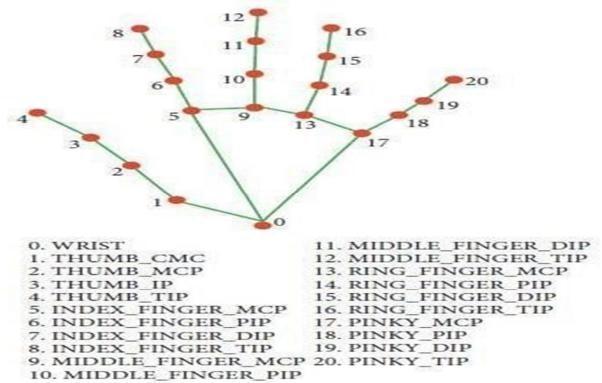
The hand landmark model is designed to recognize and track, in real time, key points on the human hand. Itdetects key joints such as the fingertips, knuckles, and wrist from input either from a webcam or an image, creating a skeletal representationofthehand.Thismappingenablesthemodel to interpret different hand shapes, movements, and gestures withgreataccuracy.Thisinformationisthenusedasinputforgesture-recognitionalgorithms,enablingapplicationssuch asvirtualcontrols,sign-languageinterpretation,andhands-freehuman–machineinteraction.Thelightweightarchitecture inthissystemsupportsfastprocessinganditspossibleuseinreal-timescenariosacrossamanydifferentplatforms
International Research Journal of Engineering and Technology (IRJET) e-ISSN: 2395-0056
Volume: 12 Issue: 12 | Dec 2025 www.irjet.net p-ISSN: 2395-0072
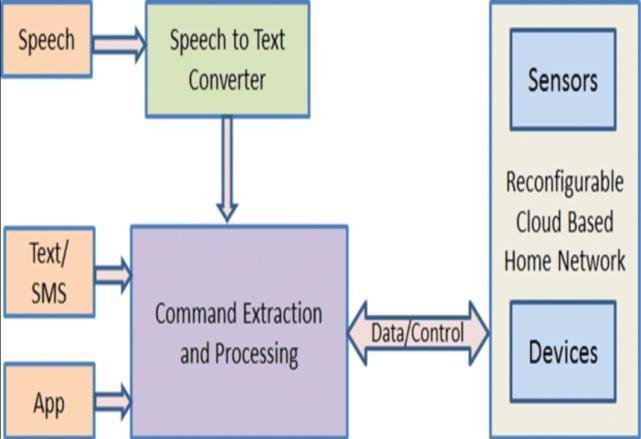
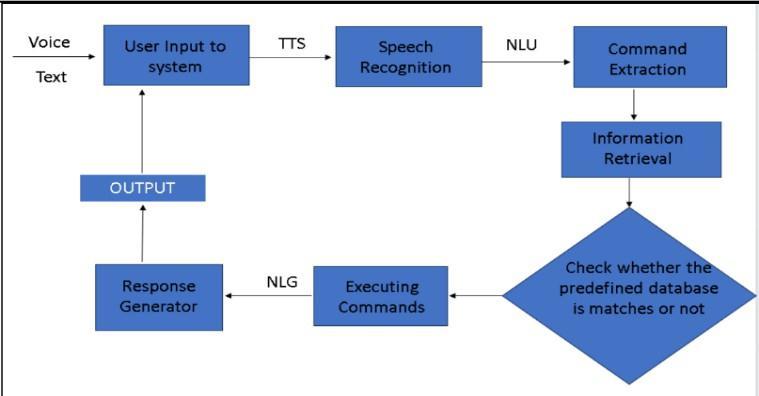
Theproposedmodelofavoiceassistantsystemprocessestheuser'sspeechinseveralkeystages:itstartswiththestageof speechacquisition,wheretheuser'svoiceiscaptured,filtered,andpreparedforanalysis.Afterthat,thespeechrecognition layer turns speech into text that is interpreted by the NLU module to determine intent and context. The dialogue managementsystemthenselectsanappropriateresponse,andtheNLGmodulerendersanatural,text-likeresponse.This response is then converted into speech by the Text-to-Speech engine. Backend integration provides the link to online servicesanduserdata,andafeedbackloopallowslearningandcontinuousimprovement.
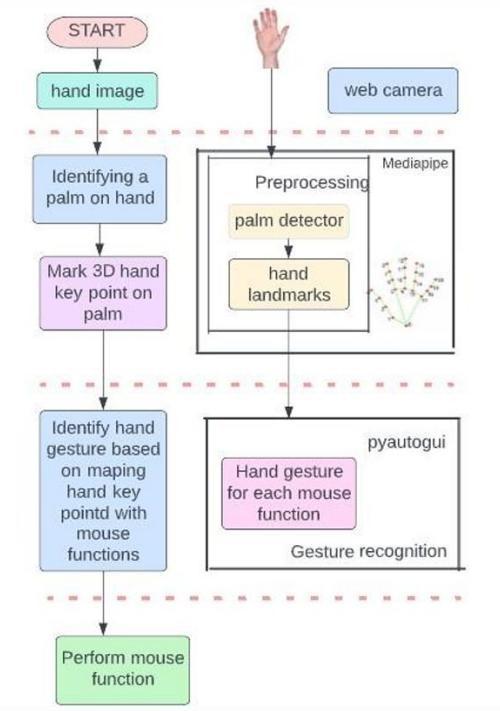
ThesystemproposedfortheAI-basedvirtualmouseutilizesthelaptoporPCcameraforlivevideocapturing.TheOpenCV libraryinPythonactivatesthewebcamandcontinuouslyrecordsframes.Thesystemthenevaluatestheseframeswiththe help of a trained AI model that identifies the movement of the user's hand. The system uses Media Pipe to identify the user's dominant or non-dominant hand. It can recognize up to two hands at a time, provided that the confidence of detectionand tracking is above 50%. The condition of each finger is decided by checking its position, returning 1 if the fingerisopenand0ifitisclosed.Thisisdonebycalculatingthedistance ratiosbetweenthefingertipandthemiddleand baseknuckles.For example, fortheindextopinkyfingers,itusesthelandmark points [8,5,0],[12,9,0],[16, 13,0],and [20,17,0],respectively,whileforthethumbituses[6].
Pointeronthescreenwhenboththeindex andmiddlefingersareraised.Eachhandisdescribedby21landmarks,withx and y coordinates normalized between 0.0 and 1.0, and a z-value indicating the hand's proximity to the camera. These correspondto3Dpositionsrelativetothecenterofthehand.Thesystemalsoestimateswhetherahandisleftorrightwith aprobabilitygreaterthan50%forthatclassification.
Gesturerecognitionisusedtocontrolvariousmousefunctions,suchas: Pointermovement:AV-shapedgesture,raisingtheindexandmiddlefingers,movesthemousepointeracrossthex-andyaxes.
Drag-and-drop/Multi-selection:Afistgestureactivatesthesefunctions. Brightness/Volumecontrol:Apinchwiththedominanthandcontrolshorizontalbrightnessandverticalvolume.
1. Scrolling: A pinch with the non-dominant hand activateshorizontalorverticalscrolling.
2. 2.Leftclick:Performedbyextendingonlythemiddlefinger.
3. Rightclick:Performedbyextendingonlythepointerfinger
4. Doubleclick:Performedbyclosingboththetwofingersnexttothethumb.
5. All mouse actions are performed through the Py Auto GUI module, which sends commands directly to the operatingsystemtoperformstandardmouseoperations.
International Research Journal of Engineering and Technology (IRJET) e-ISSN: 2395-0056
Volume: 12 Issue: 12 | Dec 2025 www.irjet.net p-ISSN: 2395-0072
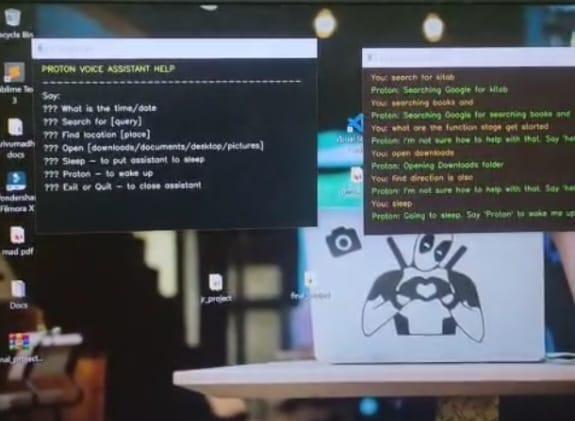
Thisvoice-assistantmoduleisdevelopedthrougha MediaPipeenablesthesystemtomovethemousesequenceofstages thatwillensureaccurateSpeechinteraction.First,thesystemcapturestheuser'svoicethroughamicrophoneandremoves background noisethroughaudiopreprocessingtechniques.Thecleanedaudio will then begiventoanautomatedsystem thatconvertsspeechintotextfor.Thistextisthenanalyzedbyanaturallanguageunderstandingcomponenttoidentifythe user's intent and relevant keywords. Based on these inputs, the dialogue management unit selects the most suitable response or action. Finally, a text-to- speech engine converts the generated response back into speech, thus allowing naturalandcontinuouscommunication between the system and the user.
4.1 Block Diagram
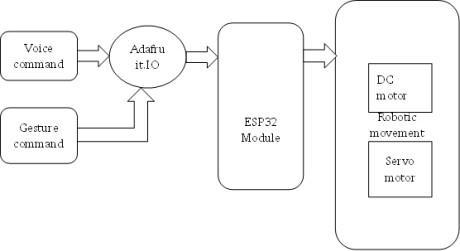
The diagram illustrates the working architecture of a control system that integrates voice and gesture commands to operate robotic components. The system begins with two types of input voice commands and gesture commands which are both transmitted to the Adafruit IO platform. Adafruit IO acts as a communication interface, processing and sending the received data to the ESP32 module. The ESP32 module functions as the main controller, interpreting the incoming commands and executing the corresponding actions. Based on these instructions, the ESP32 controls various robotic components, including DC motors and servo motors, to perform specific robotic movements. This setup enables real-time control of robotic systems using both voice and gesture inputs, offering a flexible and user-friendly interaction method.
International Research Journal of Engineering and Technology (IRJET) e-ISSN: 2395-0056
Volume: 12 Issue: 12 | Dec 2025 www.irjet.net p-ISSN: 2395-0072
1. Input Capture:
Readvideoframesfromthecamera.
Listentoaudiofromthemicrophone.
2. Hand Processing:
Detectthehandandfingertippoints.
Checkwhichfingersareraised?
Smooth the movement by mapping the tip of theindexfingertothecoordinatesonthescreen.
Recognizethefollowinggestures:two-fingerslide(scroll),pinch(click),andpinch-move(drag).
3. Voice Processing:
Translatespeechintotextwhenitisdetected.
Recognize basic commands such as "click," "scrolldown,""openbrowser,"etc.
4. Decision Layer:
Executeamouseeventifagesturecorrespondstoanaction.
Whenavoicecommandisdetected,carryouttheappropriateaction.
Whenbothoccursimultaneously,voicecommandstakeprecedenceovergestures.
5. Output:
Dependingonthedetectedgestureorspokencommand,movethecursor,click,drag,scroll,oropenapplications.
6. ADVANTAGE
Thissystemmakesusingacomputerfeelmorenaturalbecauseyoucancontrolitwithouttouchinganything.
Youareabletoshiftyourhandtoperformactionsorsimplyspeakwhenit’seasierthantyping.
This helps a lot in situations where your hands areoccupied,dirty,oryou’renotsittingclosetothedevice.
It also supports people who are not comfortable with typical methods input tools by giving them an easier way to interact. Since it only needs a normal webcam and a microphone, it doesn’t require expensive equipment and can runonmostcomputers.
Bycombininggestureswithvoicecommands,thesystemcreatesasmoother,quicker,andmorecomfortablewayto operateacomputerineverydaytasks.
7. APPLICATIONS
Thissystemcanbeusedinmanyreal-lifesituationswherehands-freecontrolishelpful.
It is useful in smart homes, where users can operate lights, music, or appliances using voice or gestures. In workplaces, it helps people control presentations or switch between files without touching the computer, which is especiallyconvenientduringmeetings.
It can also be helpful for people who have physical disabilities by giving them an easier way to interact with technology.Inmedicalenvironments,doctorscanusegesturesorvoicecommandstoviewreportswithouttouching devices,keepingthingshygienic.Thesystemisalsoeffectiveforgaming,virtuallearning,andcontrollingmultimedia, makinginteractionsfasterandmoreinteractive.
Overall,itissuitableanywherehands-free,touch-free,ormorenaturalcomputercontrolisneeded
International Research Journal of Engineering and Technology (IRJET) e-ISSN: 2395-0056
Volume: 12 Issue: 12 | Dec 2025 www.irjet.net p-ISSN: 2395-0072
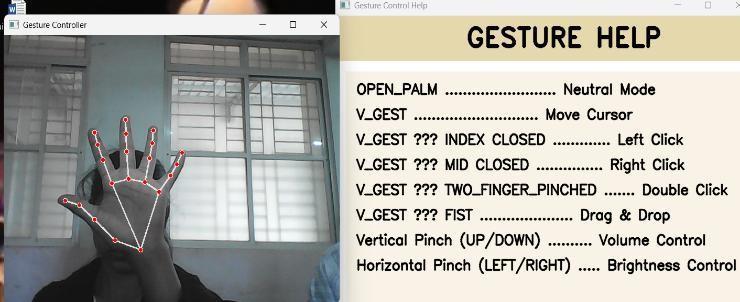
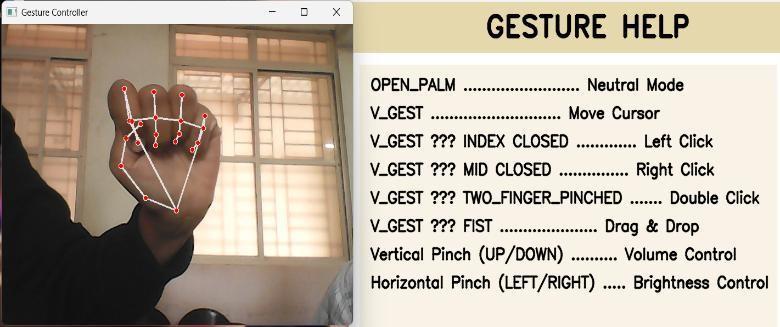
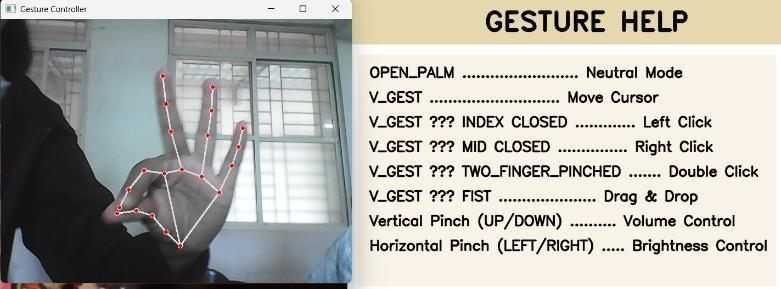
Ifallfivefingersremainopen withthetipIDs0,1,2,3,and4detected thesystemunderstandsthattheuserdoesnot wanttoperformanyaction.Inthisstate,showninFig-8.1,thecomputersimplystaysidleandnomousemovementorclick istriggeredonthescreen.
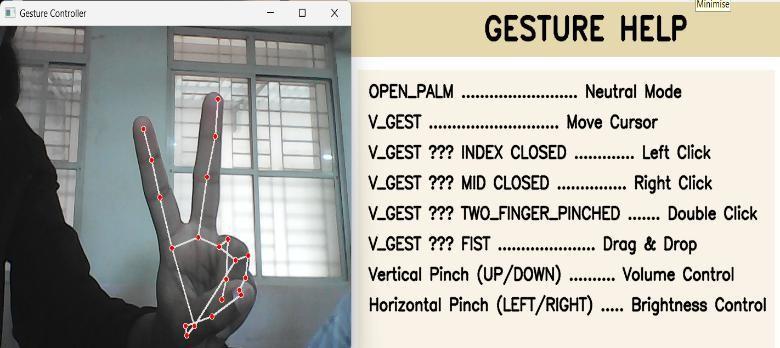
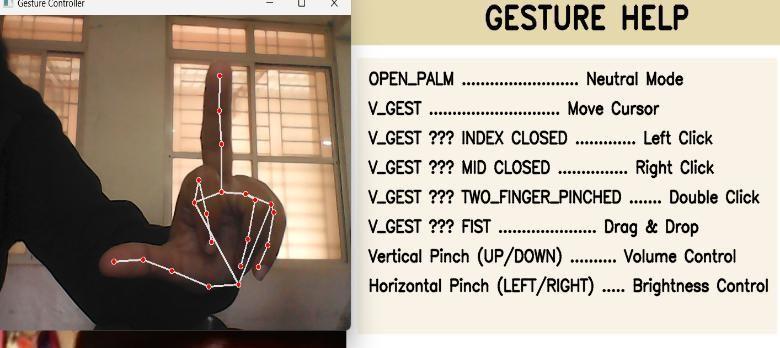
Thisfeatureallowsyoutomovethemousepointeraroundthecomputerscreen.Whenboththeindexfinger(tipID=1)and themiddlefinger(tipID=2)areraised,thePythonAutoPypackagemovesthecursoraccordingly,asillustratedinFig-8.2
International Research Journal of Engineering and Technology (IRJET) e-ISSN: 2395-0056
Volume: 12 Issue: 12 | Dec 2025 www.irjet.net p-ISSN: 2395-0072
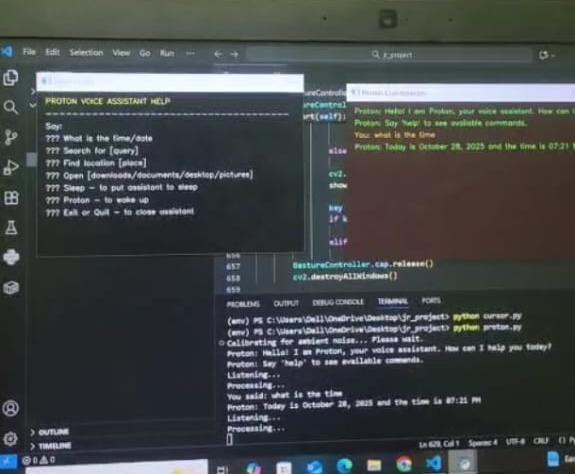
The gesture-control and voice-assistant system provides a simple, natural, and touch-free way of interacting with a computer. By combining hand-tracking with speech recognition, The system enables users to perform this function effectively and comfortably without relying on traditional input devices. It works smoothly in real time, requires only basic hardware, and can be used in many practical situations such as smart homes, presentations, and accessibility support. Overall, the system shows how AI-based interaction can make computers more intuitive, user-friendly, and accessibleforusersfromvariousbackgrounds.
International Research Journal of Engineering and Technology (IRJET) e-ISSN: 2395-0056
Volume: 12 Issue: 12 | Dec 2025 www.irjet.net p-ISSN: 2395-0072
[1] N. R. Sathish Kumar, A. Venkateswara Reddy, B. Anil Kumar, B. Pavan Kalyan Reddy and A. Shashank Kumar Reddy, “Hand Gesture-Based Virtual Mouse with Advanced Controls Using OpenCV and Mediapipe,” Proceedings of theInternationalConferenceonPower,Energy,ControlandTransmissionSystems(ICPECTS),IEEE,2024.
[2] Matlani,R.,Mishra, S., Dadlani,R., Tewari,A., & Dumbre, S., “Virtual Mouse usingHandGestures,” 2021 International ConferenceonTechnologicalAdvancementsandInnovations(ICTAI),IEEE,pp.340–345,2021.
[3] VishnuTeja Reddy, V., Dhyanchand, T., Vamsi Krishna, G., & Maheshwaram, S., “Virtual Mouse Control Using Colored FingerTipsandHandGestureRecognition,”NationalInstituteofTechnologyWarangal,pp.1–8.
[4] AkashSingh,ShraddhaSagar,ShreyaBhatt,&TraptiUpadhyay,“RealTime VirtualMouseSystemUsingHandTracking ModuleBasedonArtificialIntelligence,” 2023 International Conference on Communication,SecurityandArtificial Intelligence(ICCSAI),IEEE,pp.36–39,2023
[5] AIBasedVirtualMousewithHandGestureandAIVoiceAssistantUsingComputerVisionandNeuralNetworks J.KumaraSwamy,NavyaV.K.(2023).
[6] KavyasreeK.,SaiShivaniK.,SaiBalajiT.,SahanaYele& VishalB.,“HandGlide:Gesture-ControlledVirtualMousewith Voice Assistant,” International Journal for Research in Applied Science & Engineering Technology (IJRASET), vol. 12, issueIV,April2024,pp.–,DOI:10.22214/ijraset.2024.61178.