
International Research Journal of Engineering and Technology (IRJET) e-ISSN: 2395-0056
Volume: 12 Issue: 12 | Dec 2025 www.irjet.net p-ISSN: 2395-0072
International Research Journal of Engineering and Technology (IRJET) e-ISSN: 2395-0056
Volume: 12 Issue: 12 | Dec 2025 www.irjet.net p-ISSN: 2395-0072
Dr Brindha S1 , Ms. Priya D 2 , Mr. Akash S3 , Mr. Akhil R4, Mr. Krishan A S5, Mr. Sujeet P6
1Head of the Department, Computer Networking, PSG Polytechnic College, Coimbatore
2Lecturer, Computer Networking, PSG Polytechnic College, Coimbatore
3,4,5,6 Students, Computer Networking, PSG Polytechnic College, Coimbatore
Abstract - Vr pc building simulator is a virtual reality application designed to provide immersive training in computer hardware and networking. the system comprises two modules: a pc building simulator, enabling users to assemble and disassemble components such as cpu, gpu, ram, and storage devices, and a networking devices viewer, allowing interactive exploration of routers, switches, and hubs. by simulating real-world tasks with vr headsets and hand tracking, vr simulator offers guided instructions, real-time feedback, and safe, cost-effective practice. This platform enhances engagement, knowledge retention, and accessibility, making hardware and networking education more interactive for students and professionals
Key Words:VirtualReality,ComputerHardwareEducation,NetworkingTraining,ImmersiveLearning,Simulation
In the modern era of digital transformation, Virtual Reality (VR) is revolutionizing the way humans learn, interact, and experienceinformation.VRtechnologyallowsuserstoimmersethemselvesinasimulated3Denvironmentthatreplicates real-world scenarios or creates entirely new worlds that are otherwise impossible to experience physically. Unlike conventionallearningmethods suchastextbooks,lectures,oreven2Dsimulations VRenableslearnerstoengagewith complexsystemsinahighlyinteractive,safe,andrepeatablemanner.
This technology has found applications across numerous fields, including healthcare (surgical simulations), architecture (virtual walkthroughs), automotive design, entertainment, and education. Educational institutions in particular are increasinglyadoptingVRtoenhancestudentengagement,improveretentionofknowledge,andofferpracticalexposureto otherwiseexpensive,dangerous,orinaccessibleenvironments.
Whenitcomestocomputer hardwareandnetworking education,oneofthemajor challengesstudentsfaceisthelack of adequate hands-on experience. Physical laboratories often require significant investment in components such as motherboards,processors,networkswitches,androuters.Theselabs alsoinvolveregularmaintenancecostsandtherisk of accidental damage due to improper handling by beginners. These barriers prevent many students from truly understandinghowhardwarecomponentsfittogetherorhownetworkingdevicesfunctioninternally.
TheVRPCBUILDINGSIMULATORProjectisaninnovativesolutionthataddressesthesechallengesbyprovidingavirtual hardware and networking laboratory. Built using Unity, Blender, and Oculus SDK, it creates an immersive environment where learners can assemble and disassemble PC components, open virtual routers and switches, and explore their internalstructures withouttheriskofphysicaldamageoradditionalcost.
VirtualReality(VR)hasbeenwidelystudiedasanemergingtoolforeducationandtraining.Researchershavehighlighted its ability to create immersive environments where learners can interact with concepts in ways not possible through traditionalmethods.
Radiant et al. (2020) studied the impact of Virtual Reality on engineering education and concluded that VR applications significantlyimprovespatialvisualizationskills,technicalunderstanding,andlearnerengagement.Theirworkhighlighted thatimmersiveenvironmentsareespeciallyusefulinsubjectswherereal-worldpracticeislimitedbycostorsafetyissues.
Friona and Ott (2015) carried out a survey on immersive learning in STEM fields and reported that VR tools increase motivation, concentration, and knowledge retention among students. They noted that the interactive nature of VR helps learnerstoconnecttheoreticalconceptswithpracticalapplicationsmoreeffectively thantraditionalmethods.
The development of “PC Building Simulator” (2018) demonstrated how virtual environments can be used for hardware education.ThesimulatoralloweduserstoassembleanddisassemblecomputerpartssuchasCPUs,GPUs,RAM,andstorage
International Research Journal of Engineering and Technology (IRJET) e-ISSN: 2395-0056
Volume: 12 Issue: 12 | Dec 2025 www.irjet.net p-ISSN: 2395-0072
devicesinavirtualsetting.ThisworkshowedthatVRcanbeacost-effectivealternativetophysicalhardwarelabs.
Pinho et al. (2019) explored the use of VR in networking education, where students could virtually inspect routers, switches,andhubs.TheirstudyindicatedthatVR-basedvisualizationprovideddeeperinsightsintointernal structuresof devicescomparedtodiagramsandstaticillustrations.
Fromtheseresearchefforts,itisclearthatVRplaysanimportantroleinbridgingthegapbetweentheoryandpractice.The VRprojectbuildsupontheseworksbycombiningPCassemblyandnetworkingdevicevisualizationintoasingleplatform, creatingareusable,safe,andinteractiveeducationaltool.
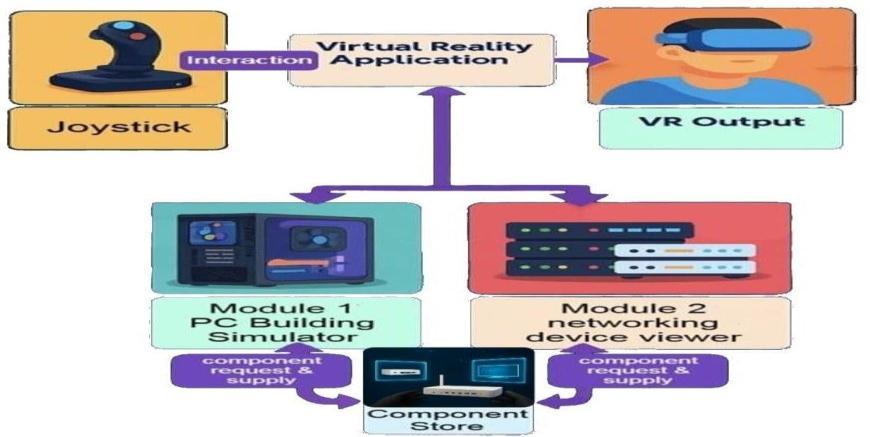
The workflow diagram below illustrates the architecture and working flow of the system. Fig.1 represents how user actions are processed by the VR application and transformed into immersive visual feedback. The system is built in a layered structure, consisting of three core layers inside the VR application: User Interaction, Simulation Engine, and Visualization&Rendering.
User Inputs
The workflow begins when the user interacts with the system using a VR headset and motion controllers. These inputs includephysicalactionslikegrabbing,rotating,placing,ordisassemblingvirtualcomponents.Thesegesturesaretracked usingtheOculusheadsetoranycompatibleVRhardware.
User Interaction Layer
This layer captures user inputs and translates them into virtual actions. It handles gesture recognition (e.g., pick, place, rotate)andallowsuserstomanipulateobjectsinthe 3Dspace.Italsoprovidesvisualcuessuchashighlightsorarrowsto assisttheuserwiththecorrectplacementofcomponents.
Thesimulationengineactsasthelogiccenterofthesystem.Itverifieswhetherthecomponentsarecorrectlyassembledor placed. For example, it checks whether theCPU is oriented properly, or the RAM is inserted into the right slot. If errors occur,itgeneratesreal-timefeedbacksuchas“IncorrectPlacement”or“Rotate180°.”
This layer is responsible for rendering high-quality 3D visuals. It uses models created in Blender and manages textures, lighting,shadows,andobjectanimations.Italsosupportsadditionalviewingmodessuchasexplodedvieworcross-section toallowuserstounderstandinternalstructuresclearly.
Finally,theprocessedsimulationisdisplayedasvisualoutputinsidetheVRheadset.
2395-0056
Volume: 12 Issue: 12 | Dec 2025 www.irjet.net p-ISSN: 2395-0072
Thismoduleoutlinesthestep-by-stepprocessusedtocreatetheproposedVRPCassembly system. It begins withsetting up the necessary hardware and softwareenvironment, followed by the creation of the Unity project and organization of projectassets.ThemodulecontinueswithenablingVRfunctionality,designingtheplayerrigandinteractiveenvironment, prototyping grabbable components, and implementing snap sockets with part compatibility logic. Finally, the system integrates a simple world- space user interface for feedback and allows testing within the Unity Editor. Together, these stepsdemonstratethedevelopmentofanimmersiveandinteractivevirtualPCassemblyexperiencethatcanvalidatepart compatibilityandprovidereal-timefeedbacktousers.
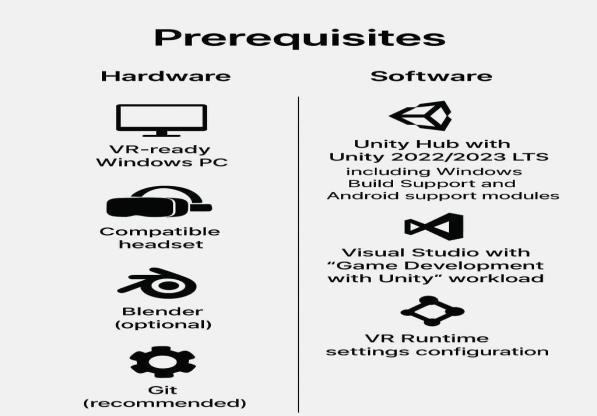
Prerequisites: BeforestartingtheVRPCassemblyproject,ensureyouhavethenecessaryhardwareand software.AVRready Windows PC and a compatible headset are required. Install Unity Hub with Unity 2022/2023 LTS, including the WindowsBuildSupportandAndroidsupportmodules.VisualStudiowiththe"GameDevelopmentwithUnity"workloadis necessaryforscripting.OptionaltoolssuchasBlenderformodelingandGitforversioncontrolarerecommended.Finally, configureyourVRruntimesettingsaccordingtotheplatformyouareusing.
Create the Project: BeginbyopeningUnityHubandcreatinganew3DprojectusingtheURPtemplate.Nametheproject VR_PC_Builder and create it. This will serve as the foundation for your VR PC assembly environment. The next step is to organizetheprojectfilesforclarityandmaintainability.
Enable VR (XR) : To enable VR, necessary Unity packages must be installed and configured. This includes XR Plugin Management,theXRInteractionToolkit,andthe InputSystem.Intheprojectsettings,switchtheactiveinputhandlingto the new input system. Open XR should be enabled for the target platform, and appropriate controller profiles such as OculusTouch,ValveIndex.Starterassetsandsampleinputactionscanoptionallybeimportedtostreamlinedevelopment.
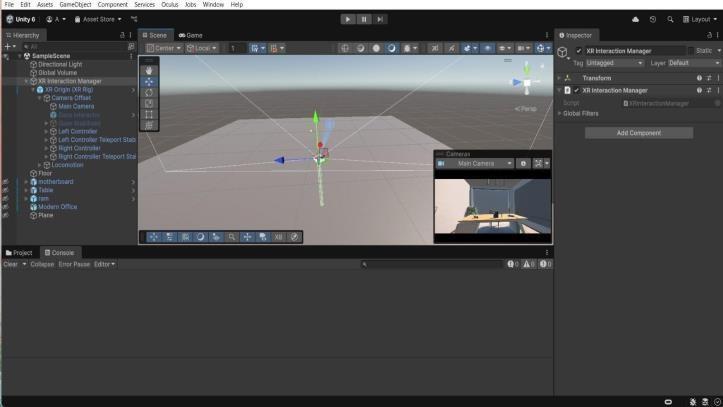
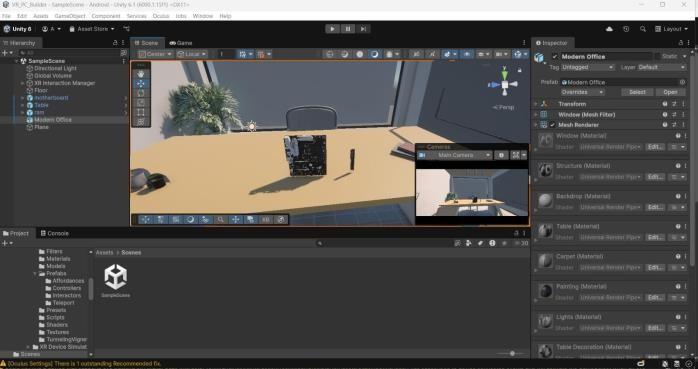
Add a VR Rig and Basic Environment: TheVRenvironmentbeginswithaplayerrigasshowninfig.3,whichrepresents theuserwithinthescene.Afloorshouldbeaddedfortheplayertostandon,along withbasicelementslikeatabletohold parts.ThisinitialsetupallowsforearlytestingandensuresthattheVRcameraandtrackingarefunctioningcorrectlywith theheadset.Lightingcanbeleftatdefaultsettingsinitially.
Volume: 12 Issue: 12 | Dec 2025 www.irjet.net p-ISSN: 2395-0072
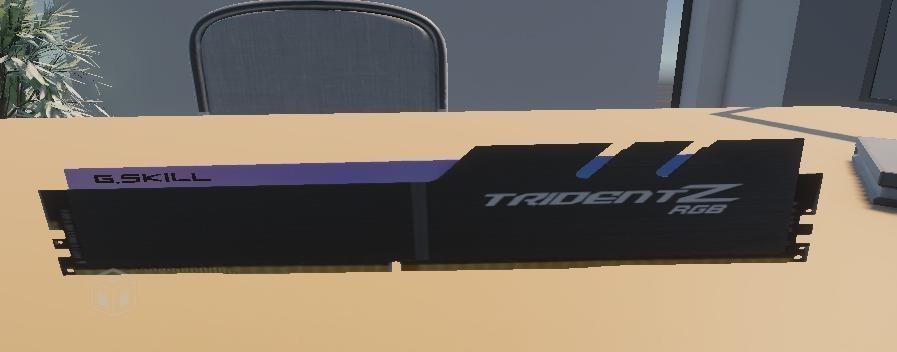
TheVRsystemconsists ofseveral integratedmodulesthatwork togethertocreate aninteractiveandeducational virtual environment for learning computer hardware and networking concepts. The system includes a PC Assembly Simulator whereuserscanhandle3Dcomponentssuchasthemotherboard,CPU,RAM,GPU,andpowersupply. Eachcomponentis designedwithrealisticdimensionsandtextures,allowinglearnerstounderstandtheappearanceandplacementofactual hardware. Users can pick, rotate, examine, and position parts correctly through the VR controllers, making the learning experience both practical and immersive. The system also provides on-screen guidance and visual cues that help users followthecorrectsequenceofassemblywithouttheriskofdamagingphysicalcomponents.
In addition to PC assembly, the system includes a Networking Devices Viewer that enables users to explore the internal structureofrouters,switches,hubs,andothernetworkingequipment.Insteadofonlyseeingtheoutercasing,learnerscan viewinternalcircuits,ports,chipsets,andlayoutsthatarenormallydifficulttoaccessinrealdevices.Thisimprovestheir understanding of networking hardware and supports theoretical learning with visual 3D representation. The system’s interaction environment is supported by VR-based movement controls, object manipulation features, and collision detection, ensuring that users can move naturally within the virtual lab. A simple and user-friendly VR interface allows easynavigationbetweenmodules,instructionalpanels,andmenus,makingitaccessibleevenforbeginners.
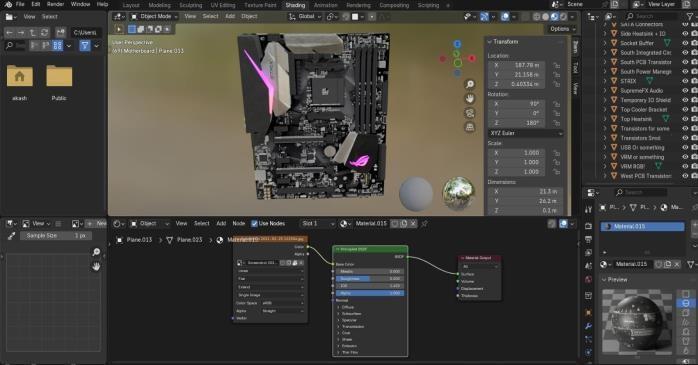
All 3D assets and models used in the system are carefully optimized to maintain smooth performance. Assets created in Blender are exported with reduced polygon counts and efficient textures to ensure stable rendering inside the VR environment.Thevirtuallabenvironmentisdesignedtofeelrealisticanddistraction-free,withproperlighting,shadows, and spatial arrangement to support an immersive training atmosphere. Together, these modules form a complete VRbasedlearningsystemthat enhancestechnical understanding,improvesengagement,andprovidesa safeand repeatable platformforpracticinghardware-relatedtasks.
International Research Journal of Engineering and Technology (IRJET) e-ISSN: 2395-0056
Volume: 12 Issue: 12 | Dec 2025 www.irjet.net p-ISSN: 2395-0072
The VR project successfully demonstrates how Virtual Reality can be used as an effective learning platform for teaching computer hardware assembly and networking concepts. By combining interactive 3D models, VR controls, and an immersiveenvironment,thesystemallowsstudentstopracticeassemblingcomponentsandexploringnetworkingdevices withouttheneedforphysicalequipment.Thisreducestheriskofdamagingrealcomponents,providesunlimitedpractice opportunities, and improves conceptual understanding through visual and hands- on engagement. The development process also offered valuable experience in Unity development, 3D modeling, asset optimization, and VR interaction design,contributingsignificantlytotechnicalknowledgeandpracticalskills.
Overall,thesystemachievesitsgoalofprovidingarealisticanduser-friendlyvirtuallabexperience.Studentswhotested the application reported that it made learning easier and more engaging compared to traditional classroom methods. Whilethecurrentversionisfullyfunctional,thesystemhasthepotentialtogrowfurtherwithadvancedfeaturessuchas collaboration, AI guidance, networking simulations, and haptic interactions. With continuous improvements, VR can become a complete, scalable, and modern solution for teaching hardware and networking subjects in educational institutions.
ACKNOWLEDGMENT
WeextendourdeepestgratitudetoMs.D.Priyafortheirinvaluableguidance,encouragement,andconstructivefeedback throughoutthisresearch.Theirexpertiseandinsightshavebeeninstrumentalinshapingthedirectionandqualityof this work.
We also acknowledge the support provided by PSG Polytechnic College, whose resources and infrastructure significantly contributed to the successful completion of this study. Special thanks to our colleagues and peers for their valuable discussions,suggestions,andmotivationthroughouttheresearchprocess.
Furthermore, we express our appreciation to the authors and contributors of publicly available datasets and research literature
[1] R. Gupta, S. Menon, and A. Kumar, “Virtual Reality–Based Computer Hardware Training System,” InternationalJournalofAdvancedComputerScienceandApplications(IJACSA),vol.13,no.5,pp.221–229, 2022.
[2] H.PatelandN.Shah,“3DSimulationandVRInteractionTechniquesforTechnicalEducation,”International JournalofEngineeringResearch&Technology,vol.11,no.2,pp.45–51,2023.
[3] L. Johnson and M. R. Torres, “Immersive VR Environments for Teaching Networking Concepts,” InternationalJournalofComputerApplications,vol.184,no.16,pp.32–38,2022.