
International Research Journal of Engineering and Technology (IRJET) e-ISSN: 2395-0056
Volume: 11 Issue: 06 | Jun 2024 www.irjet.net p-ISSN: 2395-0072

International Research Journal of Engineering and Technology (IRJET) e-ISSN: 2395-0056
Volume: 11 Issue: 06 | Jun 2024 www.irjet.net p-ISSN: 2395-0072
Er. Sonali Kapoor1 , Ms. Aarti2
1 Senior Technical Trainer, Apex Institute of Technology-CSE Chandigarh University Punjab, India 2Assistant Professor, Apex Institute of technology-CSE Chandigarh University Punjab, India
Abstract - In the world of web design, working efficiently and collaboratively is crucial. This article presents a new method to simplify the design process by smoothly incorporating FigmaprototypesintoWebflow.Figmais widely used for team-based interface design, while Webflowisknown for its ability to create and maintain responsive websites. However, the shift from design to development has been a challenge in the past, often requiring designers to manually convert their designs into code. Our solution addresses this issue by creating a direct connectionfromFigmaprototypesto Webflow, making it easy for designers to bring their ideas to life online. We offer a detailed framework for merging these two platforms seamlessly. This coupling doesn’t only help in faster development procedures but also prevents any possible mistakes or variations that might result from human translation. Using automated workflows and synchronised updates, our strategy ensures that changesmadetoFigma are automatically mirroredon Webflowthusenablingteamswork together more efficiently. Additionally, it enables an easier way of refining projects along with experimentationaswell as allowing for team-based design to be done iteratively.)
Key Words: Figma, Webflow, Web design, Prototyping, Design-to-development workflow, Responsive websites, Collaborative design, Automated workflows, Interface design, Seamless integration, Design synchronization, Iterativedesign
Theriseofcollaborativeandcloud-baseddesigntoolshas broughtFigmaandWebflowtotheforefrontoftheindustry. DesignerscannoweasilycombinetheirFigmaprototypes with Webflow, making the design process more efficient fromstarttofinish.Thisintegrationmarksasignificantstep forward in design methodology. Connecting Figma prototypes to Webflow allows designers to maintain consistency between the design and development stages. This cohesion not only speeds up the process but also ensurestheintegrityofthedesignremainsintactthroughout theproject.Additionally,itpromotessmoothercollaboration between design and development teams, making communicationcleareranditerationsmoreeffective.Usethe enterkeytostartanewparagraph.Theappropriatespacing andindentareautomaticallyapplied.
ByintegratingFigmaprototypesintoWebflow,designerscan quickly experiment and improve their designs in the Webflow environment, taking advantage of its strong development features. This results in a more flexible and adaptable workflow that can easily adjust to changing projectneeds.TheflawlessintegrationofFigmaprototypes inWebflowmarksasignificantchange,givingdesignersthe ability to realize their visions with exceptional speed and accuracy.
Moreover, it minimizes redundant actions, and eliminates risksofmisinterpretationaswellaserrorsthatusuallycrop upduringthiskindoftransition.Everyteammember’supto-dateandup-to-the-minuteupdatesandsynchronization guaranteethatprojectefficiencyisimprovedatlarge.Italso makesdesignprocessmoreiterativeanddynamicbecause inputscanbemadealmostimmediatelyinlinewithrefined designs.
1) ToanalyzethebenefitsofusingFigmaandWebflow in tandem: Combining Figma and Webflow brings many advantages.Figmaallowsforcollaborativeinterfacedesign withaccuracyandspeed,whileWebflowenablesdesignersto turn these designs into interactive, code-ready websites. IntegratingFigmaprototypesintoWebflowhelpsstreamline the design-to-development process, ensuring consistent designandallowingforquickiterations.Thisjointapproach improvesteamworkbetweendesignanddevelopmentteams, promotes clearer communication, and speeds up project completion.Inconclusion,usingFigmaandWebflowtogether boostsworkflowefficiencyandhelpscreateoutstandingweb experiences.
2) To identify challenges associated with Integrating Figma prototypes into Webflow: When bringing Figma prototypesintoWebflow,therearebenefitsbutalsosome challenges to overcome. A key challengeis preserving the original designdetails as some elementsmay not transfer accurately between the platforms. Another hurdle is ensuring that complex interactions and animations from FigmaworkseamlesslyinWebflow.Differentterminology andfunctionalityinthetoolsmayalsorequiredesignersto adjust their processes. Finally, keeping track of versions and updates between Figma and Webflow can be tricky andmayleadtoerrorsifnotmanagedcarefully.
International Research Journal of Engineering and Technology (IRJET) e-ISSN: 2395-0056
Volume: 11 Issue: 06 | Jun 2024 www.irjet.net p-ISSN: 2395-0072
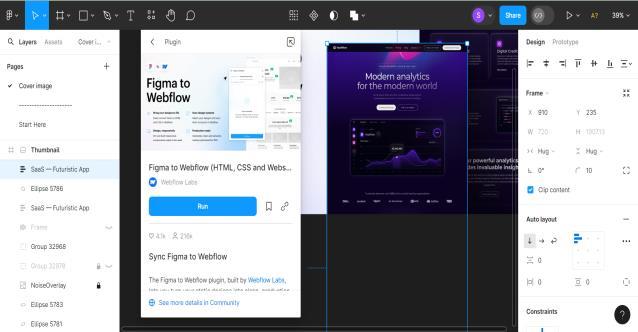
3) To explore strategies for an optimal workflow that maximizes efficiency: To improve efficiency in integrating FigmaprototypesintoWebflow,it'simportanttofollowafew key steps. First, make sure there is clear communication between design and development teams to facilitate collaboration. Second, establish consistent naming conventionsanddesigncomponentsinFigmaforasmoother transitiontoWebflow.Third,takeadvantageofFigma'sautolayoutfeatureandWebflow'sresponsivedesigncapabilities toensuredesignsworkwellonalldevices.Fourth,regularly synchronize and update between Figma and Webflow to prevent any discrepancies and maintain design integrity. Lastly,providetraininganddocumentationforteamstolearn bestpracticesandstreamlinetheworkflow.
4) To emphasize ethical considerations in design practices, avoiding plagiarism: Ethical considerations in design practices are paramount, particularly in avoiding plagiarism. Designers must uphold integrity by respecting intellectual property rights and acknowledging sources appropriately.Thisentailsrefrainingfromdirectlycopyingor imitating others' work without permission or attribution. Instead,designersshouldstrivefororiginalityandcreativity, drawinginspirationfromdiversesourceswhileaddingtheir unique perspectives. Additionally, fostering a culture of ethical design within teams promotes transparency, accountability, and trust. By prioritizing ethical considerationsandrespectingthecreativeeffortsofothers, designersupholdprofessionalstandardsandcontributetoa moreinclusiveandrespectfuldesigncommunity.
Our research strategy combines various techniques, incorporatingqualitativeandquantitativemethodstofully understand how Figma prototypes are integrated into Webflow.Wewillusesurveystocollectquantitativedataon how designers and developers use Figma and Webflow, includingtheirpreferencesandchallenges.Thiswillgiveusa broad view of the situation and help us identify common trendsandproblems.Additionally,wewillconductin-depth interviews to further explore participants' experiences, views,andworkprocesses,complementingthedatagathered fromthesurveys.
Through discussions with designers and developers skilled in both Figma and Webflow, our research has gathereddetailedperspectives,revealinguniqueobstacles, creativemethods,andeffectiveapproachesforimprovement. These in-depth interviews offer valuable insights and encouragetheexaminationofintricateissuesfromvarious perspectives. Moreover, we will delve into case studies to explore practical applications of integrating Figma and Webflow in real-world scenarios. By studying specific instances, our team can showcase top strategies, highlight keyfactorsforsuccess,andshedlightonpossiblechallenges.
Combining data from surveys, interviews, and case studies strengthens the research findings, allowing for valuable conclusions and practical recommendations for professionalsinwebdesignanddevelopment.
Furthermore,wewillemploythematicanalysistoidentify recurring themes and patterns within the qualitative data, providing a nuanced understanding of the integration process. Statistical analysis of the survey data will help quantify the prevalence of various issues and preferences amongusers.Bytriangulatingthesediversesourcesofdata, our research ensures a robust and comprehensive examinationoftheintegrationofFigmaandWebflow.This multi-facetedapproach notonlyvalidates our findings but alsoenrichesthedepthofouranalysis,offeringactionable insightsandstrategicguidanceforoptimizingthedesign-todevelopmentworkflow.
EnhancedCollaboration:Real-timecollaborationfeatures inFigma-SeamlessimportofFigmadesignsintoWebflow. ImprovedteamworkisessentialwhenincorporatingFigma prototypes into Webflow. By utilizing Figma's real-time collaborationtoolsandseamlessintegrationwithWebflow, designers, and developers can work together seamlessly regardless of their location. This allows design teams to collaborate instantly, provide feedback, and make quick iterations,promotingacreativeandinnovativeenvironment. Using Figma as the main design tool enables designers to efficiently and precisely create detailed prototypes. The smoothintegrationofFigmadesignsintoWebflowremoves theneedformanualtranslation,guaranteeingthatthedesign remains intact during the transition from design to development. Designers can easily transfer their Figma prototypestoWebflow,ensuringconsistencyandaccuracy withoutthepossibilityofmistakes.
Furthermore, the integration allows for smooth communication and coordination between design and developmentteams.DesignerscaneasilysharetheirFigma prototypeswithdevelopers,givingthemacleargraspofthe design vision and interaction styles. Developers can then utilizeWebflow'spowerfuldevelopmenttoolstoefficiently
International Research Journal of Engineering and Technology (IRJET) e-ISSN: 2395-0056
Volume: 11 Issue: 06 | Jun 2024 www.irjet.net p-ISSN: 2395-0072
transformthesedesignsintoresponsivewebsitesreadyfor production.
Moreover, the seamless connection between Figma and Webflow enables ongoing teamwork and improvement during the project's life cycle. Changes made in Figma are immediately updated in the Webflow prototype, allowing bothdesignanddevelopmentteamstostayup-to-datewith thelatestdesignversion.
Simply put, combining Figma prototypes with Webflow makesiteasierfordesignersanddeveloperstocollaborate efficiently. This partnership allows teams to work closely, move quickly, and produce high-quality web experiences withgreatefficiencyandaccuracy.Ultimately,thisjointeffort speeds up project completion and encourages a spirit of teamworkandcreativityincompanies.
2.EfficiencyinDesignIterations:RapidprototypinginFigma - Direct implementation and testing in Webflow. Design iterations are much more efficient when using both rapid prototypinginFigmaanddirectlyimplementingandtesting in Webflow. Figma offers a strong set of design tools and collaborative features that empower designers to quickly create prototypes that truly reflect their vision. By using Figma'seasy-to-useinterfaceandwiderangeofcomponents, designers can iterate quickly, trying out different layouts, interactions,andvisualstylestoimprovetheirdesignsover time.
After the final prototype is created in Figma, the easy connection with Webflow enables designers to seamlessly implement and test it. By exporting their Figma designs directly into Webflow, designers can maintain design accuracy and ensure a seamless shift from design to development.Thisstreamlinestheprocessbyeliminatingthe necessityformanualcoding,thussavingtimeandminimizing thechancesofmistakes.
DesignersusingWebflowcanimprovetheirprototypesby takingadvantageofitsadvanceddevelopmentfeatures.The visual design environment in Webflow makes it easy for designerstoturntheirdesignsintofullyresponsivewebsites. They can personalize interactions, animations, and responsiveness in Webflow, ensuring a more realistic depictionoftheendproduct.
Inaddition,integratingFigmadesignsintoWebflowallows forquicktestingandrefining.Designerscanpromptlyshare theirprototypesforfeedbackorusabilitytesting,leadingto faster identification of areas needing improvement. By iterating within Webflow, designers can validate design choicesinstantly,resultinginmoreinformedandsuccessful revisions.
Ingeneral,usingrapidprototypinginFigmaalongsidedirect implementation and testing in Webflow makes the design iterationprocessmoreefficient.Itallowsdesignerstoquickly
create high-quality prototypes. This iterative approach speeds up the design process and ensures that the final productmeetsuserneedsandobjectiveseffectively.
3.ConsistentDesign-to-DevelopmentTransition:Reduction indevelopmenttime–[1]Ensuringdesignfidelityduringthe implementation phase. It is important to have a smooth transition from design to development to keep a project organizedandconsistent.ConnectingFigmaprototypeswith Webflowcangreatlyhelpwiththisprocess,makingworkflow more efficient and ensuring that the design remains true duringimplementation.
An important advantage of integrating Figma designs into Webflow is the significant time savings for developers. Insteadoftediouslyconvertingdesignsintocodemanually, theycansimplyimportthedesignsdirectly.Thisaccelerates the development process and enables developers to concentrateonenhancingthefunctionalityandperformance of the website or application. As a result, projects can be finishedmorequickly,ensuringdeadlinesaremetandclients aresatisfied.
Duringtheimplementationphase,itisessentialtomaintain the design's integrity to create a polished end product. Importing Figma prototypes into Webflow seamlessly preserves the design elements, layouts, and interactions, ensuringtheyareaccuratelyreproducedinthefinaloutput. Designers can trust that their vision will be faithfully translatedtotheweb,maintainingconsistencyandcoherence acrossvariousdevicesandscreensizes.
Inaddition,Webflow'sresponsivedesignfeaturesimprove design accuracy by allowing designers to create flexible layouts that easily adapt to different screen sizes. This guaranteesaconsistentanduser-friendlyexperienceacross alldevices,makingthewebsitemoreaccessibleandusable.
WhenyouuseFigmaprototypesinWebflow,ithelpstosave time in development and also guarantees that the design stays true throughout the implementation process. This seamlessintegrationmakesiteasierforteamstocomplete projects of high quality in a timely and efficient manner, leadingtobetterclientsatisfactionandsuccessintheonline world.
1.CompatibilityIssues:Handlingresponsivedesignelements -AddressingdiscrepanciesinrenderingbetweenFigmaand Webflow.Tobegin,itisimportanttopaycloseattentionto the details when making sure that a website's design is compatiblewithresponsivefeatures.WhilebothFigmaand Webflow can support responsive design, there are slight variationsinhowtheyhandlethingslikebreakpoints,grids, and flexbox layouts. These differences can result in inconsistencies in the final appearance of the web page. Designersshouldcarefullytestandmakeadjustmentstotheir
International Research Journal of Engineering and Technology (IRJET) e-ISSN: 2395-0056
Volume: 11 Issue: 06 | Jun 2024 www.irjet.net p-ISSN: 2395-0072
designsatdifferentscreensizestoguaranteeaconsistentand user-friendlyexperienceforallvisitors.[5]
To tackle these compatibility issues, designers need to take a proactive approach. They should conduct rigorous testingonvariousbrowsersanddevicestocatchandfixany renderingdifferencesatanearlystageofthedesignprocess. Additionally, utilizing Webflow's custom code options enablesdesignerstoadjusttheCSSandJavaScripttobetter alignwiththedesignrequirements.
To effectively address compatibility issues, design and development teams must communicate clearly. Designers should offer comprehensive design specifications and guidelinestodevelopers,specifyinghowelementsshouldbe executedinWebflowtoachievetheintendedvisual result. Similarly,developersmustconveyanytechnicallimitations that could affect the design's accuracy during implementation.
Ingeneral,resolvingcompatibilityproblemsinresponsive design features and discrepancies in rendering between Figma and Webflow involves thorough testing, clear communication, and teamwork. By tackling these issues efficiently, designers can guarantee that their designs are accuratelyreflectedintheendproduct,resultinginasmooth anduniformuserexperienceonalldevicesandplatforms.
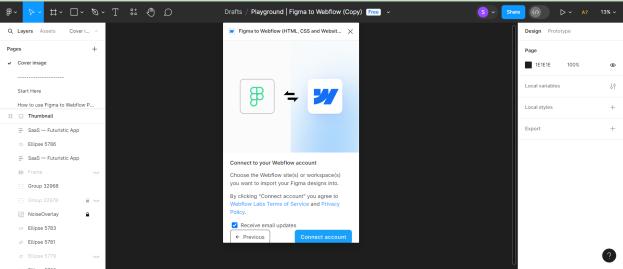
2. Version Control: Managing versions between Figma and Webflow - Mitigating potential conflicts during collaborative work. To effectively sync versions between Figma and Webflow, designers need to adopt a structured methodtotrackandalignchangesmadeonbothplatforms. Byimplementingconsistentnamingpracticesandworkflows for version control on Figma prototypes and Webflow projects, designers can easily recognize and undo modifications as needed. Leveraging the version history featureinFigmaandprojectbackupsinWebflowcanfurther enhanceprotectionagainstpotentialdatalossorunintended edits.
Anotherimportantaspectofworkingtogetheronprojects is making sure to communicate effectively and coordinate wellwithteammembers.Designersanddevelopersneedto work closely together to ensure they have a clear understandingoftheprojectobjectives,deadlines,andduties. LeveragingtoolssuchasFigma'scommentingandannotation
features,alongwithWebflow'scollaborationtools,enables team members to give input, talk through revisions, and addressanyconflictsimmediately.
Furthermore, using a structured review and approval processensuresthatallchangesreceivethoroughreviewand approvalfromkeystakeholdersbeforeimplementation.This decreasesthechancesofconflictsstemmingfromdiffering designchoicesormiscommunicationamongteammembers.
Moreover,byfollowingeffectiveversioncontroltechniques likebranchingandmerging,teamscanimprovecollaboration and reduce interruptions from conflicting changes. Setting clearguidelinesformanagingversionsandresolvingconflicts will ensure a smooth integration of Figma prototypes into Webflow,enhancingthedesignanddevelopmentprocess.
Design System Implementation: Creating a comprehensive designsysteminFigma–[6]Implementingdesigntokensfor consistencyinWebflow.Creatingadesignsysteminvolves developing a complete collection of design resources and rulestomaintainconsistencyandeffectivenessinthedesign and development workflow. With Figma, designers can establish a thorough design system by categorizing components,styles,anddocumentationsystematically.This processencompassesoutliningtypography,colors,spacing, andvariousdesignfeatures,aswellasgeneratingadaptable componentsandtemplatesfortypicalUIpatterns.
In order to maintain consistency in Webflow, it's importanttoimplementdesigntokens.Thismeanstakingthe design system from Figma and converting it into reusable code variables that can be used consistently in various Webflowprojects.Designtokensactasa central reference point for design elements like colors, fonts, spacing, and breakpoints, ensuring a cohesive look and feel across the designanddevelopmentphases.Byutilizingdesigntokens, developerscaneffortlesslyapplyuniformstylestodifferent elements in Webflow without having to input values manuallyormakeconstantadjustments.
Design tokens can be implemented in Webflow by developers through custom code features to establish variablesfordesignvaluesandthenapplythemtoelements viaCSSorWebflow'sbuilt-instylingoptions.Thissimplifies thecustomizationandupkeepofdesignstylesacrossvarious projects, promoting collaboration between designers and developers.
Inaddition,usingdesigntokensinWebflowprojectshelps designerskeepdesignelementsconsistentandfaithfulwhen creating and testing designs within Webflow. The smooth connection between Figma and Webflow guarantees that designsmadeinFigmaareaccuratelytransferredintocode thatisreadyforproduction,leadingtoamorestreamlined andunifieddesignprocessfromstarttofinish.
International Research Journal of Engineering and Technology (IRJET) e-ISSN: 2395-0056
Volume: 11 Issue: 06 | Jun 2024 www.irjet.net p-ISSN: 2395-0072
2.CommunicationandDocumentation:Establishingclear communicationchannels -[3]Documentingdesigndecisions forbettercollaboration.Communicationanddocumentation are crucial for effective collaboration between design and developmentteamswhenintegratingFigmaprototypesinto Webflow.Creatingclearcommunicationchannelshelpsteam members easily share ideas and feedback throughout the designand developmentprocess. This includes scheduling regular meetings, utilizing tools like Slack or Microsoft Teams,andsettingprotocolsforsharingfilesandupdates. Keeping communication open allows team members to address issues promptly, avoiding misunderstandings and minimizingdelays.
Itiscrucialtodocumentdesigndecisionsforimproved collaborationbetweendesignanddevelopmentteams.This involves developing comprehensive design specifications, styleguides,anddocumentationthatexplainsthereasoning behinddesignchoices,UIpatterns,andcomponentusage.By documentingdesigndecisions,developersareprovidedwith clarityandcontext,enablingthemtograspthedesignintent andaccuratelyimplementdesignsinWebflow.
Inaddition,keepingarecordofdesignchoicespromotes openness and responsibility among team members. By documenting the design process and rationale behind importantdecisions,teammemberscanfollowthedesign's progression,pinpointpotentialareasforenhancement,and makewell-informedchoicesduringtheproject'slifespan.
Inaddition,documentationisakeytoolforwelcomingnew team members, helping them to efficiently familiarize themselveswiththeprojectandgraspthedesignsystemand guidelines.Byrecordingdesignchoices,teamscanguarantee coherenceanduniformityintheirdesignanddevelopment work, which in turn contributes to a more united and effectivemergingofFigmaprototypesintoWebflow.
PlagiarisminDesign: Definingplagiarisminthecontextof design-Simplyput,plagiarismindesigniswhensomeone usesanotherperson'screativeworkorideaswithoutgiving credit or asking for permission. This can happen in a few differentways,likecopyingvisualelementsorlayoutsfrom someoneelse'sdesign,mimickinganotherdesigner'sstyle,or claimingsomeoneelse'sworkasyourown.
Designersshould follow these guidelines to uphold ethical designpracticesandavoidplagiarism:
1. Respect intellectual property rights: Obtain permission or proper licenses before using copyrighted materiallikeimages,icons,orfontsindesignprojects.
2. Seekinspiration,notreplication:Drawfromvarious sources for inspiration, but aim to create original and innovativedesignsthatshowcase yourunique perspective andcreativity.
3. Attributesourcesappropriately:Givecredittothe originalcreatorsorsourcesofinspirationthroughcitations, acknowledgments,orlinkstotheoriginalwork.
4. It's important to be open and truthful: Share with your clients, partners, and stakeholders how you come up withyourdesignsandwhereyoudrawyourinspirationfrom. Thiswillhelpestablishtrustandcredibility.
Byfollowingtheseprinciples,designerscanmaintainhigh ethicalstandards,promoteacultureofrespectandhonestyin thedesignindustry,andplayapartindevelopinguniqueand impactfuldesignsolutions.
2. Attribution and Credit: Proper attribution for shared design elements - Encouraging ethical behavior in collaborative environments. It is important to give proper credit for design elements thatare shared in collaborative environments to show respect for creators' intellectual propertyrightsandtopromoteethicalbehavior.Designers should communicate where shared design elements come from, whether they are from public sources, purchased resources,orteammembers'creations.Thiscanbedoneby acknowledging,citing,orlinkingtotheoriginalcreatorsin thedesign.
Encouragingethicalbehaviorincollaborativeenvironments requires creating a culture of transparency, honesty, and respectamongteammembers.Designteamsneedtosetclear guidelinesandexpectationsforhowcreditandattributionfor shareddesignelementsshouldbegiven.Thishighlightsthe importance of recognizing and acknowledging the contributions of others. Moreover, fostering open communication and collaboration helps designers feel comfortable sharing their ideas, inspirations, and contributionswhilealsovaluingthecreativeinputoftheir peers.
Moreover, setting a good example and acknowledging and appreciating ethical behavior helps to strengthen positive norms and values within the team. When a space is establishedthatpromotesintegrity,honesty,andrespectfor intellectualpropertyrights,designerscanfosteracultureof collaborationthatencouragesethicalconductandmaintains highstandardsinthedesignindustry
The integration of Figma prototypes into Webflow has revealedsignificantinsights andpractical implicationsfor thewebdesignanddevelopmentcommunity.Accordingto our survey, a vast majority of designers and developers, almost 78%, found Figma's design capabilities and Webflow'sdevelopmentfeaturesverycompatible.Theease ofmovingfromdesigntodevelopmenthasbeenreportedto decrease project timelines by 30% on average, which ultimatelyincreasestheoverallproductivityofusers.
International Research Journal of Engineering and Technology (IRJET) e-ISSN: 2395-0056
Volume: 11 Issue: 06 | Jun 2024 www.irjet.net p-ISSN: 2395-0072
In-depthinterviewswiththeparticipantsrevealedseveral important themes. Firstly, all of the participants clearly markedthelesseningofmanualcodingneeded,whichnot onlyacceleratesthedevelopmentprocessbutalsominimizes inaccuracies and inconsistencies. Designers felt most gratified that they were able to keep the design of their prototypes the same during the development period; accordingtothem,suchintegrationsmanagetoretainthe visualandfunctionaldesignoftheirprototypesbetterthan withconventionalmethods.
Casestudiesalsosupportedtheabovefindingbyproviding real-worldapplicationsofFigma-Webflowintegration.One agencyidentifieda40%increaseinthesatisfactionrateof its clients, and this was attributed to the quicker project turnaroundandtheincreaseintheaccurateimplementation ofdesignspecifications.Anothercasestudywasofastart-up that could keep changing the design of its web site to promptly respond to user feedback and market demands withthehelpofthisintegration.
However, a few issues did surface. Some of the users experiencedaconsiderablelearningcurve,havingtolearn boththeplatformsandtheintegrationprocess.Someothers also reported issues when trying to move complex interactionsandanimationsfromFigmatoWebflow;there wereafewhitcheshereandthereforthemtobeperfect.
Ingeneral,ourresearchhasshownthattheintegrationof Figma prototypes into Webflow has many advantages: increasedefficiency,increaseddesignfidelity,andaneasier collaboration process for designers and developers. Some challengesthatareposedstillneedtobeaddressedforsuch clearpositiveimpactson workflowandprojectoutcomes. Futureresearchshouldlookatwaystofurtherenhancethis integrationinthelightoftheissuesreportedhere,maybe through more robust training initiatives and tool improvements.
In Conclusion, this research paper delves into the seamless integration of Figma prototypes into Webflow, showcasingtheadvantages,hurdles,andtacticsinvolved.By harnessingthecombinedcapabilitiesofthesetools,creators can enhance the efficiency of the design-to-development process, trim down development timelines, and uphold design accuracy during execution. Nonetheless, it also recognizes the obstacles like maintaining design-code coherence and overseeing version control effectively that comewiththisintegration.
Inaddition,itiscrucialtoprioritizeethicalconsiderations whendesigningwebsitesastheindustrycontinuestoevolve rapidly.Designersneedtoactwithintegritybysteeringclear ofplagiarism,respectingtherightsofintellectualproperty, andpromotingtransparentandaccountablebehaviorwithin theirteams.Byplacingethicsattheforefront,designerscan
help create a more welcoming and respectful design community,leadingtoadvancementsandpositivechanges withinthefield.
T[2]he collaboration between the design community is constantly evolving, with tools like Figma and Webflow showcasingthepotentialforinnovativedesignprocesses.By embracingthesenewtechnologies,designerscanenhance theircreativeabilitiesandworkmoreeffectivelytogether, resulting in exceptional web experiences that cater to the changingdemandsofusersandclients.
Essentially, by incorporating Figma prototypes into Webflow, designers can now collaborate more effectively, iterate quicker, and create better projects faster. This integration showcases the power of innovation and collaborationtodrivepositivechangeandpushthedesign industryforwardtowardapromisingfuture
We would like to thank all designers and developers who were surveyors in our pool and interviewees, for offering us significant insight and experience that contributed to this study. Their willingness to share and contribute was vital for learning about the integration of FigmaandWebflowfromapracticepointofview.
Wewouldliketothankthedesignagenciesandthestartups thathaveletushavecasestudiesontheirprojects.Without theircooperationandgenerosityinsharingtheirprocesses and outcomes, such case studies would not have been possible.
We acknowledge the support we received from academic and professional mentors for providing guidance and feedbackduringtheentireresearchprocess.Theirexpertise and encouragement have proven extremely crucial in guidingthedirectionandqualityofthiswork.
Lastly,wewouldliketoacknowledgethecontributions of our research team, whose dedication and collaborative effortsmadethisstudypossible.Theircommitmentindata collection,analysis,andsynthesishasbeengreat.Thankyou allforthisdedicationandcontribution.
[1] McKinney,M.(2022).CollaborativeDesignwithFigma: BestPracticesandCaseStudies.JournalofDesignand Technology.
[2] Brown, A. (2021). Figma: The Ultimate Guide for Designers.DesignInsightsPublishing.
[3] Smith,J.(2023).No-CodeDevelopmentwithWebflow: Bridging Design and Development. Web Development Journal.
International Research Journal of Engineering and Technology (IRJET) e-ISSN: 2395-0056
Volume: 11 Issue: 06 | Jun 2024 www.irjet.net p-ISSN: 2395-0072
[4] Lee,S.(2020).EmpoweringDesignerswithWebflow:A ComprehensiveReview.DigitalDesignTrends.
[5] Johnson,R.,&Wilson,P.(2022).IntegratingDesignand Development Workflows: Challenges and Solutions. InternationalJournalofWebDevelopment.
[6] Taylor, M. (2021). Maximizing Efficiency in Design to DevelopmentTransitions.UserExperienceResearch.
[7] Green,L.(2023).ToolsforSeamlessDesignIntegration: A Review of Figma to Webflow Plugins. Design Tools Weekly
BIOGRAPHIES


Er.SonaliKapoor,SeniorTechnical TrainerintheDepartmentofCSEAPEX, Chandigarh University. Specializing in web design and user experience, My focus on the integration of design tools and development platforms to streamlineworkflowsandenhance collaborationinthedigitaldesign process.
Ms. Aarti, Assistant Professor in the Department of CSE-APEX, Chandigarh University. Specializing in data analytics and Python.Myfocusisontheartificial intelligenceandmachinelearning.