
International Research Journal of Engineering and Technology (IRJET) e-ISSN: 2395-0056
Volume: 11 Issue: 02 | Feb 2024 www.irjet.net p-ISSN: 2395-0072
International Research Journal of Engineering and Technology (IRJET) e-ISSN: 2395-0056
Volume: 11 Issue: 02 | Feb 2024 www.irjet.net p-ISSN: 2395-0072
Hiralkuvarba Solanki1, Prof. (Dr.) Tejas Shah2, Prof. (Dr.) Deepali Shah3
1Hiralkuvarba Solanki, Research Scholar, Instrumentation & Control Dept., L.D College of Engineering, Ahmedabad, Gujarat, India
2Prof. (Dr.) Tejas Shah, Associate Professor, Instrumentation & Control Dept., L.D College of Engineering, Ahmedabad, Gujarat, India
3Prof. (Dr.) Deepali Shah, Associate Professor, Instrumentation & Control Dept. ,Govt. Engineering College, Sector 28 , Gandhinagar, Gujarat, India
Abstract - The essential & eminent fields of medical science, space exploration, security, and surveillance field infinitely rely on crucial implication of Image processing. Thisscenarioevolvedanimportantrequirementoflearning & understanding image processing techniques with user friendly trends of Graphical User Interface (GUI). The proposed work in this publication is aimed to provide an interactive as well as engaging platform for image processing fundamentals. The proposed application deliberatelyenhancestheprofessionalskillofalllevelusers. The proposed application bridges the gap from theoretical aspects to practical applications and enhances the effectivenessofimageprocessinginrespectivedomains.
Key Words: MATLAB GUI, Image Processing, Edge Detection, Image Filtering, Brain Tumor Detection
Graphical User Interface (GUI) in MATLAB refers to the creation of interactive interfaces for your MATLAB programs [1][4]. These interfaces allow users to interact withyourMATLABcodethroughgraphicalelementssuch asbuttons,sliders,textboxes,plots,andmore,ratherthan solelythroughthecommandlineinterface.
MATLAB provides tools and functions to design and implement GUIs efficiently, making it easier for users to visualize data, adjust parameters, and control the execution of algorithms. GUIs can range from simple interfaces for data visualization to complex applications for image processing, signal analysis, simulation, and more.
In this paper, a brief visualization of image filtering techniques are provided in a representative manner and one application that is Brain Tumor Detection has been included for understanding of the techniques used using imageprocessingusing
MATLAB GUI for understanding Image Processing in MedicalField.
2.1
The Laplacian filter, also known as the Laplacian of Gaussian (LoG) filter, is a commonly used filter in image processingforedgedetectionandimagesharpening.
It detects the correct places of edges, tests wider area aroundpictureelements[9].WorkflowofLaplacianFilter isshowninFigure1.
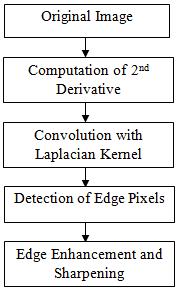
Figure1WorkFlowofLaplacianFilter
The Laplacian filter is particularly useful for detecting edges regardless of their orientation. However, it is sensitivetonoise,whichcanleadtofalseedgedetections. Tomitigatethisissue,theLaplacianfilterisoftenapplied after smoothing the image with a Gaussian filter (hence the term Laplacian of Gaussian), which helps suppress noisewhilepreservingedges.
The Sobel filter is a popular edge detection filter used in image processing. It calculates an approximation of the
International Research Journal of Engineering and Technology (IRJET) e-ISSN: 2395-0056
Volume: 11 Issue: 02 | Feb 2024 www.irjet.net p-ISSN: 2395-0072
gradient of the image intensity function, which highlights regionsofrapidintensitychange,typicallycorresponding to edges [8]. The filter works by convolving the image with a pair of 3x3 kernels to calculate the gradient approximation of the image intensity function, highlighting regions of rapid intensity change, which typically correspond to edges [6]. The Sobel filter is commonly used for edge detection in image processing, highlighting areas of rapid intensity change to identify edges and features within images, crucial for tasks like object detection and boundary delineation. Work flow of SobelFilterisshowninFigure2.
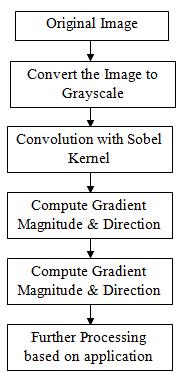
Filter
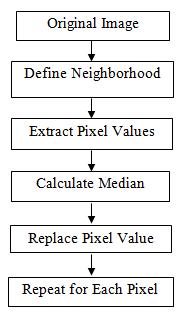
The median filter is a non-direct digitalized procedure, regularly used to eliminate noise [10] from a picture/imageorsignal.Suchnoisedecreaseisthetypical pre-processed step to improve the consequences of later processing [2]. It works by replacing each pixel's value with the median value of the intensity levels in its neighborhood.Themedianfilterisparticularlyeffectiveat preserving edges and fine details in images while effectivelyreducingnoise.
The key advantage of the median filter is its ability to effectivelysuppressvarioustypesofnoise,includingsaltand-pepper noise [7], Gaussian noise, and impulse noise, withoutblurringordistortingedgesandfinedetails.This makes it particularly useful in applications where noise reduction is crucial while preserving image quality, such as medical imaging, satellite imaging, and digital photography.
WorkflowofMedianFilterisshowninFigure3.
The Maximum Filter is a digital image processing technique used primarily for enhancing or modifying imagesbyadjustingtheintensityvaluesofpixelsbasedon theirneighboringpixels.Itworksbyreplacingeachpixel's value with the maximum pixel value within a defined neighborhood. The maximum filter is particularly useful for tasks such as noise reduction, edge detection, and featureextraction.Itachievesthisbyemphasizingregions of high intensity within each neighborhood, effectively smoothing out noise and enhancing edges and other features.WorkflowofMaximumFilterisshowninFigure 4.
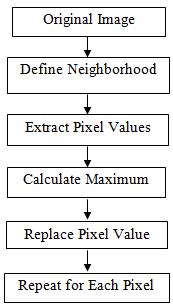
Figure4WorkFlowof
It's frequently used for noise reduction, edge enhancement, and feature extraction in various image processingapplications.
2395-0056
Volume: 11 Issue: 02 | Feb 2024 www.irjet.net p-ISSN: 2395-0072
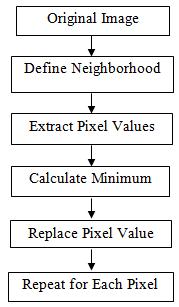
TheMinimumFilter,alsoknownastheminimumfilteror erosionfilter,isadigitalimageprocessingtechniqueused primarily for noise reduction and feature extraction. It works by replacing each pixel's value with the minimum pixel value within a defined neighborhood. The key function of the minimum filter is to suppress noise and minimize small-scale variations in intensity while preserving larger-scale features in the image. It achieves thisbyemphasizingregionsoflowerintensitywithineach neighborhood.
The minimum filter is particularly useful in scenarios where noise reduction and feature preservation are critical, such as in medical imaging, satellite imaging, and textureanalysis.Thekeyfunctionoftheminimumfilteris to suppress noise and minimize small-scale variations in intensity while preserving larger-scale features in the image. It achieves this by emphasizing regions of lower intensitywithineachneighborhood.
WorkflowofMinimumFilterisshowninFigure5.
The minimum filter is particularly useful in scenarios where noise reduction and feature preservation are critical, such as in medical imaging, satellite imaging, and textureanalysis.
The Midpoint Filter, also known as the Midpoint Median Filter, is a digital image processing technique used primarily for noise reduction while preserving image details. It works by replacing each pixel's value with the midpoint between the minimum and maximum pixel valueswithinadefinedneighborhood.
ThekeyfunctionoftheMidpoint Filteris to reduce noise while preserving edges and fine details in the image. By replacing each pixel with the midpoint value of its neighborhood, it effectively smoothens out variations in intensity caused by noise while maintaining the overall structure of the image Work flow of Midpoint Filter is showninFigure6.
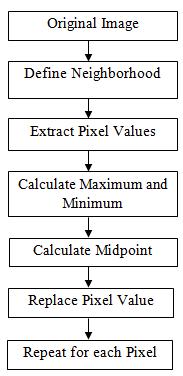
Figure6MidpointFilterWorkFlow
3. BRAIN TUMOR DETECTION SYSTEM USING MATLAB GUI
Detecting Brain tumors using MATLAB GUI involves buildinganinteractivegraphicaluserinterface(GUI)that facilitates the processing of brain images and the detectionoftumors[13].StepsforBrainTumordetection isshowninfigure7
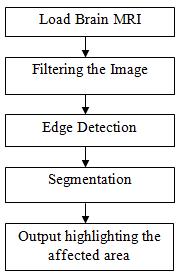
Figure7StepsforBrainTumorDetection
International Research Journal of Engineering and Technology (IRJET) e-ISSN: 2395-0056
Volume: 11 Issue: 02 | Feb 2024 www.irjet.net p-ISSN: 2395-0072
Using MATLAB's App Designer or GUIDE (Graphical User Interface Development Environment), design a GUI with elementssuchasbuttons,textboxes,axes,andmenus[5].
DesigntheGUIlayouttoincludefunctionalitieslikeimage loading, preprocessing, tumor detection, and result visualization.
Users can select the image file that is MRI of Brain from theirlocaldirectory.
3.3 Preprocessing
Preprocesstheloadedbrainimage toenhancethequality and facilitate tumor detection. Common preprocessing stepsincludenoisereductionandfilteringtechniques
3.4 Tumor Detection Algorithm
Implementation of tumor detection algorithm that analyzes the preprocessed brain MRI to identify the regions suspected of containing tumor. Common approaches for tumor detection include Edge Detection andSegmentation
3.5 Result Visualization
The highlighted portion indicates the tumor so that user canidentifytheaffectedportion
4.1 Building Filter Selection Using MATLAB GUI
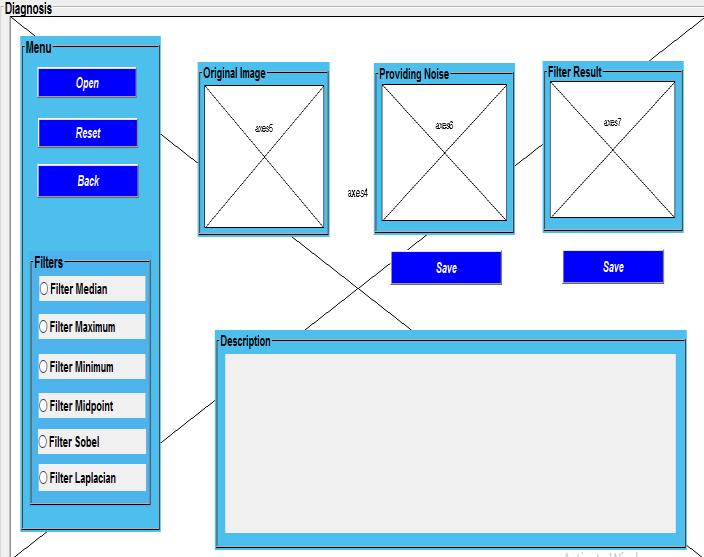
Figure8EditorViewofFilterDesignforImageProcessing
TheFigure8includes:
1. Menu Bar
a)OpenButton:ToUploadanyImagefromPC
b)ResetButton:ToResettheImage.
c)BackButton:ToGotoHomePage.
2. Filter Panel
There are six different types of Filters available to check theresult.
3. Axes
There are 3 Axes in which, first one show “Original Image”,SecondaxesprovidesNoiseinoriginalImageand ThirdaxesshowsFilterResult.
4. Description
Text will be displayed in the Description Box as per filter selected.
4.2 User will interact with following window
AsShowninfigure9,
1.UsercanuploadanyImagefromdirectoryinComputer byclicking“Open”Button.
2. Now, just select the desired filter you want to see the resultandprocessedimagewillbeseenontheaxesalong withexplanationinthedescriptionofthefilterused.
3. Image of the result obtained can also be saved by clicking“Save”Button.
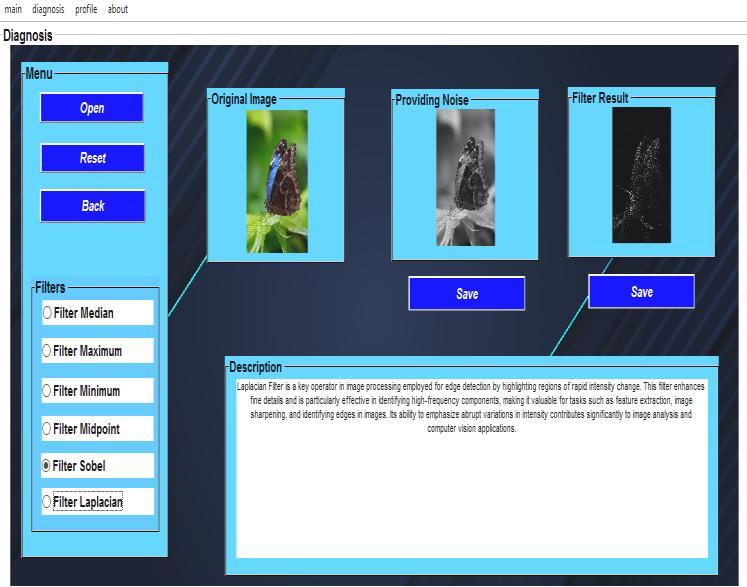
9UIofFilterDesignforImageProcessing
International Research Journal of Engineering and Technology (IRJET) e-ISSN: 2395-0056
Volume: 11 Issue: 02 | Feb 2024 www.irjet.net p-ISSN: 2395-0072
4.3 Building Brain Tumor Detection Using MATLAB GUI
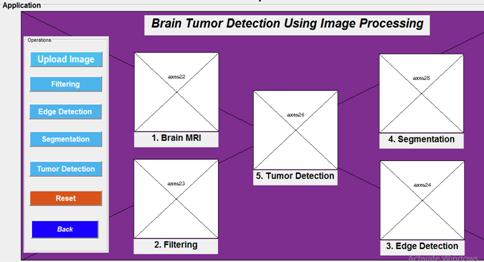
10EditorViewofBrainTumorDetectionSystem
The editor view of Brain Tumor Detection System is showninfigure10
4.3 Output Window for Brain Tumor Detection
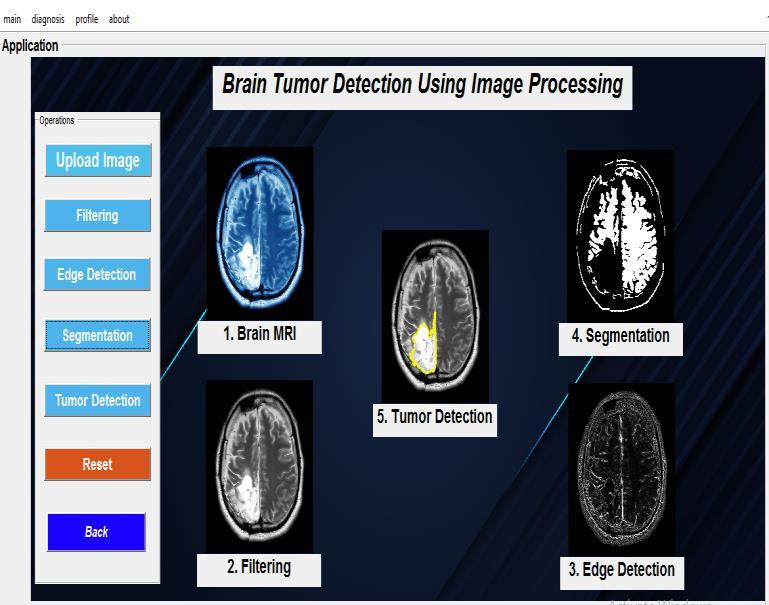
Figure 11 UIofBrainTumorDetectionSystem
The output window for user of Brain Tumor Detection Systemisshowninfigure11.
5. CONCLUSION
MATLAB GUI for Image processing bridges the gap betweenAlgorithmcomplexityandUseraccessibility.
This tool serves as a valuable resource for educational purposes, research endeavors, and practical applications in fields requiring image analysis and enhancement.
As technology continues to evolve, GUI-based approaches are expected to further democratize image processingandfosterinnovationinvariousdomains.
[1] Image Processing using MATLAB GUI by Onkar Potdar|2022IJCRT|Volume10,Issue2February2022 |ISSN:2320-2882
[2] FILTERS IN MEDICAL IMAGE PROCESSING| Santhosh B |Suraj Punj Journal for Multidisciplinary Research|ISSNNO:2394-2886
[3] Image processing system using MATLAB-based analytics by Gerald Ijemaru, Augustine| Bulletin of Electrical Engineering and Informatics |Vol. 10, No. 5|October2021,pp2566~2577ISSN:2302-9285
[4] Image Processing MATLAB (GUI) by Mistry Unnat| ResearchGate|22November2021
[5] Edge Detection with different Parameters in Digital Image Processing using GUI by P.Srujana| Proceedings of the Fifth International Conference on Computing MethodologiesandCommunication(ICCMC2021)IEEE XplorePartNumber:CFP21K25-ART
[6] A Comparative Study of Various Edge Detection Methods by Rehan Yousaf| 2018 14th International Conference on Computational Intelligence and Security (CIS)
[7] Image Processing Using MATLAB GUI by Janani Rajaraman| International Journal of Electronics, Electrical and Computational System IJEECS| ISSN 2348-117X|Volume6,Issue|1January2017
[8] Analysis of Image Quality using Sobel Filter| International Conference on Inventive Systems and Control (ICISC 2019)| Chethan K S |IEEE Xplore Part Number:CFP19J06-ART;ISBN:978-1-5386-3950-4
International Research Journal of Engineering and Technology (IRJET) e-ISSN: 2395-0056
Volume: 11 Issue: 02 | Feb 2024 www.irjet.net p-ISSN: 2395-0072
[9] An Analysis of CANNY & LAPLACIAN of GAUSSIAN Image Filters in Regard to Evaluating Retinal Image |IEEE|
[10] Digital Image Restoration using Image Filtering Techniques |2019| |978-1-5386-8010-0/19| International Conference on Automation, Computational and Technology Management (ICACTM)AmityUniversity
[11] Computer Aided Diagnostic for cancer detection usingMRIimagesofbrain|IEEE|978-1-5090-3646-2/16 |
[12] Detection and Classification of Brain Tumor using Support Vector Machine Based GUI|2020 7th International Conference on Signal Processing and Integrated Networks (SPIN) |Imran Ullah Khan|978-17281-5475-6/20
[13] Noise Estimation and Reduction in Multispectral MagneticResonanceImages|TMI.2016.2601243,IEEE|