Updation in Route Mapping Using Videography Technology
Abhishai E. Amair5Abstract - Visualization works from a human perspective because we respond to and process visual data better than any other type of data, that’s why we taught about route mapping using videography technology. The technical validation of videography navigate on, a new service that makes use of the map platform, and the basis for building multiple services in a high-accuracy positioning society. The capacity to give real-time video information, which may be utilized to improve navigation accuracy, is one of the main benefits of videography navigation. Videography navigation may be a pillar of positioning technology in the future with more research and testing.
Key Words: Video graphic Technology, Informatory Landmarks, Navigation, Route mapping ETC..
1. INTRODUCTION
Google Maps does not show us photographs of the sites thatwill bealongtheroadtoourdestination sinceitonly showsa visual representationof the major locationthata travelerwishestoreach.GoogleMapssimplyprovidesthe turn distances. For example, if we are travelling while there lies a turn afterward, Google Maps will inform us that the turn is 300 meters away or something similar. However, if someone misses a turn sometimes, Google Mapswillrerouteusandshowusalongerpath.Thisissue won'timpactourmapssincewegivethemphotographsof landmarks, allowing the user or passenger to readily acknowledgetheimageincludedintherouteandtakethe turn. Additionally, our project will conserve time and gasoline, because it enables travelers to get there more quickly.Thevisualizationworksfromahumanstandpoint because we react to and absorb visual information more quicklythananyothersortofdata.Visualimageswillplay a significant role in the future, That's why we considered usingvideographytechnologywithroutemapping.
Maps is now one of the primary ways to go to the target location due to the improvement in the quality of videos and the increasing number of its users. This enables the integrationofGoogleMapswithvideographytechnologies.
This research says that businesses that have started applying digital maps have seen an increase in staff productivity,improvedvisual communication,anda more than 50% reduction in the cost of logistics and resource
planning. Online markets, delivery services, farming, property management, engineering either media, power and utilities, insurance, and architecture are just a few of the numerous sectors that have benefited from this technology - O.S. Asaolu et al (2018)[1]. This study says that the availability of online mapping tools like Maps by Google and Street View has increased. Although there are numerous practical applications for these technologies in daily life, law enforcement organizations have voiced worry that they may be used by criminals to their advantageandpotentiallychangeestablishedpatternsand habits of criminal behavior. Despite not being designed withscientificinquiryinmind,MapsbyGoogleandStreet View provide intriguing opportunities for studyChristophe Vandeviver et al (2014)[2]. Web map services are a new type of map service that was made possible by the use of GIS, computer, and internet technologies. This article uses the Google Maps Application Programming Interface (API) and XML to create a network release mechanism for regional land use data and applies Web map services to the distribution of land use information. The application programming interface for Google Maps based on its three map modes was introduced by Google. Chenzjietal(2010)[3].
1.1 OBJECTIVES
[1] To rectify the problems faced by travelers while travellingonroutes

[2] To collect data of main spots from the site selected of “Nagpur”
[3] To merge and upload the data collected in website or application
[4] Tosavetravelertimeandwastageoffuelbyproviding shortestroutesusingvideographictechnology
1.2 SCOPE OF THE WORK
Soourscopeoftheprojectistomakeawebsitewhereuser can enter the specified location where he or she wants to travel and then our maps will locate the place or destination and then our map will provide the shortest routeofthedestinationwiththevisualimagesorvideosof the important landmarks which can be easily viewable by traveler.
The study is to make a website where each and every Visual photos or videos of every landmarks is present not entirethecitybutacrossthestate.Thisisourfuturescope. Wealsowantthattravelercaneasilyreachthedestination and also faster. Our project main scope is to reduce the time and wastage of petroleum using videography technology i.e. providing visual images or photos of landmarksthatareeasilyviewablebyanyperson.
2. EXPERIMENTAL PROGRAM
AfterMumbai,PuneandNagpuristhethird-largestcityin Maharashtra, with an estimated population of over 2.5 million.
When it comes to traffic, Nagpur is renowned for having an effective rail, road, and air transportation infrastructure. The city has excellent transit links to different regions of India. Additionally, Nagpur has an internationalairportthatlinksthecitytoothernations.
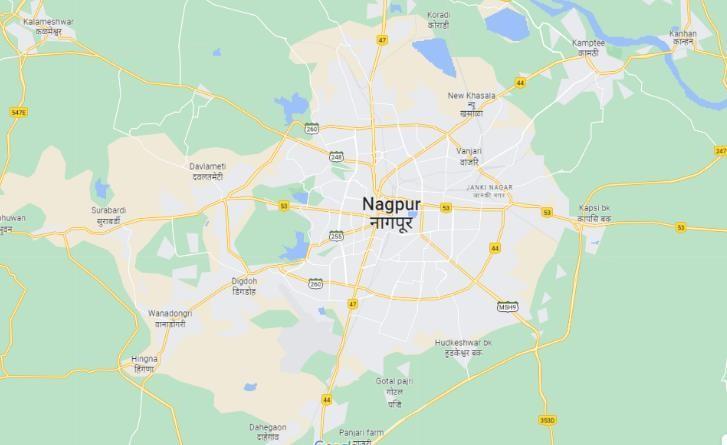
ROUTES THAT WE SELECTED
Junction AnjumanCollegeNagpur
[1] AnjumantoNagpurAirport(Sonegaon,Nagpur).
[2] AnjumantoItwariMarket(ItwariNagpur).
[3] AnjumantoFutalaUniversity(NearFutalalake).
[4] AnjumantoKoradiTemple(Koradiroad).
[5] Anjuman to Automotive metro station (Automotivesquare).
2.2 SELECTION OF LAND MARKS FOR ROUTE MAPPING
The selection of landmarks for route mapping is an essential step in creating an accurate and useful route mappingvideo.Itinvolvesdefiningtheproject'sobjectives, identifyingthetargetaudience,visualizablephotosandthe desired outcome of the project, identifying the landmarks thatarerelevanttotheproject,determiningtheirvisibility, and recognizability and planning the logistics of capturing photosandvideosofthem.
This includes scouting the locations to determine the best angles and lighting conditions for capturing high-quality footage,andcoordinatingwithlocalauthoritiesorproperty owners to ensure that the capture process goes smoothly and without interruption. The selection of landmarks for route mapping is an essential step in creating an accurate andusefulroutemappingvideo.
By considering factors such as the visibility and recognizability of landmarks, their location, and their relevance to the audience, the resulting map provides valuableinformationthatiseasytounderstandandfollow.
2.3 CAPTURING PHOTOS AND VIDEOS FOR EASY NAVIGATIONFOR ROUTE MAPPING
2.1 SELECTION OF AREA FOR ROUTE MAPPING
Firstwewillhavetoselectaareaonwhichwecanmapthe route. When selecting a route map, one of the first and mostimportantstepsistoselectanarea onwhichtomap theroute.Thisareashouldbechosenbasedonavarietyof factors,includingtheavailabilityofdataandresourcesand geographyofarea.Dataresourcesuchaslandmarks,roads anythingwithintheroutes
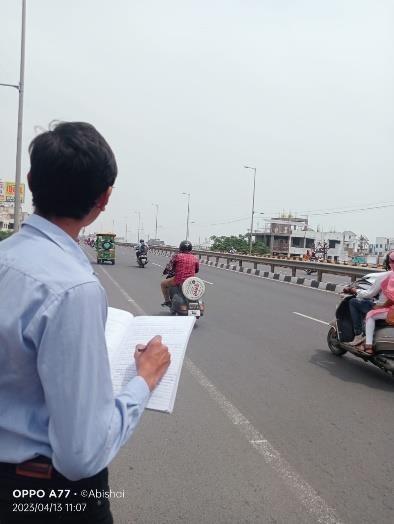
Capturing photos and videos of landmarks and key points along the route is essential for creating a visual guide for navigation and accurate mapping. GPS- enabled cameras are expensive, so alternative methods such as manually tagging each photo and video with location data are also available.
It is important to focus on capturing key landmarks and pointsofinterestalongtheroute,aswellassignsandother markersalongtheroute.ByusingGPS-enabledcamerasor manually taggingeach photoand videowith location data, we can create a visual guide for navigation, accurate mapping,andsharingtheroutewithothers.
2.4 MERGING PHOTOS & VIDEO FOR MAPPING
Mergingphotosandvideoscanbeapowerfulwaytocreate acomprehensivevisualrecordformappinginaproject.To merge photos and videos, we need to use specialized software that allows us to combine differentmedia types. Once we have merged our photos and videos, we can exportthefinalproductasavideofile.
Video is an excellent tool for visualizing maps and providingamoreimmersiveexperienceforviewers.Itcan capture a wide range of actions, from the subtle movements of nature to the fast-paced action of sports, giving viewers a more immersive and realistic experience. Videos are an effective and engaging medium for visualizinginformation,offeringauniquewayofconveying informationthatcancaptivateandengageaudiences.
2.5 ADDING IMAGES, VIDEO & ROUTE DATA TO DATABASE
Themostimportantdetailsinthistextarethestepsneeded to add images and videos to a database. This can be achieved by creating a table in the database that includes thenecessaryfields for storingimage and videodata, such as file name, file type, file size, and file location. Additionally, a server-side scripting language such as JavaScript is used to upload the multimedia filesto the database.
Additionally, route data is storedin thedatabasetocreate interactiveandinformativemapsfortheproject.Finally,a videoplayerlibrarysuchasVideo.jsorPlaycanbeusedto play videos on the website. By adding images, video, and routedatatothedatabase,theprojectcangreatlyenhance the functionality and appeal of the project, creating a rich andengagingmultimediaexperiencefortheuser.
3. METHODOLOGY OF EXPERIMENT
On our website, there is a page where visitors may choose their starting place and final destination for a journey. The page uses the responsive Bootstrap 4.3.1 framework and has a dark mode design. Two dropdown choices on the form let you choose the beginning and ending points, respectively. After the form is submitted, a scriptisruntoprocessthedataandcarryoutanadditional actionnotmentionedinthepresentcode.
3.1 DESIGN
The website has a slick, contemporary layout with a dark color palette. The form's max-width and min-width are both 500px, and it includes a border with a 1px thickness and the color #555555. The form-group labels are styled with a margin-bottom of 5px and a display of block.Thepaddingfortheselectelementsis12pxand20 px, and their width is 100%. The select element's background image is an ion icons-provided down arrow icon.Theform'sbackground-sizeandappearancearesetto 20pxby20px,andthesubmitbuttonis100%widewitha backgroundcolorof#00bfffandafontcolorof#f5f5f5.The text-align has been set to centre, and the padding is 12px 20px. There is a transitional effect applied to the background-color property, and the text decoration is nonexistent. The labels for the starting point and destinationselectelementsarestyledwithafontawesome iconofamapmarker.
3.2 WORKING
Fordemopurposeyourwebsiteisavailablelocallyandnot global so as of now people can only access this website if theyhaveitintheircomputerslocally.Afterthewebsiteis testedandapprovedthewebsitewillbemakinggloballyso everyone can access and use our project. After the user loads our project in their browser like chrome, brave, internet explorer, etc. If your net speed is slow then the website will show a loading screen till the project is not fully loaded into the browser after the website is fully loaded. You will see the name of the project at the center alongwithaformandamapjustnexttotheform.Theform willconsistoftwoinputsoneforthestartingpointandthe otherfordestinationorendpoint.Thestartingpointinput will be disabled because we have taken our collegeas the center so the starting point will always be the starting point. When click on destination point input multiple
option will appear, they are the location that theuser can goto.
After the user clicks a destination andpresses go button. The control will go to the JavaScript function which is assigned with the form. The function will retriever the information like the starting point and the end point and then provides this information to the Google maps. The Google maps will provide destination or end point information. After this the mapwhich was showing our college at the start will now show the route to the destination or end point. The formwill also get changed, nowitwillhavetwonewfieldsoneforthetimerequiredto go to that station and the over will show the distance between our college that is the starting point and the destination selected by the user. After sometime a video will be played which will showtheroutefromthestarting pointanddestinationorendpoint.Afterthevideoisplayed the user will be redirected to the Google maps app for route.Nowastheuserknowstheroutethatwas playedin the video, he or she will follow that route andthe Google mapwilladjusttherouteaccording.
6. Checkedthattwonewfieldsarevisibletotheuser that are time and distance after go button is clicked.
7. Checked that the time and distance field are not changeableandtheyshowtimeanddistance.
8. Checked that the map can be zoomed in and zoomedoutbytheuser. Checkedthatthevideois played.
9. Checked that after the video is played the user is redirectedtotheGooglemapsapp.
10. Checkedthatthecorrectvideoisplayed.
5. RESULTS AND DISCUSSION
1. The starting point field is disabled and the user cannotchangethestartingpoint.
2. The user can click on the destination field and changeit
3. The entire required destinations are included in theendpointordestinationfield
4. The go button can be clicked by the user and its callstheJavaScriptfunctionproperly.
5. The map takes some time to update but it properly updates according to the destination specifiedbytheuser
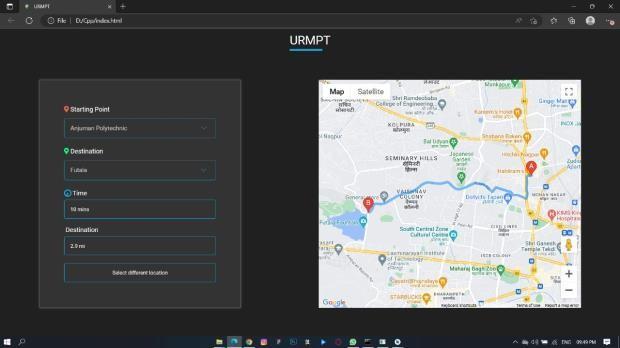
6. Two new fields gets displayed as the user clicks onthegobutton
7. Theusercannotchangethetimeanddestination field.
4. TESTS CONDUCTED
1. Checked that the starting point field is disabled becauseusercannotchangethestartingpoint.
2. Checked whether the end point or destination pointfieldcanbeclickedbytheuser.
3. Checked whether the entire destinations are includedintheendpointordestinationfield.
4. Checkedwhetherthegobuttonisclickablethatis theusercanclickthebutton.
5. Checkedthataftertheuserselectedtheendpoint or destination and clicks the go button then the mapisupdatedaccording.
8. The map gets zoomed in after user clicks plus button and the map gets zoomed out after user clicksminusbutton.
9. Thevideoisplayedautomaticallyaftergobutton isplaced
10. After the video is finished the user is redirected toGooglemapsapp.
11. Correct video is played when user presses go button.
5.1 ADVANTAGES
5.1.1 Wealth of Information
1. Our project provides the layout of roads, the locations of cities and towns, state boundaries,
geographical features, restaurant reviews and satelliteimageswithvideographicTechnology.
5.1.2 We reach our destination faster
1. Our project gives you directions for trips by car, bike,orpublictransportationinshortestdistance, shortestinperiodoftime.
2. Our project shows the shortest root for your destination so that the user can reach his destinationasearlyaspossible.
5.1.3 Explore Places with videos
1. Ourprojectshowsthevideoofthelandmarkwhile travelling
2. It makes easy for the user for understanding the routesandtoreachhisdestination.
5.1.4 Easy Navigation
1. Ourprojectmakesiteasytonavigateandfindyour way to the destination with turn -by-turn direction.
5.1.5 Visual Representation
1. Maps provide a visual representation of geographic information, making it easy to understand and analyze complex data, including patterns,relationships,andtrends.
2. It shows the proper routes and present in easy way to user so it become easy for the user to travelinunknownplacecity,state.
5.2 LIMITATIONS
5.2.1 Dependence on internet connection
1. It requires an internet connection to function properly, which can be a problem in areas with poor connectivity or when traveling to other countrieswhereroamingchargesmayapply.
5.2.2. Limited accessibility
1. As our project is in developing phase so it can be access in limited areas. There is limitation in the features,wecanuseonlylimitedfeaturesbecause itisindevelopingphase.
6. CONCLUSIONS
Inconclusion,ourprojectisahighlyuseful.Itallowsusers to easily search for locations, get directions, view satellite imagery, and even explore new places through features such as Street View. it is available on various devices
includingdesktopcomputers,Smartphone’s,andtablets.It is a updating of Google maps so that it can show an accurate direction of the location mentioned by the user, and makes easy for the user to travel in unknown city, statethroughvideographytechnologyOverall,ourproject has revolutionized the way we navigate and explore the worldaroundus.
REFERENCES
[1] O.S. Asaolu et al (2018) - Shortest Route: A Mobile ApplicationforRouteOptimizationusingDigitalMap" Published bytheFacultyofEngineering,Universityof Maiduguri,Maiduguri.
[2] ChristopheVandeviver etal (2014) - ApplyingGoogle Maps and Google Street View in Criminological Research,VandevierCrimeScience.
[3] Chenzji et al (2010) - Land Use Information Release System Based on Google Maps API and XML", Key Laboratory of Geo-informatics of State Bureau of SurveyingandMapping(No.200712)
[4] SU De-guo et al (2010) - The Framework of Active Cartography of Statistical Map", 2010 Second InternationalWorkshoponEducationTechnologyand ComputerScience
[5] Alexanderetal(2009)-AnExpertSystemforTourists UsingGoogleMapsAPI",2009IEEER.Nicole,“Titleof paperwithonlyfirstwordcapitalized,”J.NameStand. Abbrev,inpress.