International Research Journal of Engineering and Technology

Volume: 10 Issue: 03 | Mar 2023 www.irjet.net

International Research Journal of Engineering and Technology
Volume: 10 Issue: 03 | Mar 2023 www.irjet.net
Abstract - In recent years, with the rapid development in technologyand thepopularityofmobileintelligentterminals (such as smartphones,tablets,etc.),mobile learning beginsto rise and attracts widespread attention. Mobile learning is a new form of learning using wireless mobile communication network technology and wireless mobile communication devices(suchas mobilephones,PDA,PocketPC,etc.) toobtain education information, education resources and education services.Thecharacteristicsofmobilelearningdeterminethat it has unique advantages compared with traditional education,includingthefollowingcharacteristics:(1)Readers can read anytime and anywhere; (2) Readers can make full use of trivial time to learn; (3) It can meet readers personalized learning needs. Mobile phone is the most importantcarrierofmobilereading,currentlythefunctionsof reading apps in the platform is gradually becoming perfect, but they still have some shortcomings such as unable to display meaning of a word within the app itself, not tracking users reading progress and text-to-speech for given content. Tocatertheseproblems,wehavesetouttodevelopareading app. It has inbuilt feature to display the meaning of a word and also provides various user-friendly functionalities which improve users’ experience. The app is developed with appropriate system configuration and Android Studio framework.
Key Words: mobileintelligentterminals,shortcomings.....
Today’smobilephoneusersareoftenextensivelydependent uponapplicationsforaccessingemail,navigation,chatting, readingeBooksetc.
All these purposes are fulfilled only when there is a framework,whichprovidesacompletemobileplatformto achievethesetasks.Androidisoneofthemobileapplication basedplatformsforprovidingawiderangeofapplications thatarereliable.
AnE-BookReaderisasoftwareplatformforreadingbooks which can be installed in computer laptops and also on mobile devices. This software allows users to read books without internet, change view and navigate through the bookseasily.
This PDF Reader is the ultimate app for viewing and managingallyourPDFdocumentsonyourAndroiddevice. Whether you're a student, a professional, or just an avid reader,ourappoffersauser-friendlyinterfacethatmakes readingandeditingPDFsabreeze.
WithAAMple-GPDFReader,youcanquicklyaccessallyour PDF files from your device's internal storage. Our app supportsawiderangeofPDFfeatures,includingzooming, scrolling,andbookmarking.Youcanalsouseourapptofill out forms, sign documents, and even annotate PDFs with highlights,comments,anddrawings.
Ourappisdesignedwithconvenienceinmind.Withjusta fewtaps,youcaneasilysearchforspecificwordsorphrases inyourPDFfiles.Youcanalsocustomizetheapp'ssettings to suit your preferences, such as changing the font size, brightness,andcolorscheme.
ThePDFReaderandroidapplicationhasbeendesigned to provide a comprehensive solution for viewing, editing, and managingPDFfilesonAndroiddevices.However,to meet the needs of users, the app needs to overcome several advancedchallenges.
Oneofthesignificantadvancedchallengeisprovidingusers withadvancedPDFeditingfeatures,suchasformfilling,text editing,anddocumentmerging.Theappcanbeenhancedby integrating advanced editing tools and collaborating with other software providers to provide a seamless user experience.
Byaddressing theseadvancedchallenges, the PDFReader app can provide a more advanced and comprehensive solution for managing PDF documents, enabling users to efficientlymanage,edit,andsecuretheirPDFfilesontheir Androiddevices
Depending onthedevice,usermustbeable toreadthe ebookinlowlight,changeitsfonts,findwordmeaningsand allowannotations.
An e-book must be able to use Text-to-speech software to readthetextaloudforvisuallyimpaired,partiallysighted,or justforconvenience.
ToaddressthechallengesfacedbythePDFReaderandroid application,weproposethefollowingsolutions:
Compatibility and Performance: The app can improve its compatibilityandperformancebyimplementingadvanced optimization techniques such as preloading, caching, and backgroundloading.Additionally,theappcanutilizemodern technologiessuchasGPUaccelerationandmulti-threading toprovideafasterandmoreresponsiveuserexperience.
AdvancedEditingFeatures:Theappcanenhanceitsediting capabilities by integrating with third-party software providersordevelopingitsadvancededitingtools.Thiswill enable users to edit PDF files, fill out forms, and merge documents more efficiently, providing a more comprehensivesolutionformanagingPDFfiles.
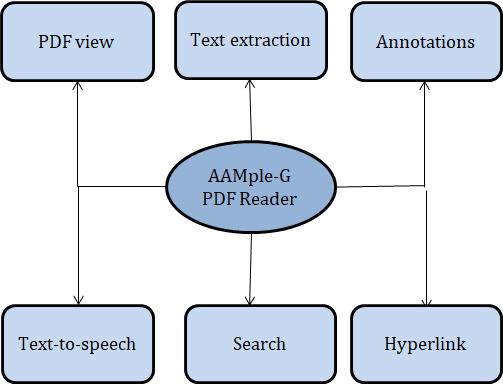
Text to speech: The text to speech function in an Android appsynthesizesspeechfromtextforimmediateplaybackor tocreateasoundfile.It isapowerfultoolthatcanenhance theuserexperiencebyconvertingwrittentextintospoken words. This feature can benefit individuals with visual impairments, learning disabilities, or those who prefer to listenratherthanread.
Hyperlink: Hyperlinks in an Android app are an essential feature that allows users to navigate between different screens or web pages within the app. Hyperlinks are clickablelinksthat,whenselected,cantaketheusertoanew locationwithintheapportoawebsiteoutsideoftheapp. Byimplementinghyperlinkswithinanapp,developerscan maketheappmoreuser-friendlyandengaging,improving itsoverallqualityandusability.
User Interface: The app can improve its user interface by incorporatinguserfeedbackandconductinguserexperience testing.Bysimplifyingtheapp'sdesignandmakingitmore intuitive, users will find it easier to navigate and use, improvingtheiroverallexperience.
Byimplementingtheseproposedsolutions,thePDFReader androidapplicationcanprovideuserswithamoreefficient, comprehensive, and secure solution for managing PDF documents on their Android devices, improving the app's functionalityanduserexperience.
Theprojectisbuiltinandroidstudiousingjavaasprimary language.
To implement annotations in a PDF reader in Android Studio,youcanfollowthesesteps:
Use a PDF library: There are several open-source PDF librariesavailableforAndroid,suchasPDFBox,iText,and MuPDF.Choosealibrarythatsuitsyourneedsandimportit intoyourAndroidStudioproject.
CreateaPDFviewer:YoucancreateaPDFviewerusinga WebView, or you can use a library that provides a PDF viewercomponent.YoucanaddthenecessaryUIelements, suchasnavigationcontrolsandzoomcontrols,totheviewer.
Add annotation functionality: To add annotation functionalitytothePDFviewer,youcanusetheannotation featuresprovidedbythePDFlibrary.Youcanaddtheability tohighlighttext,underlinetext,addnotes,anddrawshapes.
Storeannotations:Youneedtostoretheannotationsmade bytheusersothattheycanberetrievedlater.Youcanusea localdatabase,suchasSQLite,tostoretheannotations.You cancreateatabletostorethePDFfilename,pagenumber, annotationtype,coordinates,andannotationtext.
Retrieve annotations: When the user opens the PDF file again, you can retrieve the stored annotations from the databaseanddisplaythemonthePDFviewer.Youcanuse the PDF library's annotation features to draw the annotationsonthePDFpages.
Edit and delete annotations: You can allow the user to edit and delete annotations by selecting them and providing an editing interface. You can update the database with the changesmadebytheuser.
By default each annotation type has an associated tool to allow you to create those annotations. When creating a custom annotation you'll need to create an associated annotation tool to define how the user can create that annotation.
Annotation tools handle interactions by receiving touch and gesture events. When touch & gesture are made, PDFViewCtrl sends corresponding event to ToolManager. ToolManager passes event to current tool which perform specifiedfunctions.
Table1:AnnotationTools
extracted text to the TextToSpeech object to convert it to speech.
Add text to speech controls: You can add UI elements to controlthetexttospeechfunctionality,suchasplay,pause, stop,andspeedcontrols.Youcanalsoaddaprogressbarto showthecurrentpositionofthetextbeingread.
Highlight the text being read: To improve the user experience,youcanhighlightthetextbeingreadbythetext tospeechengine.YoucanusethePDFlibrarytoidentifythe location of the text being read and highlight it on the PDF viewer.
Hyperlink function allows users to navigate through digital documents by clicking on links that take them to other locations within the same document or to different documents or websites. To implement hyperlink functionality in a PDF reader in Android Studio, you can followthesesteps:
The Text-to-Speech function is a technology that allows a device to read out written text in a synthesized voice. It involves the user inputting text into a text field, selecting a language, and the text being analyzed by the TTS engine to identify the correct pronunciation, pitch,andemphasisofthe words and phrases. To implement text to speech functionality in a PDF reader in Android Studio, you can followthesesteps:
Use a PDF library: There are several open-source PDF libraries available for Android, such as PDFBox, iText, and MuPDF.Choosealibrarythatsuitsyourneedsandimportit intoyourAndroidStudioproject.
Create a PDF viewer: You can create a PDF viewer using a WebView, or you can use a library that provides a PDF viewercomponent. Youcan addthenecessary UIelements, suchasnavigationcontrolsandzoomcontrols,totheviewer.
ExtracttextfromPDF:Toenabletexttospeechfunctionality, you need to extract the text from the PDF file. You can use thePDFlibrarytoextractthetextfromthePDFfileandstore itinastring.
Implement text to speech: You can use the Android TextToSpeechAPItoimplementtexttospeechfunctionality. YoucancreateaTextToSpeechobjectandsetitslanguageto the user's preferred language. You can then pass the
Use a PDF library: There are several open-source PDF libraries available for Android, such as PDFBox, iText, and MuPDF.Choosealibrarythatsuitsyourneedsandimportit intoyourAndroidStudioproject.
Create a PDF viewer: You can create a PDF viewer using a WebView, or you can use a library that provides a PDF viewercomponent.Youcan addthenecessaryUIelements, such as navigation controls and zoom controls, to the viewer.
Identify hyperlinks in PDF: You need to identify the hyperlinks in the PDF file. You can use the PDF library to extract the annotations from the PDF file and identify the hyperlinks.
Handle external hyperlinks: Some hyperlinks may lead to external websites. You can handle external hyperlinks by launchingthedefaultwebbrowseroftheuser'sdevice and openingtheexternallinkinit.
AddUIcontrols:YoucanaddUIcontrolstoenabletheuser to navigate through the hyperlinks in the PDF file. You can addabackbuttontogobacktotheprevioushyperlink and aforwardbuttontogoforwardtothenexthyperlink.
This project includes adding links, images and audio file intothePDF.
ThedevelopmentofaPDFreadingapplicationforAndroidis a significant project that can offer many benefits to users. With the growing popularity of mobile devices and the increasing need for remote access to information, a PDF
readingapplicationcanprovideuserswithanefficientand convenient way to read PDF documents on their mobile devices.
Theapplicationcanbedesignedwithvariousfeaturessuch as highlighting,commentingandtexttospeechcapabilities toenhancetheuserexperienceandimprovetheaccessibility ofthedocuments.
Furthermore,thedevelopmentofaPDFreadingapplication forAndroidcancontributetothemobileappmarketandthe digital reading experience. As the Android platform continues to grow and evolve, there is a great demand for new and innovative applications that can offer unique functionalities and features. A PDF reading application can be designed to integrate with other applications and platforms, such as cloudstorageservices, to offerseamless accesstodocumentsandimproveproductivity.
Moreover,thedevelopmentofaPDFreadingapplicationfor Androidcanofferopportunitiesfordeveloperstolearnand enhancetheirskillsinmobileappdevelopment.Byworking onacomplexprojectthatrequirestheintegrationofvarious functionalities, developers canimprovetheirknowledge of different programming languages, frameworks, and tools. The project can also offer opportunities for collaboration, creativity, and innovation, which can benefit both the developersandtheusersoftheapplication.
Inconclusion,thedevelopmentofaPDFreadingapplication forAndroidisavaluableprojectthatcanoffermanybenefits to users, the mobile app market, and the development community. With its unique features and functionalities, a PDF reading application can improve the accessibility and efficiencyofdigitalreadingonmobiledevicesandoffernew opportunitiesforlearningandinnovation.
There are several potential areas for future work and improvements for a PDF reading application for Android. Firstly, the application can be designed to support more document formatssuch asEPUB,MOBI, and DOCX, tooffer a more comprehensive reading experience. Additionally, the application can be enhanced with more advanced features such as word meanings, collaboration tools and document retrieval system, tooffer more functionality and conveniencetousers.
Moreover, the application can be optimized for performance and speed, to improve the overall user experience and reduce the load on the device's resources. The application can also be integrated with cloud-based services such as Google Drive, Dropbox, and OneDrive, to enable seamless access todocumentsfromanywhere and any device. Furthermore, the application can be enhanced with more intuitive and user- friendly interfaces, to improve usability and accessibility for users with differentlevelsoftechnicalproficiency.
Overall, the development of a PDF reading application for Androidcanoffermany opportunitiesforfuturework and improvements, to cater to the evolving needs and preferences of users and enhance the overall digital readingexperience.
[1] R. Xu, Z. Gao, B. Wu, W. Diao, Y. Huang and W. Zhao, "Mobile Book Reader Based on Reading Behavior Characteristics," 2020 IEEE Intl Conf on Dependable, Autonomic and Secure Computing, Intl Conf on Pervasive IntelligenceandComputing,IntlConfonCloudandBigData Computing, Intl Conf on Cyber Science and Technology Congress (DASC/PiCom/CBDCom/CyberSciTech), 2020, pp. 306-311, doi: 10.1109/DASC-PIComCBDComCyberSciTech49142.2020.00060.
[2] Z. Mu, Y. Peng and Y. Liu, "E-Reading System Based on Android,"201912thInternationalConferenceonIntelligent ComputationTechnologyandAutomation(ICICTA),2019,pp. 487-491,doi:10.1109/ICICTA49267.2019.00110.
[3]P.Kumar,P.Nagar,R.GautamandS.Rawat,"Designand Development of an Android Application on PDF Reader," 2019 8th International Conference System Modeling and Advancement in Research Trends (SMART), 2019, pp. 166170,doi:10.1109/SMART46866.2019.9117460.
[4]Ćirić,J.andĆirić,A.,2021.TheimpactoftheCOVID-19 pandemic on digital library usage: a public library case study.JournalofWebLibrarianship,15(2),pp.53-68.
[5] Meireles, J., Nunes, K., Passos, A., Santos, J., Costa, Y., Durand, J., Silveira, R., Oliveira, A., Viana, D., Figueiredo de Oliveira, A.E. and Teixeira, M., 2022, October. Identifying RequirementsandQualityAttributesfromthePointofView of Users of Mobile Digital Libraries. In HCI International 2022- Late Breaking Papers. Design, User Experience and Interaction: 24th International Conference on HumanComputer Interaction, HCII 2022, Virtual Event, June 26–July 1, 2022, Proceedings (pp. 396-408). Cham: Springer InternationalPublishing.
[6]Chowdhury, G., & Chowdhury, S. (2007). Digital libraries:definitionandcharacteristics.InG.Chowdhury& S.Chowdhury(Eds.),Introductiontodigitallibraries(pp.1
16).FacetPublishing.
[7]Sagale, U., Bhutkar, G., Karad, M., Jathar, N. (2018). An Eye-FreeAndroidApplicationforVisuallyImpairedUsers. In: Ray, G., Iqbal, R., Ganguli, A., Khanzode, V. (eds) ErgonomicsinCaringforPeople.Springer,Singapore.
[8] J. Fong and W. L. Cheuk, "A Coursepack eBook with AnnotationonMobileDevicesfor Peer-to-Peer Learning," 2015 International Symposium on Educational Technology(ISET),Wuhan,China,2015,pp.145-150,doi: 10.1109/ISET.2015.37.
[9] J. Gao, L. Li, P. Kong, T. F. Bissyandé and J. Klein, "Understanding the Evolution of Android App Vulnerabilities,"inIEEETransactionsonReliability,vol.70, no. 1, pp. 212-230, March 2021, doi: 10.1109/TR.2019.2956690.
[10]Hussain,A.,Mkpojiogu,E.O.C.,Musa,J.,Mortada,S.,& Yue, W. S. (2018). Mobile Experience Evaluation of an eReaderApp.JournalofTelecommunication,Electronicand ComputerEngineering(JTEC),10(1-10),11–15.
[11] Haslam Oliver, "Download Android Studio IDE For WindowsOSXAndLinux",RedmondPie,May2013
[12] Dobie Alex, "Android Studio unveiled at Google I/O keynote",AndroidCentral.MobileNations,May2013.
[13] MY SCANS PDF DOCUMENT SCANNER[Android application], 2014, [online] Available: https://play.google.com/store/apps/details?id=sisis.myscan sfree&hl==zh-TW
[14]Javier Santo Domingo, ANDROID PDF WRITER[Androidlibrary], 2012, [online] Available: http://sourceforge.net/p/apwlibrary/code/HEAD/tree/.
[15] Chang G, Chunguang T, Guanhua L, Chuan Z (2010) Developing mobile applications on the android platform. Mobile multimedia processing. Springer, Berlin, pp 264–286
[16]Jadhav A, Patil A (2012) Android speech to text converter for SMS application. Int Organ Sci Res J Eng 2(3):420–423
[17]Visually Impairment Statistics (World) by WHO (updatedAugust 2014) http://www.who.int/mediacentre/factsheets/fs282/en/.
[18]Wang Peng, "Design and Implementation of Panoramic Photo Reader Based on Android Platform [J]", ElectronicDesignEngineering,no.18,pp.90-93,2017.
[19] Gaishuang, "Analysis of Design Elements of E-Reader Based on User Experience [J]", Design, vol. 5, pp. 118-119, 2018.
[20]Sahoo,E.,Panda,K.,Majhi,S.,Rana,C.,Pradhan,E.,Sahu, M. K., & Sahoo, R. (2014). Academic librarianship in digital era.ReproprintLtd.