
International Research Journal of Engineering and Technology (IRJET) e-ISSN: 2395-0056
Volume: 12 Issue: 04 | Apr 2025 www.irjet.net p-ISSN: 2395-0072
International Research Journal of Engineering and Technology (IRJET) e-ISSN: 2395-0056
Volume: 12 Issue: 04 | Apr 2025 www.irjet.net p-ISSN: 2395-0072
P. Chitralingappa1, Fardeen Hussain2, L. Hemanth Kumar3, C. Dheeraj4, M. Harish Chavan5
1Associate Professor, Dept. of CSM, Srinivasa Ramanujan Institute of Technology, Anantapur, India; 2,3,4,5 Dept. of CSM, Srinivasa Ramanujan Institute of Technology, Anantapur, India; ***
Abstract - With Air Canvas users can draw on screens through simple hand movements while they do not need to physically touch it. Index finger serves as the main drawing instrument in this system yet users can switch tools without creating accidents by keeping their second finger shut. A fist gesture has been built into the system to instantly delete everything drawn on the canvas. Despite delivering highprecision landmark detection MediaPipe’s Hand Tracking module enables better control over smooth and precise drawingperformance.Userinteractionreceivesimprovement through the system's implementation of computer vision methods like color detection and contour extraction and tracking algorithms. Air Canvas enables users to create drawingsthrough touchlessgesturesthatfindapplications in educationalsettingsaswellasdesignandassistivetechnology fields.
Key Words: Air Writing, Motion-to-Text Conversion, Computer Vision, Object Tracking, Human-Machine Interaction.
Computervisionalongwith artificial intelligence research hasfosteredfreshmethodsofinteractingbetweenhumans andcomputerswhichcanfunctionwithoutphysicaltouching devices. Users can now employ the Air Canvas system to drawondigitalscreensbyperformingbasichandmotions whicheliminatesmanualscreeninteraction.Thetouch-free drawingfeatureofthissystemenablesusefulapplications across educational institutions and laboratories that specialize in digital art and assistive technology fields. A combinationofOpenCVforreal-timeprocessingandhand tracking enables the Air Canvas system which uses MediaPipe’sHandTrackingmoduletoimproverecognition efficiency. Index finger operation detects drawings and second finger closure selects tools without producing unwantedmarks.Userscaneasilycleartheircanvasthrough the implementation of a fist gesture for an improved user experience. The Air Canvas achieves exact and smooth drawingwithitsimplementationofcolordetectionmethods and contour extraction algorithms together with tracking algorithms. A paperless world can be created using this applicationwherethereisonlyneedforadeviceandahand [1].Computervisionhasproveditscapabilityfordeveloping interactive user interfaces during this project as it sets precedencefornewapplicationsindigitalaccessibility.
A. Kinetic sensors
The most commonly used equipment for the studies involvingcomputervisionusinghandsiskineticsensors.The hardwareismountedontothefingertipsofourhandslikea gloveandthenthemovementistracked.
B. Simple UI
Theaircanvasdesignedbyotherssofarhaslimitedfeatures and gestures, it usually has only a single functionality of writingwithanindexfingerandclearingtheboardwithit, thefunctionslikeshapes,erasingorbrushsizearenotreally implemented.
C. Using the canvas
Ittakesawhiletogetusedtothewritinginairconceptfor theuser,thecanvashasmanyfeaturesandgesturesthatthe user cannot get in the first try, to make the task simple a simpleUIisneeded.
D. Limited features and gestures
Thetoolsbuiltforcomputervisioncanbeverylimitedasit takessomeknowledgetounderstandtheCVtechniques,we can use multiple gestures and tools for making the canvas moreversatile.
Asystemdesignfora"AirCanvas"applicationusingOpenCV needs several key components. This app enables users to utilizecamera-capturedmotionstosketchorpaintinmidair. Belowisasimplifiedsystemarchitecturewithaflowchart.
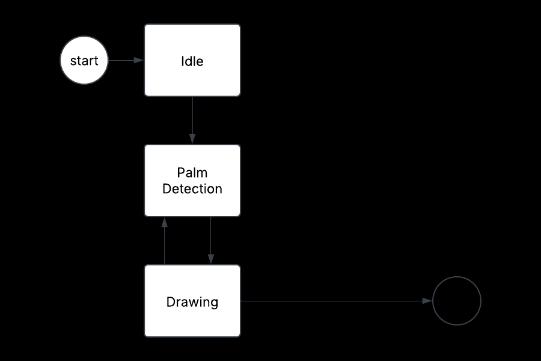
Figure1.BasicDesignofthesystem
CanvasUserInterface:Thefrontendpartofthecanvashas functionalitiesthatausercaninteractwith,thetoolscontain
International Research Journal of Engineering and Technology (IRJET) e-ISSN: 2395-0056
Volume: 12 Issue: 04 | Apr 2025 www.irjet.net p-ISSN: 2395-0072
line, rectangle, freehand, circle, eraser and a color section with6differentcolors,thegesturesareindexfinger,middle fingerandafist.Thethreegesturesareresponsiblefortool selection,drawingandclearingtheboard.
Camera Module: This module records GDG frames in real timebyusingthecomputer'scameraasaninterfaceandit also provides the video stream for the Image Processing Module. The module absorbs the video from the camera streamand recognizeshumangesturesbyprocessingand analyzingimagesinrealtime.
HandTrackingmodule:TheHandTrackingmodulegetsits functionality from MediaPipe which operates as an opensourceframeworkfromGoogleforreal-timehandtracking applications in our air canvas system. MediaPipe Hand Trackingprovidesdetectionandprecisemotiontrackingof hand fingers to enable users to interact through gestures. Our system depends on this functionality to identify the index finger position because it functions as our initial interfacebothforcreatingdrawingsandchoosingcolorsand providing clearing commands. The efficient structure of MediaPipealongwithitslightweightdesignensuressmooth real-time operational capabilities in applications. This technologyenablesaneasyandtouchlessdrawingprocess throughaconventionalcamerasetuponly.
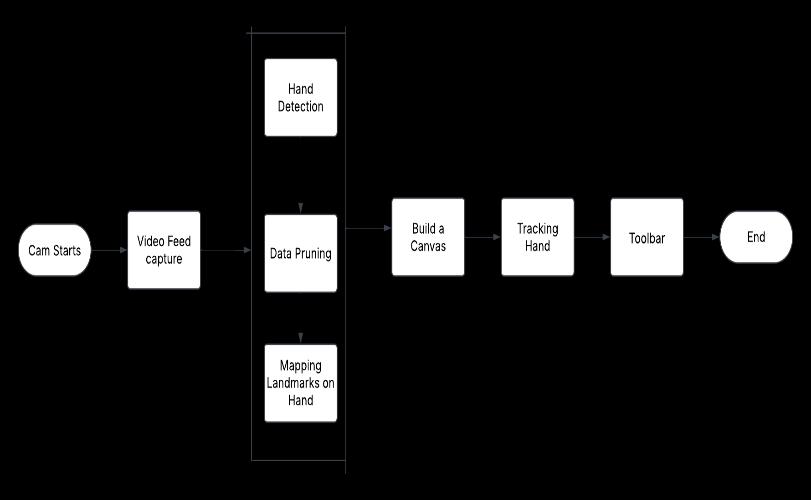
Figure2.Architectureofthesystem
An air writing recognition procedure that uses computer visionappears in theflowchart.Thealgorithm starts with camerapower-upandcontinueswithvideosynchronization. Data pruning and landmark mapping of the hand allow precision improvement at the hand detection phase. A virtual writing surface becomes available as a result of landmark identification in the hand. Hand movement trackingoccurstoguaranteeaccurategesturedetectionby thesystem.Additionally,thesystemincludesatoolbarfor user interaction including selection of different colors or canvasclearingfeatures.Thesystemreachesefficiencyfor air writing functionalities during the conclusion of this process.
This is the first interface that has the toolbar and fps monitor; wecangetitby executing the Pythonscriptthat usestheOpenCVandMediapipemodules.
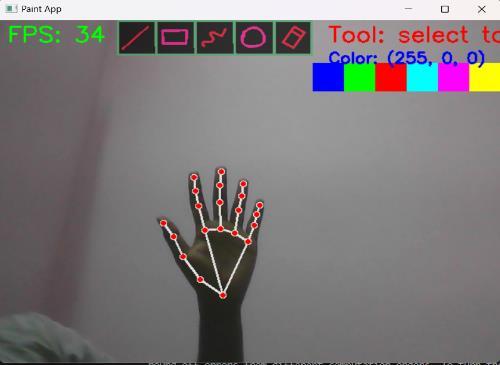
Figure3.MainInterfaceoftheapplication
To write and draw, wecan choose from five distinct tools andsixdifferentcolors.Additionally,wehaveanoptionfor erasingthelinesusingerasertool.
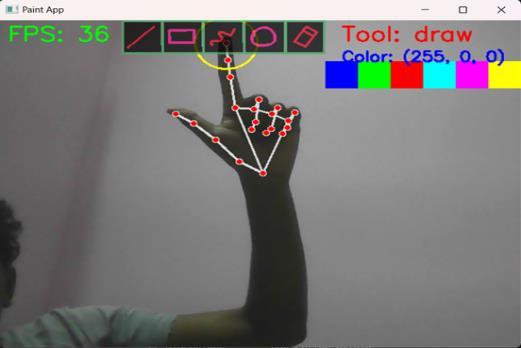
The most dependable tool for writing and drawing is the drawtool.Whenchoosingatool,wemustclosethesecond fingerinordertoisolatethetip.Wecandrawafteropening the second finger, and so on. We can use different shapes using line, rectangle and circle tools for adding more versatility to our canvas, the fps monitor is also useful to depicttheimprovementsneededinthehardwaretheuser has currently. The right side of the canvas shows us the currenttoolselectedandalsothecolor.
International Research Journal of Engineering and Technology (IRJET) e-ISSN: 2395-0056
Volume: 12 Issue: 04 | Apr 2025 www.irjet.net p-ISSN: 2395-0072
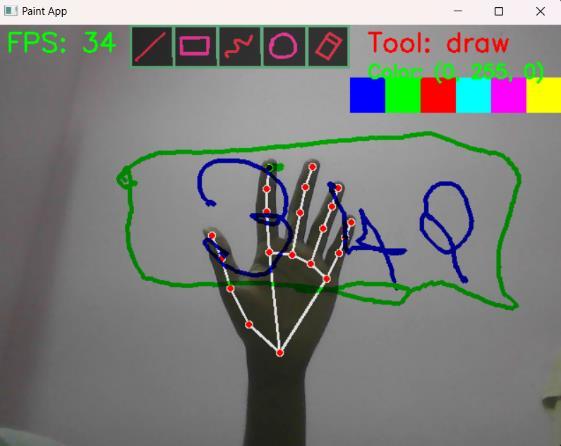
Thepathstheindexfingertakeswhendrawingaredepicted inthefigureabove.
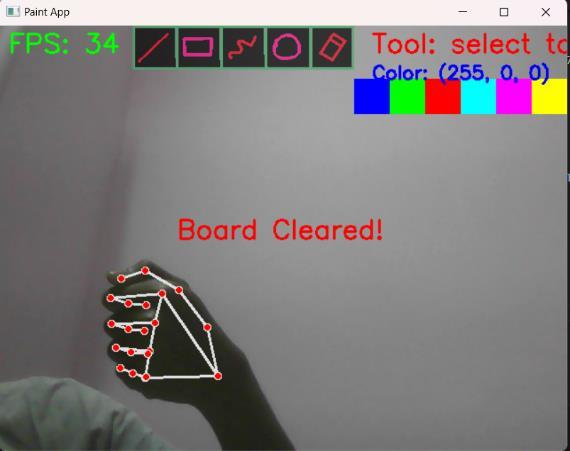
Figure6.Gestureforclearingtheboard
Wemayusethefollowingfistmotiontocleartheboard,after clearing the stuff we have drawn thus far, the message "BoardCleared"appearsonthescreen.
Aircanvastechnologysystemsdevelopmentwillconcentrate on enhancing precision and speed alongside user-friendly usabilityfactors.Amachinelearningmodelatanadvanced researchstageshould be implemented withthesystem to decrease errors while improving system adaptability. The implementation of multi-finger gestures would open up opportunitiesforuserstoexecutedigitalzoomandrotation commandsandselecttoolswithinthesystem.Thesystem gives users additional functions which provide visual informationthroughaugmentedrealityduringtheirwriting sessions. Multiple devices connected remotely can collaborate on writing by using cloud-based system synchronizationinreal-time.Programaccessibilityalongside user experience will improve because of implementing adjustabletoolbarscombinedwithgestureshortcutsinthe userinterfacedesign.Thedevelopmentof"AirCanvas"with OpenCVsoftwareenableseffectiveexplorationofcomputer vision technology potentials through an exciting user experience. Through this application users can perform drawingbyusingtheirhandmovements.Emphasisforvital subjects exists throughout the development challenges whichguidetheprocess.
[1]A.Mehra,S.Singh,P.Singh,K.GuptaandT.Agrawal,"Air CanvasforEducationalSystemswithHandTrackinginReal Time using Mediapipe: A Computer Vision," 2023 International Conferenceon Communication,Securityand ArtificialIntelligence(ICCSAI),GreaterNoida,India,2023.
[2]Y.Huang,X.Liu,X.Zhang,andL.Jin,“Adataset,approach, and application for a pointing gesture-based egocentric interaction system,” Proc. IEEE Conf. Comput. Vis. Pattern
Recognit.Workshops(CVPRW),LasVegas,NV,USA,2016, pp.370–377.
[3] X. Liu, Y. Huang, X. Zhang, and L. Jin. A cascading CNN pipeline for real-time fingertips Self-centered video recognition”,Corr,2015.
[4]Yuan-HsiangChang,Chen-MingChang,"AutomaticHandPose Detection Tracking System Using Video Serise", INTECH,Croatia,2010.
[5]Saoji,S.,Dua,N.,Choudhary,A.K.,&Phogat,B.(2021).Air canvas application using Opencv and numpy in python. IRJET,8(08).
[6] Pratik N., Lowlesh Y., Neehal J., (2024) Air canvas applicationusingOpencvandnumpyinpython.IJFIAHM.
[7]NikhilP.,AayushiS.,AmanyaV.,(2021)ColorDetection System,IJNTR.
[8]V.RamachandraH,G.Balaraju,K.Deepika,S.NavyaMand S. R. Sebastian, "Virtual Air Canvas Using OpenCV and Mediapipe," 2022 International Conference on Futuristic Technologies(INCOFT),Belgaum,India,2022.
[9]S.R.J,S.AandS.B.B,"AirCanvas:ExpressingCreativity in the Real World with OpenCV and Python," 2023 International Conference on Energy, Materials and Communication Engineering (ICEMCE), Madurai, India, 2023.
[10] B. A. Kumar, T. Vinod and M. S. Rao, "Interaction through Computer Vision Air Canvas," 2022 International Conference on Advancements in Smart, Secure and IntelligentComputing(ASSIC),Bhubaneswar,India,2022.
[11]Chandhan,TamalampudiHemaa andR, Kavin Kumar andRaj,NalinandReddy,NeelamNandaKishoreandAN, Mohammed Zabeeulla, Air Canvas: Hand Tracking Using OpenCVandMediaPipe(August1,2023).1st-International ConferenceonRecentInnovationsinComputing,Science& Technology.
[12]K.Pavithra,A.GeethaandR.Chinnaiyan,"TheVirtual Air Canvas Using Image Processing," 2023 International Conference on New Frontiers in Communication, Automation,ManagementandSecurity(ICCAMS),Bangalore, India,2023.