
International Research Journal of Engineering and Technology (IRJET) e-ISSN: 2395-0056
Volume: 13 Issue: 03 | Mar 2026 www.irjet.net p-ISSN: 2395-0072
International Research Journal of Engineering and Technology (IRJET) e-ISSN: 2395-0056
Volume: 13 Issue: 03 | Mar 2026 www.irjet.net p-ISSN: 2395-0072
Dr. Jonnadula Narasimharao 1, B. P. Deepak Kumar2, Tentu Avinash3 , Sriram Keerthipriya4 , Abhilash Radharapu5
1Associate professor, Dept of CSE CMR Technical Campus Hyderabad, Telangana, India
2Assistant professor, Dept of CSE CMR Technical Campus Hyderabad, Telangana, India 3 4 5 UG Student, Dept of CSE CMR Technical Campus Hyderabad, Telangana, India
Abstract tracking fingertip positions accurately underchanginglightconditionsandsensornoisecontinues to be a difficult problem in human-computer interaction. This paper presents Fusion Mouse, a dual-modality input platform that brings together hand-gesture recognition based on skeletal landmarks with a fully offline speech recognition module, allowing users to perform cursor operations and run system commands without touching any physical device. Gesture detection works by analyzing joint positions and applying motion-smoothing filters instead of relying on skin color, resulting in consistent recognition performance at 30–40 ms per frame on standard consumer hardware. All voice processing runs locally on the device, so no internet connection is needed, and command response stays under 260 ms. When combined, the two modules form a complete touchless input system suited for accessibility needs, hygienesensitive settings, and low-budget deployments. The setup only needs a regular webcam and microphone, showing that thoughtful signal processing can make up for basic hardware while keeping the interaction natural and easy touse.
Keywords Human-pc Interaction (HCI), Graphical User Interface (GUI), Red Green Blue (RGB), Artificial Intelligence, Human–Computer Interaction, Virtual Mouse, Gesture Recognition, Voice Assistant, Edge AI, Offline Artificial Intelligence, Real-Time Systems, TouchlessComputing
As digital devices become more common across education, healthcare, and workplaces, there is increasing demand for input methods that go beyond standard keyboards and mice. Conventional peripherals tie users to a fixed surface, require physical contact, and can create accessibility challenges for those with motor difficulties. Human-Computer Interaction (HCI) research has explored alternative modalities such as hand gestures, gaze tracking, and speech commands that feel more natural to use. FusionMouse takes this further by combining camera-based hand tracking with a locally running speech recognition engine, replacing traditional input hardware altogether. While gesture-based [3], [9]
and voice-driven [1], [5], [8] approaches have each been investigated on their own, very few systems bring both togetherinawaythatavoids conflictsbetweenthemandoperateswithoutanyinternet connection.
Physical input devices such as keyboards and mice come with several practical limitations: they depend on a flat surface, wear out over time, and reduce how freely users can move. To work around these issues, several camerabased virtual mouse systems have been built using computervisionandmachinelearningtechniques[2],[6], [21].
This project builds a virtual mouse that tracks finger positionsinrealtimeusingastandardwebcam.Computer vision and hand tracking techniques are used to detect gestures and translate them into cursor movement and click events. The implementation uses Python with OpenCV and AI-based landmark detection for smooth, real-time gesture processing. Gesture-driven cursor systems like this have already shown good results in practicalHCIsettings[4],[15].
Beyond gesture control, voice-based assistants have become a well-known way to interact with computers using spoken commands [1], [5], [8]. These hands-free systemsareparticularlyusefulforimprovingaccessibility. InFusionMouse,avoiceassistantcomponentisintegrated alongside the gesture module to handle tasks such as launching browsers, checking the date and time, and running system commands. Combining speech input with gesture control creates a more complete and flexible interactionexperience.
Traditional mouse devices need a clean, flat surface to work on and carry hygiene concerns in shared environments something that became more noticeable duringtheCOVID-19pandemic.Ontopofthat,peoplewith limited hand mobility or who work in confined spaces often struggle with conventional peripherals. Many of the camera-based alternatives developed so far still rely on
International Research Journal of Engineering and Technology (IRJET) e-ISSN: 2395-0056
Volume: 13 Issue: 03 | Mar 2026 www.irjet.net p-ISSN: 2395-0072
cloudprocessingorspecializedsensors,whichlimitshow well they work offline and raises questions about user privacy. FusionMouse takes a different approach: it uses onlyawebcamtoreadhandshapesandamicrophoneto pick up spoken commands, moving the interaction away from physical hardware and toward natural movement and speech. No extra drivers, specialized equipment, or network connection is needed, making it practical for environments with limited resources. Removing mechanical parts also means fewer components that can breakdownovertimeandlowercoststomaintain.
Several published works have explored gesture-based andvoice-controlledinterfacesaspartof broader efforts to make human-computer interaction more natural and accessible.
The work in [1] built a desktop assistant in Python that can report weather conditions and show date/time information. It uses libraries like datetime, pyttsx3, and pyaudio to handle voice interaction. While the assistant handles basic tasks well, its microphone sensitivity means the user needs to stay close to the system for commandstoregisteraccurately.
Reference [3] describes a gesture interface that locates the hand by matching pixels against preset skin-color ranges defined in RGB space. This approach works in controlled conditions, but when lighting changes or the background becomes complex, the detection accuracy drops noticeably, which reduces its reliability in realworldsettings.
The system in [5] processes voice commands entirely offline using Python and pyttsx3 for speech output. Running without a network connectionisa strength, but it means the system cannot fetch live data or interact withwebservices,whichlimitswhatitcandoinpractice.
The assistant described in [8] can handle a broad set of commands including launching apps, playing media, and answering questions. Its main drawback is higher response latency, which becomes noticeable during continuous use and disrupts the flow of real-time interaction.
Work in [9] used a specially designed hand pad to improvegesturedetectionaccuracy.Theaddedhardware does help with precision, but several of the angled gestures required by the system turned out to be unintuitive and difficult for new users to perform reliably.
The camera-based control system in [23] supports both flat and depth-based hand gestures and can handle two hands at once. However, certain operations require the
user to use both hands together, which adds complexity andmakesthosegestureslessconvenientineverydayuse.
The proposed system architecture is broken down into two main modules: (1) Virtual Mouse Module and (2) Voice Assistant Module. These two modules are designed toworkseparatelybutwithacommonactivationsystem.
1. Virtual Mouse Module
TheVirtualMousemoduleallowsfornon-contactcursor control through real-time hand gesture recognition via a webcam or in-built camera. The module is activated by a voice command (“Dora, turn on gesture recognition”), afterwhichthecameraactivatesandstartsdetectinghand landmarks.
Thefollowinggesturesarerecognizedandmapped:
1. Neutral Gesture
When all fingers are extended, the module temporarily halts active gesture recognition to avoid executing unintendedactions.
2. Cursor Movement
When the index and middle fingers are raised, the cursor moves based on fingertip positions detected by the camera.
3. Left Click
Whenboththeindexandmiddlefingersareraisedandthe index finger is semi-extended, a left-click action is executed.
4. Right Click
Whenboththeindexandmiddlefingersareraisedandthe middle finger is semi-extended, a right-click action is triggered.
5. Double Click
Whentheindexandmiddlefingertipsapproacheachother andtouch,adouble-clickactionisexecuted.
6. Scrolling
When the thumb and index finger are connected, vertical scrollingfunctionalityisactivated.
7. Drag and Drop
A sustained gesture setup enables click-and-hold
International Research Journal of Engineering and Technology (IRJET) e-ISSN: 2395-0056
Volume: 13 Issue: 03 | Mar 2026 www.irjet.net p-ISSN: 2395-0072
functionality to transfer files or objects from one directorytoanother.
8. Multiple Item Selection
Certain gesture combinations enable the selection of multipleitemswithinthegraphicalenvironment.
9. Volume Control
Handdistancevariationorgestureschangesystemaudio volumedynamically.
10. Brightness Control
Similar gesture modulation allows control of screen brightness.
TheVirtualMousemodulecanbeturnedoffbythevoice command:
“Dora,turnoffgesturecontrol.”
Voice Assistant Module
The Voice Assistant module allows the system to be controlled through voice commands. It receives commands from the user and performs system-level and web-basedtasksaccordingly.
Majorfeaturesinclude:
1. Web Search
Whentheusergivesthecommand, “Dora,searchfor{query}”, the system automatically opens a web browser and searchesforthequeryonGoogle.
2. Location Search
Whentheusergivesthecommand, “Dora,find{location}”, the system opens the location in Google Maps in a browsertab.
3. File Navigation
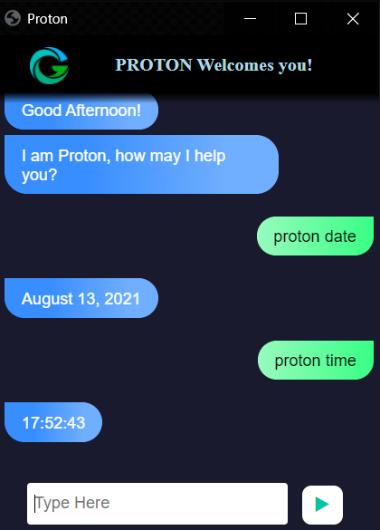
Whentheusergivesthecommand, “Dora,listfiles”, thesystemliststheavailablefileswithindexednumbers. Theusercanthenenterarangetoopenthedesiredfiles.
4. Date and Time Retrieval
Whentheusergivesthecommand, “Dora,whatistoday’sdate?” or
“Dora,whatisthecurrenttime?” thesystemretrievesreal-timesysteminformation.
5. Copy and Paste Operations
Whentheusergivesthecommands, “Dora,copy” and “Dora,paste”, the system controls the clipboard without using the physicalkeyboard.
Description of Table A – Gesture Control System
Component Methodology Description Functional Description Image Acquisition Capturesreal-time videoframesusing awebcam. Providescontinuous visualinputofhand movementstothe system.
Pre-processing Performsnoise reduction,frame resizing,andcolor spaceconversion. Enhancesimage qualityforaccurate handdetectionunder varyinglighting conditions.
HandDetection& Landmark Extraction Detectshandregion andextractskey fingertiplandmarks usingcomputer visionalgorithms. Identifies precise finger positions required for gesture interpretation.
Gesture Recognition Engine Analyzes finger positions and motion patterns to classifygestures.
Recognizesactions suchascursor movement,click, scroll,drag,anddrop.
Cursor Control Interface Mapsrecognized gesturestosystem mouseevents. Executesreal-time cursorcontroland commandoperations onthecomputer.
Table A presents a structured overview of the major components involved in the gesture-controlled virtual mouse system along with their corresponding methodologyandfunctionalroles.
The system begins with the image acquisition module, which captures real-time video input using a standard webcam. The captured frames undergo preprocessing to enhance image quality and ensure robustness against noiseandlightingvariations.
Following preprocessing, the hand detection and landmark extraction module identifies the hand region anddeterminesprecisefingertippositionsusingcomputer visiontechniques.Theselandmark pointsareanalyzed by thegesturerecognitionengine,whichclassifiespredefined gesturesbasedonspatialorientationandmotionpatterns. Finally, the cursor control interface translates the
2026, IRJET | Impact Factor value: 8.315 | ISO 9001:2008 Certified Journal | Page820
International Research Journal of Engineering and Technology (IRJET) e-ISSN: 2395-0056
Volume: 13 Issue: 03 | Mar 2026 www.irjet.net p-ISSN: 2395-0072
recognized gestures into corresponding mouse events suchascursormovement,clicking,scrolling,
Component Methodology Description Functional Description
Audio Input Module Capturesvoice inputusinga microphone.
Speech Recognition Engine Convertsspeech signalsintotext usingspeech-to-text algorithms.
Natural Language Processing(NLP)
Analysesand interpretsthe meaningof recognizedtext.
Command ProcessingUnit Maps interpreted commands to predefined system functions.
Providesrealtimespeechdata tothesystem.
Translatesuser voicecommands intomachinereadableformat.
Determines user intent and identifies appropriate actions.
Executestasks suchasopening browser,fetching date/time,or launching applications.
Text-to-Speech Module Convertssystem responsesinto audiooutput. Providesaudible feedbacktothe userfor interactive communication.
Table B provides a structured summary of the core components of the voice control system along with their methodological approach and functional responsibilities. The system begins with the audio input module, which capturesthe user’s speech through a microphone in real time. The captured audio signals are then processed by the speech recognitionengine,whichconvertsspokenlanguageinto machine-readabletextusingspeech-to-textalgorithms. The recognized text is further analyzed by the Natural Language Processing (NLP) module to interpret user intent and determine the appropriate command. The command processing unit then maps the interpreted instruction to predefined system operations such as launchingapplications,openingwebbrowsers,retrieving date and time information, or performing other systemlevel tasks. Finally, the text-to-speech module generates audibleresponses, enabling interactiveanduser-friendly communication.
Overall, the table demonstrates how the integration of speech recognition, NLP, and command execution modules enables efficient, hands-free system control throughvoiceinteraction.
The gesture module works by reading hand movements through a camera and mapping them to cursor actions. A standard webcam feeds live video into a hand tracking pipeline that runs continuously. Rather than trying to isolatethehandusingskincolor,themoduledetectsfinger joints and palm orientation through a landmark-based approach, giving more stable results across different skin tonesandbackgrounds.
For each video frame, the positions of fingertip joints are extracted and used to build a geometric picture of the hand. The system then looks at how finger angles, distances, and movement paths relate to each other to figure out what the user intends. Based on these calculations, cursor actions like moving the pointer, clicking,drag-and-drop,scrolling,andzoomcontrol.
Keeping cursor movement stable is important, so the system applies motion smoothing and checks that a gesture is consistent across multiple frames before acting on it. Small jitters from lighting changes or sensor noise arefilteredout.Agestureonlytriggersacommandafterit has been held steady long enough, which cuts down on accidentalinputs.
The whole gesture processing pipeline is built to run efficientlyoneverydaylaptophardwarewithoutneedinga GPU or any extra sensor. This makes the system easy to deployandaccessibletoawiderangeofuserswhowanta hands-free computing experience without buying special equipment.
The voice module listens through the microphone and turns spoken audio into text using a recognition engine that runs entirely on the local machine. Since all processingstayson-device,usercommandsarenotsentto anyexternalserver,whichkeepsdataprivateandremoves thedelaythatcomeswithinternetround-trips.
After the spoken input is converted to text, the system parses it to determine what the user wants to do. It separates commands that perform actions like opening appsornavigatingfiles frominformational requestslike asking for the time or date. This classification uses rulebased parsing along with simple contextual logic to pick the right response for each type of input. This keeps the response logic straightforward while still being able to handleavariedsetofspokenrequests.
When background noise is present, the system uses confidence scores to decide whether a recognized
International Research Journal of Engineering and Technology (IRJET) e-ISSN: 2395-0056
Volume: 13 Issue: 03 | Mar 2026 www.irjet.net p-ISSN: 2395-0072
command is reliable enough to act on. Inputs that fall below the threshold are held back until they can be rechecked or the user repeats them. Responses are given either as text on screen or through text-to-speech audio, sotheusergetsfeedbackeitherway.
Thevoice processingpipeline was builtfrom thestart to work without an internet connection. It does not rely on any third-party speech service, so it performs consistently regardless of network availability and does notexposevoicedatatooutsidesystems.
A shared controller coordinates when gesture control and voice commands are active. Both modules can run independently without interfering with each other. Switching between them happens either when the user saysatriggerwordorwhenthesystemdetectsachange inwhattheuseristryingtodo.
When the user asks for information, the system first checks a local data store before falling back to other sources. If a more complex answer is needed, a small local language model handles it. The data is indexed to allowfastlookupswithoutusingmuchmemory.
The system tracks recent conversation context within a session to make follow-up commands feel more natural, but it does not store any personal data once the session ends. If the user gives an incomplete command, the systemhandlesitgracefullyandpromptsforclarification ratherthanfailingsilently.
Taken together, Fusion Mouse is a fully offline system thatmergesgestureandvoiceinputintoasingleworking platform. The focus throughout the design has been on keepingitpractical,private, andusableacross arangeof everydaycomputingsituations.
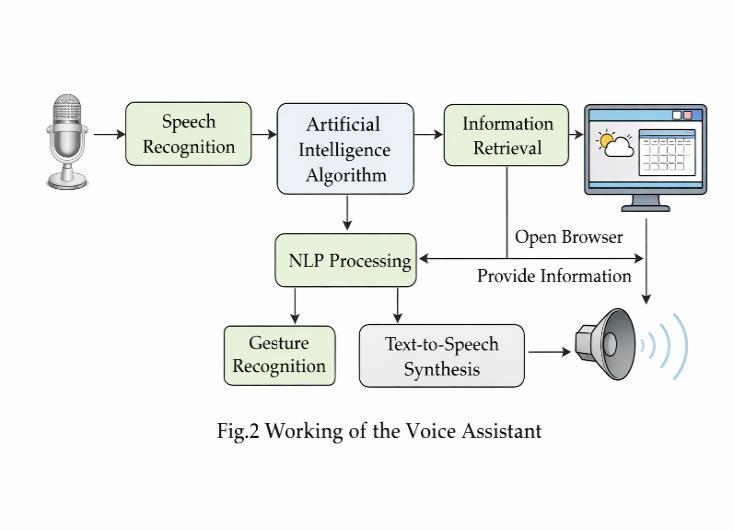
FusionMouse was built to address three shortcomings seen in current touchless input systems. First, it removes the need for cloud connectivity by keeping both gesture andvoiceprocessingentirelyonthelocaldevice.Second,it addsacoordinationlayerthatstopsthegestureandvoice modules from conflicting when both are active. Third, it runsonordinaryconsumerhardwarewithoutneedingany extradriversorspecialsensors.Eachofthesegoalssetsit apart from previous designs that either treat gesture and voice separately or rely on remote servers to handle realtimecomputation.
Keepinghardwarerequirementslowwasakeygoal,since this makes the system cheaper to use and easier to carry from one place to another. Using just a webcam and a microphone means almost any laptop can run it without any setup beyond installing the software. The system was also designed with a wide range of users in mind, so that people of different ages and technical skill levels can use gestures and speech to control their computer without a steeplearningcurve.
HardwareRequirements
Memory(RAM):Minimum4gigabytes.
Systemtype:64-bit,x64-basedprocessor.
Basefrequency:2.30GHz.
InputDevice:Webcam,Microphone
SoftwareRequirements
Systemsoftware:WindowsXP,7,8,and10.
Python3.13.9version
AnacondaDistribution
International Research Journal of Engineering and Technology (IRJET) e-ISSN: 2395-0056
Volume: 13 Issue: 03 | Mar 2026 www.irjet.net p-ISSN: 2395-0072
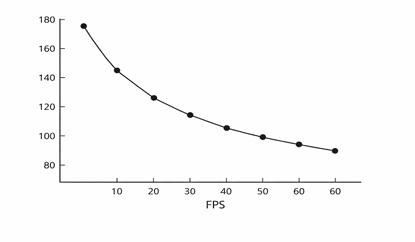
Figure 3 shows the evaluation setup used to test the system, covering gesture accuracy, offline voice command handling, response times, and how efficiently the system used hardware under realistic operating conditions.
Testingwasdoneona regularconsumerlaptop usingits built-in webcam and microphone, to verify that the systemworkswithoutanyspecial hardware.Trialswere run both under steady indoor lighting and in conditions where the light changed over time. Several participants with different hand sizes, movement styles, and voices took part so the results would reflect a broader user groupratherthanjustasingleprofile.
Gesture accuracy was measured by counting how many gestures were correctly identified out of the total attempted across extended interaction sessions. The tested gestures covered the core set of operations: moving the cursor, single click, double click, drag-anddrop, scrolling, and zoom. Each was repeated across multipletrialstogetareliablepictureofperformance.
Recognitionheldupwellbecausethemotionfilteringand frame validation steps weeded out most false triggers. Evenwhenhandsmovedquicklyorpartofthehandwas hiddenfrom the camera, incorrectactivationswere rare. Each frame took between 30–40 msto process, which was fast enough for smooth cursor movement at normal frame rates. Tracking stayed consistent throughout longer sessions with no drifting or lag building up over time.
Theofflinevoicemodulewastestedforhowaccuratelyit recognizedcommands,howreliablyitidentifiedwhatthe userwantedtodo,andhowfastitresponded.Usersgave commands covering app launching, web browsing, and system queries in both quiet rooms and settings with someambientnoise.Inquietconditions,commandswere
interpreted correctly with very few errors. In noisier conditions, the confidence filtering kept the system from actingonunclearinputs.Theaverage
voice command processing latency ranged between 170–260 ms,whichvariedbasedonhowlongandcomplexthe spokeninputwas.Becauseallprocessingwasdonelocally, responsetimeswerepredictableanddidnotfluctuatedue tonetworkconditions.
How quickly the system could switch from gesture mode to voice mode was also measured. Mode transitions finishedinroughly 80–100 ms,fastenoughthatusersdid not notice any gap when alternating between hand gesturesandspokencommandsduringnormaluse.
CPU and memory usage were tracked at three frame rate settings: 10, 30, and 60 FPS. Across all three, the system usedamoderateshareofCPUresourcesandkeptmemory use steady. Running at higher frame rates made cursor movementsmootherbutdidnotcausethesystemtoslow downorbecomeunresponsive.
Running everything locally also meant the system did not slowdownorfailwhennetworkconnectivitywaspooror unavailable. In contrast to cloud-based tools, response timesstayedconsistentbecausetheywerenotaffectedby serverloadorinternetspeed.
Userexperiencewasassessedthroughopenfeedbackfrom participants after they used the system. Most found the controls easy to learn and felt less physical strain comparedtousingastandardmouse.Thetouchlessnature of the design was mentioned as a specific benefit by participants who were concerned about hygiene or had physicallimitationsaffectingtraditionalmouseuse.
International Research Journal of Engineering and Technology (IRJET) e-ISSN: 2395-0056
Volume: 13 Issue: 03 | Mar 2026 www.irjet.net p-ISSN: 2395-0072
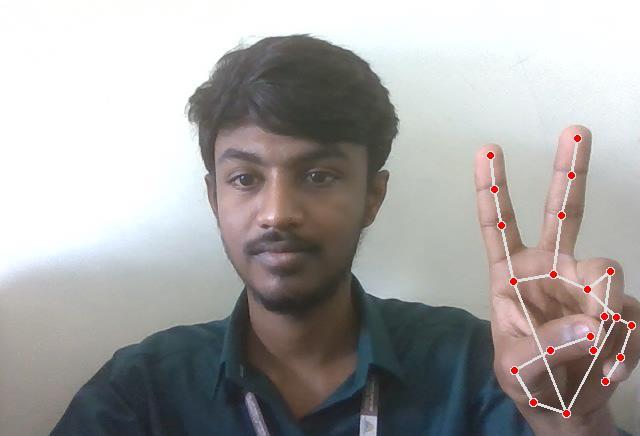
Fig.4 Cursormovement
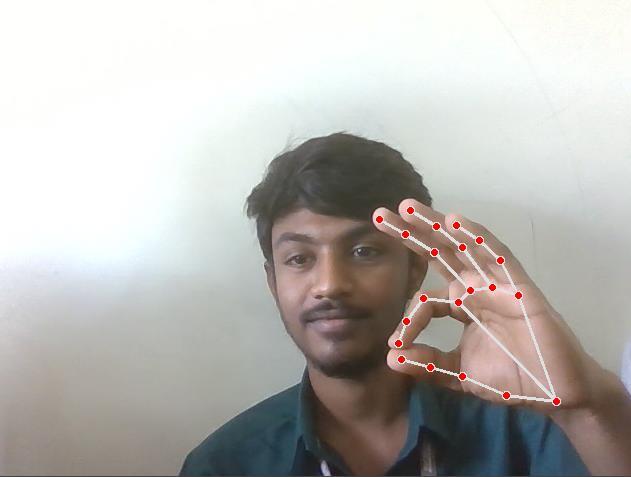
Fig.5 Scrollingmovement
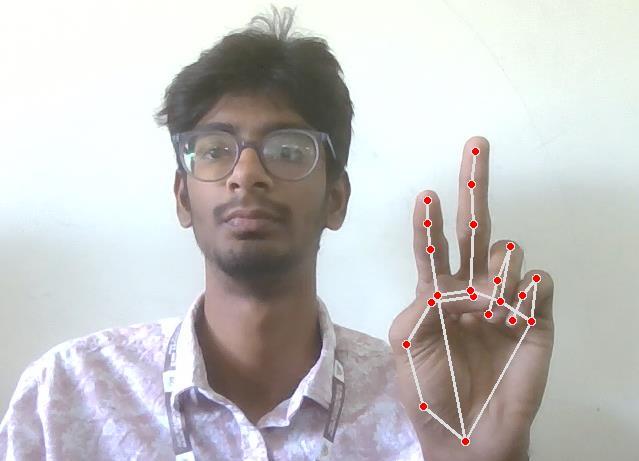
Fig.6 LeftClickmovement
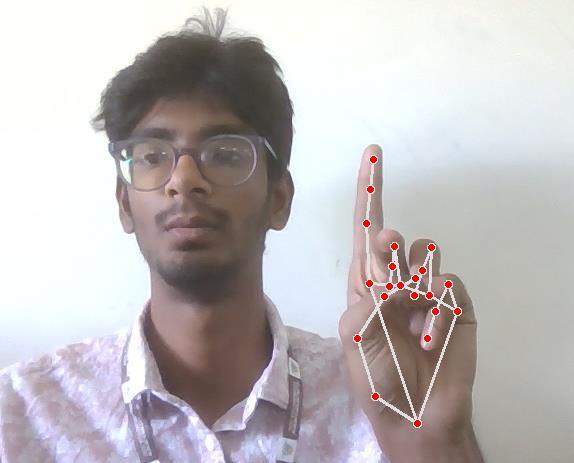
Fig.7 RightClickMovement
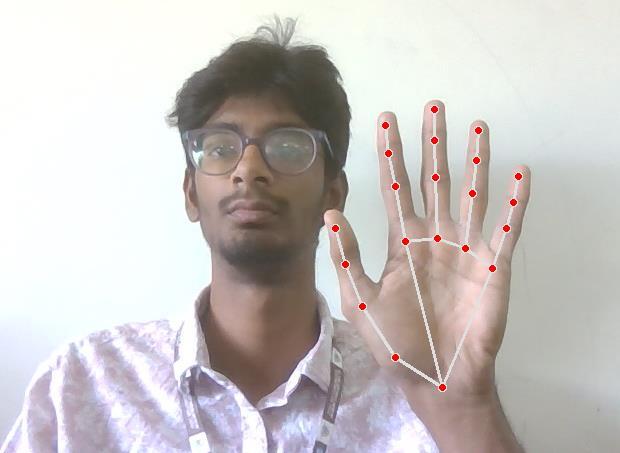
Fig,8 NeutralGesture
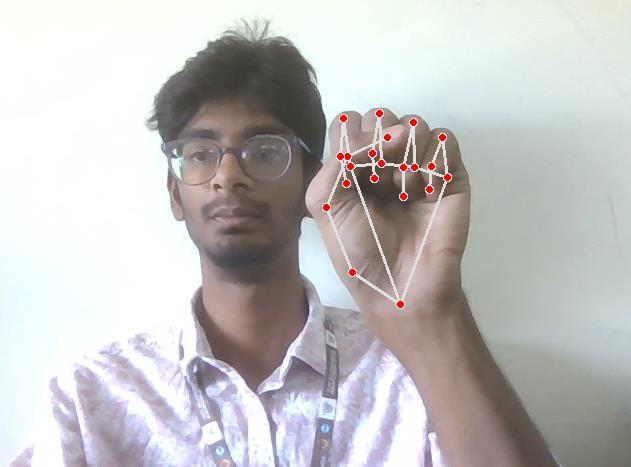
Fig.9 MultipleItemSelectionMovement
International Research Journal of Engineering and Technology (IRJET) e-ISSN: 2395-0056
Volume: 13 Issue: 03 | Mar 2026 www.irjet.net p-ISSN: 2395-0072
Thisworkshowedthataregularwebcamandmicrophone are enough to build a working touchless input system whentheunderlyinggestureandvoiceprocessingisdone carefully. In testing, gesture recognition processed each frame in 30 to 40 ms and voice commands were responded to within 260 ms, both without any internet connection. The offline design was particularly useful in environments with some background noise, where a cloud-based approach would have added unpredictable delays. User feedback from the evaluation suggested that theinterfacewaseasytopickupandlesstiringtousethan a physical mouse over time. Going forward, the plan is to supportawiderrangeofgesturesusingtrainedclassifiers, make the system more reliable under harsh lighting, and letuserscustomizetheirowncommand phrasesto better matchhowtheywork.
[1]Research Paper on Desktop Voice Assistant VisKumar Dhanraj (076) ,Lokesh Kriplani (403) , Semal Mahajan (427),B.Tech Scholar Department of Information TechnologyDr.AkhileshDasGuptaInstituteofTechnology And Management,February 2022
[2] Deep Learning-Based Real-Time AI Virtual Mouse SystemUsing ComputerVisiontoAvoidCOVID-19Spread S. Shriram , B. Nagaraj , J. Jaya , S. Shankar and P. Ajay , October2021
[3] VirtualMouseControlUsingHandClassGesture,Vijay Kumar Sharma, Vimal Kumar, Md. Iqbal, Sachin Tawara, Vishal Jayaswal, Department of Computer Science and EngineeringMIET,Meerut,December2020
[4] Real-time virtual mouse system using RGB-D images and fingertip detection, Dinh Son Tran1 & Ngoc-Huynh
Ho1&Hyung-JeongYang1&Soo- HyungKim1.GueeSang Lee1,November2020
[5] DESKTOP VOICEASSISTANT,GauravAgrawal,Harsh Gupta, Divyanshu Jain, Chinmay Jain, Prof. Ronak Jain. Department of Information Technology, A.I.T.R, Indore, Madhya Pradesh, India. Assistant Professor, Department of Information Technology, A.I.T.R, Indore, Madhya Pradesh, India,May2020
[6] Abhilash S S, Lisho Thomas, NWCC (2018) Virtual Mouse Using Hand Gesture. International Research Journal of Engineering and Technology (IRJET), April 2018
[7] Wang P, LiW, Ogunbona P, Wan J, Escalera S (2018) RGB-D-based human motion recognition with deep learning:asurvey,April2018
[8] PersonalAssistantwithVoiceRecognitionIntelligenc, Dr. Kshama V. Kulhalli, Dr.KotrappaSirbi, Mr. Abhijit J. Patankar, International Journal of Engineering Research and Technology. ISSN 0974-3154 Volume 10, Number 1 (2017)
[9] Human hand gesture based system for mouse cursor control, Horatiu-Stefan GrifP,Trian Turc,11th International Conference Interdisciplinarity in Engineering,INTER-ENG2017,5-6October2017
[10] Haria A, Subramanian A, Asokkumar N, Poddar S, Nayak JS (2017) Hand gesture recognition for human computerinteraction,2017
[12] Tang D, Chang HJ, Tejani A, Kim T-K (2017) Latent regressionforest:structuredestimationof3DHandPoses, 2017
[13]XuP(2017)Areal-timehandgesturerecognitionand human-computerinteractionsystem,2017
[14]Camgoz,N.C.,Hadfield,S.,Koller,O.,Bowden,R.,2016. Using convolutional 3D neural networks for user independent continuous gesture recognition, in: 2016 23rd International Conference on Pattern Recognition (ICPR),2016
[15] Grif H-S, Farcas CC (2016) Mouse cursor control systembasedonhandgesture,2016
[16] Static and Dynamic Hand Gesture Recognition in Depth Data Using Dynamic Time Warping, Guillaume Plouffe and Ana-Maria Cretu, Member, IEEE , February 2016
[17] Cursor Control using Hand Gestures Pooja Kumari, Saurabh Singh Vinay Kr. Pasi, Recent Trends in Future Prospective in Engineering & Management Technology,
International Research Journal of Engineering and Technology (IRJET) e-ISSN: 2395-0056
Volume: 13 Issue: 03 | Mar 2026 www.irjet.net p-ISSN: 2395-0072
[18] Deep Sign: Hybrid CNN-HMM for Continuous Sign Language Recognition , Oscar Koller , Richard Bowden, HermannNey,2016
[19] H.S. Grif, Z. German, A.Gligor, Hand posture mouse. ProcediaTechnology,19(2015)
[20]KhamisS,TaylorJ,ShottonJ,etal(2015)Learningan efficient model of hand shape variation from depth Images,2015
[21] Reza MN, Hossain MS, Ahmad M (2015) Real time mouse cursor control based on bare finger movement usingwebcamtoimproveHCI,May2015
[22]SharpT,KeskinC,RobertsonD,etal(2015)Accurate, robust, and flexible real-time hand tracking. In: proceedingsofthe33rdannualACMconferenceonhuman factorsincomputingsystems,2015
[23] Vision-Based Interpretation of Hand Gestures for Remote Control of a Computer Mouse, Antonis A. Argyros and Manolis I.A. Lourakis, Institute of Computer Science, Foundation for Research and Technology - Hellas (FORTH), VassilikaVouton, P.O.Box 1385, GR 711 10, Heraklion,Crete,Greece,May2006