
International Research
Volume: 12 Issue: 11 | Nov 2025 www.irjet.net p-ISSN: 2395-0072
International Research
Volume: 12 Issue: 11 | Nov 2025 www.irjet.net p-ISSN: 2395-0072
Arnav Sharma1
1Student, B.E. – Software Engineering, Chitkara University, Punjab, India
Abstract - This paper presents the design and implementation of a low-cost dual-screen smart mirror built around an Arduino Uno microcontroller and an ESP8266 Wi‑Fi module. Two 1.8‑inch TFT LCDs are mounted behind a partially reflective acrylic mirror and used to display time, date, weather conditions, indoor and outdoor temperature, a to‑do list and a simple news headline widget. The ESP8266 connects to the internet, obtains network time and weather data from public web APIs, formats the information as serial messages and forwards it to the Arduino over a software serial link. The Arduino is dedicated to sensor acquisition and graphics rendering, driving both TFT displays using the ST7735 controller. A PIR motion sensor enables automatic activation of the screens when the user is present, while a DHT11 sensor provides indoor temperature measurements that are combined with the outdoor temperature from the weather API. A simple Linux command‑line interface allows the user to choose, in real time, which information widget should be shown on each screen. The resulting system demonstrates how microcontroller‑class hardware can be used to prototype an IoT‑enabled smart mirror without requiring a full single‑board computer such as a Raspberry Pi.
Key Words: Smart mirror, Internet of Things (IoT), Arduino, ESP8266, TFT display, PIR sensor, DHT11, Linux CLI.
Smart mirrors combine a reflective surface with an embedded electronic display to present contextual information such as time, weather, calendar events or notifications while still functioning as a regular mirror. Mostpublisheddesignsrelyonasinglelargedisplayanda single‑boardcomputer,forexampleaRaspberryPirunning a web‑based smart‑mirror framework. In contrast, this project explores a different design point: a microcontroller‑based smart mirror that uses two small TFT displays driven directly by an Arduino Uno, with a separate ESP8266 NodeMCU module responsible for all networkingtasks.
The primary goals of the system are: (i) to demonstrate that dual‑screen smart‑mirror functionality can be achieved using modest 8‑bit hardware, (ii) to separate network‑facing code and API keys from the display
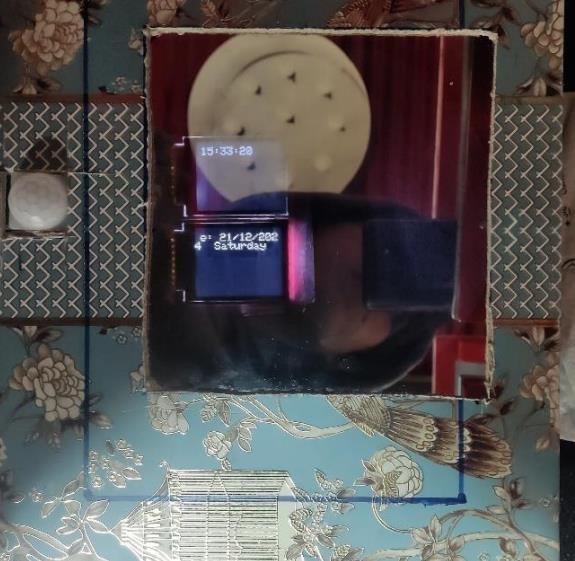
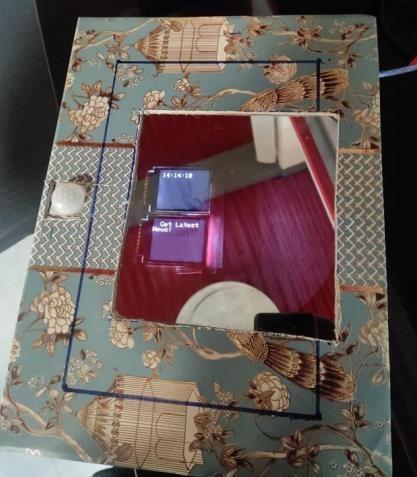
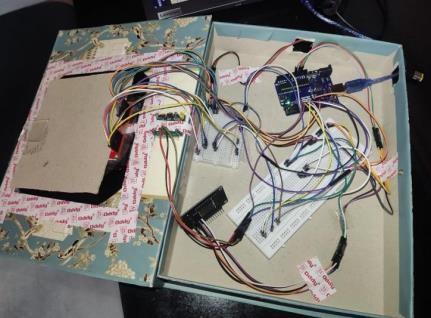
controller for better modularity and security, and (iii) to provide a flexible interaction model in which the user can dynamically assign different information widgets to either display via a simple Linux terminal interface. The finished prototype is shown in Fig. 2 and Fig. 3 (front view and internal wiring respectively), and a short demonstration videoisavailableonline.[9].
Numerous smart‑mirror implementations have been reported in both hobbyist communities and academic literature. Many designs are based on the MagicMirror² framework running on a Raspberry Pi, where a web browserrendersHTMLwidgetsshowingtime,weatherand news feeds behind a two‑way mirror. Several research papersdescribeIoT‑enabledmirrorsthatdisplaydate,time and weather while integrating features such as voice assistants, home‑automation control or security cameras. However, these architectures usually assume the presence of an operating system and relatively high processing and memoryresources.
Closer to the embedded domain, there are designs that employanArduinoUnowithasingleLCDorTFTdisplayto showbasicinformation,butthesetypicallytreatthemirror asasinglecombineddisplaysurface.Thedesignpresented inthispaperdiffersinthreeways:itusestwoindependent TFT panels, it delegates all Internet communication to a separate ESP8266 module, and it introduces a Linux command‑line interface as a lightweight yet powerful controlmechanismforselectingthecontentofeachscreen.
Thesmartmirrorsystemconsistsoffourmainsubsystems: (1) the sensing and display controller built around an Arduino Uno, (2) the Wi‑Fi and web‑API subsystem implemented using an ESP8266 NodeMCU board, (3) the mirror assembly containing two 1.8‑inch ST7735‑based TFTdisplaysmountedbehindareflectiveacrylicsheet,and (4) a Linux PC that acts as a control console via the serial port.
Volume: 12 Issue: 11 | Nov 2025 www.irjet.net
The NodeMCU connects to the home Wi‑Fi network and periodically obtains network time using an NTP client. It then calls a public weather API for the city of Chandigarh and parses the resulting JSON payload to extract the current temperature and a short textual weather description. It also generates static strings representing a to‑do list and calendar information using the TimeLib library.Allofthisinformationisformattedaslabelledlines, for example “Time:HH:MM:SS” or “Weather:clear sky”, and transmittedoveraUARTlinktotheArduino.
TheArduinoUnoreceivestheselabelledlinesonasoftware serial port implemented with the AltSoftSerial library. It storesthelatestvaluesinstringbuffersandcombinesthem with indoor temperaturereadings obtained from a DHT11 sensor. APIR motionsensor connected toa digital input is usedtodecidewhenthemirrorshouldbeactive.Whenthe sensor detects motion, the Arduino restores the most recent content on both TFT displays and starts a thirty‑secondtimer.Ifnofurthermotionisdetectedbefore the timer expires, the displays are cleared to black to reducepowerconsumption.
The prototype is built in a cardboard enclosure sized to accommodatethemirrorandelectronics.Two1.8‑inchTFT modules based on the ST7735 controller are mounted behind cut‑outs in an acrylic mirror sheet so that the displayedtextappearstofloatwithinthereflectivesurface. Each TFT uses an SPI interface plus dedicated chip‑select, data/command and reset lines. To avoid contention, the two displays share the SPI clock and data lines but have separatechip‑selectandresetpins.
The Arduino Uno is responsible for driving both displays andreading the local sensors.ADHT11 moduleconnected to a digital pin provides indoor temperature and humidity readings, while a PIR motion sensor mounted on the front paneldetectsuserpresence.TheNodeMCUESP8266board is mounted inside the enclosure and powered from the same 5 V USB supply as the Arduino, with on‑board regulation providing 3.3 V for the Wi‑Fi module. A simple UART connection implemented using AltSoftSerial carries data from the NodeMCU to the Arduino. The Linux PC is connectedtotheArduino’sprimaryUSB‑serialinterface.
The software is divided into three main programs: firmware for the ESP8266, firmware for the Arduino Uno, and a lightweight Linux terminal client. The ESP8266 firmware is responsible for network connectivity and API access. After joining the configured Wi‑Fi network, it uses anNTPclient to synchroniseits internal clock andqueries a weather API endpoint exposed by OpenWeather. The HTTP response is parsed using ArduinoJson to extract the current outdoor temperature and a brief weather description string. The firmware also constructs a simple calendarstringandafixedto‑dolist.
Volume: 12 Issue: 11 | Nov 2025 www.irjet.net
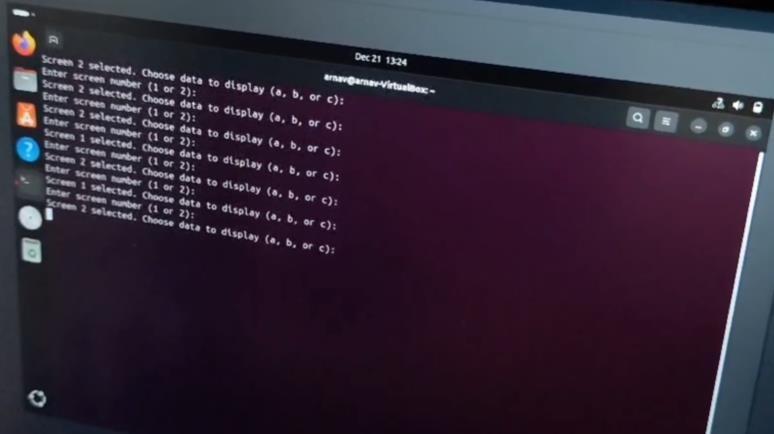
Periodically, the ESP8266 prints a sequence of labelled lines to its serial port: current time, weather description, outdoortemperature,calendarstring,to‑dolistheaderand a placeholder for news. On the Arduino side, these messagesarereadfromtheAltSoftSerialport,andaparser functionupdatesthecorrespondingglobalstringvariables. Indoor temperature readings from the DHT11 are combined with the outdoor temperature string to create a compositemessageshowingbothvalues.
ThemainloopontheArduinomonitorsthePIRsensorand the USB serial port connected to the Linux PC. When motion is detected, the loop enables the displays and processes any pending user commands from the terminal. The user is first promptedtoselect a screen number(1 or 2) and then to choose a widget option labelled “a”, “b” or “c”. For screen 1, option “a” selects the time widget, “b” selects the weather description and “c” selects the combined indoor/outdoor temperatureview. Forscreen2, option“a”selectsdateandday,“b”selectstheto‑dolistand “c” selects the news string. A small rendering function clearsthechosenTFT,setsfontandcolourparametersand printstherequestedtext.
The prototype smart mirror successfully demonstrates dual‑screen operation using an Arduino‑class microcontroller. In normal use the PIR sensor reliably detects a person approaching the mirror, at which point both TFT displays wake from a blank state and restore theirlastcontents.TheLinuxterminalinterfaceprovidesa convenientwaytoexperimentwithdifferentcombinations of widgets on the two screens without needing to recompilefirmware.Userscan,forexample,keeptimeand weatheronthetopdisplaywhilecyclingbetweencalendar, to‑dolistandnewsonthelowerdisplay.
Because the ESP8266 handles all HTTP requests and JSON parsing, the Arduino firmware remains relatively simple and timing‑deterministic, focused mainly on sensor handling and graphics. This separation of concerns also
keeps API keys and network credentials on the Wi‑Fi module, which could, in a more advanced design, be replacedorupdatedindependentlyofthemirrorhardware. The main limitations of the current prototype are the limited resolution and viewing angle of the small TFT displaysandtheabsenceofadvancedfeaturessuchasuser recognition or voice interaction. Nevertheless, the system serves as a useful platform for experimenting with IoT‑connectedambientdisplaysonconstrainedhardware.
Thispaperhasdescribedthedevelopmentofadual‑screen smart mirror that combines an Arduino Uno, an ESP8266 Wi‑Fi module, motion and temperature sensors and two 1.8‑inch TFT displays. By delegating internet connectivity and API integration to the ESP8266 and reserving the Arduinosolelyforsensormanagementanddisplaycontrol, the design demonstrates an effective division of labor between microcontrollers. The Linux terminal interface provides a flexible mechanism for selecting which information is shown on each display without requiring a graphicalconfigurationtool.
Future work could include migrating to higher‑resolution IPS displays, integrating additional data sources such as calendar services or task managers, and exploring richer interactiontechniques,forexamplevoicecontrolorgesture recognition.Thepresentimplementation,however,already achieves the core smart‑mirror experience with inexpensive hardware and relatively simple firmware, making it well suited for educational settings and DIY home‑automationprojects.
[1] M. Teipen et al., "MagicMirror²: An open modular smartmirrorplatform,"MagicMirror²Project,online: https://magicmirror.builders/
[2] "IoT Based Smart Mirror Using Raspberry Pi," Int. J. Eng.Res.Technol.(IJERT),vol.8,no.6,2019.
[3] "IoT based Smart Mirror using Raspberry Pi," Int. J. RecentAdv.Sci.Eng.Technol.(IJRASET),2018.
[4] OpenWeather, "Weather API," https://openweathermap.org/api,accessed2025.
[5] NewsAPI.org, "News API Documentation," https://newsapi.org/,accessed2025.
[6] Arduino, "Arduino Uno Rev3," https://docs.arduino.cc/hardware/uno-rev3, accessed2025.
[7] Espressif Systems, "ESP8266EX Datasheet," https://www.espressif.com/,accessed2025.
International Research Journal of Engineering and Technology (IRJET) e-ISSN: 2395-0056
[8] A.Sharma, "Smart Mirror Arduino–LinuxCLI Project Report," SIT‑111 Task 3.8HD, Chitkara University, 2023.
[9] A.Sharma,“SIT111|3.8HD|SmartMirror Implementation”, https://www.youtube.com/watch?v=XgDFLYp4BZM
Volume: 12 Issue: 11 | Nov 2025 www.irjet.net p-ISSN: 2395-0072 © 2025, IRJET | Impact Factor value: 8.315 | ISO 9001:2008 Certified
| Page951