
Note: Use Bookmarks panel to navigate

Product: WHEEL LOADER
Model: 936 WHEEL LOADER 4SB
Configuration: 936 WHEEL LOADER 4SB00001-01623 (MACHINE) POWERED BY 3304 ENGINE
Disassembly and Assembly
26SI Series Alternator
Media Number -RENR1252-01
Alternator - Assemble
SMCS - 1405-016
Assembly Procedure
Date -01/10/1999 Date Updated -09/10/2001
i01167078
Note: Cleanliness is an important factor. Before assembly, all parts should be thoroughly cleaned in cleaning fluid. Allow the parts to air dry. Wiping cloths or rags should not be used to dry parts. Lint may be deposited on the parts which may cause later trouble. Inspect all parts. If any parts are worn or damaged, use new parts for replacement.
Note: Do not strike the diodes. The shock of such an impact can damage the diodes. Use proper tools in order to press the diodes in the mountings.
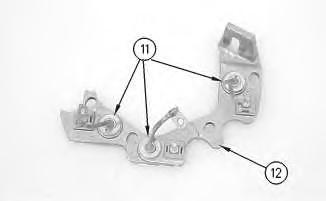
Illustration 1
1. Install 3 diodes (11) in heat sink (12) .
g00628072
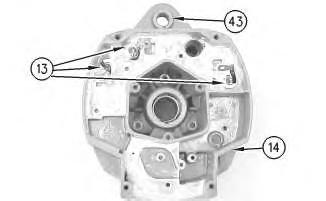
Illustration 2
g00628068
Note: Do not strike the bushing. Shocks from striking the housing can cause damage.
2. Press bushing (43) in housing (14) .
3. Install 3 diodes (13) in housing (14) .
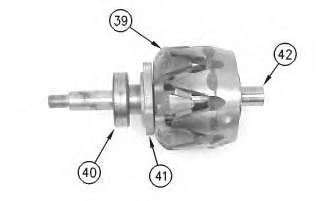
Illustration 3
This is the sample of the manual click on the download link for complete manual
DOWNLOAD LINK
For some reason if link does not work download this pdf and then click
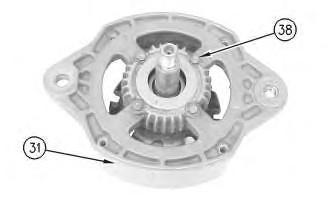
Illustration 4
g00628063
7. Press housing (31) on rotor (39) and bearing (40) .
8. Install 4 screws (38) in housing (31) .
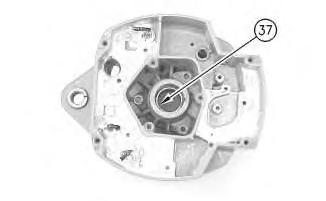
Illustration 5
g00628057
Note: Do not strike the bearing. Shocks from striking the housing can cause damage.
9. Install the inner race. Press bearing (37) into the housing.
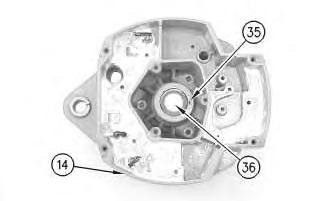
Illustration 6
10. Press cap (36) in housing (14) .
g00628043
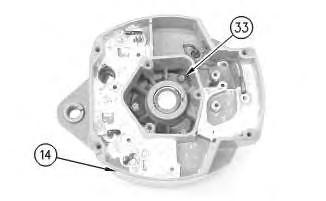
Illustration 7
g00628041
11. Install the coil and support (34) in housing (14). Guide the field leads and the grommet through the hole as the coil is installed in housing (14). Install 3 screws (33) .
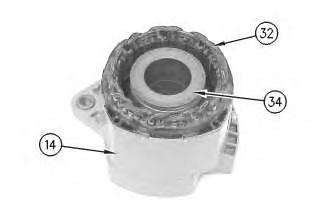
Illustration 8
g00628037
12. Press the stator (32) and housing (14) together. Guide the stator leads and the grommet through the hole as the stator is installed in housing (14) .
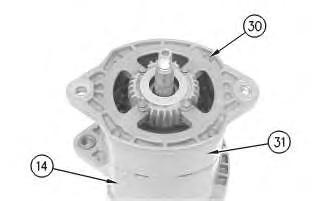
Illustration 9
g00628035
Note: Do not damage exposed stator windings or field windings. Bumping the windings or scraping the windings may break the insulation. Broken insulation may create a short circuit or a ground.
13. Join housing (31) and housing (14). Install 4 bolts (30) .
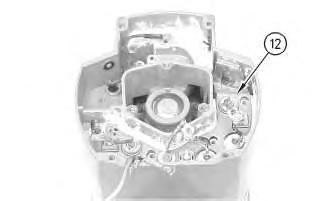
Illustration 10
g00627853
Note: Many of the alternator's internal components are covered with dielectric grease. If the grease is removed, reapply the grease.
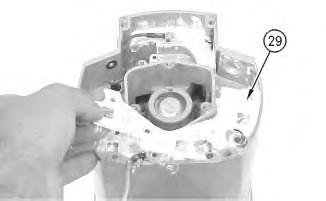
11
14. Install Insulator (29). Install the heat sink and diode assembly (12) in housing (14) .
12
15. Install separator (28) .
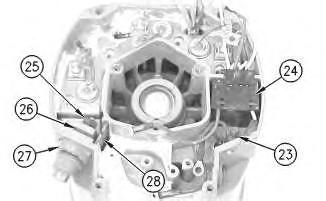
16. Install alternator output terminal (27). Install insulator (26). Install the nut and washer (25) .
17. Install diode trio (24) and install screw (23) .
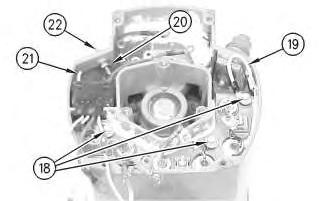
Illustration 13
g00627832
18. Install the 3 screws and insulators (18). Connect wire (19) .
19. If the "R" terminal is used, install the following components: nut (20), lead (21), the washer and terminal (21) .
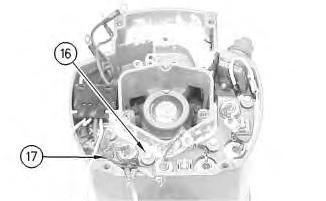
Illustration 14
g00627820
20. Install the screw and insulator (16). Connect capacitor lead (17) .
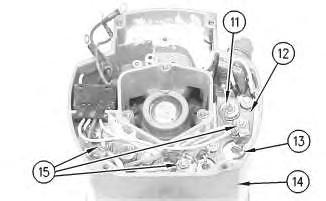
Illustration 15
g00627810
Note: The 3 output diodes (11) are located in heat sink (12). These diodes are identical in polarity. Diode (11) has red insulation on the wire. The 3 ground diodes (13) are located in housing (14). These diodes are identical in polarity. Diode (13) has black insulation on the wire.
21. Connect 6 diode leads. Connect 3 phase leads. Connect 3 stator phase leads. Install 3 nuts (15).
Table 1
Alternator Ground
Negative
Current Flow of the Output Diodes
Lead to the Heat Sink
Current Flow of the Ground Diodes
Housing to the Lead Red Wire Black Wire
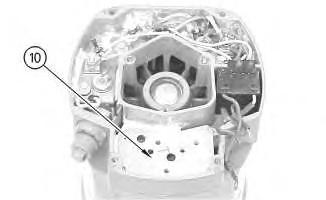
Illustration 16
22. Install mounting plate (10).
g00627808
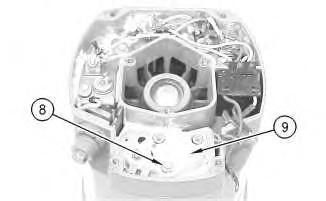
Illustration 17
23. Install regulator (9) .
24. Install grounded mounting screw (8) .
g00627804
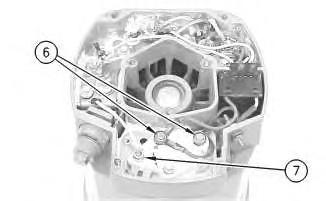
18
25. Install 2 insulated screws (6). Connect the 3 leads.
Note: The regulator and the mounting plate are coated with dielectric grease. If the grease is removed, reapply the grease.
26. Install nut (7) and connect the wire.
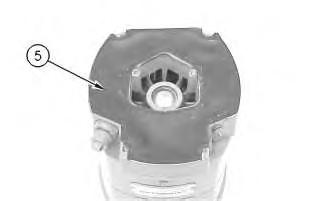
19
27. Install gasket (5) .
20
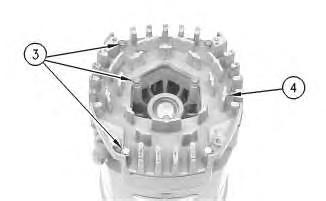
28. Position cover (4). Install 7 screws (3) .
21
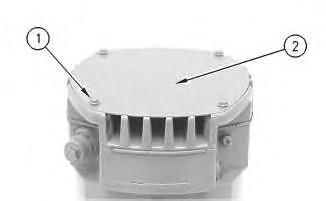
29. Position plate (2). Install 4 screws (1) .
30. Install the fan, the pulley, the washer, and the pulley nut.
1993 - 2023 Caterpillar Inc. All Rights Reserved.
Network For SIS Licensees.
Nov 3 13:30:32 UTC+0530 2023
Product: WHEEL LOADER
Model: 936 WHEEL LOADER 4SB
Configuration: 936 WHEEL LOADER 4SB00001-01623 (MACHINE) POWERED BY 3304 ENGINE
Disassembly and Assembly
26SI Series Alternator
Media Number -RENR1252-01
Alternator - Disassemble
SMCS - 1405-015
Disassembly Procedure
Table 1 Required Tools
-09/10/2001
Start By:
A. Remove the alternator. Refer to Disassembly and Assembly, "Alternator - Remove" for the machine that is being serviced.
Note: Cleanliness is an important factor. Before the disassembly procedure, the exterior of the component should be thoroughly cleaned. This will help to prevent dirt from entering the internal mechanism.
1. Remove the pulley nut, the washer, the pulley, and the fan.
Illustration 1
2. Remove 4 screws (1). Remove plate (2) .
Illustration 2
3. Remove 7 screws (3). Remove cover (4) .
Illustration 3
4. Remove gasket (5) .
Illustration 4
5. Remove 2 insulated screws (6). Remove the 3 leads.
Note: The regulator and the mounting plate are coated with dielectric grease. If the grease is removed, reapply the grease.
6. Remove nut (7) .
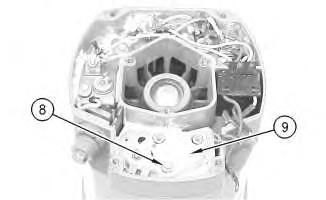
Illustration 5
7. Remove grounded mounting screw (8) .
8. Remove regulator (9) .
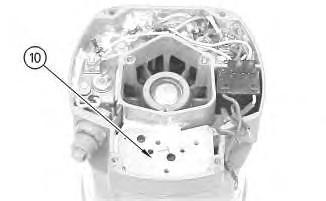
Illustration 6
g00627808
9. Remove mounting plate (10). The mounting plate may be stuck to the regulator.
Illustration 7
g00627810
Note: The 3 output diodes (11) are located in heat sink (12). These diodes are identical in polarity. Diode (11) has red insulation on the wire. The 3 ground diodes (13) are located in housing (14). These diodes are identical in polarity. Diode (13) has black insulation on the wire.
10. Remove 3 nuts (15). Disconnect 3 stator phase leads. Disconnect 3 phase leads. Disconnect 6 diode leads.
Table 2
Alternator Ground Current Flow of the Output Diodes Current Flow of the Ground Diodes
Negative
Lead to the Heat Sink Housing to the Lead Red Wire Black Wire
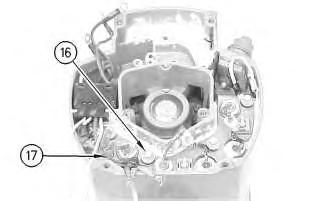
Illustration 8
g00627820
11. Remove the screw and insulator (16). Disconnect capacitor lead (17) .
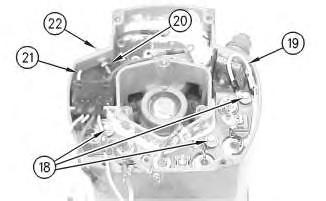
Illustration 9
g00627832
12. Remove the 3 screws and insulators (18). Disconnect wire (19) .
13. If the "R" terminal is used, remove the following components: nut (20), lead (21), the washer and terminal (21) .
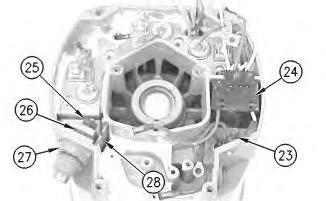
Illustration 10
14. Remove screw (23) and remove diode trio (24) .
15. Remove the nut and washer (25). Remove insulator (26). Remove alternator output terminal (27) .
16. Remove separator (28) .
Illustration 11
g00627853
Note: Many of the alternator's internal components are covered with dielectric grease. If the grease is removed, reapply the grease.
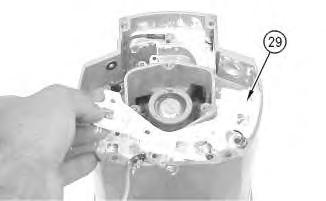
Illustration 12
g00627855
17. Remove the heat sink and diode assembly (12) from housing (14). Insulator (29) may be stuck to heat sink (12) .
Illustration 13
g00628035
Note: Do not damage exposed stator windings or field windings. Bumping the windings or scraping the windings may break the insulation. Broken insulation may create a short circuit or a ground.
18. Remove 4 bolts (30). Carefully separate housing (31) from housing (14) .
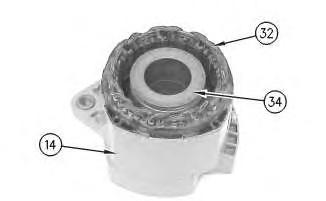
Illustration 14
g00628037
19. Pull apart stator (32) and housing (14). Guide the stator leads and the grommet through the hole as the stator is removed from housing (14) .
Illustration 15
g00628041
20. Remove 3 screws (33). Remove the coil and support (34) from housing (14). Guide the field leads and the grommet through the hole as the coil is removed from housing (14) .
Illustration 16
g00628043
21. Position a small screwdriver in slot (35). Pry cap (36) from housing (14) .
Illustration 17
g00628057
Note: Do not strike the bearing. Shocks from striking the housing can cause damage.
22. Wipe the excess grease from the bearing well. Press bearing (37) into the housing. Remove the inner race.
Illustration 18
23. Remove 4 screws (38) from housing (31) .
g00628063
24. Lift rotor (39) and bearing (40) from housing (31) .
Illustration 19
25. Pull bearing (40) from rotor (39) .
26. Pull retainer (41) from rotor (39) .
27. Pull collar (42) from rotor (39) .
g00628067
Illustration 20
g00628068
Note: Do not strike the bushing. Shocks from striking the housing can cause damage.
28. Press bushing (43) from housing (14) .
Note: Do not strike the diodes. The shock of such an impact can damage the diodes. Use proper tools in order to press or pull the diodes from the mountings. As much as 890 N (200 lb) of force may be needed to remove a diode.
29. Remove 3 diodes (13) from housing (14) .
Illustration 21
30. Remove diode (11) from heat sink (12) .
g00628072
Copyright 1993 - 2023 Caterpillar Inc. All Rights Reserved. Private Network For SIS Licensees.
Fri Nov 3 13:30:01 UTC+0530 2023
Product: WHEEL LOADER
Model: 936 WHEEL LOADER 4SB
Configuration: 936 WHEEL LOADER 4SB00001-01623 (MACHINE) POWERED BY 3304 ENGINE
Disassembly and Assembly AIR DRYER
Media Number -SENR2065-01 Publication Date -19/07/1995 Date Updated -10/03/2020
Disassemble And Assemble Air Dryer
SMCS - 3263-015; 3263-016
Start By:
a. remove the air dryer
1. Make sure that the outside of the air dryer is thoroughly clean prior to disassembly.
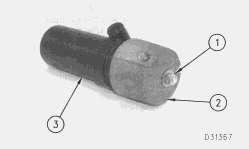
2. Put an alignment mark across the cap (2) and the housing (3) for assembly purposes.
3. Remove the two nuts (1) and the washer. Remove the cap (2) from the housing (3).
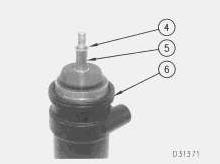
4. Remove the seal washer (4) from the shaft (5). Remove the O-ring seal (6).
SENR20650003
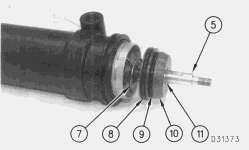
5. Remove the shaft (5), the seal washer (11) and the plate (10) from the air dryer. Remove the Oring seals (8) and (9) from the plate (10).
6. Remove the spring (7).
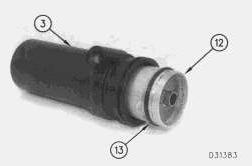
7. Remove the cartridge (12) from the housing (3). Remove the O-ring seal (13) from the cartridge (12).
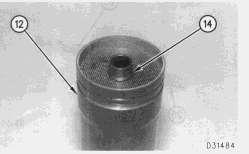
8. Remove the retaining ring (14) from the cartridge (12).
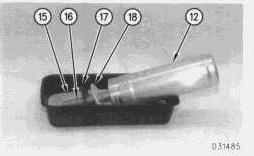
9. Turn the cartridge (12) over and let the desiccant (15) fall into a suitable container for proper disposal.
10. Remove the screen (17) and the filter (18) from the center post (16). Remove the center post (16) from the cartridge (12).
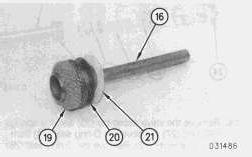
11. Remove the filter (21), the screen (20) and the wire mesh (19) from the center post (16).
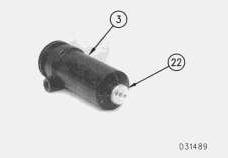
12. Remove the valve body (22) from the housing (3).
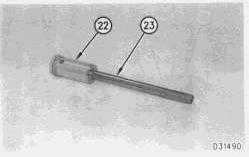
13. Remove the shaft (23) from the valve body (22).
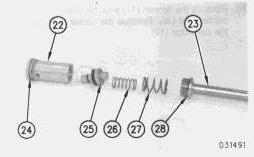
14. Remove the valve assembly (25) and the springs (26) and (27). Remove the O-ring seal (24) from the valve body (22). Remove the O-ring seal (28) from the shaft (23).
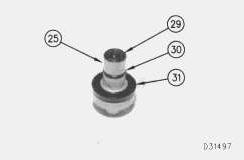
15. Remove the seal (29), the O-ring seal (30) and the cup (31) from the valve assembly (25).
NOTE: The following steps are for the assembly of the air dryer.
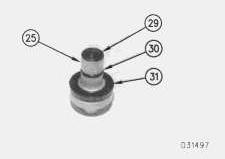
16. Install new seals (29) and (30) and a new cup (31) on the valve assembly (25).
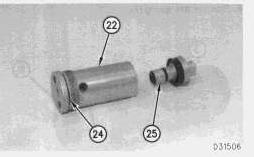
17. Install a new O-ring seal (24) on the valve body (22). Install the valve assembly (25) in the valve body (22).
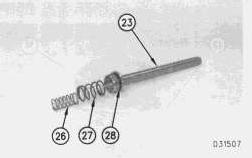
18. Install a new O-ring seal (28) on the shaft (23). Install the springs (26) and (27) in the end of the shaft (23).
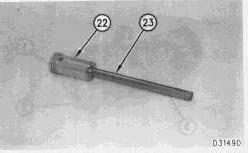
19. Install the shaft (23) in the valve body (22).
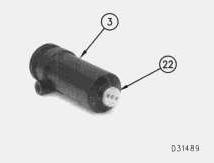
20. Install the valve body (22) in the housing (3).
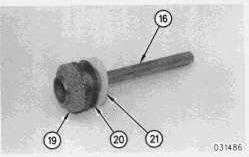
21. Install the wire mesh (19), the screen (20) and the filter (21) on the center post (16).
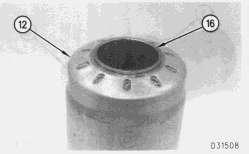
22. Install the center post (16) in the cartridge (12). Make sure that the center post is fully seated in the cartridge before filling the cartridge with desiccant.
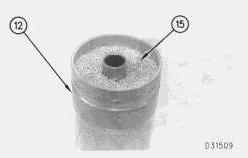
23. Fill the cartridge (12) with new desiccant (15). Tap the outside of the cartridge with a soft hammer to settle the desiccant.
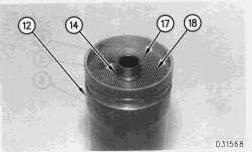
24. Install the filter (18), the screen (17) and the retaining ring (14) in the cartridge (12).

25. Install a new O-ring seal (13) on the cartridge (12). Install the cartridge (12) in the housing (3)
NOTE: Inspect the O-ring seal (13) to ensure that it is properly seated between the cartridge (12) and the housing (3).
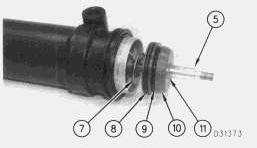
26. Install new O-rings (8) and (9) on the plate (10). Install the spring (7), the plate (10), a new seal washer (11) and the shaft (5) in the air dryer.
This is the sample of the manual click on the download link for complete manual
DOWNLOAD LINK
For some reason if link does not work download this pdf and then click