



Product:BACKHOELOADER
Model:430F2BACKHOELOADERHWE
Configuration:430F2CenterPivotBackhoeLoaderHWE00001-UP(MACHINE)POWEREDBYC4.4Engine
OperationandMaintenanceManual
MediaNumber-M0086999-05PublicationDate-01/05/2019DateUpdated-14/05/2019
Foreword
LiteratureInformation
Thismanualshouldbestoredintheliteratureholder.
Thismanualcontainssafetyinformation,operationinstructions,andmaintenance recommendations.
s03058862
Somephotographsorillustrationsinthispublicationshowdetailorattachmentsthatcanbe differentfromyourproduct.
Continuingimprovementandadvancementofproductdesignmighthavecausedchangestoyour productwhicharenotincludedinthispublication.Read,study,andkeepthismanualwiththe product.
Wheneveraquestionarisesregardingyourproduct,orthispublication,pleaseconsultyourCat dealerforthelatestavailableinformation.
Safety
Thesafetysectionlistsbasicsafetyprecautions.Inaddition,thissectionidentifiesthetextand locationsofwarningsignsandlabelsusedontheproduct.
Operation
Theoperationsectionisareferenceforthenewoperatorandarefresherfortheexperienced operator.Thissectionincludesadiscussionofgauges,switches,productcontrols,attachment controls,andprogramminginformation.
Photographsandillustrationsguidetheoperatorthroughcorrectproceduresofchecking,starting, operating,andstoppingtheproduct.
Operatingtechniquesoutlinedinthispublicationarebasic.Skillandtechniquesdevelopasthe operatorgainsknowledgeoftheproductanditscapabilities.
Themaintenancesectionisaguidetoequipmentcare.
Copyright1993-2023CaterpillarInc. AllRightsReserved. PrivateNetworkForSISLicensees.
MonFeb609:15:56UTC+05302023
Product:BACKHOELOADER
Model:430F2BACKHOELOADERHWE
Configuration:430F2CenterPivotBackhoeLoaderHWE00001-UP(MACHINE)POWEREDBYC4.4Engine OperationandMaintenanceManual
Radio-EntertainmentIfEquipped
SMCS-7338
Whendriving,alwayskeepyoureyesontheroadandhandsonthe steeringwheel,payingcarefulattentiontonormaldrivingtasks.As always,thedriverisresponsibleforsafevehicleoperation.Notkeeping youreyesontheroadandhandsonthewheelwhiledrivingcouldresult ininjurytoyouorothers.
Introduction
Informationincludedinthisownersmanualwasaccurateatthetimeofpublication.Caterpillar, however,reservestherighttochangespecificationsandperformancewithoutpriornotice.Check withyourdealerfordetailsregardingchangesthatmayhaveoccurredsincetimeofprinting.
TheRadiosystemiscontrolledbyusingthebuttons,RSA(RearSeatAudio),orsteeringwheel controls.
StereoReceivers
This is the sample of the manual if you need complete manual Click Here to download
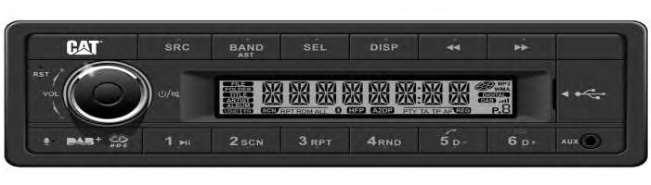
RADIO/USBMP3/USB/DAB+/DAB/BluetoothReceiver
RadioPinout
Radiopinoutisshownbelow
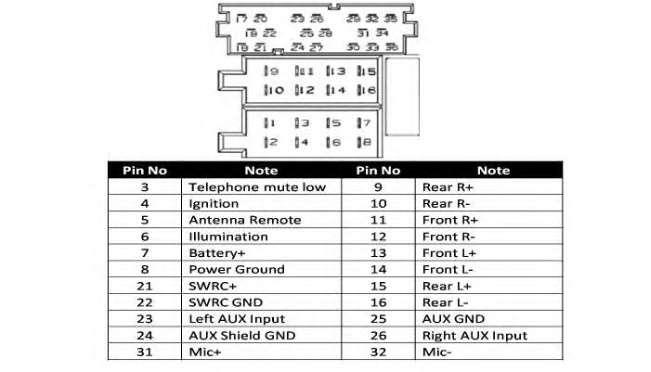
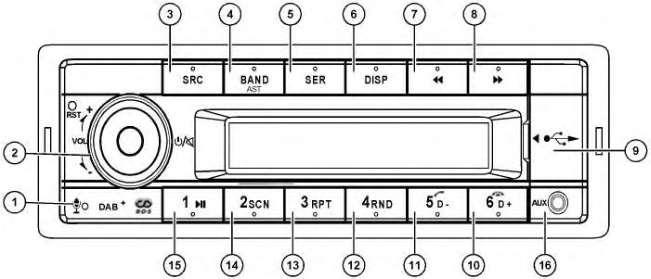
Illustration3g06247166 (1)Microphone (2)PowerON/OFF/Mute (3)Powerbutton (4)Band/ASTButton (5)Source(SRC)Button (6)DISP(Display)Play/Pause (7)PREV(Previous) (8)NextButton (9)USBSlot (10)MP3Folderahead/PhoneHangUp (11)MP3Folderback/PhonePickUp (12)MP3Randomplay (13)MP3Repeatplay (14)ProgramintroPlay(SCAN) (15)MP3/BluetoothPlay/Pause (16)FrontAuxiliaryinput
Options
•AnAMbandwith6AMpresets
•ThreeFMbandswithatotalof18FMpresets
•OneweatherbandwithsixWXpresets
GeneralOperation
PowerON/OFF/Mute
ToSwitchontheRadiopushthePowerON/OFFbutton.ToswitchofftheRadio,pushthePower ON/OFFbuttonformorethan2sec.TheRadiowillbemutedbypushingthePowerON/OFFbutton forlessthat2sec.
IgnitionLogic
Withignitionlogicactivated(Defaultsetting)theRadiocanbeswitchedonandoffmanuallyevenif thevehiclesignitionpinisnotconnected.Toavoidbatterydischarge,theradioisswitchedoffafter 1hwithoutuseroperation.
SystemSettings
Thesystemsettingsmenuisenteredbylongpressingthe[DISP]button.Toaccesstheavailable menuentries,pushthesearchbuttons[<</>>].Toselecttheavailableoptionsofeachmenuentry, rotatethe[VOL]knob.
Source(SRC)Button
Pressthe[SRC]buttontoswitchbetweenandselectavailablesources:TUNER->USB->AUXF>AUXR->Bluetooth->DAB(applicabletoDABfeature).USBandBluetoothisonlyvisibleinthe menuwhenconnected.
ReceptionArea
ThisRadioisdesignedtoworkindifferentregionswithdifferentfrequencyranges.TheReception areacanbeadjustedviatheSystemSettingsmenu
ThefollowingAreasareavailable:
•EUROPE
•ASIA
•JAPAN
•NorthAfrica
•UnitedStatesofAmerica(USA)
ClockSetting
Theclocktimecanbeadjustedmanuallybylongpressingthe[DISP]buttontosetthetime.
Select[CLOCK]withthesearchbuttons[<</>>].Press[SEL]buttonandrotate[VOL]knobto adjusttheminutes.
VOLUMEKNOB/OK
ToadjusttheVolume,rotatethe[VOL]knob
Predefinedsoundeffects
TheRadioprovidesdifferentpredefinedsoundeffects.Pressthe[SEL]buttontoentertheSound settingsmenu.Rotatethe[VOL]knobtoselectoneofthefollowingoptions:EQOFF->POP-> ROCK->CLASSIC->JAZZ->CUSTOM.
Balance.FadeandLoudness
ToadjustBalance,FaderandLoudnesspressthe[SEL]buttonandthenpush[<</>>]buttonto selectBALANCE->FADER->LOUDNESS.Rotatethe[VOL]knobtoadjustBalance,Fade,and Loudnessaccordingtoyourneeds.
ManualSoundAdjustment
FormanualsoundadjustmentsfirstselectCUSTOM.Pushthe[SEL]buttonagainandthenselect BASSorTREBLEwiththe[<</>>]button.Rotatethe[VOL]knobtoadjustBASSand TREBLEaccordingtoyourneeds.
Note:Thedefaultsetting
AM-FMRadio
ToaccessAM/FMRadio,pressthe[SRC]buttonandselectTuner.
SelectBand
Pressthe[BAND]ButtontoselectoneoftheavailableRadioBands.TheRadiobandswillbe changedinthefollowingorder:FM1->FM2->FM3->AM1->AM2
Note:TheAMBandcanbedeactivatedbytheuserviathesystemsettingsmenu.
AutomaticTuning
ForAutomatictuningpressthe[<</>>]button.TheRadiowillsearchandselectthenext receivablestation.
WhenTrafficAnnouncementisactivated(“TA=ON”),onlystationsthatbroadcastTraffic announcementswillbetuned.
Manualtuning
Formanualstationselectionspressthe[<</>>]buttonforlongerthan2sec.“MANUAL”is showninthedisplay.Pressingthe[<</>>]buttonagainthefrequencywillbeincrementally increased/decreased.
ManualStoringFavorites
Thereare18FM,12AMFavoritebanksavailable.Selectthefavoritebankwheretostorethe stationandtunethestationthatshallbestored.Pushthepresetbuttonlongerthan2sec.tostorethe station
RecallStoredFavorites
Torecallastoredfavorite,pushthepresetbuttoncorrespondingtothestoredfavorite.
AutoMemoryStore
Tosearchforthebestreceivablestationsandstoreasfavorite,pressthe(BAND/AST]buttonfor2 sec.TheRadiosearchesthebestreceivablestationandstoresthosestations.
ManyFMStationsinEuropetransmitRDSdata(RadioDataSystem)inadditiontoaudioprograms.
WithRDStheuserhasthefollowingbenefits:
•Thebestaudiblefrequency(AF)ofaselectedstationistunedautomaticallyforbest receptionquality.Toenableautomaticselectionofbestaudiblefrequency,select“AF=ON”in theSettingsmenu.
•TheRadiorecognizesTrafficAnnouncementandcanswitchtoRadio,evenifanotherAudio sourceisselected.ToenableautomaticTrafficannouncement,select“TA=ON”intheSettings menu.
•SomeStationsprovideregionalspecificprograms.Withtheregional(REG)functiononly thosefrequenciesarefollowedthatbroadcasttheselectedregionalprogram.Tofollowregional programs,select“REG=ON”intheSettingsmenu.
•Thestationsnamecanbedisplayed.
Note:ForfurthersettingsseeSystemMenu.
ProgramType(PTY)
ViatheRDSSystemFMstationsinmanycountriestransmitthetypeofprogram(ProgramType, PTY)thatisbroadcasted.
TosearchforadesiredProgramtype,push[SRC]forabout2secondsandselecttheProgramtypeby rotatingthe[VOL]knob.TheRadiowillsearchforaRadio-ProgramwiththeselectedProgramtype whenthe[SEL]buttonispushed.“PTYSEEK”isshownintheDisplay.
IfnostationwiththeselectedProgramTypecanbefound,thelasttunedstationwillbeselectedand “NOPTY”isshownintheDisplay.
Thefollowingprogramtypesareavailable:
•ROCK-M
•EASY-M
•LIGHT-M
•CLASSICS-M
•OTHER-M
•WEATHER
•FINANCE
•CHILDREN
•SOCIAL
•RELIGION
•PHONEIN
•TRAVEL
•LEISURE
•JAZZ
•COUNTRY
•NATIONAL-M
•OLDIES
•FOLK-M
•DOCUMENT
•TEST
•ALARM
DABRadio(applicabletoDABfeature)
DAB/DAB+Providesradioprogramsindigitalsoundquality.
DABRadioSelection
ToaccessDigitalAudioBroadcast(DAB),pressthe[SRC]buttonandselectDAB.
DABServiceSCAN
TosearchforreceivableDABServices,theDABserviceSCANhastobestartedbypushing [BAND/AST]for2sec.“SCAN”isshowninthedisplay.
TuningaDABService
TotuneaDABservice,push[<</>>]toselectthenext/previousDABservice.“Tuning”isshown ontheDisplay.
StoringDABFavorites
Thereare3DABfavoritebandsavailable.Pressthe[BAND]Buttontoselectoneoftheavailable DABBands.TheDABbandswillbechangedinthefollowingorder: •DAB1-> •DAB2->
Pushthepresetbuttonlongerthan2seconds,tostorethestation.
RecallStoredFavorites
Torecallastoredfavorite,pushthecorrespondingpresetbutton.
DABServiceList
TogetanoverviewofreceivableDABservices,aDABServiceListcanbedisplayed. Push[SEL]for2sec.toopentheDABServiceList.Rotatethe[VOL]Buttontoscrollthroughthe listofreceivablestations.
TotuneaDABservice,push[SEL].“Tuning”isshownonthedisplay. InthecasethataServiceistemporarynotreceivable“NoService”willbeshownonthedisplay.
SwitchingbetweenDABandFM
WhentheDABsignalqualitydropssignificantly,switchtoFMandlistentotheserviceviaFM.
SwitchingbetweenDABandFM(DABFMLNK)canbedisabledviathesystemsettingsmenu.
USB/MP3/WMA
MP3isshortforMPEGAudioLayer3andreferstoanaudiocompressiontechnologystandard.This productallowsplaybackofMP3files.TheunitcannotreadanMP3filethathasafileextensionother than".mp3".•Ifyouplayanon-MP3filethathasthe“.mp3"extension,youmayhearsomenoise.In thismanual,refertowhatarecalled"MP3file"and"folder"inPCterminologyas"track"and "Album,"respectively.Maximumnumberofdirectoriesandfilesis65535,includingtheroot directory.Maximumnumberoffilesperfolderis1000.Theunitmaynotplaytracksintheorderof Tracknumbers.Supportsbitratefrom8to320kbpsandVBR(VariableBitRate).
Note:Supportsbitratefrom5to384kbpsandVBR(VariableBitRate).
USB
USBfunctions(flashmemorytype)MP3musicplay:
•USBflashmemory2in1support
•FAT12/FAT16/FAT32formatsupported
•Filename:64byte/directory(DIR)name:64byte/tagname:30byte
•Tag(id3tagver2.0)-title/artist/album:32bytesupport.
•USB1.1support,USB2.0support(For2.0,speedperformanceisasUSB1.1)
Note:NotallUSBdevicesarecompatiblewiththeunit.USBconnectorcansupportmaximumwork powerwith500mA.
Loading/RemovalandFunctionsofUSBDevice
InsertaUSBdeviceintotheUSB-slot“Reading”isshownontheDisplay.MP3Playbackwillstart immediateafterwards.
BeforeremovingtheUSBDeviceswitchtoanotherSourcebypushingthe[SRC]button.
TheUSBDeviceshasthefollowingfunctions:
•MP3Playback/PauseTopauseandresumeMP3Playbackpushbutton[1>].
•Next/PreviousMP3TrackToselectthenext/previoustrackpushthe[>II]button.
•Fastforward/fastrewindTofastforward/fastrewindthecurrenttrackpushthe[>II]button longerthan2sec.
•RandomPlayToactivaterandomplaypushthebutton[4RND].
•RepeatPushthe[3RPT]buttontoactivaterepeatTrack/repeatdirectory/repeatall.
•SCANToactivate/stopthescanfunctionpushthebutton[2SCN].Inscanmodealltitlesare playedfor10sec.
Bluetooth
TheBluetoothallowsyoutoutilizeyourvehiclesbuilt-inaudiosystemforwirelessmobilephoneor musichandsfreecommunication.SomeBluetoothmobilephoneshavetheaudiofeatures,andsome portableaudioplayerssupportBluetoothfeature.Thissystemcanplayaudiodatastoredina Bluetoothaudiodevice.ThevehiclestereowithBluetoothwillbeabletoretrievephonebook contacts,receivedcall,dialedcall,missedcall,incomingcalls,outgoingcallandlistentomusic.
Note:DonotleavethemicrophoneonBluetoothhandsfreeintheplaceswithwindpassingsuchas airoutletoftheairconditioner.Leavingthemicrophoneintheaforementionedmannermaycausea malfunction.
Note:Ifleftinplacessubjectedtodirectsun,hightemperaturecancausedistortion,discoloration whichmayresultinamalfunction.
Note:ThissystemwillnotoperateormayoperateimproperlywithsomeBluetoothaudioplayers.
Note:Compatibilityofallmobilephoneswiththisunitisnotguaranteed.
Note:Audioplaybackwillbesettothesamevolumelevelassetduringtelephonecall.Thevolume levelmightcauseproblems,ifextremevolumelevelissetduringtelephonecall.
HandsfreeOperations
Pairing:
1.TurnonBluetoothfunctionofyourmobilephone.
2.EntermobilephonesBluetoothsetupmenu.
3.SearchfornewBluetoothdevices.
4.SelectBluetooth"CatRadio"devicesfromthepairinglistonthemobilephone.
5.Enter“1234”asthepassword(Thepassworddefaultsettingis“1234”).
Note:Afterpairingsuccessfully,BTandHPFiconswilllightup.A2DPiconwilllightupafter A2DPconnected
DialNumber
LCDscreendisplaysdialinginformation.
Unitdialing:
1.Press[SRC]buttonswitchtoBT/Audiomode
2.Press[5D+]tochoosetheDIALONfunction,press[SEL]button/[<</>>]buttonandrotate theknobtoinputdialingnumbers.
TransferCall
Youcanswitchbetweenhandsfreecallandmobilephonecall.Pressthe[5/]buttonduringcall.
Answeringacall
Youcanansweranincomingcallbypressingthe[5/]button.Pressthe[6/]buttontorejectan incomingcall.
AudioStreaming
Audiostreamingisatechniquefortransferringaudiodata,audiostreamingcanbeprocessedasa steady,andcontinuousstream.Userscanstreammusicfromexternalaudioplayerstothestereo wirelesslyandlistentothetracksthroughthespeakers.Consultyournearestdealerformore informationontheproductofwirelessaudiostreamingtransmitteroffered.
Note:Avoidoperatingyourconnectedmobilephonewhileaudiostreaming,doingsomaycause noiseorsoundchoppyonthesongplayback.Audiostreamingmayormaynotresumeafter telephoneinterruptionanddependsonthemobilephone.ThesystemwillalwaysreturntoRadio modeifaudiostreamingisdisconnected.Besuretoreadthechapter“Pairing”beforeproceeding.
BT/Audiomode(A2DP)
•Playback/PauseTopauseandresumePlaybackpushbutton[1>].
•Next/PreviousTrackToselectthenext/previoustrackpushthe[<</>>]button.
Note:PlayingorderwilldependonBluetoothaudioplayer.Whenthe[>II]buttonispressed,some A2DPdeviceswillrestartthecurrenttrackdependsonthedurationofplayback.Duringmusic streamingplayback,“A2DPandHFP”willbeshownonthedisplay.WhenA2DPdeviceis disconnected,“DISCONN”willbeshownonthedisplaySomeBluetoothaudioplayersmaynothave play/pausesynchronizedwiththisunit.Makesurethatbothdeviceandmainunitareinthesame play/pausestatusinBT/Audiomode.
Dimming
Thedisplayandbuttonscanbedimmed.Thisradioallowsmanualorautomaticdimming.Select “DIMMING”inthesettingsmenuandselectoneofthefollowingoptions:
1.Select“OFF”todisableDimming.
2.Select“Manual”dimmingwhentheradioisnotconnectedtothevehiclesilluminationpin.
3.Select“Auto”dimmingwhentheRadioisconnectedcorrecttothevehiclesillumination-pin.
Brightnessadjustment
Toadjustyourfavoritebrightness-settingfordisplay-andbuttonbrightnessselectmanualmode.
SelectManualdimmingtoadjustBrightnessofDisplayandButtons
DAY/NightSelection
SelectDIMMANandchangebetweendaymodeandnightmodebyselecting“DIMDAY“or “DIMNIGHT”
NightBrightnessadjustmentofdisplayandButtons
ToadjustNightBrightnessofthedisplayandbuttons,select“DIMNIGHT”.Thenselect,“DIM DISP”andadjustthebrightnessoftheDisplayaccordingly.Thenselect“DIMNIGHT”andadjustthe brightnessoftheButtonsaccordingly.
DayBrightnessadjustmentofdisplayandButtons
ToadjustDayBrightnessofthedisplayandbuttons,select“DIMDAY”.Then,select“DIMDISP” andadjustthebrightnessoftheDisplayaccordingly.Then,select“DIMKEY”andadjustthe brightnessoftheButtonsaccordingly.
ManualMode
ChangebetweenDayandNightModebyselecting“DIMDAY”or“DIMNIGHT” AutomaticMode
Inautomaticmodethedisplaywillchangeautomaticallybetweendayandnightmodewhentheradio isconnectedtothevehiclesilluminationpin.
SystemSettingItemList
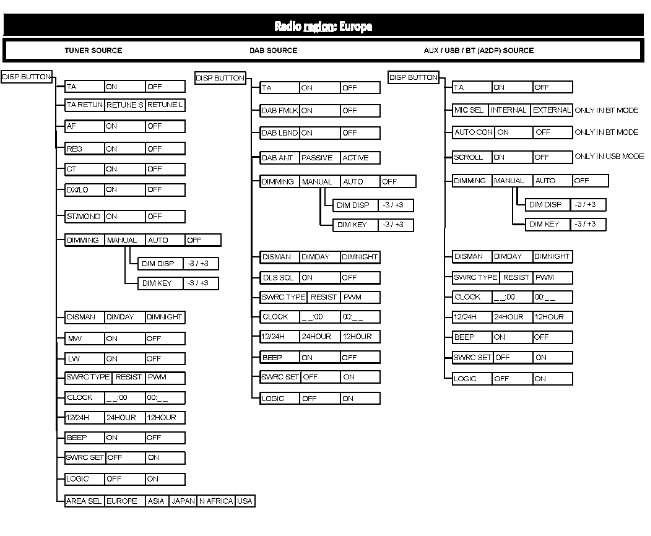
Illustration4g06247829
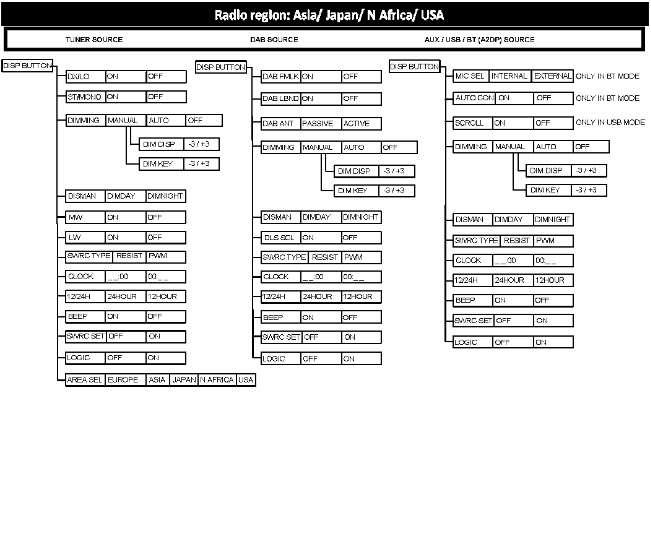
Illustration5g06247868
AM/FMTunerOptions
TheAM/FMtunerhasthefollowingoptions:
•"TA"Enable/DisableautomaticswitchingtoFM-tunermodeifthereisincomingTraffic announcements.
•"TAReturn"SwitchbacktimeinthecasethatAnnouncement-Signalcannotbedetectedany more.
•"AF"Enable/DisableautomaticselectionofbestaudiblefrequencyinFM-TunerMode(RDS).
•"REG"Enable/Disableautomaticselectionofbetteraudiblefrequenciesthatbroadcast differentregionalcontent.
•"CT"AutomaticsynchronizationofClockwithtimereceivedviaRDS-Signal.
•"DX/LO"SearchLevelofAM/FM-Tuner.
•"ST/MONO"SelectionofStereoorMonooutputofFM/AMtuner.
•"AREASEL"ToadjusttheAM/FMtunertoyourregion.
DABTunerOptions
ThefollowingfeaturesareapplicabletoDABfeature:
•"DABFMLINK"Enable/DisableautomaticswitchingtoFM-tunerwhenDAB-Signaldrops.
•"DABLBND"Enable/DisableL-BandDecoding.
•"DABANT"SelectionofActiveorPassiveantennaisconnected.
•"DLSSCROLL"EnabledisplayofArtistandSong
BluetoothOptions
•"SCROLL"ON:DisplayID3taginformationcyclic:Track-Folder-File-Album-TitleArtist-Track.OFF:DisplayTrack.
•"MICSEL"UseofintegratedMicrophoneinfrontpanelorexternalMicrophoneconnectedby rearconnector.
•"AUTOCON"Todisable/enableBluetoothconnection.
SteeringWheelControlOptions
Thefollowingarethesteeringwheelcontroloptions:
•"SWRCTYPE"SelectionofSteeringWheelcontroltype(Resistance/PWM).
•"SWRCSET"Toenable/disablesteeringwheelcontrol.
DimmingOptions
ThefollowingaretheDimmingoptions:
•"DIMMING"ToSelectDimmingMode(OFF,Manual,automatic).
•"DIMDISP"ToAdjustDisplaybrightness.
•"DIMKEY"ToadjustButtonbrightness.
•"DISMAN"ToswitchbetweenDAYandNightMode
Otheroptions
•"AM/MW"Toenable/disableAM/MWReception.
•"LW"Toenable/disableLWReception.
•"BEEP"Toenable/disableconfirmationsignal.
•"Logic"Toenable/disableignitionlogic.
•"Clock"Toadjusthoursandminutes.
•"12/24H"Toselect12/24hClockformat.
ElectricalConnections
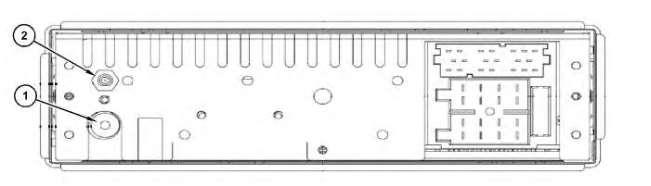
Illustration6g06247910
(1)DABSMBConnector
(2)AM/FMISOConnector
TipsandTroubleshootingChart
Thefollowingchecklistcanhelpyousolvesomeproblemswhichyoumayencounterwhenusingthe unit.Beforeconsultingaservicerepresentative,checktheconnectionsandfollowtheinstructionsin theusermanual.Donotusetheunitinabnormalcondition.Examplesofabnormalconditionsareaas follows,nosound,smoke,orfoulsmell.Theaforementionedexamplescancausefireorelectric shock.Immediatelystopusingradioandcallthestorewhereyourradiowaspurchased.
Table1
ProblemPossibleCause Solution
General
Theunitwillnot switchon.
vehicleignitionisnoton. Cableisnotproperly connected.Fuseisburnt.
NosoundVolumeissetatminimum orthemutefunctionison.
Turnyourvehiclekeyintheignition.Check cableconnection.Replacefusewithanewfuse ofthesamecapacity.
Checkthevolumeorswitchoffthemute function.
Theunitorscreen doesnotwork normally. TheunitsystemisunstablePresstheRESETbutton.
ModeTuner
Unabletoreceive stations.
Poorquality receptionofradio station.
ModeUSB
Theantennaisnot connectedproperly.Connecttheantennaproperly.
Theantennaisnotfully extendedorbroken. Fullyextendtheantennaandifbroken,replace withanewone.
Unabletoinsert USBdevice. TheUSBdevicehasbeen insertedthewrongway around.
TheUSBdevice cannotberead.
NTFSformatisnot supported.
Inserttheotherwayaround.
CheckthatthefilesystemisinFATorFAT32 format.Duetodifferentformats,somemodels ofstoragedevicesorMP3playersmaynotbe read.
Specifications
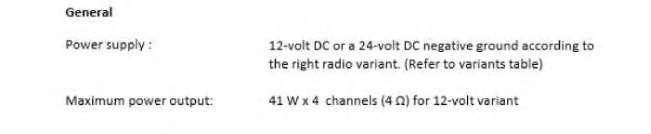

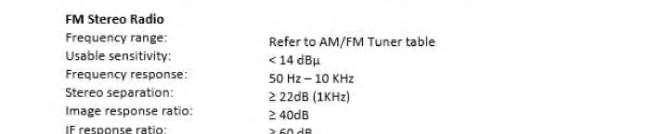
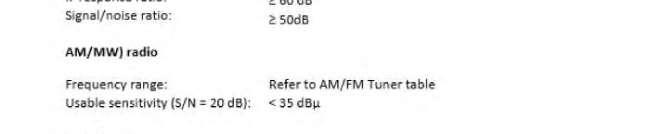
Thefollowinginformationpertainstospecificationsoftheradio. Illustration7g06248106 Table2
Europe
Asia
Japan
Latam
NAfrica
FM87.5-108.0MHz100KHz50KHz
MW522-1620KHz9KHz9KHz
LW144-288KHz3KHz3KHz
FM87.5-108.0MHz50KHZ50KHz
AM522-1629KHz9KHz9KHz
FM76.0-95,0MHz100KHz100KHz
AM522-1629KHz9KHz9KHZ
FM76.0-107.9MHz50KHz50KHz
AM530-1710KHz10KHz10KHz
FM87.5-108.0MHz100KHz50KHZ
MW531-1602KHz9KHz9KHz
LW153-252KHz3KHz3KHz
Table3
Digital(DAB)Radio
DABBandIII:174.928MHz~239.200MHz
Frequencyrange:
DABBandL:1452.960MHz~1490.624MHz
Usablesensitivity(RF=72dBM)-95dBM
Frequencyresponse: 20Hz-20KHz
Stereoseparation Signal/noiseratio:
Faroffselectivity:42dB60dB
Adjacentchannelrejection:35dB40dB
Note:Specificationsandthedesignaresubjecttochangewithoutnoticeduetoimprovementsin technology.
Table4
Bluetooth
Outputpower4dBm(Class2)
Frequencyband2.4000GHz-2.4835GHz(ISMBand)
Range10m(freespace)
StandardBluetooth2.0specification
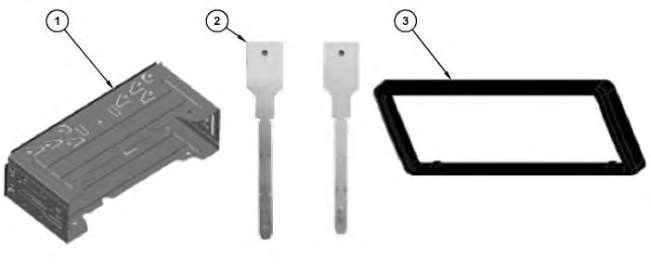
Radioaccessories (1)Metalsleeve (2)Removaltools (3)Bezel
Copyright1993-2023CaterpillarInc. AllRightsReserved. PrivateNetworkForSISLicensees.
MonFeb609:20:40UTC+05302023
Product:BACKHOELOADER
Model:430F2BACKHOELOADERHWE
Configuration:430F2CenterPivotBackhoeLoaderHWE00001-UP(MACHINE)POWEREDBYC4.4Engine
OperationandMaintenanceManual CaterpillarShortBodyRadio
MediaNumber-M0086999-05PublicationDate-01/05/2019DateUpdated-14/05/2019
i07724274
EntertainmentRadio-Continental-IfEquipped
SMCS-7338
Table1
ModelCatPartNumber Continental525-1508
Specifications
Thefollowingcommunicationdevicespecificationsareprovidedtoaidinconductinganyrelated hazardassessmentandtoensurecompliancewithalllocalregulations:
Table2
RadioTransmitterSpecifications
RadioModelTransmitterFrequencyRangeMaximumPowerOutput Continental
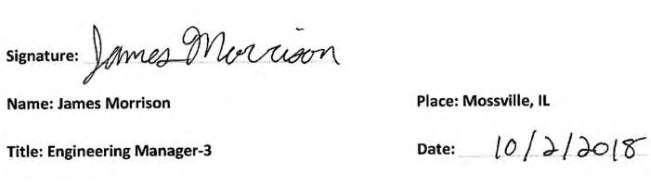
EUDeclarationofConformity
ThisDeclarationofConformityisissuedunderthesoleresponsibilityofthemanufacturer. Theundersigned,representingthemanufacturer: CATERPILLARINC 100N.E.AdamsStreet
Peoria,IL61629
USA herebydeclaresthattheproduct,theobjectofthisdescription:CaterpillarEntertainmentRadios Brand:Caterpillar Model:CaterpillarShortBodyUtilityRadio Part#:525-1508 Antenna:8E-1118
IsinconformitywiththerelevantUnionharmonizationlegislation: Directive2014/53/EU Directive2011/65/EU
Conformityisshownbycompliancewithapplicablerequirementofthefollowingdocuments: AssessmentProcedure:______AnnexII,___X____AnnexIII,_______AnnexIV 2014/53/EU: REDLVD(Sec.3.1a):EN60065:2014
EN62479:2010
EMC(Sec.3.1b):EN301489-1V2.2.0
EN301489-17V3.2.0
RF(Sec.3.2)EN300328V2.1.1
FinalDraftEN303345V1.1.7
2011/65/EU RoHS
NotifiedBodyName:SiemicInc.
NotifiedBodyNumber:2200
ExaminationCertificate#:RE-17101308
EN50581:2012
MonFeb609:19:49UTC+05302023
Product:BACKHOELOADER
Model:430F2BACKHOELOADERHWE
Configuration:430F2CenterPivotBackhoeLoaderHWE00001-UP(MACHINE)POWEREDBYC4.4Engine
OperationandMaintenanceManual
GeneralHazardInformation
SMCS-7606
Donotoperateorworkonthisequipmentunlessyouhavereadand understandtheinstructionsandwarningsintheOperationand MaintenanceManuals.Failuretofollowtheinstructionsorheedthe warningscouldresultininjuryordeath.ContactyourCaterpillar dealerforreplacementmanuals.Propercareisyourresponsibility.
Foreword
ThisdocumentisasupplementtotheOperationandMaintenanceManualfortheequipment. PermanentlyattachthisdocumenttotheOperationandMaintenanceManualfortheequipment.
Introduction
ThisdocumentprovidesinformationabouttheoperationoftheCaterpillarAM/FMRadioSystem.
Operationoftheequipmentandthemaintenanceoftheequipmentmustnotoccurunlessthe instructionsandwarningsintheOperationandMaintenanceManualfortheequipmenthavebeen readandtheinstructionsandthewarningsareunderstood.Thecontentsofthisdocumentmustbe understoodbeforetheequipmentthatisequippedwiththeCaterpillarAM/FMRadioSystemis operated.